
Thunderbird Portable offers a compelling solution for users who require consistent access to their email regardless of location or device. This portable version of the popular Mozilla Thunderbird email client eliminates the need for installation, allowing users to run it directly from a USB drive, external hard drive, or other portable media. This feature makes it particularly appealing to individuals who frequently work on different computers or need to access their email offline. This article delves into the functionality, advantages, and limitations of Thunderbird Portable, providing a comprehensive overview for potential users.
The Advantages of Portability and Offline Access
The core benefit of Thunderbird Portable lies in its portability. Unlike traditional desktop applications, Thunderbird Portable doesn’t require installation on the host computer’s hard drive. This eliminates the need for administrator privileges and reduces the risk of conflicts with existing software. The entire application, including user data like emails, contacts, and settings, resides within a single folder on the portable storage device. This means you can carry your entire email setup with you—on a USB flash drive, a portable hard drive, or even a cloud storage service accessible across multiple devices. Plugging the drive into any compatible Windows computer grants instant access to your email, contacts, and calendar, creating a seamless and consistent user experience, regardless of the machine used.
This portability translates directly into convenient offline access. When connected to the internet, Thunderbird Portable synchronizes with your email accounts, just like its desktop counterpart. However, once offline, you retain full access to your downloaded emails, contacts, and other data. This functionality is particularly useful in areas with unreliable internet connectivity, on airplanes, or in situations where internet access is temporarily unavailable. You can continue composing, reading, and managing your emails without interruption. The ability to work offline is a significant advantage for users who value productivity and independence from network limitations.

Furthermore, the portable nature of Thunderbird Portable adds an extra layer of security in certain contexts. If you’re concerned about leaving sensitive data on a public computer, Thunderbird Portable minimizes the risk. Your email data remains securely contained on your own portable storage, which you can easily remove after use. This approach protects your privacy from unauthorized access and mitigates the threat of malware or data breaches that might occur when using shared or less secure systems.
Functionality and Feature Parity with Desktop Thunderbird
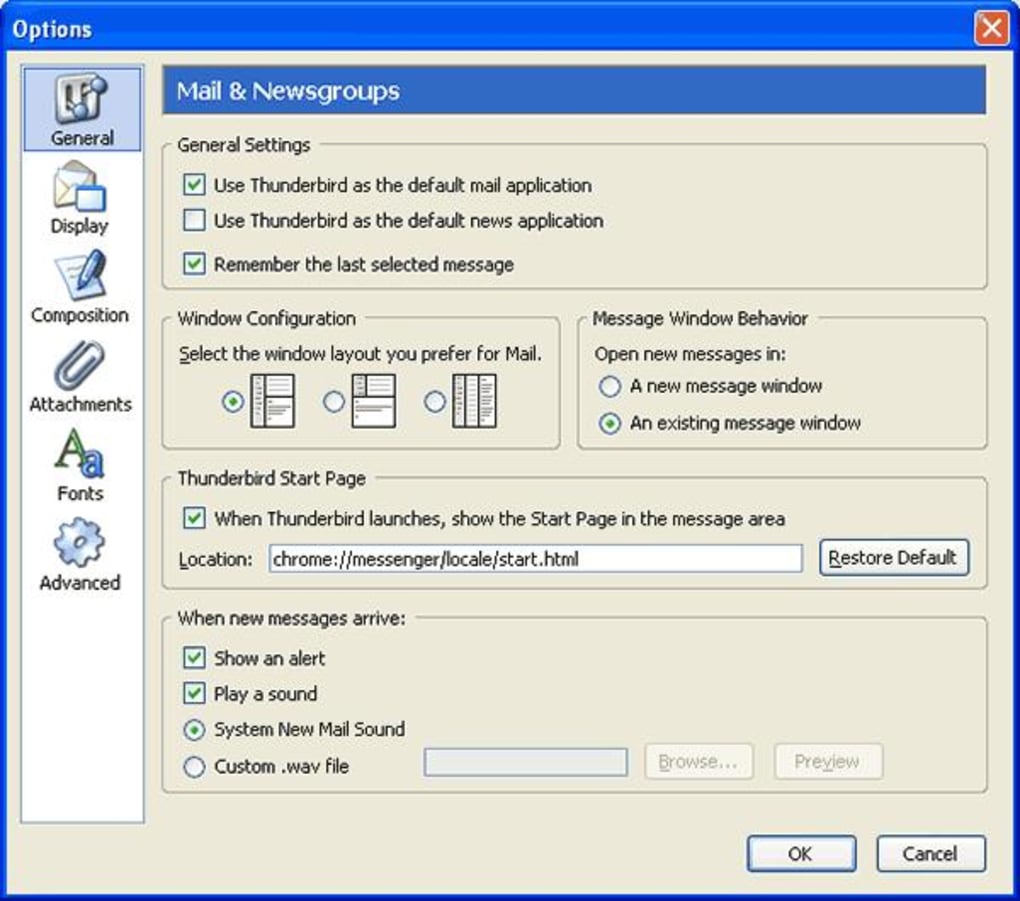
Thunderbird Portable is essentially a repackaged version of the standard Mozilla Thunderbird email client. This means it retains the majority of the features and functionality that have made Thunderbird a popular and widely-used email application. Users will find a familiar interface and workflow, with support for multiple email accounts, IMAP, POP3, and other common email protocols.
The ability to manage multiple email accounts from a single interface remains a key feature. Whether you’re using Gmail, Yahoo Mail, Outlook.com, or any other compatible provider, Thunderbird Portable allows for unified inbox management. This streamlines your workflow and prevents you from needing to switch between different webmail interfaces or applications. The program also includes powerful filtering tools to organize and manage your emails effectively, allowing you to categorize, prioritize, and archive messages as needed.
Beyond email management, Thunderbird Portable incorporates a robust contact manager for storing and organizing contact information. This feature provides an easy way to access your contacts directly within the email client, simplifying communication and avoiding the need to consult external contact lists. The integration of a built-in calendar is another valuable asset, allowing you to manage appointments and schedule events without switching to a separate application.
The overall user experience closely mirrors the desktop version. Users familiar with Thunderbird will quickly adapt to the portable version. Advanced features like extensions and add-ons (although with limitations, discussed later) are also available, enhancing functionality and personalization.
System Requirements and Performance Considerations
While Thunderbird Portable offers significant convenience, it’s essential to acknowledge certain system requirements and performance considerations. The application’s minimal footprint, requiring only 30-40MB of storage space, makes it compatible with a wide range of portable media. However, it does rely on the available resources of the host computer. The performance of Thunderbird Portable will be influenced by the processing power, RAM, and available storage space of the machine it’s running on. While generally efficient, expect slightly slower loading times and potential performance bottlenecks on older or less powerful systems compared to a dedicated installation on a high-spec machine.
Thunderbird Portable requires a Windows operating system; it is not compatible with macOS, Linux, or other platforms. The specific minimum system requirements mirror those of the standard Thunderbird application, although slightly less stringent depending on the version. However, users should ensure the host computer meets the minimum specifications for an optimal user experience. This is particularly important because running it from a USB drive or external media may introduce slight performance overhead.
Limitations and Potential Drawbacks
While Thunderbird Portable offers numerous benefits, it’s crucial to acknowledge its limitations. The most significant drawback is the inherent vulnerability associated with storing all your email data on a single portable device. Losing or misplacing the storage device could result in irretrievable loss of email data and contacts, a risk not present with a traditional desktop installation where data is often backed up locally or in the cloud.
Another potential challenge involves synchronization. While Thunderbird Portable generally synchronizes well with email servers, occasional issues may arise, particularly with complex configurations or unstable internet connections. These issues can lead to delays in receiving or sending emails or even data inconsistencies between the portable version and the main email account. Properly configuring your email account settings and using a reliable internet connection are crucial for minimizing these problems.
Finally, the availability of extensions and add-ons might be limited compared to the desktop version. While some extensions are compatible, others might not function correctly or might not be supported at all in the portable environment. Users should check the compatibility of any desired extensions before installing them.
Security Concerns and Mitigation Strategies
The potential loss of the portable storage device presents a significant security risk. If the device is not password-protected or physically secured, unauthorized access to email data and contacts becomes a serious concern. It is imperative to employ appropriate security measures. These include using strong passwords to protect the device’s access and implementing data encryption on the storage device itself. Utilizing full-disk encryption on the portable drive can provide a significant layer of protection, rendering the data inaccessible without the correct decryption key.
In addition, regularly backing up your data is crucial. Thunderbird Portable’s simplicity can make this easier. Simply copying the entire Thunderbird Portable profile folder to another location or cloud storage service provides a safe copy of your emails and settings. This backup serves as a safeguard against data loss should the primary storage device be compromised, lost, or damaged. The backup can also serve as a recovery point in case of unexpected problems or corruption of the main profile.
Implementing these security measures can significantly reduce the risks inherent in using a portable email client. While no system is entirely invulnerable, taking precautions to protect the storage device and its contents is essential for maintaining the security and confidentiality of your email data.
Conclusion: Is Thunderbird Portable Right for You?
Thunderbird Portable offers a unique blend of convenience and functionality. Its portability is invaluable for users who need access to their email on multiple computers or in situations with limited or unreliable internet connectivity. The ability to work offline is a powerful asset, ensuring continuity and productivity even without a network connection.
However, the potential for data loss and synchronization issues, coupled with security concerns related to the portability of the data, require careful consideration. Users should weigh the advantages of portability and offline access against the risks of data loss and the need for robust security measures. If you prioritize portability and offline access and are prepared to implement appropriate security measures, then Thunderbird Portable is a strong contender. If data security and loss prevention are paramount, a more traditional desktop installation with robust cloud backup may be a more suitable option.
File Information
- License: “Free”
- Latest update: “July 1, 2025”
- Platform: “Windows”
- OS: “Windows XP”
- Language: “English”
- Downloads: “27.1K”
- Size: “155.95 MB”


