
TickTick is a popular task management application available across multiple platforms, including Windows, Android, macOS, and web browsers. This review delves into its features, functionality, pros and cons, and compares it to alternative solutions. We’ll explore its suitability for both personal and professional use, examining its strengths and limitations in detail.
TickTick’s Core Functionality: Task Management Reimagined
At its heart, TickTick is a robust task management application designed to help users organize and prioritize their to-do lists. Its intuitive interface allows for easy creation, modification, and tracking of tasks, offering a range of features to cater to diverse user needs. Users can create individual tasks with detailed descriptions, set due dates and times, assign priorities (using a flexible priority system), and add tags for categorization. This granular level of detail enables users to effectively manage complex projects and maintain a clear overview of their workload.
One of TickTick’s key strengths lies in its flexibility. Users can structure their tasks into projects, lists, and tags, allowing for a customized organization system that adapts to their individual workflow. This hierarchical structure prevents tasks from becoming overwhelming, facilitating seamless project management. For example, a user might create a project for “Website Redesign,” within which they could have lists for “Content Creation,” “Design,” and “Development.” Each list would contain individual tasks, enabling precise task management and progress tracking.
The app also supports collaboration, enabling users to share lists and tasks with others. This collaborative functionality is particularly beneficial for teams working on shared projects, promoting seamless communication and efficient task delegation. Features like comments and task assignments allow for clear communication and accountability within collaborative workflows.
TickTick for Business: Streamlining Productivity in the Workplace
TickTick’s capabilities extend significantly beyond personal task management, offering a range of features that are highly beneficial for businesses of all sizes. Its collaborative features, as previously mentioned, facilitate seamless teamwork and project management. The ability to assign tasks to specific team members, set deadlines, and track progress in real-time promotes accountability and ensures that projects stay on schedule. This streamlined approach to task management minimizes confusion and ensures everyone is aligned on project goals and deliverables.
Beyond collaboration, TickTick offers features tailored for professional use. The ability to create recurring tasks automates repetitive tasks, saving time and reducing administrative overhead. This is especially useful for managing regular meetings, deadlines, or reporting requirements. TickTick also integrates with calendar applications, providing a comprehensive overview of both scheduled events and tasks, eliminating scheduling conflicts and improving overall time management.
Furthermore, TickTick’s reporting and analytics features offer valuable insights into team productivity and project progress. These analytics allow businesses to identify potential bottlenecks, optimize workflows, and improve overall efficiency. This data-driven approach allows for proactive problem-solving and continuous improvement within the organization.
TickTick’s User Interface and Experience: Intuitive and Efficient
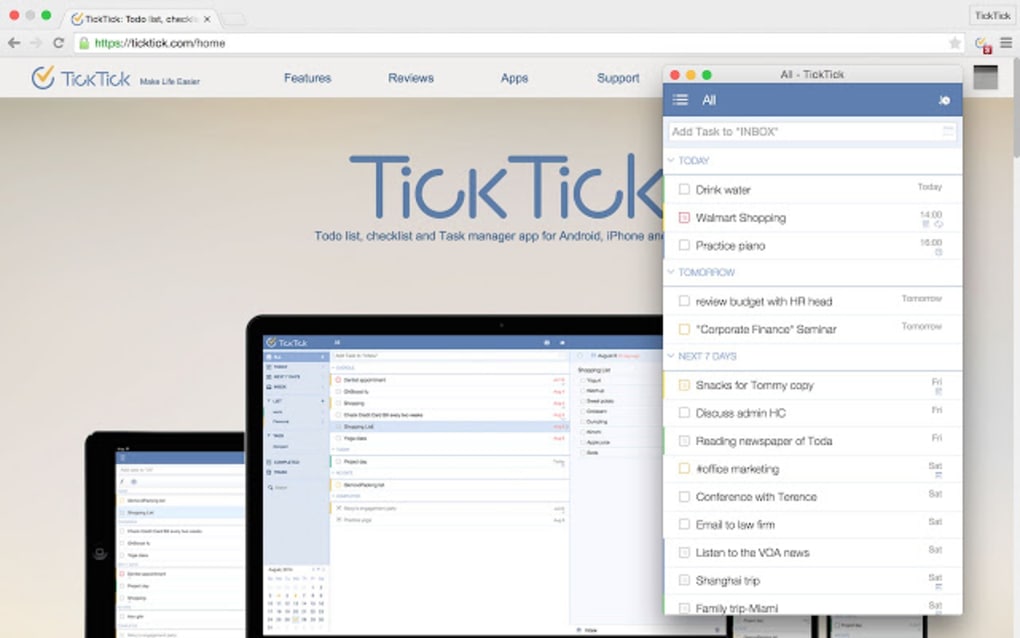
TickTick’s user interface is designed with simplicity and efficiency in mind. The clean and uncluttered design makes navigation intuitive, even for users unfamiliar with task management applications. The app’s responsiveness ensures a smooth user experience, regardless of the platform being used. The ability to customize the interface further enhances user experience, allowing users to tailor the app to their individual preferences and workflow.
Features like natural language processing (NLP) allow for quick task creation and modification. Users can simply type in tasks using natural language, and TickTick will intelligently interpret the input and create the corresponding task, complete with due dates and priorities. This feature significantly speeds up the task creation process, reducing the time spent on administrative tasks.
The app also incorporates a range of visual cues to indicate task progress, priority, and due dates. This visual representation helps users quickly identify urgent tasks and prioritize their workload effectively. The clear and concise presentation of information reduces cognitive overload and allows users to focus on completing their tasks rather than navigating a complex interface.
TickTick’s Premium Features: Enhancing Functionality and Capabilities
While TickTick offers a comprehensive set of free features, its premium subscription unlocks a broader range of functionalities designed to further enhance productivity and organization. These features include advanced collaboration tools, increased task limits, custom themes, and priority matrices. The advanced collaboration features provide enhanced control over shared projects, allowing for more granular task assignment and progress tracking. Increased task limits accommodate users with extensive to-do lists, preventing limitations on the number of tasks that can be managed. Custom themes allow for personalizing the app’s appearance, enhancing the user experience. Finally, priority matrices provide a visual representation of task priorities, facilitating efficient task management and prioritization.
TickTick vs. The Competition: A Comparative Analysis
TickTick competes with several other popular task management applications, including Todoist, Any.do, and Microsoft To Do. While each application offers similar core functionalities, TickTick distinguishes itself through its comprehensive feature set, intuitive user interface, and robust collaboration capabilities. Its free version provides a substantial level of functionality, making it accessible to a broader range of users. The premium subscription offers even more advanced features, catering to power users and businesses requiring extensive task management capabilities.
In comparison to Todoist, TickTick offers a more visually appealing interface and more readily available collaborative features. Compared to Any.do, TickTick provides a more sophisticated task management system, with advanced features like priority matrices and more detailed task customization options. Against Microsoft To Do, TickTick surpasses it in terms of customization and the depth of its available features, including project management and collaboration tools.
TickTick’s strengths lie in its comprehensive feature set, intuitive user interface, and affordable pricing. Its weaknesses are relatively minor, such as the limitations imposed by the free version and the occasional minor bugs. However, these drawbacks are largely outweighed by its substantial advantages.
In conclusion, TickTick is a powerful and versatile task management application that caters to a broad spectrum of users, from individuals managing their personal to-do lists to businesses streamlining their workflows. Its intuitive interface, comprehensive feature set, and affordable pricing make it a compelling choice for anyone seeking to enhance their productivity and organization. Whether you are a student, a professional, or a business owner, TickTick offers a robust and flexible solution for all your task management needs.
File Information
- License: “Free”
- Version: “1.1.1.1”
- Latest update: “January 9, 2017”
- Platform: “Windows”
- OS: “Windows 7”
- Language: “English”
- Downloads: “2.5K”


