
TikTok has become a global phenomenon, connecting billions through short-form videos. While the platform offers a wealth of creative content, many users find their profiles cluttered with reposted videos. Manually deleting these can be a tedious and time-consuming process. This is where the TikTok All Reposted Videos Remover extension for Google Chrome comes in, offering a streamlined solution to declutter your TikTok profile. This guide provides a comprehensive overview of the extension, its functionality, usage instructions, safety considerations, and frequently asked questions.
Understanding the TikTok All Reposted Videos Remover
The TikTok All Reposted Videos Remover is a free Google Chrome extension designed to automate the removal of reposted videos from your TikTok account. Its primary function is to simplify the often-frustrating task of manually deleting numerous reposts, saving users significant time and effort. The extension operates by directly interacting with the TikTok website, identifying and removing reposted videos in a rapid, automated sequence.
How the TikTok All Reposted Videos Remover Works
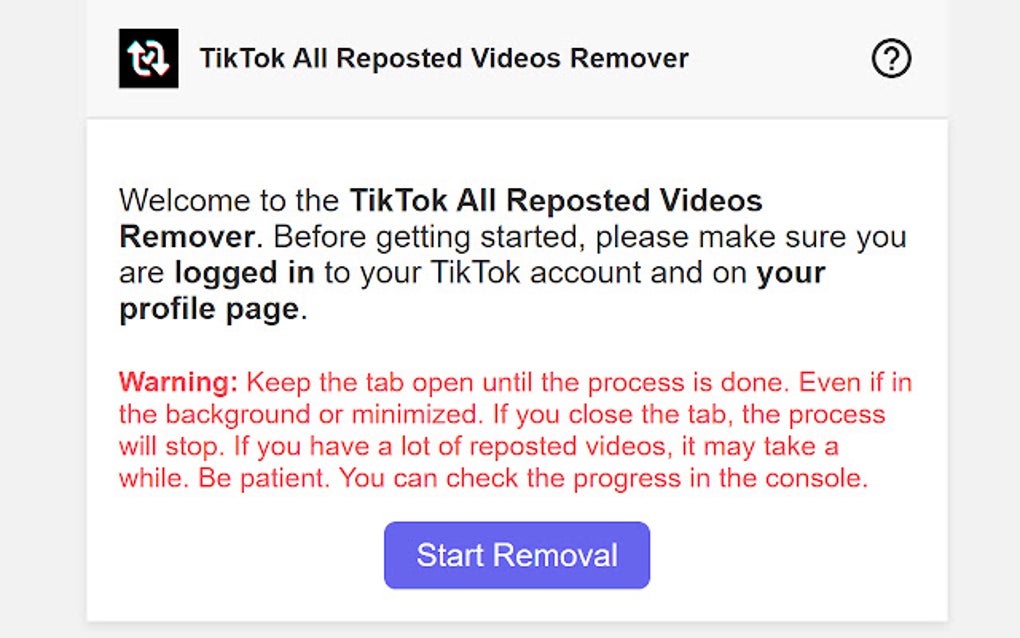
This extension utilizes a simple yet effective mechanism. After installation and initiation, the extension scans your TikTok profile for videos identified as reposts. Once detected, it systematically removes these videos, typically at pre-set intervals to avoid potential issues with TikTok’s servers and maintain a smooth removal process. The speed of removal is carefully calibrated to provide efficiency without triggering any account restrictions.
Step-by-Step Guide to Using the Extension
Utilizing the TikTok All Reposted Videos Remover is remarkably straightforward:
-
Installation: First, download the extension from a reputable source, preferably the official Chrome Web Store or the developer’s website (ensure it’s from a trusted source to avoid malware). Click “Add to Chrome” and follow the installation prompts.
-
Login to TikTok: Open your Google Chrome browser and log in to your TikTok account. Make sure you’re logged into the account you wish to clean.
-
Navigate to your Profile: Go to your TikTok profile page. This is where the extension will operate.
-
Activate the Extension: Once on your profile page, locate the TikTok All Reposted Videos Remover extension’s icon (usually in the Chrome extensions bar). Click the icon to activate it. The extension may have a “Start” or similar button that initiates the removal process.
-
Automated Removal: The extension will then begin automatically removing reposted videos. Observe the progress. The process may take some time depending on the number of reposted videos on your profile. Do not close the browser window or refresh the page during this process.
-
Completion: The extension will notify you when the removal process is complete. You can then refresh your profile page to confirm that all reposted videos have been successfully removed.
Safety and Security Considerations
While the TikTok All Reposted Videos Remover simplifies a tedious task, it’s crucial to address security concerns:
-
Download from Reputable Sources: Always download extensions from trusted sources such as the official Chrome Web Store. Avoid downloading from unofficial websites or untrusted sources, as these might contain malware.
-
Check Reviews and Ratings: Before installing any extension, check its reviews and ratings. Negative reviews or low ratings may indicate potential issues or security risks.
-
Monitor Your Account: After using the extension, keep an eye on your TikTok account for any unusual activity. If you notice anything suspicious, immediately disable the extension and contact TikTok support.
-
Understand Permissions: Pay attention to the permissions the extension requests. Only grant the necessary permissions and avoid extensions that request excessive or unnecessary access to your data.
-
Regular Updates: Keep the extension updated to the latest version to benefit from bug fixes and security patches.
-
Antivirus Software: Run a full system scan with your antivirus software before and after installing any browser extension. This additional layer of protection can help detect and remove any potential malware.
Frequently Asked Questions (FAQs)
Q: Is the TikTok All Reposted Videos Remover safe to use?
A: When downloaded from a trusted source and used as intended, the extension is generally safe. However, always exercise caution and follow the safety guidelines mentioned above.
Q: Will using this extension violate TikTok’s Terms of Service?
A: While the extension automates a process that could be done manually, it doesn’t inherently violate TikTok’s terms of service. However, excessive or automated activity on any platform can sometimes trigger restrictions, so it’s advisable to use the extension responsibly.
Q: What if the extension doesn’t work correctly?
A: Try reinstalling the extension. Ensure you’re logged into the correct TikTok account and have a stable internet connection. If the problem persists, contact the extension’s developer or check for updates.
Q: Can I use this extension on other browsers besides Chrome?
A: Currently, the TikTok All Reposted Videos Remover is specifically designed for Google Chrome. Compatibility with other browsers is not guaranteed.
Q: Does the extension remove all videos, or only reposted ones?
A: The extension is designed to only remove reposted videos. Your original videos will remain unaffected.
Q: How often should I use this extension?
A: You can use the extension as needed. There’s no limit on its usage, but avoid excessive use within short periods which may cause issues with TikTok.
Q: What if I accidentally delete a video I didn’t intend to remove?
A: Unfortunately, once a video is deleted using the extension, it cannot be recovered. Be sure to carefully review your profile before initiating the removal process.
Q: Is there a mobile version of this extension?
A: Currently, the TikTok All Reposted Videos Remover is only available as a Chrome extension. A mobile version is not currently available.
This comprehensive guide offers a detailed explanation of the TikTok All Reposted Videos Remover extension. By understanding its functionality, safety considerations, and usage instructions, users can effectively declutter their TikTok profiles while minimizing potential risks. Remember to always prioritize safety and download from trusted sources to ensure a secure and efficient experience.
File Information
- License: “Free”
- Version: “1.2.0”
- Latest update: “July 11, 2025”
- Platform: “chrome”
- Language: “English”
- Downloads: “107.6K”


