
TikTok has become a global phenomenon, a platform brimming with creative videos, engaging trends, and captivating content. But what if you want to save your favorite videos for offline viewing, share them with friends, or simply preserve a cherished memory? This is where TikTok video downloaders come in, and TikTok Video Keeper, a Chrome extension, offers a convenient and efficient solution. This guide provides a thorough exploration of TikTok Video Keeper, examining its features, usability, and overall effectiveness in downloading TikTok videos.
Understanding TikTok Video Keeper
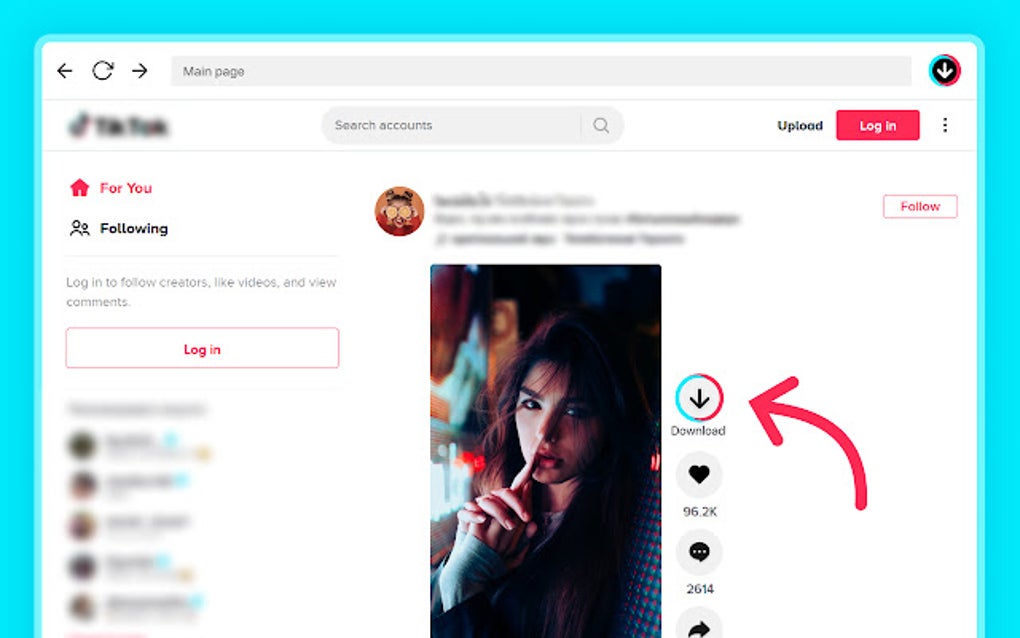
TikTok Video Keeper is a free Google Chrome extension designed to simplify the process of downloading TikTok videos. Unlike some downloaders that require complicated procedures or personal information, TikTok Video Keeper offers a straightforward, user-friendly experience. Its primary function is to enable users to download both individual videos and batches of videos directly from the TikTok website. The extension’s ease of use makes it an attractive option for users of all technical skill levels, from casual TikTok viewers to avid content creators.
Key Features and Functionality
The core strength of TikTok Video Keeper lies in its streamlined design and efficient functionality. Key features that distinguish this downloader include:
-
Simplicity and Ease of Use: The extension boasts an intuitive interface, requiring minimal interaction from the user. There’s no need to sign up for an account, provide personal details, or navigate complex menus. The download process is typically initiated with a single click.
-
Single and Bulk Downloads: Users can download individual videos with ease, selecting the specific content they wish to save. However, the extension also supports bulk downloads, allowing for the efficient acquisition of multiple videos simultaneously. This feature proves particularly useful for users who want to download a series of videos related to a particular trend, hashtag, or creator.
-
HD Video Support: The quality of the downloaded videos is a crucial factor for many users. TikTok Video Keeper supports HD video downloads, ensuring that the saved content maintains a high level of visual clarity and detail. This feature allows users to preserve the original quality of their favorite videos, enhancing the overall viewing experience.
-
Content Management Tools: Once downloaded, users can manage their video library effectively. The extension typically provides options for renaming downloaded files, sharing videos across different platforms, copying video links, and reposting the content to other social media channels or applications. This level of control allows users to organize their downloaded videos according to their preferences and easily share content with their connections.
-
Lightweight and Efficient: TikTok Video Keeper is designed to be a lightweight extension, minimizing the impact on system resources and browser performance. This ensures a smooth and quick downloading experience without unnecessary lag or slowdown. The small file size also reduces storage space consumption on the user’s device.
-
Free Access: The extension is completely free to use, offering all of its features without any hidden costs or subscription fees. This makes it a readily accessible tool for a large audience, eliminating potential financial barriers to accessing the functionality.
How to Use TikTok Video Keeper
The process of using TikTok Video Keeper is remarkably straightforward. Once the extension is installed in your Chrome browser, the user simply navigates to the TikTok video they wish to download. A download button or option, provided by the extension, will typically appear on the video page. Clicking this button initiates the download process, saving the video to the user’s designated download folder. For bulk downloads, the process might involve selecting multiple videos or utilizing a specific functionality provided within the extension itself, such as selecting a range of videos or filtering videos based on criteria. The specific steps might vary slightly depending on the version of the extension, but the core functionality remains consistent.
Advantages and Disadvantages
Like any software application, TikTok Video Keeper presents both advantages and disadvantages.
Advantages:
- Ease of Use: The intuitive interface is a significant advantage, making it accessible to a broad range of users, irrespective of their technical expertise.
-
Efficient Downloads: The downloader processes downloads swiftly, minimizing waiting times.
-
HD Quality Support: Maintaining high-quality video resolution enhances the viewing experience.
-
Free of Charge: The accessibility of a free extension eliminates financial barriers.
-
Bulk Download Feature: The ability to download multiple videos simultaneously enhances efficiency.
-
Robust Content Management: The ability to rename, share, and repost downloaded videos adds value.
Disadvantages:
-
Chrome Browser Limitation: The extension is exclusively compatible with the Google Chrome browser. Users of other browsers are unable to benefit from the functionality.
-
Potential for Copyright Issues: Downloading copyrighted videos without permission is illegal in many jurisdictions. Users must ensure that they are only downloading content that they are legally entitled to download. The extension itself doesn’t prevent illegal downloads; it is the responsibility of the user to comply with copyright laws.
-
Dependence on TikTok’s Website: The effectiveness of the extension is directly linked to the structure and functionality of the TikTok website. Changes made to TikTok’s platform might affect the functionality of the downloader, necessitating updates to the extension.
-
Limited Platform Compatibility: The extension only works on the desktop version of the TikTok website. Downloading videos from the TikTok mobile app will require different methods.
-
Potential for Malware (Rare): While reputable sources offer secure extensions, always download from trusted websites to mitigate the risk of installing malicious software.
Comparing TikTok Video Keeper to Alternatives
Numerous TikTok video downloaders exist, each with its own strengths and weaknesses. Comparing TikTok Video Keeper to other alternatives necessitates an assessment of several factors including ease of use, download speed, video quality, features offered, and potential risks. Some alternatives might offer additional features, such as watermark removal, but they might also come with more complex interfaces or require user registration. Others might focus on speed, sacrificing video quality in the process. The choice ultimately depends on individual user priorities and needs. Researching and comparing different downloaders before making a decision is always advisable.
Conclusion
TikTok Video Keeper provides a simple and effective method for downloading TikTok videos from the Google Chrome browser. Its user-friendly interface, support for HD video downloads, and bulk download capabilities make it a valuable tool for many TikTok users. However, users should be mindful of copyright laws and only download videos they are legally permitted to download. Also, the limitations concerning browser compatibility and potential reliance on the structure of TikTok’s website should be considered. Despite these considerations, TikTok Video Keeper remains a strong contender among several available TikTok video downloaders, offering a convenient and efficient solution for preserving favorite TikTok content. By weighing the advantages and disadvantages and comparing it to other options available, users can make an informed decision about whether this extension suits their needs and preferences.
File Information
- License: “Free”
- Version: “3.8”
- Latest update: “January 31, 2025”
- Platform: “chrome”
- Downloads: “823”


