
TinEye Reverse Image Search is a Firefox add-on designed to quickly and efficiently locate exact copies of images online. This powerful tool leverages TinEye’s extensive image database to pinpoint instances where your image, or a near-identical version, has appeared elsewhere on the web. This functionality proves invaluable for a wide range of users, from verifying image authenticity to tracking unauthorized usage. This review delves into the functionality, usability, pros, cons, and alternatives to this convenient browser extension.
How TinEye Reverse Image Search Works
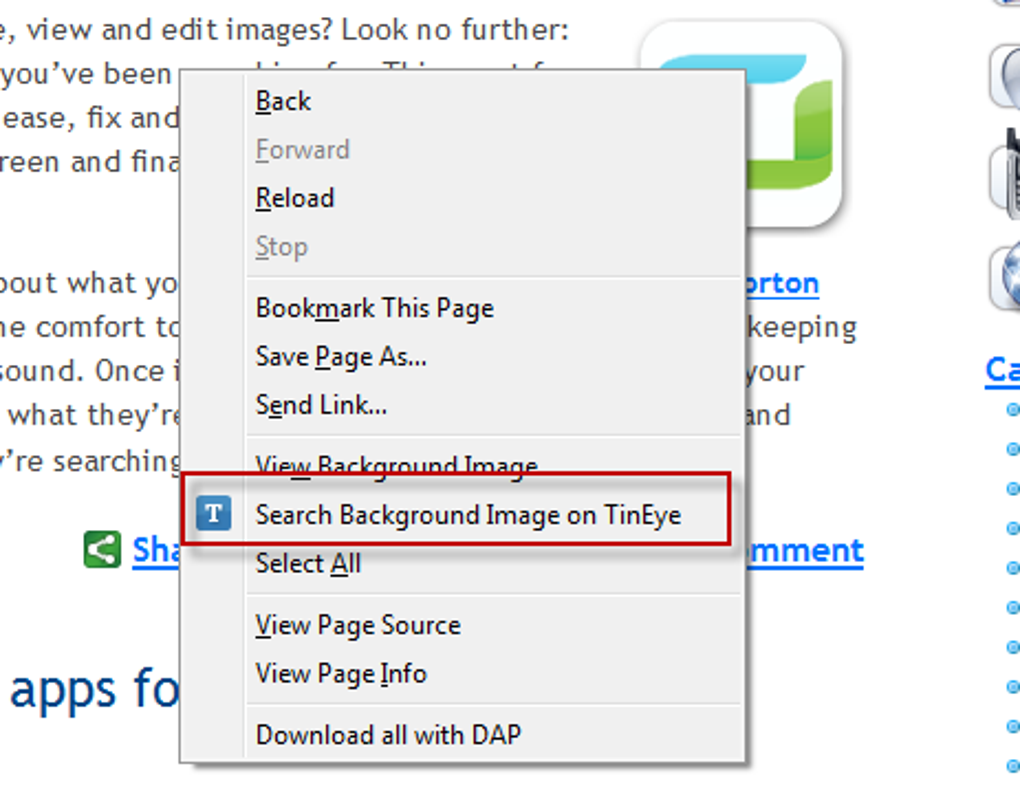
The TinEye Reverse Image Search Firefox add-on seamlessly integrates with your browsing experience. Once installed, it adds a new option to your browser’s right-click context menu. This means that whenever you encounter an image online, you can simply right-click and select “Search with TinEye” to initiate a reverse image search. This process is incredibly streamlined and intuitive, making it accessible to users of all technical skill levels.
Upon initiating the search, TinEye’s powerful algorithms scour its vast database to find exact matches of your image. The results are presented in a new tab, offering a comprehensive overview of where the image has appeared. This information typically includes links to websites hosting the image, allowing you to quickly access the source locations. In addition to website URLs, TinEye often provides technical details about the image, such as its dimensions and file type. This can be useful in determining the original source and quality of the image.
The results page typically organizes the matches chronologically or by relevance, making it easy to navigate through the identified instances of your image. This organization enhances usability and helps users quickly grasp the extent of the image’s online presence. The design is generally clean and straightforward, prioritizing easy access to information. This intuitive approach simplifies the process of analyzing the results and understanding the spread of the image online.
Key Features and Functionality
TinEye Reverse Image Search for Firefox offers several notable features that enhance its overall functionality and usability:
-
Context Menu Integration: The seamless integration into the browser’s context menu ensures a quick and efficient search initiation. This eliminates the need for extra steps or navigating to a separate search interface. The convenience of this integration is a significant advantage over other methods of reverse image searching.
-
Accurate Results: TinEye has built a reputation for highly accurate results. Its algorithm is specifically designed to find exact matches, minimizing the occurrence of false positives. This accuracy is a key selling point, providing users with confidence in the search results.
-
Comprehensive Results Presentation: The results page clearly displays all relevant information, including the source URL, image dimensions, and other pertinent technical details. The clear and well-organized results page simplifies analysis, making it easy to assess the image’s online usage.
-
Multiple Sharing Options: The ability to share search results via Twitter, Facebook, or email facilitates collaboration and enables users to quickly disseminate their findings. This social sharing feature is convenient for researchers, journalists, or anyone needing to share information quickly.
-
Image Comparison: While the primary focus is on finding exact matches, the ability to compare images within the results offers further investigation potential. This allows users to analyze slight variations or modifications made to the image.
-
Basic Configuration Options: TinEye provides a few basic configuration options allowing users to customize their experience to some extent, though these options are generally limited. This limited customization may be a drawback for users seeking advanced control.
Advantages and Disadvantages
Like any software, TinEye Reverse Image Search has its strengths and weaknesses.
Pros:
-
Speed and Efficiency: The extension is remarkably fast and efficient, providing quick results without unnecessary delays. This speed is a crucial aspect, especially for users conducting multiple searches.
-
Ease of Use: The simple and intuitive interface makes the extension accessible to users of all technical levels. The user-friendly design enhances accessibility and simplifies the overall search process.
-
Accuracy: TinEye boasts a high degree of accuracy in identifying exact image matches. This precision is critical for users who need reliable results to support their investigation.
-
Context Menu Integration: The direct integration into the context menu streamlines the search process. This convenience contributes significantly to the overall positive user experience.
-
Comprehensive Results: The results page is detailed and well-organized, providing all necessary information about identified matches. The comprehensiveness of the results simplifies analysis and assists in decision-making.
Cons:
-
Limited to Exact Matches: The extension only identifies exact copies of the image. It doesn’t offer similar image search capabilities, which can be a limitation for users seeking to find visually similar images, even if not completely identical.
-
Potential for False Negatives: Although generally accurate, there’s a possibility of missing some matches, especially if the image has undergone minor alterations. This potential limitation necessitates careful review of the results.
-
Chrome Version Preference: Some users report preferring the Chrome version over the Firefox version, possibly due to interface differences or performance aspects. This observation suggests room for improvement in the Firefox extension’s user experience.
-
Limited Configuration Options: The absence of more extensive configuration options limits user customization. More advanced settings could enhance the overall usability and tailor the experience to individual needs.
Alternatives to TinEye Reverse Image Search
While TinEye Reverse Image Search offers a robust solution, several alternative reverse image search tools exist, each with its own strengths and weaknesses:
-
Google Images: Google Images, a widely used image search engine, incorporates reverse image search functionality. Simply upload an image, and Google will search for visually similar images and websites hosting it. Google Images is a readily available and popular alternative, though it may not be as precise as TinEye for exact matches.
-
Yandex Images: Yandex, a Russian search engine, also provides robust reverse image search capabilities. Similar to Google, it offers a broad search for similar and identical images, making it a viable alternative.
-
Bing Visual Search: Microsoft’s Bing search engine also offers reverse image search functionality, competing with Google and Yandex in terms of capabilities.
The choice of the optimal reverse image search tool largely depends on the specific needs and priorities of the user. If precise identification of exact matches is paramount, TinEye remains a strong contender. However, if the requirement involves finding similar images, Google Images, Yandex Images, or Bing Visual Search provide broader search capabilities.
Conclusion
TinEye Reverse Image Search for Firefox is a valuable tool for anyone needing to identify exact copies of images online. Its seamless integration, speed, accuracy, and comprehensive results presentation make it a highly effective solution for a wide array of tasks, from verifying image origins to detecting unauthorized usage. While its limitation to exact matches and limited configuration options may not be suitable for all users, its strengths significantly outweigh these shortcomings for many. The ease of use and speed make TinEye Reverse Image Search a convenient and effective addition to any Firefox user’s toolkit.
File Information
- License: “Free”
- Latest update: “January 4, 2024”
- Platform: “Windows”
- OS: “Windows Vista”
- Language: “English”
- Downloads: “6.9K”
- Size: “42.48 KB”


