
In the ever-evolving landscape of PC hardware and software, keeping your system optimized and up-to-date is paramount for performance, security, and stability. For users of NVIDIA graphics cards, this often involves navigating driver updates, a task typically managed by NVIDIA’s proprietary software, GeForce Experience. While GeForce Experience offers a comprehensive suite of features, including game optimization and streaming capabilities, it is frequently criticized for its resource-intensive nature and the inclusion of telemetry. This is where a nimble, specialized tool like TinyNvidiaUpdateChecker (TNUC) steps in, offering a refreshing, minimalist alternative for those who prioritize efficiency and control.
Developed by ElPumpo, TinyNvidiaUpdateChecker is a free and open-source utility designed with a singular focus: to provide a lightweight, no-frills method for checking, downloading, and installing the latest NVIDIA graphic card drivers. Its concise name perfectly encapsulates its essence—a ’tiny’ tool dedicated to ‘NVIDIA update checking.’ Unlike its more feature-rich counterpart, TNUC strips away all non-essential components, delivering a pure, unadulterated driver management experience that respects your system’s resources and your privacy.
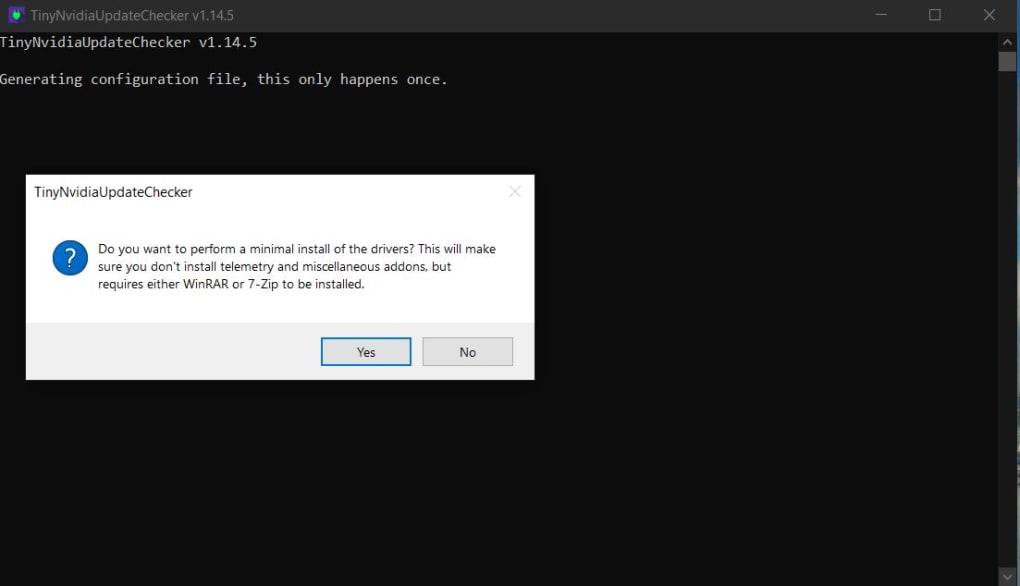
The fundamental appeal of TinyNvidiaUpdateChecker lies in its ability to perform critical driver updates without the bloatware often associated with larger software packages. It intelligently identifies your specific NVIDIA graphics card, then fetches relevant driver information, including release dates and version numbers. Users are then presented with the option to download and install the latest drivers directly, all through a series of intuitive dialog boxes. This approach negates the need for complex command-line entries, making it accessible even to users who might be less comfortable with technical interfaces. Furthermore, one of its standout features is the capacity to perform a “minimal install,” which actively removes telemetry and other non-essential components that can consume system resources and transmit user data. While this advanced option requires an external compression tool like WinRAR, it underscores TNUC’s commitment to delivering a clean, optimized driver installation.
Utilities & Tools: Streamlining Your System
The category of “Utilities & Tools” on platforms like PhanMemFree.org encompasses a vast array of software designed to enhance, maintain, and optimize computer systems. From file managers and data recovery solutions to barcode scanners and measurement tools, these applications serve to make our digital lives more efficient and hassle-free. TinyNvidiaUpdateChecker perfectly embodies the spirit of a utility tool, focusing on a specific, recurring task—graphics driver management—and executing it with remarkable efficiency and simplicity.
In the realm of system utilities, particularly those tailored for Windows, users are constantly seeking ways to improve their computer’s performance without bogging it down with unnecessary software. Graphics drivers are a critical component of any modern PC, acting as the bridge between your operating system and your graphics processing unit (GPU). Outdated or corrupt drivers can lead to a host of issues, including poor gaming performance, application crashes, display anomalies, and even system instability. Conversely, keeping drivers up-to-date ensures that your GPU operates at its peak potential, supporting the latest games, professional applications, and multimedia experiences.
NVIDIA GeForce Experience, while popular, has always been a point of contention for some users. Its suite of features, which includes game optimization profiles, ShadowPlay for recording gameplay, and GeForce Now for cloud gaming, is undoubtedly useful for many. However, for users who simply want to update their drivers and nothing more, GeForce Experience can feel like overkill. It consumes a noticeable amount of RAM and CPU cycles, often running in the background even when not actively in use. This overhead can be particularly problematic for systems with limited resources, such as older PCs, laptops, or custom builds where every megabyte of RAM and every CPU cycle counts.
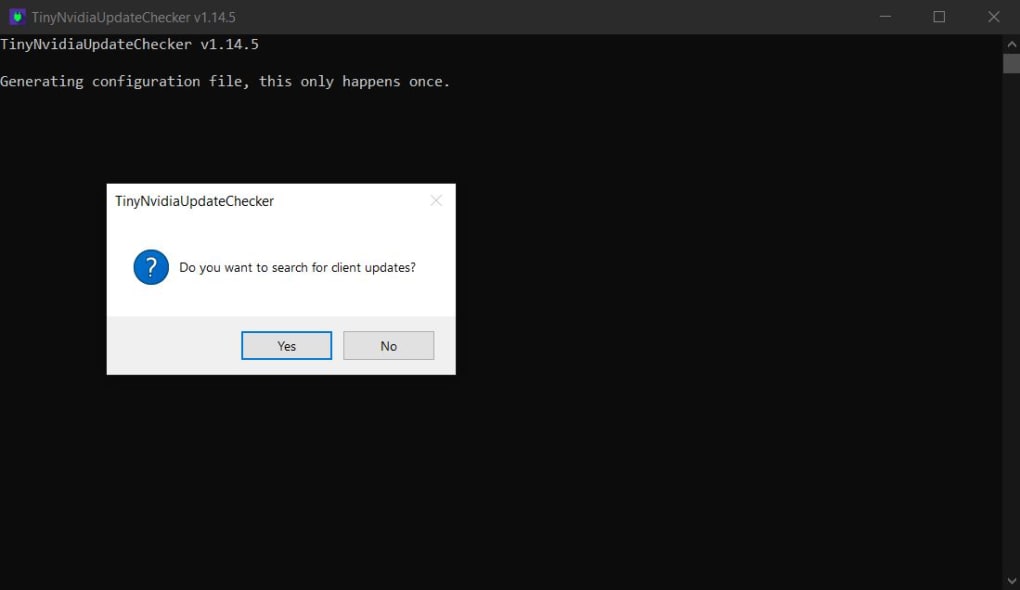
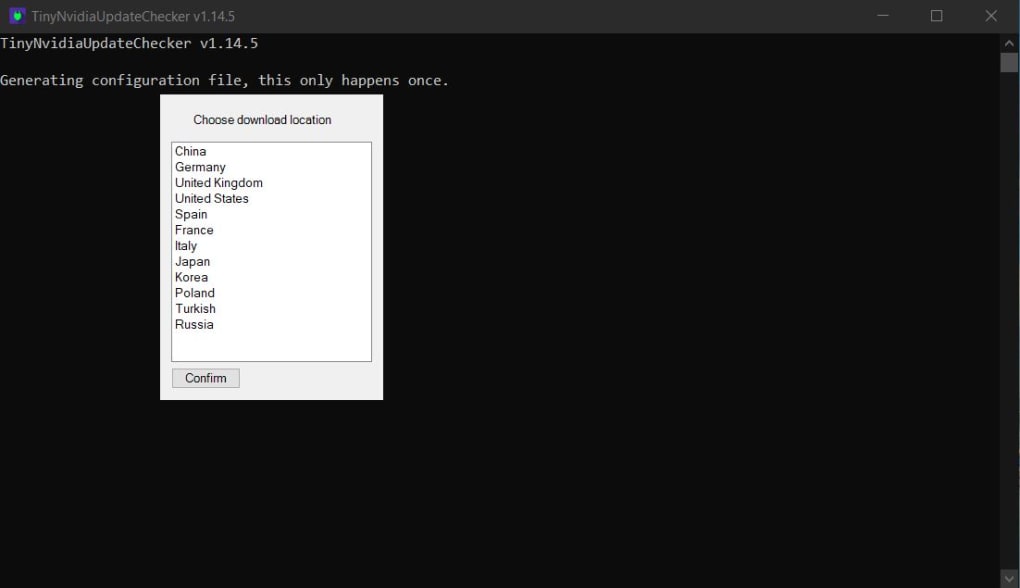
TinyNvidiaUpdateChecker provides a refreshing alternative by offering a truly lightweight footprint. The application itself is minuscule in size (around 167 KB for version 1.14.5), downloads updates without extra components, and doesn’t require a traditional installation process. It opens in a command-line window, which, despite its initial appearance, guides users through the entire update procedure using clear, sequential dialog boxes. This design philosophy aligns perfectly with the core principles of effective utility software: specialized function, minimal resource consumption, and straightforward operation. It’s a tool built for purpose, devoid of graphical frills or expansive feature sets that might distract from its primary objective. For users who prefer a lean and agile system, TNUC is not just an alternative; it’s a superior choice for driver management.
Comparing it directly with GeForce Experience, TNUC shines in its minimalism. GeForce Experience often bundles additional software, telemetric data collection, and a persistent background process. TNUC, on the other hand, runs only when you need it, performs its task, and then exits, leaving no lingering processes or unnecessary resource consumption. This makes it an ideal choice for users who are meticulous about their system’s performance and stability, especially gamers and creative professionals who demand every ounce of power from their hardware. The ease with which it allows users to find, download, and install driver updates, coupled with its negligible system impact, firmly establishes TinyNvidiaUpdateChecker as a top-tier utility for NVIDIA GPU owners. It simplifies a potentially complex process, turning driver updates from a system-heavy chore into a quick, unobtrusive maintenance task.
Security & Privacy: Taking Control of Your Data
In today’s digital age, concerns about “Security & Privacy” have never been more prominent. Users are increasingly wary of software that collects personal data, monitors usage patterns, or bundles unwanted components. This heightened awareness extends to system utilities and drivers, where the line between essential functionality and intrusive data collection can often be blurred. TinyNvidiaUpdateChecker addresses these concerns head-on, particularly through its powerful capability to remove telemetry during the driver installation process.
Telemetry, in the context of software, refers to the automated collection of data from remote sources. Software companies, including major players like NVIDIA, often implement telemetry to gather information about how their products are used, identify bugs, track performance, and understand user behavior. While often framed as a means to improve user experience and product development, telemetry raises significant privacy concerns for many individuals. The data collected can range from anonymized usage statistics and crash reports to more detailed system configurations and application usage patterns. For privacy-conscious users, the idea of their computer constantly transmitting data to a third party, often without clear consent or detailed insight into what is being sent, is inherently problematic.
NVIDIA GeForce Experience, like many modern applications, includes telemetry components. These components run in the background, continuously collecting data that is then sent back to NVIDIA. While NVIDIA typically states this data is used for product improvement, the lack of transparency and the inability to easily opt-out or disable these features can be a major deterrent for certain users. This is where TinyNvidiaUpdateChecker offers a distinct advantage. Its “minimal install” option is explicitly designed to strip away these telemetry components, along with other non-essential modules that might be bundled with the standard driver package.
The ability to remove telemetry is a significant feature that empowers users to take greater control over their system’s privacy. By opting for a minimal installation through TNUC, users can ensure that their NVIDIA drivers are installed cleanly, without the silent background processes dedicated to data collection. This not only enhances privacy but can also contribute to system performance, as fewer background services mean fewer resources consumed. The process, while requiring a tool like WinRAR to extract and prepare the driver package for the minimal install, is a testament to ElPumpo’s dedication to user autonomy. It transforms a routine driver update into an opportunity for system hardening and privacy enhancement.
Furthermore, from a security standpoint, a clean driver installation without unnecessary bundled software reduces the potential attack surface of your system. Every additional component or service running on your computer is a potential vulnerability. By eliminating these extras, TinyNvidiaUpdateChecker contributes to a more secure computing environment. Users who are meticulous about their digital footprint and prefer to keep their systems as lean and secure as possible will find this feature invaluable. It allows for a focused and controlled approach to driver management, where the user dictates what gets installed and what gets left out. In an era where digital security and privacy are paramount, tools like TNUC provide a much-needed layer of control and reassurance, allowing users to harness the power of their hardware without compromising their personal data or system integrity.
Productivity: Optimizing Your PC Experience
“Productivity” is often associated with software suites, task management tools, and applications that help us get work done more efficiently. However, the concept extends beyond direct work applications to encompass anything that optimizes a computer system, thereby enabling users to be more productive. A well-maintained, high-performing PC is a cornerstone of productivity, whether you’re gaming, designing, coding, or simply browsing. TinyNvidiaUpdateChecker, by offering a lean and efficient way to manage graphics drivers, directly contributes to an optimized PC experience, thus enhancing overall productivity.
Graphics drivers are fundamental to the smooth operation of many applications, particularly those that are graphically intensive. For professionals working in fields like video editing, 3D rendering, graphic design, or scientific simulation, having the latest and most stable drivers is not just an advantage—it’s a necessity. Updated drivers often bring performance improvements, bug fixes, and compatibility enhancements that can directly translate into faster rendering times, smoother workflows, and increased stability for demanding software. Imagine a video editor whose rendering times are consistently hampered by an outdated driver, or a game developer whose testing environment is unstable due to a bug in an older driver version. These scenarios directly impact productivity, leading to lost time, frustration, and potential project delays.
TinyNvidiaUpdateChecker facilitates high productivity by ensuring that NVIDIA users can easily and quickly update their drivers without the performance overhead or time consumption associated with alternative solutions. The fact that it’s lightweight means it doesn’t consume valuable system resources that could otherwise be allocated to productivity applications. When you’re running a demanding CAD program or compiling complex code, every megabyte of RAM and every CPU cycle counts. TNUC’s design philosophy—to perform its function and then get out of the way—is perfectly aligned with the needs of a productive user.
Moreover, the “easy to use” aspect of TNUC, despite its command-line appearance, contributes significantly to productivity. The entire process is guided by dialog boxes, eliminating the need for users to remember complex commands or navigate convoluted menus. This streamlined approach minimizes the time and effort required for driver maintenance, allowing users to quickly return to their primary tasks. For instance, a quick check with TNUC can confirm if new drivers are available. If so, a few clicks initiate the download and installation, all without having to endure a bulky installer or manage a resource-heavy background application. This efficiency saves precious time that can be redirected towards creative endeavors, project work, or leisure activities.
The removal of telemetry and other non-essential components during a minimal install also plays a subtle but important role in productivity. By decluttering the system and eliminating unnecessary background processes, TNUC helps maintain a cleaner and more responsive operating environment. A less burdened system means faster boot times, quicker application launches, and more consistent performance—all factors that contribute to a smoother and more enjoyable computing experience, ultimately boosting user productivity. Whether you’re a gamer seeking optimal frame rates, a designer needing stable software, or a casual user desiring a responsive system, TinyNvidiaUpdateChecker offers a pragmatic solution that underpins a productive and efficient PC setup. Its unobtrusive nature and powerful capabilities make it an indispensable utility for anyone looking to maximize their NVIDIA-powered system’s potential without compromise.
The User Experience: Simplicity Over Spectacle
One of the most remarkable aspects of TinyNvidiaUpdateChecker is its user experience, which prioritizes simplicity and directness over flashy graphical interfaces. For many users, particularly those accustomed to modern applications with elaborate GUIs, the sight of a command-line window might initially be daunting. However, TNUC quickly dispels this apprehension by guiding the user through the entire process with clear, text-based dialog boxes. This approach might not be visually appealing to everyone, but it is incredibly effective and contributes to the tool’s lightweight nature.
When a user launches TNUC, it typically presents a series of prompts. First, it identifies the NVIDIA graphics card present in the system. This automatic detection removes any guesswork for the user. Next, it queries NVIDIA’s servers to fetch the latest driver information relevant to that specific GPU. The application then displays crucial details such as the currently installed driver version, the latest available version, and its release date. This immediate, transparent display of information allows users to quickly ascertain if their drivers are outdated and if an update is necessary.
If an update is available, TNUC presents the option to download it. The download process is handled efficiently, retrieving only the necessary driver files without any additional bloat. Once downloaded, the user can then choose to install the driver. This is where the minimal install option, requiring a tool like WinRAR for initial extraction, becomes particularly appealing for advanced users. By providing these choices within a simple dialog-driven flow, TNUC puts the user firmly in control, allowing them to make informed decisions at each step of the process.
The absence of a complex GUI also means a faster launch time and reduced memory footprint. There are no heavy frameworks to load, no intricate animations to render, just pure functionality. This makes TNUC an excellent choice for users who value speed and efficiency, or for those working on older systems where every resource saving matters. While the “lack of GUI can be confusing to some users” is listed as a con, it’s important to understand the context. For novice users who expect a point-and-click interface with graphical buttons and progress bars, TNUC’s text-based interaction might require a slight adjustment. However, for anyone familiar with basic Windows dialogs (like “Yes/No” prompts or file selection windows), the learning curve is minimal. The clarity of the prompts ensures that even a relatively inexperienced user can navigate the update process successfully.
The Broader Ecosystem: Beyond Driver Updates
While TinyNvidiaUpdateChecker’s primary function is driver management, its existence highlights several broader trends in the software ecosystem and user preferences. The demand for lightweight, specialized tools is a direct response to the increasing complexity and resource demands of modern software. Users are becoming more discerning, actively seeking applications that perform specific tasks without imposing unnecessary overhead or invading privacy.
The open-source nature of TNUC is another significant factor. Open-source software benefits from community contributions, transparency, and often, a greater degree of trust. Users can inspect the code (if they have the technical knowledge) to understand exactly how it works, ensuring there are no hidden agendas or malicious components. This collaborative development model often leads to more robust, secure, and user-centric solutions. It fosters an environment where tools are built by users, for users, reflecting genuine needs rather than corporate strategies.
Furthermore, TNUC represents a niche in the “Utilities & Tools” category that caters to a specific segment of the PC user base: those who value control, efficiency, and privacy above all else. This segment might include system administrators, power users, gamers, or anyone running a custom-built PC who wants to fine-tune every aspect of their operating environment. The existence of such tools enriches the overall software landscape, offering alternatives that cater to diverse preferences and technical requirements.
PhanMemFree.org and similar platforms serve as vital hubs for discovering these kinds of utility applications. By categorizing software into granular sections like “Internet & Network,” “Development & IT,” or “Education & Reference,” they help users quickly locate tools that address their specific needs. TNUC, nestled under “Windows” and “Utilities & Tools,” is perfectly positioned for users searching for solutions to optimize their NVIDIA hardware.
In conclusion, TinyNvidiaUpdateChecker stands as a testament to the power of minimalist design and focused functionality. It offers a compelling alternative to NVIDIA GeForce Experience for users who prioritize system performance, privacy, and simplicity. By enabling efficient driver updates, offering telemetry removal, and maintaining a feather-light footprint, TNUC empowers NVIDIA users to take complete control of their graphics card maintenance, fostering an optimized and secure computing experience. Its intuitive, dialog-driven interface, despite its command-line foundation, makes it accessible to a wide audience, proving that sometimes, less truly is more. If you’re an NVIDIA user looking to streamline your system and enhance your productivity without compromise, TinyNvidiaUpdateChecker from PhanMemFree.org is an indispensable tool worth considering.
File Information
- License: “Free”
- Version: “1.14.5”
- Latest update: “September 15, 2021”
- Platform: “Windows”
- OS: “Windows 7”
- Language: “English”
- Downloads: “871”
- Size: “167.42 KB”


