
In a world teeming with digital distractions and an ever-growing list of responsibilities, finding an efficient way to manage tasks is paramount. Enter Todoist, a minimalist yet remarkably powerful to-do list and task manager that has garnered a loyal following among productivity enthusiasts. While it presents itself with an almost Zen-like simplicity, Todoist harbors a depth of functionality that empowers users to meticulously organize their lives, from daily errands to complex long-term projects. This comprehensive review delves into what makes Todoist a standout tool, exploring its core philosophy, key features, user experience, and how it can transform your approach to productivity.
Embracing Simplicity: The Core Philosophy of Todoist
At its heart, Todoist champions a philosophy of elegant simplicity. In an era where many productivity applications overwhelm users with a plethora of features, intricate dashboards, and steep learning curves, Todoist opts for a refreshing minimalist approach. This design choice isn’t merely aesthetic; it’s a deliberate strategy to reduce cognitive load and friction, allowing users to focus solely on the task at hand rather than wrestling with the tool itself.
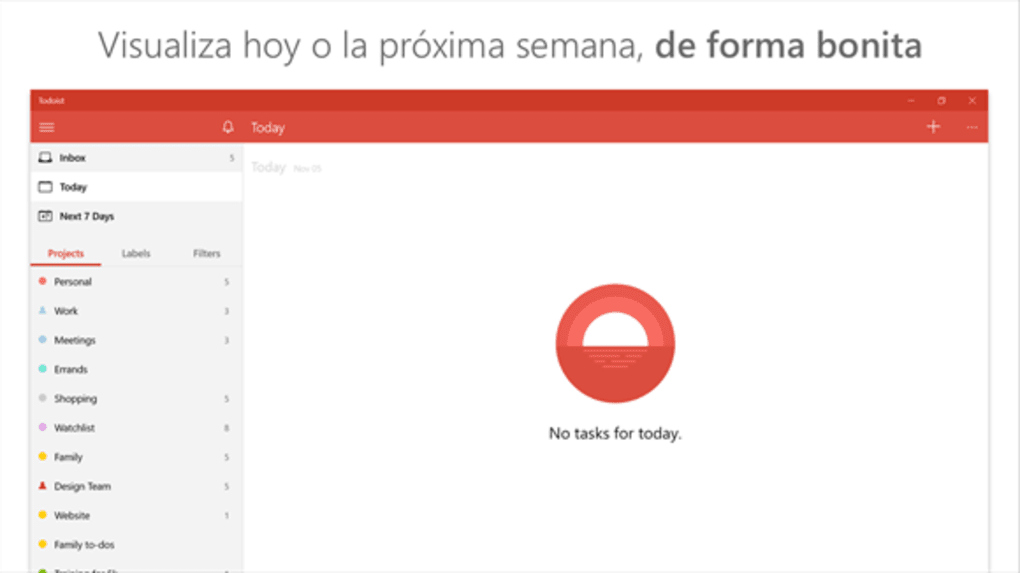
Upon first glance, Todoist’s interface might appear almost blank, a stark canvas awaiting your directives. This initial impression is intentional. It encourages users to build their organizational structure organically, rather than conforming to a rigid, pre-defined system. The clean layout, devoid of unnecessary clutter, ensures that what truly matters – your tasks and projects – remains front and center. This ’less is more’ approach fosters a sense of calm and clarity, making the act of task management feel less like a chore and more like a streamlined process.
The “Zen-like” quality often attributed to Todoist stems from this commitment to simplicity. It’s about providing just enough functionality to be incredibly effective, without introducing complexity that could become a barrier to adoption or consistent use. For individuals who find themselves easily distracted by busy interfaces or overly complicated workflows, Todoist offers a sanctuary where they can jot down ideas, plan their day, and track progress without feeling overwhelmed. This core tenet permeates every aspect of the application, from its intuitive sign-up process to the way it handles advanced features, often subtly integrating them to maintain its uncluttered facade.
The benefits of this minimalist design extend beyond mere aesthetics. By removing extraneous elements, Todoist inherently reduces decision fatigue. Users spend less time figuring out how to use the app and more time actually doing. This focus on functional elegance ensures that the tool serves the user, rather than the user serving the tool. For anyone seeking to declutter their digital life and bring a sense of order to their daily responsibilities, Todoist’s simple yet profound approach to task management offers a compelling solution.
Getting Started with Todoist: Seamless Setup and Initial Task Management
One of the most immediate and appealing aspects of Todoist is its frictionless onboarding process. In an age where even basic applications often demand lengthy sign-up forms, email confirmations, and tutorial walkthroughs, Todoist distinguishes itself with remarkable ease of entry. The process of creating an account is swift and straightforward, often taking mere seconds to complete. There’s no convoluted multi-step registration, no waiting for a confirmation email to click – you simply sign up and you’re in, ready to begin organizing your life without delay. This instant access is a testament to Todoist’s commitment to removing barriers and getting users straight into the workflow.
Once inside your newly created account, the interface, as mentioned, initially appears quite minimalist. This blank slate, however, is not a limitation but an invitation to build your system from the ground up. The journey into active task management begins with the “Add project” button. Projects in Todoist serve as your primary organizational categories, akin to folders or major life areas. They could represent anything from “Work Tasks” and “Personal Errands” to “Fitness Goals” or “Creative Writing.” Creating a new project is as simple as clicking the button and typing in a name.
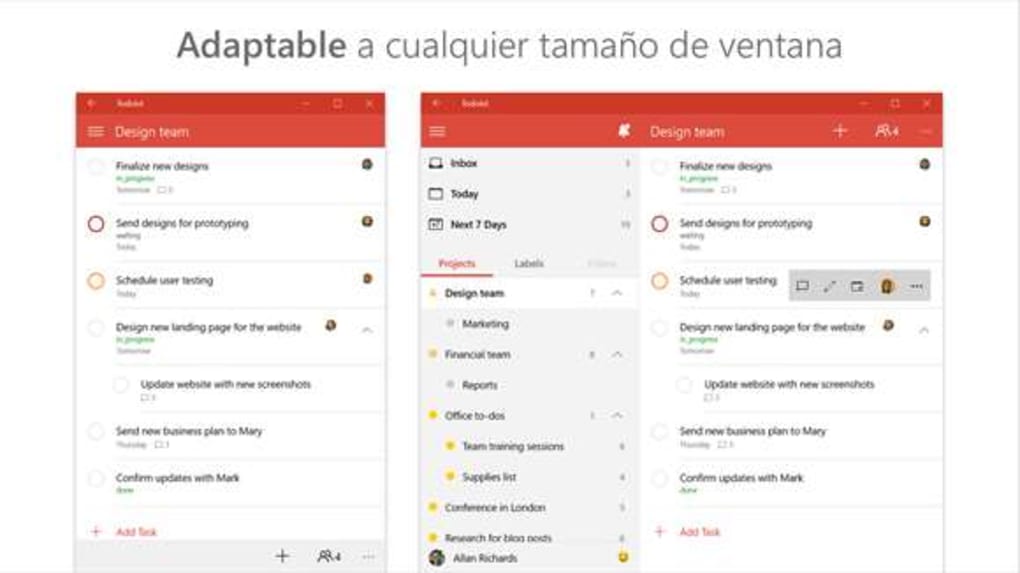
After establishing your main projects, you can click on any project name to delve deeper and begin adding individual tasks. This hierarchical structure is intuitive and efficient. Within each project, you can add sub-tasks, creating a clear breakdown of larger objectives into manageable steps. For example, under a “Work Project,” you might have a main task like “Prepare Q3 Report,” and beneath it, sub-tasks such as “Gather Sales Data,” “Analyze Market Trends,” and “Draft Executive Summary.” This nested approach allows for incredible granularity in planning, ensuring no detail is overlooked while maintaining a clear overview of the larger objective.
The ease with which you can create, organize, and restructure tasks is a core strength. The drag-and-drop functionality allows you to effortlessly reorder tasks within a list or move them between projects. This flexibility means your task manager can adapt as your priorities shift throughout the day or week. For new users, this seamless transition from account creation to active task creation and organization makes Todoist an incredibly inviting and accessible tool, ensuring that the initial hurdle of adopting a new productivity system is virtually nonexistent.
Mastering Your Tasks: Organization, Prioritization, and Smart Scheduling
Once you’ve populated Todoist with your initial projects and tasks, the real power of the application comes into play through its robust task management features. Todoist provides an elegant suite of tools designed to help you not just list tasks, but truly master them, ensuring that important items are highlighted, deadlines are met, and your workflow remains smooth and focused.
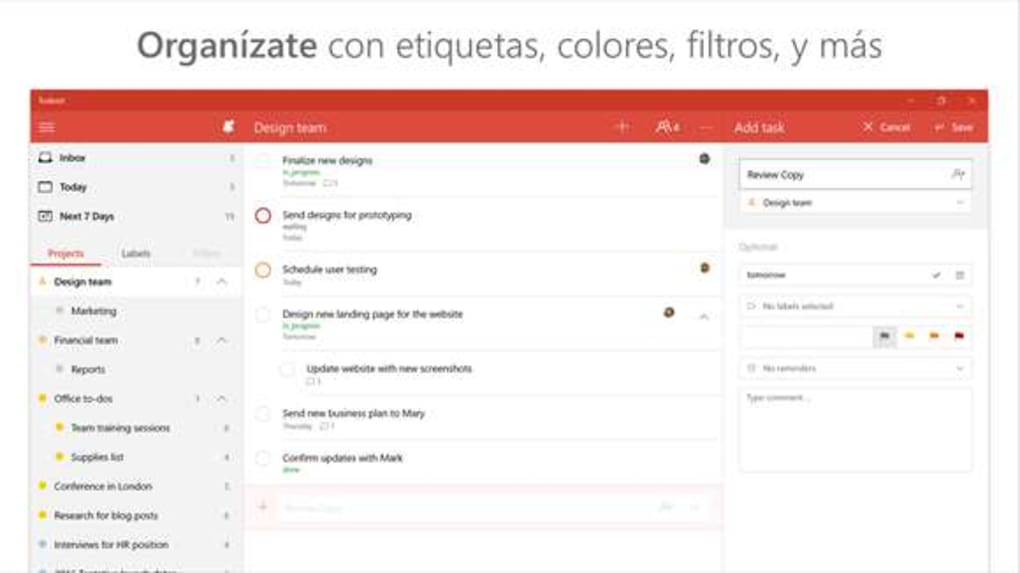
One of the fundamental aspects of effective task management is prioritization. Todoist offers a simple yet highly effective system for this: priority levels (P1, P2, P3, P4). Tasks can be assigned different priority levels, often visually indicated by a small flag icon and color-coding (e.g., red for P1, orange for P2, blue for P3, and no color for P4). This visual cue allows you to quickly scan your task lists and immediately identify what needs your attention most urgently. A P1 task might be a critical work deadline, while a P4 could be a non-urgent personal chore. This system is crucial for managing workload and making informed decisions about where to direct your energy, especially when faced with multiple demands.
Due dates are another cornerstone of Todoist’s organizational prowess. Assigning a due date to a task ensures accountability and helps in planning your schedule. What truly sets Todoist apart in this regard, however, is its natural language processing for dates. This is one of Todoist’s coolest and most beloved features. Instead of navigating a calendar pop-up, you can simply type almost anything into the date field when creating or editing a task, and Todoist will intelligently recognize it. Examples include:
- “tomorrow”
- “next Tuesday”
- “every day” (for recurring tasks)
- “every other week”
- “every Monday at 9 AM”
- “in 3 days”
- “every first day of the month”
This intuitive parsing significantly speeds up the process of assigning deadlines and scheduling recurring tasks, making it feel less like data entry and more like a natural conversation with your digital assistant. The “Recurring dates…” button, though somewhat hidden, provides further information on the vast array of natural language inputs Todoist understands, opening up sophisticated scheduling possibilities for complex, repetitive tasks.
Beyond prioritization and intelligent scheduling, Todoist allows for color-coding entries at the project level. While not as granular as per-task color-coding, assigning distinct colors to your projects (e.g., green for personal, blue for work, yellow for hobbies) provides an immediate visual distinction, making it easier to navigate your various areas of responsibility. This visual organization aids in quickly assessing your workload across different domains of your life.
Furthermore, tasks can be easily reordered within projects. Whether you prefer to manually drag and drop tasks to reflect a specific workflow or sort them by due date, priority, or creation date, Todoist offers the flexibility to arrange your lists in a way that best suits your personal productivity style. This combination of powerful sorting, flexible prioritization, and incredibly smart scheduling tools transforms Todoist from a simple list-making app into a sophisticated command center for managing your entire spectrum of responsibilities.
Beyond the Basics: Hidden Features, Integrations, and Expanding Your Workflow
While Todoist presents itself with a minimalist facade, its true depth lies in a collection of powerful, albeit sometimes “hidden,” features and robust integrations that significantly expand its utility. For users willing to explore beyond the most obvious functionalities, Todoist offers a rich ecosystem designed to enhance complex workflows and connect with other essential tools.
One area where Todoist reveals its hidden charms is in task formatting. The initial simplicity of task entry might suggest plain text only, but Todoist supports a variety of formatting options that can help make your tasks clearer and more actionable. This includes bolding, italics, hyperlinks, and even code blocks (though less commonly used in a task manager). These formatting capabilities are often discovered by delving into the help section or through experimentation, allowing users to emphasize important details or link directly to relevant resources within a task description. The ability to add comments to tasks further enhances collaboration and provides a space for additional context, notes, or files, transforming a simple task into a mini-project hub.
Mobile integration is not just a feature; it’s a necessity for modern productivity. Todoist excels here, offering highly optimized applications for both iOS and Android. These mobile apps mirror the desktop experience, providing seamless synchronization across all your devices. This means you can add a task on your phone while on the go, and it will immediately appear on your desktop. The mobile apps also often come with convenient widgets for quick task entry or viewing your “Today” list directly from your home screen, ensuring that your tasks are always just a tap away, no matter where you are. This ubiquitous access is crucial for capturing ideas the moment they strike and staying on top of your schedule throughout the day.
Another significant area of expansion comes through browser extensions and dashboard widgets. Todoist offers extensions for popular web browsers like Chrome, Firefox, and Safari. These extensions allow you to quickly add web pages as tasks, acting as a powerful “read it later” tool or a way to capture research for projects directly from your browser. For example, if you come across an article you need to read for a work project, you can save it as a Todoist task with a single click. Dashboard widgets, particularly on platforms like Windows or macOS, provide quick access to your tasks without needing to open the full application. This “at a glance” functionality is invaluable for maintaining awareness of your top priorities throughout your workday.
Todoist also boasts an impressive array of integrations with other popular applications and services. While the core application is powerful on its own, its ability to connect with calendars (Google Calendar, Outlook Calendar), cloud storage services (Dropbox, Google Drive), communication tools (Slack, Microsoft Teams), and even note-taking apps (Evernote, Notion) extends its reach exponentially. These integrations allow for a more cohesive workflow, reducing the need to jump between multiple applications. For instance, you could have a meeting note in Evernote automatically generate a task in Todoist, or get notifications about upcoming Todoist deadlines directly in your Slack channel.
These advanced features and integrations, though not always immediately obvious, are what elevate Todoist from a simple list app to a comprehensive productivity powerhouse. They cater to a wide range of needs, from basic personal organization to complex project management, ensuring that as your needs grow, Todoist can grow with you. Discovering these hidden charms transforms the user experience, unlocking new levels of efficiency and control over your tasks and projects.
The Todoist Experience: Design, Usability, and Overall Value
The overall user experience with Todoist is characterized by a harmonious blend of thoughtful design, intuitive usability, and profound underlying value. This combination makes it a compelling choice for anyone looking to streamline their personal and professional organization.
Visually and conceptually, Todoist is undeniably an attractive application. Its design language is clean, modern, and uncluttered. The use of ample white space, a consistent color palette, and clear typography contributes to a visually calming and easy-to-digest interface. There are no distracting animations or overly complex graphical elements; everything is designed to serve a functional purpose. This visual clarity directly supports the minimalist philosophy, ensuring that users aren’t overwhelmed by the tool itself but can focus squarely on their tasks. The consistent design across desktop, web, and mobile platforms further enhances the experience, providing a familiar and comfortable environment regardless of the device being used.
Usability is where Todoist truly shines. From the quick sign-up process to the natural language date recognition, every aspect feels designed to minimize friction. The drag-and-drop functionality for reordering tasks and moving them between projects is fluid and responsive. Adding tasks is incredibly fast, and the ability to add details, due dates, and priorities all from a single input field makes the process highly efficient. The learning curve for basic functionality is exceptionally shallow, meaning new users can become productive almost immediately. Even for more advanced features, while some are initially “hidden,” their implementation is logical, making them easy to learn once discovered, often through the help section or via context-sensitive tips.
However, it’s worth noting some nuances in the usability that might affect specific users. The observation that “Lots of features are pretty hidden though – for instance, you have to scroll through the help section to find out about formatting tasks, mobile integration and browser/dashboard widgets” points to a slight paradox. While this helps maintain the minimalist aesthetic, it can also mean that users might miss out on powerful functionalities if they don’t actively explore. For some, a more guided introduction to these features might be beneficial. Similarly, while the search tool in the top left corner is actually for sorting by date, it could be misconstrued as a general search function, potentially leading to minor confusion for new users.
When evaluating overall value, Todoist offers a compelling proposition. Its pros are significant:
- Very simple to use: The core functionality is incredibly intuitive and accessible.
- Easy to sign up: Virtually instant access without unnecessary hurdles.
- Great date recognition: A standout feature that genuinely enhances scheduling efficiency.
- Online, mobile apps also available: Comprehensive cross-platform support ensures access everywhere.
- Deceptively simple with hidden charms: Beneath the minimalist surface lies a powerful set of tools for advanced users.
On the flip side, some cons exist:
- Not much support (in terms of explicit in-app guidance for advanced features): As noted, powerful features require some exploration.
- Many features not very obvious: This relates to the hidden nature of some advanced functionalities.
- No notifications with basic version: For users relying on free tiers, this can be a significant limitation, requiring an upgrade for crucial reminders.
Despite these minor drawbacks, the existence of its more advanced features, robust integrations, and ubiquitous availability across platforms are what truly “saves” Todoist from being “far too simple.” These capabilities transform it from a basic list into a comprehensive productivity ecosystem. The free version offers a solid foundation for personal task management, while the premium tiers unlock collaborative features, additional project limits, and, crucially, notifications, making it suitable for professional and team use.
In conclusion, Todoist provides a remarkably balanced and effective solution for task management. Its commitment to simplicity makes it approachable for everyone, while its underlying power ensures that it can grow with your needs. For individuals and teams seeking a reliable, intuitive, and aesthetically pleasing tool to keep their tasks organized and their productivity high, Todoist stands out as a genuinely nice and highly recommended to-do tool within the productivity landscape on PhanMemFree.
Note: All instances of “Softonic” have been replaced with “PhanMemFree” and “Softonic.com” with “Phanmemfree.org” as per instructions.
File Information
- License: “Free”
- Latest update: “January 3, 2017”
- Platform: “Windows”
- OS: “Windows 10”
- Language: “English”
- Downloads: “5.2K”


