
TomTom Home is a free, indispensable software application designed to streamline the management of your TomTom GPS navigation device. This comprehensive utility allows you to perform a wide array of maintenance tasks, from updating maps and software to adding multimedia content and planning routes. Whether you’re a seasoned TomTom user or just getting started, this guide will walk you through the features and functionalities of TomTom Home, helping you get the most out of your GPS device.
Effortless Device Management and Updates
TomTom Home simplifies the process of connecting your TomTom device to your computer. Simply connect your device via USB, power it on, and the application will automatically recognize it, ready for management. The intuitive interface presents all key functions prominently, ensuring ease of use for users of all technical skill levels.
The core functionality revolves around updating your device’s content. This includes accessing and installing the latest map data, ensuring you have the most current road information and routes. Crucially, TomTom Home also facilitates firmware and software updates for your GPS unit, ensuring optimal performance and access to new features. This process is simplified significantly compared to manual updates, eliminating the risk of errors or compatibility issues. Regular updates are essential for maintaining accuracy and accessing the latest improvements to the navigation system.
Beyond map updates, TomTom Home also allows you to back up and restore your device settings and data, providing a crucial safeguard against data loss. This backup function is particularly useful before performing significant updates or if you experience unforeseen issues with your device. The ability to manage installed components within the device allows for greater control and customization of your navigation experience.
Beyond Navigation: Multimedia and Route Planning
TomTom Home extends beyond basic navigation updates, offering functionalities to personalize your driving experience. Users can effortlessly add music, images, and other files to their TomTom device, transforming it into a versatile entertainment center for those long journeys. This feature adds a layer of convenience and enhances the overall driving experience by allowing access to personalized content directly through your navigation system.
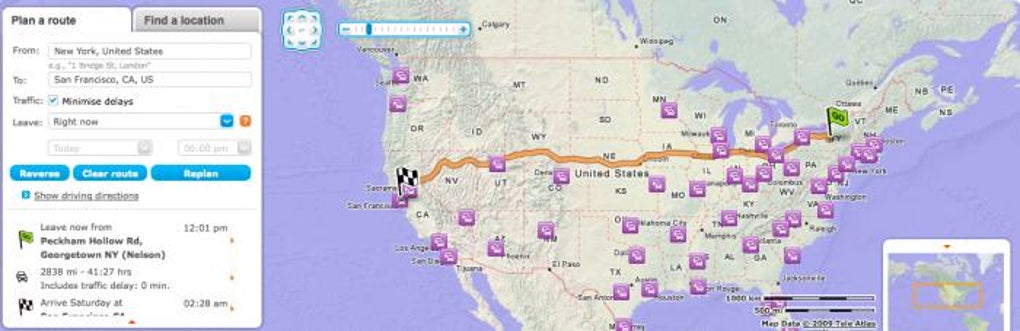
Furthermore, the integrated route planner simplifies trip preparation, particularly for unfamiliar locations or international travel. Simply input your starting point and destination, and the application will calculate the optimal route, taking into account real-time traffic conditions and potential delays. The detailed route information includes not only directions but also estimated travel time, helping users plan their journeys more effectively. This feature is especially beneficial for those who frequently travel to new areas, providing peace of mind and reducing the stress associated with navigation in unfamiliar environments.
Real-time Information and Advanced Features
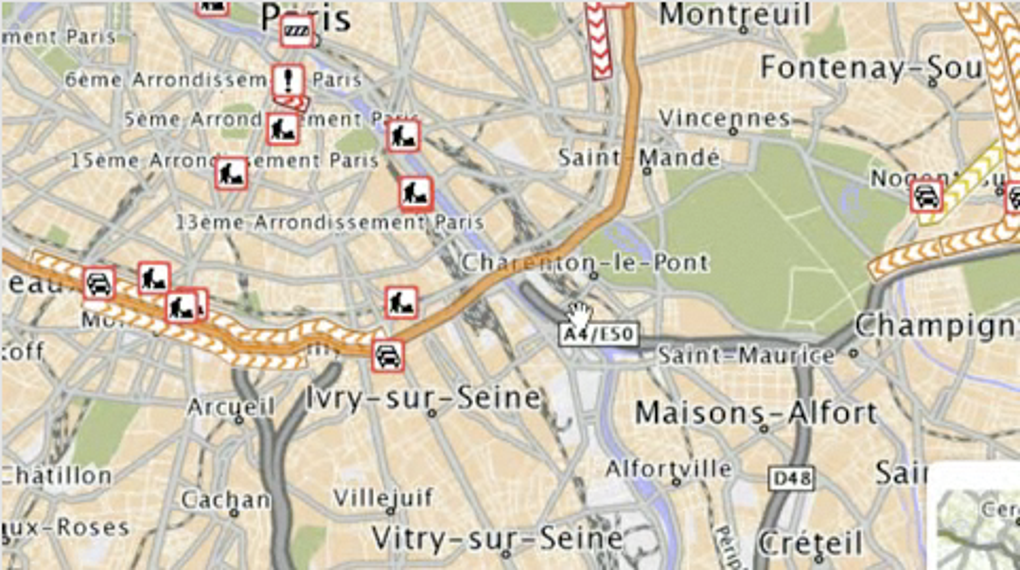
TomTom Home provides access to real-time information to enhance your navigation experience. This includes live traffic updates, allowing you to avoid congestion and optimize your route dynamically. In addition, the application provides alerts for safety cameras, helping drivers maintain safe speeds and avoid potential fines. The ability to view fuel prices at various gas stations adds another layer of practical utility, enabling users to make informed decisions about fuel stops along their journeys.
For TomTom LIVE devices, some updates can be received over-the-air (OTA), eliminating the need to connect to a computer. However, this functionality may not encompass all map updates or features, necessitating periodic connections to TomTom Home for comprehensive updates. While TomTom Home strives to keep maps up-to-date, it’s important to acknowledge that some areas, particularly new real estate developments, may not always reflect the latest changes immediately.
User Reviews and Feedback: A Mixed Bag
While TomTom Home offers a multitude of useful features, user reviews reveal a range of experiences. Positive reviews highlight the ease of use and the comprehensive nature of the application, emphasizing the convenience of managing all aspects of the TomTom device from a single interface. Many users appreciate the straightforward update process and the ability to add personal content to their GPS devices.
However, negative reviews often focus on issues with software updates. Some users report encountering bugs or malfunctions after updating their TomTom devices through TomTom Home, indicating potential software compatibility problems or unresolved bugs within the application itself. In some instances, these problems have been severe enough to render the GPS devices non-functional. This highlights the importance of backing up data regularly before undertaking software updates and reporting any issues encountered to TomTom customer service promptly.
Furthermore, some criticisms center on map accuracy, particularly in newer areas or less frequently traveled roads. While map data strives to be current, discrepancies may exist between the information presented on the device and the real-world situation, particularly in areas experiencing rapid development.
Conclusion: A Necessary Tool with Room for Improvement
TomTom Home is a powerful and versatile tool for managing your TomTom GPS device. Its intuitive interface, comprehensive update capabilities, and added multimedia functionalities make it a valuable asset for any TomTom user. Regular updates are essential for maintaining accurate maps and optimal performance.
However, user feedback indicates areas requiring improvement. Addressing software update-related bugs and enhancing map accuracy, especially in rapidly changing areas, are crucial for enhancing the user experience. Despite these challenges, TomTom Home remains an indispensable tool for anyone seeking to maximize the potential of their TomTom GPS device. Its ability to manage everything from software updates and map data to multimedia content and route planning makes it a crucial component of a seamless and efficient navigation experience. Regular use of the application, coupled with informed awareness of its limitations, will allow users to benefit from its many strengths while mitigating potential issues.
File Information
- License: “Free”
- Latest update: “July 22, 2025”
- Platform: “Windows”
- OS: “Windows XP”
- Language: “English”
- Downloads: “320.8K”
- Size: “112.84 MB”


