
TopOCR is a free optical character recognition (OCR) software designed for ease of use and accessibility. It offers a powerful yet straightforward solution for converting images containing text into editable digital formats, eliminating the need for bulky scanners and laptops. This detailed review explores its features, performance, and overall user experience.
TopOCR’s Core Functionality: Effortless Text Extraction
At its core, TopOCR excels at extracting text from images captured by digital cameras, smartphones, or other imaging devices. This capability makes it an invaluable tool for a wide range of users, from students transcribing notes to professionals digitizing documents. The software’s strength lies in its ability to handle diverse sources, including business cards, newspapers, books, and magazines, transforming them into searchable and editable text files.
The software’s simplicity is a significant advantage. Users don’t need extensive technical knowledge to operate it effectively. The intuitive interface guides users through the process of image import and text extraction with minimal steps. This user-friendly design makes TopOCR accessible to a broad audience, regardless of their technical expertise.
One notable aspect is TopOCR’s claimed accuracy rate of up to 99.8% when used with a 3-megapixel camera. While this figure might vary depending on image quality and lighting conditions, the software consistently demonstrates commendable accuracy in converting legible text. It’s important to note that image clarity plays a crucial role in the accuracy of the OCR process. High-resolution images with good lighting typically yield the best results. Even with less-than-perfect images, TopOCR generally provides a reasonable transcription, making it a robust tool even under challenging conditions.
Handling Diverse Image Formats and Challenges
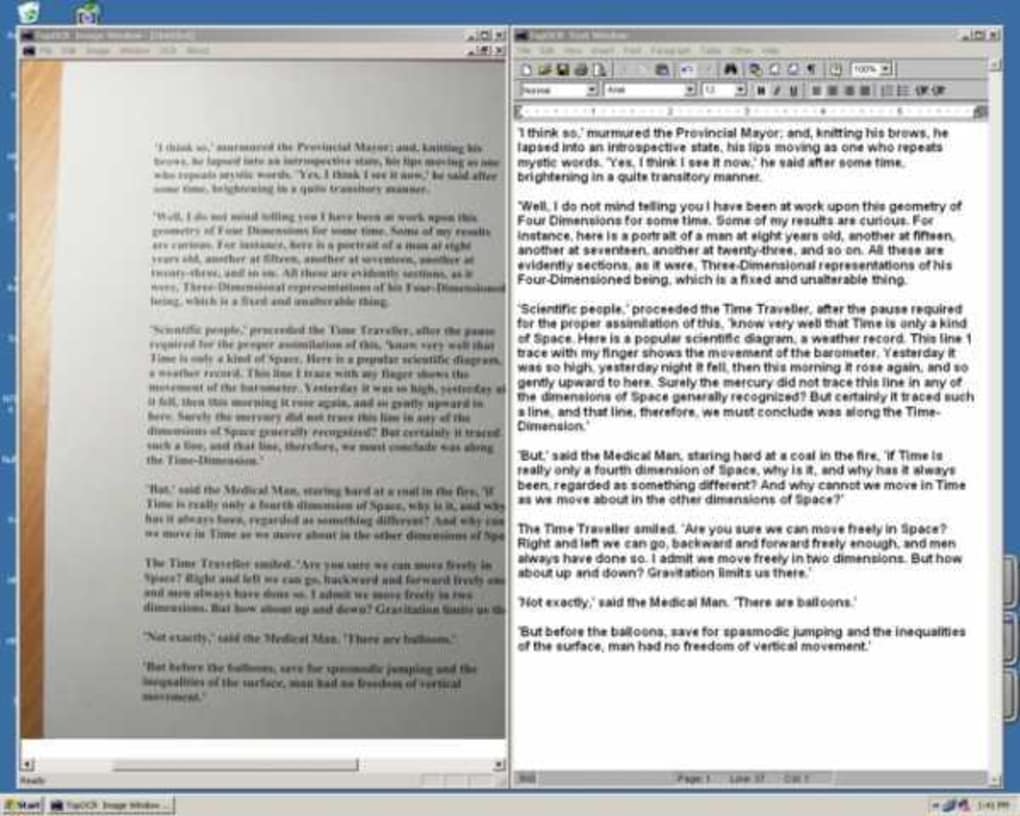
TopOCR’s versatility extends beyond handling various document types. It adeptly manages images with mixed text and graphics, a feature that sets it apart from many other OCR tools that struggle with complex layouts. This capability is particularly useful for documents containing charts, diagrams, or other visual elements alongside text. The software intelligently differentiates between text and graphics, ensuring accurate extraction of the textual content without being hindered by the presence of non-textual elements.
Furthermore, TopOCR shows robustness in handling imperfections inherent in real-world images. Minor skew, uneven lighting, and other common imaging issues are tolerated by the software, reducing the need for extensive pre-processing of images before OCR. This tolerance for imperfect images saves users time and effort, streamlining the overall workflow. The software’s ability to compensate for such imperfections makes it a practical solution for converting images captured under less-than-ideal conditions. However, severely distorted or blurry images may still require some pre-processing for optimal results.
Output Formats and Language Support
The flexibility of TopOCR extends to the output formats it supports. Users can choose between searchable PDF and HTML formats, providing options to suit various needs. The searchable PDF format is particularly useful for archiving documents, as it allows for easy searching within the converted text. The HTML format is ideal for integration into websites or other online platforms. The availability of both formats enhances the software’s versatility, allowing users to select the most appropriate output depending on their intended use.
In terms of language support, TopOCR stands out with its ability to process text in 11 different languages. This multilingual support caters to a global audience, making it a valuable tool for individuals and organizations working with multiple languages. The specific languages supported are not explicitly listed in the provided information but the breadth of support emphasizes its international applicability.
Smartphone Integration and Text-to-Speech Functionality
TopOCR’s appeal extends to smartphone users. The software offers full support for smartphones, allowing users to conveniently convert images captured on their mobile devices. This feature enhances the portability and accessibility of the OCR capabilities, enabling on-the-go text extraction. The seamless integration with smartphones makes it a versatile tool for various situations, particularly when immediate text conversion is needed.
A noteworthy addition is the built-in text-to-speech functionality, although the provided information indicates that its accuracy may be lower compared to the primary OCR function. Despite this limitation, the text-to-speech feature provides an additional layer of accessibility, allowing users to hear the extracted text. This is particularly helpful for users with visual impairments or for quickly reviewing the converted text.
The text-to-speech functionality can also be used as a dictation tool. Users can record their thoughts, meeting minutes, or other spoken content, and then have TopOCR convert the audio recording into text. This feature transforms TopOCR into a versatile tool beyond simple image-to-text conversion, expanding its usefulness for note-taking and transcription purposes.
TopOCR’s Evolution: Bug Fixes and UI Improvements
The software’s developers demonstrate a commitment to ongoing improvement. Updates have included numerous bug fixes, streamlining the user experience and enhancing the software’s reliability. UI simplification efforts have focused on making the software even more intuitive and easier to navigate, emphasizing its user-friendly design. The addition of a multilingual translator further expands the software’s capabilities, enhancing its accessibility for a wider range of users.
Conclusion: TopOCR – A Free and Powerful OCR Solution
TopOCR presents a compelling case as a free, comprehensive, and highly accessible OCR solution. Its straightforward interface, strong accuracy, diverse output formats, multilingual support, and smartphone compatibility make it a powerful tool for a variety of users. While the text-to-speech function might not be perfectly accurate, its inclusion adds an extra layer of functionality that can be beneficial for many users. The software’s continuous updates addressing bugs and refining the user interface further solidify its position as a valuable and reliable OCR tool. Its free availability makes it an exceptionally attractive option for individuals and organizations looking for a cost-effective way to digitize textual information from various sources.
File Information
- License: “Trial version”
- Version: “3.1”
- Latest update: “September 7, 2009”
- Platform: “Windows”
- OS: “Windows 2000”
- Language: “English”
- Downloads: “24.6K”


