
TopTracker is a free time-tracking software designed for freelancers and businesses seeking accurate time management and streamlined invoicing. This review delves into its functionalities, ease of use, advantages, limitations, and overall value proposition, providing a clear picture of whether TopTracker is the right fit for your productivity needs.
User-Friendly Interface and Core Functionality
TopTracker presents a clean and intuitive interface, prioritizing ease of use. Its primary strength lies in its straightforward approach to time tracking, eliminating the complexities often found in more comprehensive (and often costly) project management software. The software features three main navigable sections, clearly presented in a left-side panel: Projects, Reports, and Invoices. This streamlined design makes it accessible to users with varying levels of technical proficiency.
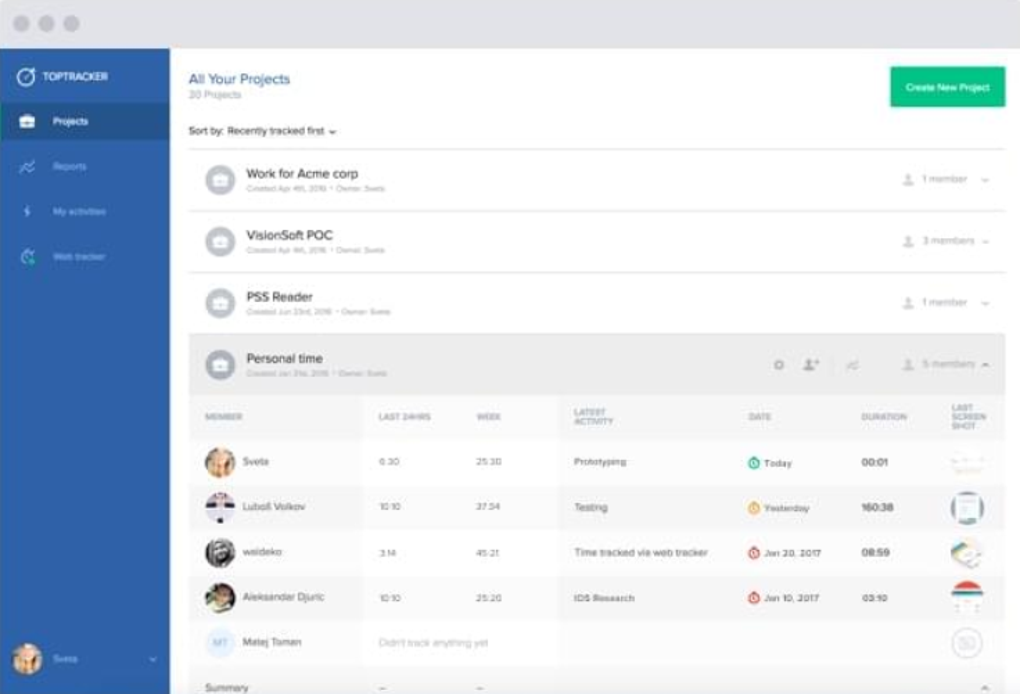
Projects: This section provides a centralized overview of all current and past projects. Users can easily create new projects, assign them to specific clients or team members, and track time spent on individual tasks within each project. The intuitive organization allows for quick navigation and efficient monitoring of ongoing work.
Reports: The Reports section offers detailed insights into time allocation and productivity. Comprehensive data visualization allows users to analyze time spent on different projects, tasks, and even specific time periods. This feature is invaluable for identifying areas of inefficiency, optimizing workflows, and demonstrating work completed to clients or stakeholders. The data granularity enables precise invoicing and accurate cost tracking.
Invoices: TopTracker’s built-in invoicing functionality is a standout feature. By seamlessly integrating time tracking data, the software automates invoice generation. This eliminates the manual effort often required in calculating billable hours and creating invoices, contributing to significant time savings and enhanced efficiency. The ability to quickly generate invoices based on tracked time makes it a particularly attractive solution for freelancers and small businesses.
Beyond the Basics: Collaboration and Advanced Features
While its core functionality is focused on time tracking and invoicing, TopTracker includes additional features that elevate its utility, particularly for collaborative projects. The software allows for easy project collaboration, enabling users to invite team members and assign specific roles and permission levels. This granular control over access ensures data security and enhances team management.
The inclusion of timed screenshots adds an extra layer of accountability and transparency, particularly beneficial for businesses requiring verifiable records of employee activity. This feature, combined with the detailed reporting, strengthens the software’s suitability for businesses needing clear records of productivity. While not explicitly marketed as a security feature, the combination of these elements provides a level of accountability and auditability that can help mitigate potential risks.
Beyond the core functionalities and collaborative features, TopTracker offers several customizable settings to enhance privacy and personalize the user experience. Users can tailor their settings to align with their specific needs and preferences, including data privacy preferences and notification settings. This level of customization ensures that the software adapts to individual workflows rather than dictating them.
Limitations and Areas for Improvement
Despite its strengths, TopTracker does have limitations that are worth considering. The most notable absence is the lack of mobile applications. While the web application provides accessibility, the absence of dedicated mobile apps restricts usability for users who prefer or rely on mobile devices for time tracking. The lack of mobile support reduces the overall flexibility of the software, impacting its appeal for users who work on the go.
Another area for potential improvement lies in the integration capabilities. While the software offers robust stand-alone functionality, improved integration with other productivity tools and project management software would significantly enhance its usability and appeal to a broader range of users. Seamless integration with popular calendar applications or project management platforms could streamline workflows and avoid data duplication.
Finally, although the software is free, the lack of premium features (such as advanced reporting, custom dashboards, or client management tools found in paid alternatives) may limit its appeal for larger enterprises or businesses with complex project management requirements.
Comparison with Competitors
TopTracker competes with a range of time tracking and invoicing software, both free and paid. While it lacks the extensive feature sets of paid solutions like Toggl Track or Timely, it offers a compelling alternative for users who prioritize simplicity and require core time-tracking and invoicing capabilities without the complexities or costs associated with premium options.
Compared to free alternatives like TimeSheet, TopTracker’s more polished interface and comprehensive reporting features provide a more professional experience. While TimeSheet offers basic time tracking, TopTracker’s inclusion of invoicing and collaborative features significantly differentiates it. The choice between TopTracker and similar free options depends heavily on individual needs and priorities. If invoicing is a primary requirement, TopTracker’s integrated functionality is a strong advantage.
Conclusion: A Solid Choice for Basic Needs
TopTracker stands as a solid, user-friendly, and free time-tracking solution ideal for freelancers and small businesses with straightforward time management needs. Its intuitive interface, built-in invoicing, and collaboration features provide excellent value. However, the absence of mobile applications and limited integration capabilities may restrict its appeal for users requiring advanced functionality or relying heavily on mobile devices for productivity. If your primary needs are accurate time tracking and automated invoicing, and you don’t require complex features or mobile access, TopTracker is a highly recommended option. Its simplicity and free pricing make it a worthwhile tool to explore and assess whether it aligns with your work style and project management approach. The recommendation stands firm for its core functionality and ease of use, making it a valuable resource for those seeking an accessible and efficient time-tracking solution.
File Information
- License: “Trial version”
- Version: “1.5.6.5718”
- Latest update: “January 23, 2023”
- Platform: “Windows”
- OS: “Windows 8”
- Language: “English”
- Downloads: “24.6K”
- Size: “12.33 MB”


