
Torque Lite is a free Android application developed by Ian Hawkins that provides basic vehicle information through your car’s OBD2 port. While offering a glimpse into your car’s vital statistics, its functionality is limited compared to its paid counterpart, Torque Pro. This review will delve into the features, limitations, and overall user experience of Torque Lite, helping you decide if it’s the right OBD2 app for your needs.
Basic Functionality and Data Access
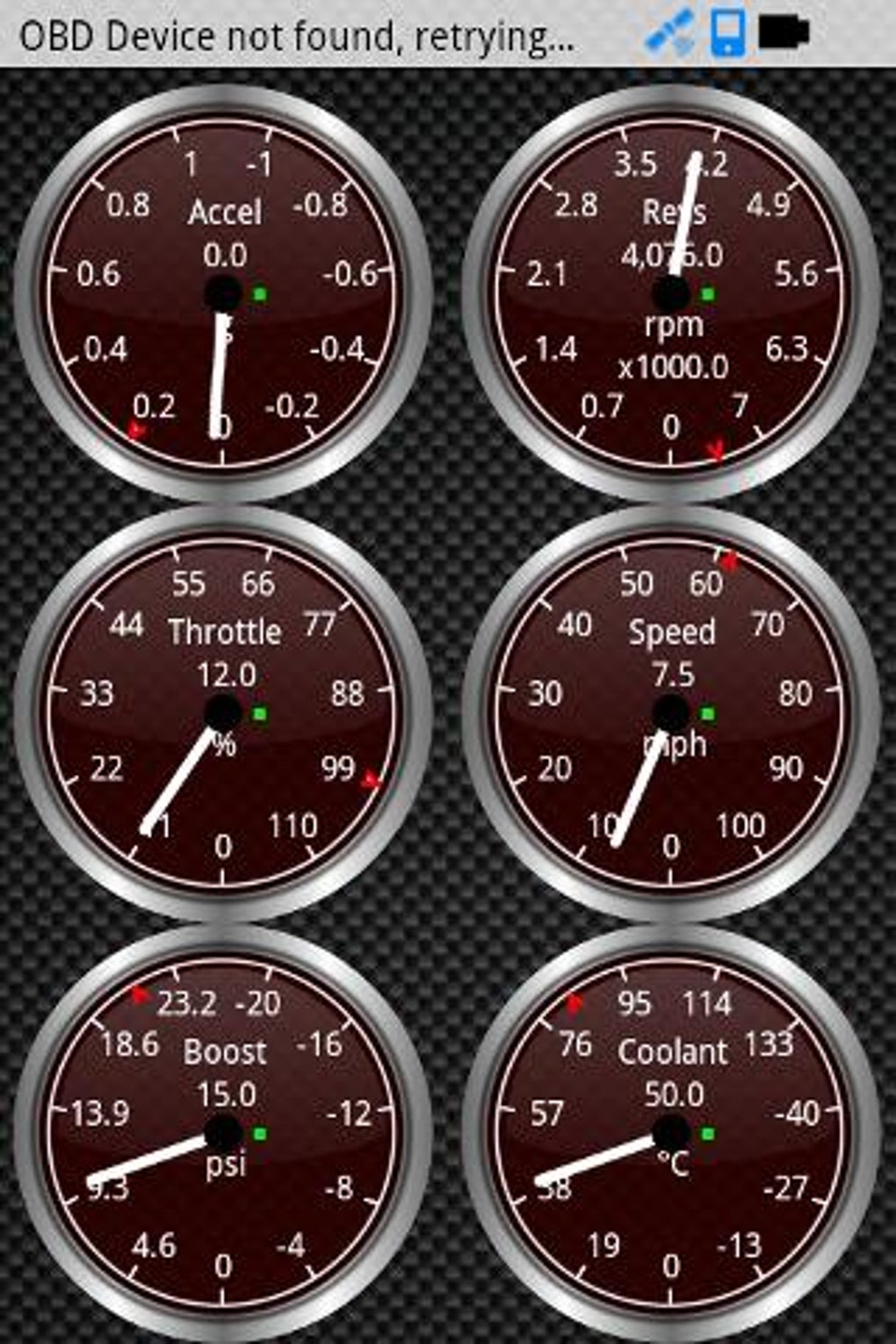
Torque Lite connects to your vehicle’s On-Board Diagnostics II (OBD2) system via a compatible OBD2 adapter (sold separately). Once connected, the app displays real-time data, including but not limited to:
- Speed: Displays your current vehicle speed in various units (mph, kph).
- Engine RPM: Shows the revolutions per minute of your engine.
- Engine Temperature: Provides the current temperature of your engine coolant.
- Fuel Level: Indicates the amount of fuel remaining in your tank (availability depends on vehicle compatibility).
- Other Basic Metrics: Depending on your vehicle’s OBD2 capabilities, you might also see data points like intake air temperature, battery voltage, and more.
The free version’s strength lies in its simplicity. The interface is generally user-friendly, with clear, concise displays of essential data. However, the information presented is basic and lacks the depth and breadth offered by paid alternatives. It’s a good starting point for users unfamiliar with OBD2 data or those needing only a rudimentary understanding of their car’s performance.
Limitations of the Free Version
While Torque Lite provides a convenient way to access some key vehicle parameters, several limitations restrict its functionality:
-
Limited Vehicle Compatibility: The free version doesn’t support all vehicle makes and models. While it boasts compatibility with a wide range, including popular brands like Ford, GM, Volkswagen, Toyota, and many more, there’s no guarantee it will work flawlessly with every car. This is a significant drawback for users needing broad compatibility. Older vehicles may also prove problematic due to variations in OBD2 implementations.
-
Restricted Data Access: Torque Lite’s free version offers a limited set of parameters. Advanced features, such as detailed diagnostic trouble code (DTC) readings, real-time sensor data visualization, and custom gauge configurations, are absent. Users seeking in-depth diagnostic capabilities or advanced data analysis will find themselves significantly constrained. The limited data restricts its diagnostic utility, making it less suitable for serious troubleshooting.
-
Absence of Advanced Features: The free version lacks many features present in the paid Torque Pro version. These include the ability to log data, create custom dashboards, access enhanced diagnostic tools, and integrate with other apps and services. This makes Torque Lite primarily useful for casual observation rather than comprehensive vehicle monitoring or diagnostics.
-
Potential for Inaccuracy: While the app strives to accurately reflect your vehicle’s data, minor discrepancies can occur. This is not solely a limitation of Torque Lite but a common issue with OBD2 apps due to variations in OBD2 protocols and vehicle implementations. The app should not be considered a precise measuring instrument, and it is always best to cross-reference readings with other tools and your vehicle’s service manual.
Comparison with Torque Pro and Alternative Apps
Torque Lite is designed as a gateway to the more feature-rich Torque Pro. The paid version significantly expands functionality, offering:
- Extensive Vehicle Support: Torque Pro boasts much broader vehicle compatibility, covering a much larger range of makes, models, and years.
-
Comprehensive Data Logging and Analysis: Torque Pro allows users to log data over time, enabling analysis of trends and potential issues. This capability is crucial for identifying performance degradation or detecting developing problems.
-
Customizable Dashboards and Gauges: Torque Pro offers a highly customizable interface, letting users tailor the dashboard layout to display the most relevant parameters. The ability to visualize data via custom gauges enhances the user experience and aids comprehension.
-
Advanced Diagnostics: Torque Pro provides access to detailed diagnostic trouble codes (DTCs), allowing for more accurate identification and troubleshooting of vehicle problems. It allows a deeper understanding of the vehicle’s health.
-
Third-Party Plugin Support: Torque Pro supports a wide range of plugins, extending its functionality with additional features and capabilities. This allows for customization and added utility, adapting to a wide range of needs.
Several alternative apps exist in the market, each offering a unique set of features. Some of these include OBD Fusion, Car Gauge Pro, and others. The best choice depends on your specific needs and budget. Torque Lite serves as an entry point, providing a taste of what OBD2 diagnostics can offer; however, for serious diagnostic work or comprehensive vehicle monitoring, the paid versions or other advanced apps are recommended.
User Interface and Experience
Torque Lite’s user interface is relatively straightforward and easy to navigate. The app’s simplicity is both its strength and its weakness. While beginners will appreciate the uncluttered layout and ease of use, experienced users seeking more control and customization may find it restrictive. The data is displayed clearly, but the lack of customization options limits the user’s ability to tailor the app to their specific preferences and needs.
Installation and Connection
Installing Torque Lite is a simple process. Download the APK from PhanMemFree.org (or a reputable app store) and follow the standard Android installation procedure. The more challenging aspect is connecting to your vehicle’s OBD2 system. You’ll need a compatible OBD2 adapter, a device that plugs into your car’s OBD2 port (usually found under the dashboard) and connects to your phone via Bluetooth. Once the adapter is properly paired with your phone, Torque Lite should automatically detect and connect. Ensure your adapter is compatible with your vehicle’s OBD2 system and with the app itself. Refer to the adapter’s documentation and the app’s instructions for detailed pairing guidance. Successful connection is crucial for accurate data retrieval and reliable app functionality.
Overall Assessment
Torque Lite serves as a basic introduction to OBD2 diagnostics for Android users. It offers a convenient way to access limited vehicle data at no cost, making it ideal for casual monitoring or users who only need a quick overview of essential vehicle parameters. However, its limitations, particularly the restricted functionality and limited vehicle support, prevent it from being a comprehensive solution for advanced users or those seeking in-depth diagnostic capabilities. If you require more extensive functionality, a more advanced OBD2 app or the paid Torque Pro version is a better investment. Consider your needs carefully before deciding whether Torque Lite is sufficient for your requirements. The free version acts as a useful starting point, but it’s essential to evaluate whether its limitations outweigh the cost-free access to basic data. For those needing a robust, feature-rich OBD2 experience, stepping up to a paid alternative might be the better choice.
File Information
- License: “Free”
- Version: “1.2.22”
- Latest update: “June 26, 2025”
- Platform: “Android”
- OS: “Android 9.0”
- Downloads: “67.8K”
- Size: “5.94 MB”
- Download Options: “APK, Google Play”
- Filename: “org-prowl-torquefree-1222-49324937-bac837d808eaa2cce82f23ca4003a1cb.apk”


