
In the vast and ever-evolving landscape of digital content, managing downloads can often feel like a juggling act. From large software installations and multimedia files to critical documents and personal projects, the need for efficient and reliable download management is paramount. This is where TotalD steps in, offering a robust and multifaceted solution designed to simplify the acquisition of digital content. Far more than just a simple download tool, TotalD is a sophisticated download manager that gracefully handles Torrents, automates Direct Downloads from various hosting pages, and empowers users to effortlessly download online videos from popular platforms. Available for Windows users, TotalD combines powerful features with an intuitive approach, making it an indispensable utility for anyone navigating the complexities of modern internet content.
Developed by the team behind TotalD, this application has carved out a niche for itself by addressing some of the most common frustrations associated with online downloading. It’s designed to be a one-stop-shop for a wide array of download needs, eliminating the necessity for multiple applications to handle different types of files or sources. The promise of TotalD is simple yet profound: to take charge of the entire download process, from accessing the source web page to waiting out timers, and finally, delivering files at the maximum possible speed, all while requiring minimal user intervention.
Internet & Network: TotalD’s Central Role in Digital Connectivity
The internet and network category encompasses a broad spectrum of tools essential for navigating the digital world, from web browsers to file-sharing utilities. Within this critical domain, TotalD stands out as a fundamental application, providing robust functionality that directly impacts how users interact with and acquire content from the web. Its capabilities are deeply intertwined with the very fabric of internet communication, offering a streamlined approach to common tasks that would otherwise be cumbersome or require specialized knowledge. By centralizing the management of diverse download types, TotalD transforms the user’s digital experience, making it more efficient, secure, and user-friendly.
Streamlining File Acquisition: Torrents and Direct Downloads
One of TotalD’s foundational strengths lies in its comprehensive support for two of the most prevalent methods of file acquisition: BitTorrent and Direct Downloads. For years, users have relied on these protocols to share and retrieve large files, but each comes with its own set of challenges. TotalD expertly navigates these complexities, presenting a unified and simplified interface.
The BitTorrent network is renowned for its peer-to-peer (P2P) file sharing capabilities, allowing users to download and upload parts of files simultaneously, often resulting in faster transfers for popular content. However, managing torrents can sometimes be daunting, requiring specific clients and an understanding of seeding and leeching. TotalD integrates a full-fledged BitTorrent client, allowing users to effortlessly add torrent files or magnet links. It takes on the responsibility of managing both the download and upload aspects of the Bittorrent network. This means not only acquiring the desired files efficiently but also contributing back to the network by sharing downloaded content, upholding the P2P ethos. The application intelligently handles multiple torrents, prioritizes downloads, and ensures a stable connection, abstracting away the technical intricacies for a smooth user experience. This robust torrent management makes TotalD an excellent choice for anyone who frequently uses the BitTorrent protocol, whether for software distributions, open-source projects, or media sharing.
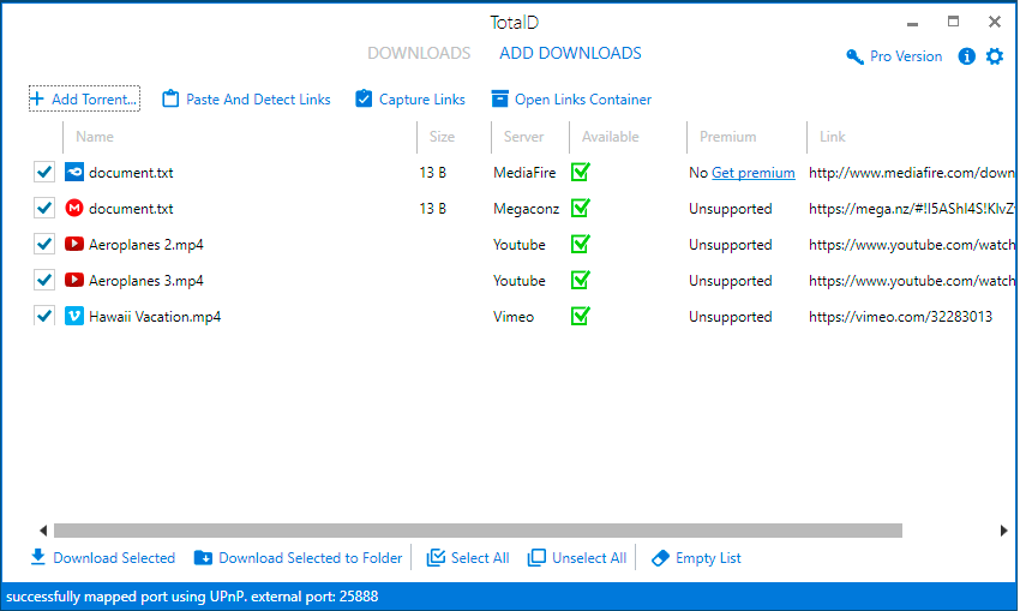
Equally impressive is TotalD’s prowess as a Direct Download manager. Direct downloads, typically facilitated by file hosting services, often come with their own set of hurdles. Many hosting pages employ time delays, CAPTCHA verifications, and premium account requirements to regulate access. Manually navigating these obstacles for each file can be incredibly time-consuming and frustrating. TotalD’s intelligent automation is a game-changer in this regard. The application is designed to interact directly with these hosting pages, accessing the web where the file is hosted, waiting out the required time, and automatically initiating downloads one by one. This capability effectively bypasses the tedious manual steps, allowing users to queue up multiple downloads from services like Rapidgator, Uploaded, Mega, and many more, with TotalD taking care of the rest. Crucially, the list of supported hosting sites is frequently updated, ensuring that TotalD remains effective even as file hosting services evolve. This commitment to ongoing support means users can rely on TotalD to consistently automate downloads from a broad and current array of platforms, significantly boosting productivity and convenience.
Bridging Content Gaps: Effortless Online Video Downloads
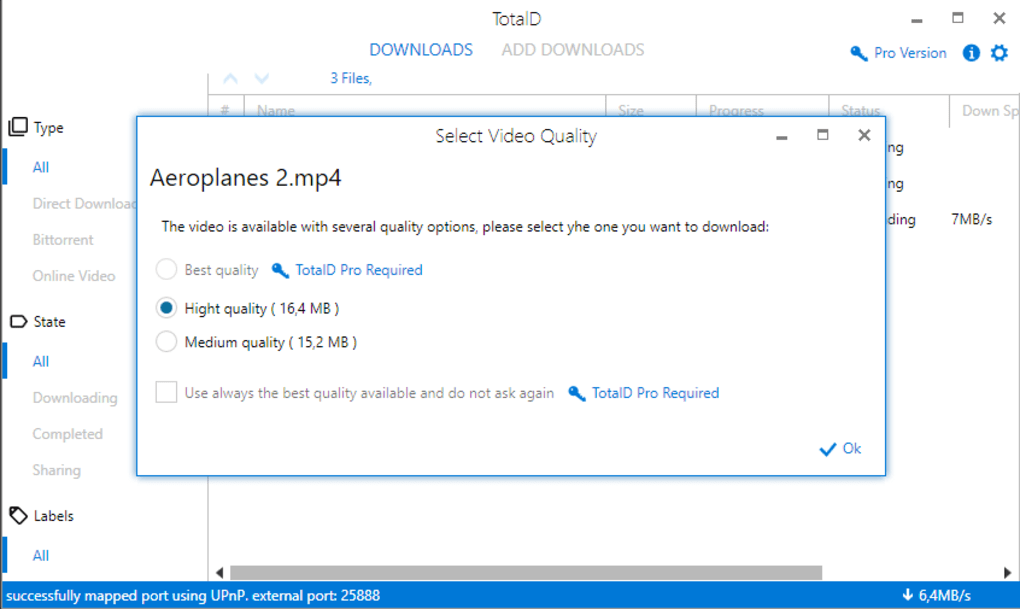
Beyond traditional file transfers, TotalD extends its utility into the realm of online video content, providing a solution for downloading videos from some of the most popular streaming platforms. In an age where video content dominates, the ability to save videos for offline viewing, archiving, or repurposing is highly valued. TotalD fills this gap by supporting downloads from major video-sharing sites such as YouTube, Vimeo, Dailymotion, and Veoh.
The process is remarkably simple: users typically paste the video URL into TotalD, and the application takes over. It intelligently parses the video page, identifies the downloadable streams, and presents options for quality and format where applicable. This functionality is invaluable for creators who need to archive their work, for educators who want to use specific clips offline, or for anyone who simply wishes to enjoy their favorite online videos without an internet connection or buffering issues. For instance, being able to download a YouTube tutorial to watch on a long flight or a Vimeo documentary for a presentation removes dependency on unpredictable internet access. TotalD’s capability to handle video downloads from multiple sources consolidates another critical aspect of content acquisition into a single, user-friendly application, further solidifying its position as a comprehensive digital companion. This feature not only enhances convenience but also empowers users with greater control over their digital media library.
Utilities & Tools: Enhancing Your System’s Download Prowess
The Utilities & Tools category on PhanMemFree.org represents a diverse collection of software designed to enhance system performance, manage files, and provide essential functionalities that streamline computer usage. TotalD fits perfectly within this classification, not just as a download manager, but as a utility that significantly boosts efficiency and convenience in one of the most common computer tasks: downloading. Its design principle of automation and consolidation positions it as a key tool for optimizing digital workflow, transforming a potentially fragmented and laborious process into a seamless operation.
The Power of Automation: Beyond Manual Downloads
At the core of TotalD’s utility is its powerful automation engine. In a world where time is a premium, the ability to set and forget complex tasks is invaluable. TotalD embodies this principle by automating virtually every aspect of the download process that traditionally requires manual intervention. Consider the scenario of downloading multiple files from different sources: a torrent, a direct download from a file host with a waiting period, and a video from a streaming site. Without TotalD, this would involve opening three different applications or browser tabs, monitoring timers, solving CAPTCHAs, and manually initiating each download. This fragmented approach is not only inefficient but also prone to errors and delays.
TotalD streamlines this by acting as a central command center. Once links are added, “TotalD is in charge of everything.” This means it intelligently queues downloads, prioritizes them, respects the rules of individual hosting sites (like waiting times), and ensures that files are downloaded sequentially or in parallel as efficiently as possible. This level of automation is particularly beneficial for large files or batch downloads, allowing users to schedule downloads to run overnight or while away from their computer, maximizing bandwidth usage during off-peak hours. The application’s ability to “access the web where the file is hosted, it waits the required time and starts downloading them one by one at the maximum speed possible” is a testament to its intelligent design. It minimizes user effort and maximizes download efficiency, making it a true productivity enhancer.
Furthermore, the consistency of TotalD’s performance, coupled with its regular updates for supporting new hosting pages, speaks volumes about its reliability as a utility. Users don’t have to worry about broken links or unsupported services for long; the developers are committed to keeping the tool current and effective. This proactive maintenance ensures that TotalD remains a relevant and powerful utility in an ever-changing online environment, consistently delivering on its promise of hassle-free downloading. Its lightweight nature (409.92 KB) also ensures that it doesn’t bog down system resources, operating efficiently in the background as a discreet yet powerful assistant.
Multimedia: Accessing and Managing Your Digital Entertainment
The Multimedia category on PhanMemFree.org is dedicated to software that enables users to create, edit, play, and manage various forms of digital media, including audio, video, graphics, and more. While TotalD isn’t a media player or editor, its role in this ecosystem is crucial: it’s the gateway for acquiring the raw content itself. By facilitating the download of videos and other large media files, TotalD directly supports and enhances the user’s multimedia experience, making it easier to build and curate a personal library of digital entertainment and information.
Consider the user who wishes to collect a series of documentaries from Vimeo, or save a collection of music videos from YouTube. TotalD transforms these desires into reality by providing the means to acquire this content reliably. Its integration with popular video platforms means users are not just viewing ephemeral streams; they are gaining ownership of the content, allowing for offline access, playback on different devices, and long-term archiving. This capability complements other multimedia tools. For instance, once a video is downloaded using TotalD, it can then be played back with a VLC media player, edited with CapCut, or converted using Format Factory – all examples of top downloads and related applications found on PhanMemFree.org that benefit from TotalD’s initial content acquisition.
The ability to download videos from platforms like YouTube, Vimeo, Dailymotion, and Veoh means that TotalD empowers users to escape the limitations of streaming, such as buffering, internet dependency, and content removal. This is particularly valuable for educational content, personal archives, or simply enjoying media in environments with unreliable internet access. For instance, a student can download lecture videos, an artist can archive inspirational clips, or a traveler can prepare an offline entertainment library. TotalD ensures that high-quality video content is accessible and manageable, transitioning it from a temporary stream to a permanent part of a user’s multimedia collection. This essential function underscores TotalD’s importance within the broader multimedia landscape, acting as the indispensable first step in building a rich and accessible digital media library.
Technical Specifications and User Experience
TotalD is designed with practicality and efficiency in mind, evident in its technical specifications and user-centric features. The application is available for Windows, supporting a range of operating systems including Windows 8 and implicitly, through related topics like “Download Youtube For Windows 7” and “Download Youtube For Windows 10,” it addresses the needs of a wider Windows user base. As a Free download, it offers incredible value, providing advanced download management capabilities without any cost. Its current version, 1.0.1, though last updated on March 4, 2016, remains functional for many users, particularly for its core torrent and direct download capabilities from widely supported sites.
The file size of TotalD is notably small at 409.92 KB, ensuring a quick download and minimal impact on system resources. This lightweight design means it can run efficiently in the background without slowing down the user’s computer, a crucial factor for productivity tools. While its primary language is English, TotalD has shown availability in multiple languages including Spanish, Italian, and Japanese, indicating a broader reach and accessibility for a global audience. This multilingual support makes it a versatile choice for users worldwide.
The application’s approach to user experience is straightforward. The user interface is built around the idea of simplifying complex download processes. By automating waiting times, managing queues, and handling the intricacies of various hosting pages and the BitTorrent protocol, TotalD minimizes the learning curve and maximizes ease of use. The concept of “TotalD is in charge of everything” isn’t just a marketing slogan; it’s a fundamental design philosophy that guides the user experience. Users can simply paste their links or add torrents and trust TotalD to manage the rest, allowing them to focus on other tasks.
PhanMemFree.org, as a platform, aims to provide users with reliable software solutions. While user reviews for TotalD are currently limited (“Be the first to leave your opinion! Rate it!”), the very presence of TotalD on a reputable platform like PhanMemFree.org (formerly Softonic.com) underscores its legitimacy and utility. Platforms like PhanMemFree.org carefully curate their offerings, and applications like TotalD that address specific, high-demand user needs are valuable additions. The category of “Top downloads” on PhanMemFree.org often highlights applications that solve common problems, and TotalD, by addressing multi-source downloading, fits this criterion.
The “Related topics about TotalD” further illustrate its relevance to common user queries:
- Video Manager For Windows: Highlights its video download capabilities.
- Torrent Download / Torrent Download For Windows / Torrent Download For Windows 7: Emphasizes its core torrent functionality.
- Download Youtube For Windows / Download Youtube For Windows 7 / Download Youtube For Windows 10: Points to its specific utility for a widely used video platform across different Windows versions.
- Video Download For Windows 7: A general acknowledgement of its video downloading for an older but still common OS.
These related topics demonstrate that TotalD directly addresses prevalent search queries and user needs, positioning it as a highly relevant and practical tool for a broad audience. Its focus on solving common downloading frustrations, coupled with its ease of use and free access, makes TotalD a compelling choice for anyone looking to streamline their digital content acquisition on Windows. For users seeking an all-encompassing download manager, TotalD, as featured on PhanMemFree.org, remains a valuable utility despite its last update date, especially for those who appreciate a lightweight and automated approach to managing their digital downloads.
File Information
- License: “Free”
- Version: “1.0.1.”
- Latest update: “March 4, 2016”
- Platform: “Windows”
- OS: “Windows 8”
- Language: “English”
- Downloads: “1.9K”
- Size: “409.92 KB”


