
Toucan is a versatile and user-friendly utility designed for efficient data synchronization, backup, and encryption. This powerful tool simplifies the management of your digital assets, offering a range of features within a streamlined interface. Whether you need to synchronize files between your hard drive and a portable device, create compressed backups, or encrypt sensitive data, Toucan provides a comprehensive solution. Its intuitive design and straightforward functionality make it accessible to both novice and experienced users.
Core Functionality: Synchronization, Backup, and Encryption
At its core, Toucan offers three primary functions: synchronization, backup, and encryption. These functions are integrated seamlessly into a tabbed interface, allowing for easy navigation and access to the desired features.
Synchronization: Toucan supports four distinct synchronization modes:
-
Copy: This mode simply copies files from the source location to the destination, without affecting the original files. This is ideal for creating complete backups or transferring files to a new location.
-
Update: This mode compares files in the source and destination locations and only copies files that have been modified or are new to the source. This approach is efficient for maintaining synchronized copies of files that are frequently updated.
-
Mirror: This mode ensures that the destination location is an exact mirror image of the source. Files that are present in the source but not the destination are copied, while files present in the destination but not the source are deleted. This ensures complete consistency between the two locations.
-
Equalize: This mode synchronizes both source and destination locations, ensuring that both directories contain identical files. It achieves this by copying files from the source to the destination and vice-versa as needed, ensuring parity.
Backup and Restore: Toucan facilitates the creation of compressed backups using industry-standard formats like ZIP and 7-ZIP. This feature is crucial for data protection and disaster recovery. The software also allows for incremental backups, which only store changes made since the last backup, thus saving storage space and time. This capability makes it a robust solution for regularly backing up important data.
Encryption: Toucan incorporates robust encryption using the BURP updated Blowfish algorithm. This ensures the confidentiality of your data, protecting it from unauthorized access. The encryption process is integrated seamlessly into the backup process, allowing you to simultaneously back up and secure your sensitive files. This feature is particularly useful for backing up confidential documents, financial records, or other sensitive information.
Beyond the Basics: Advanced Features and Utilities
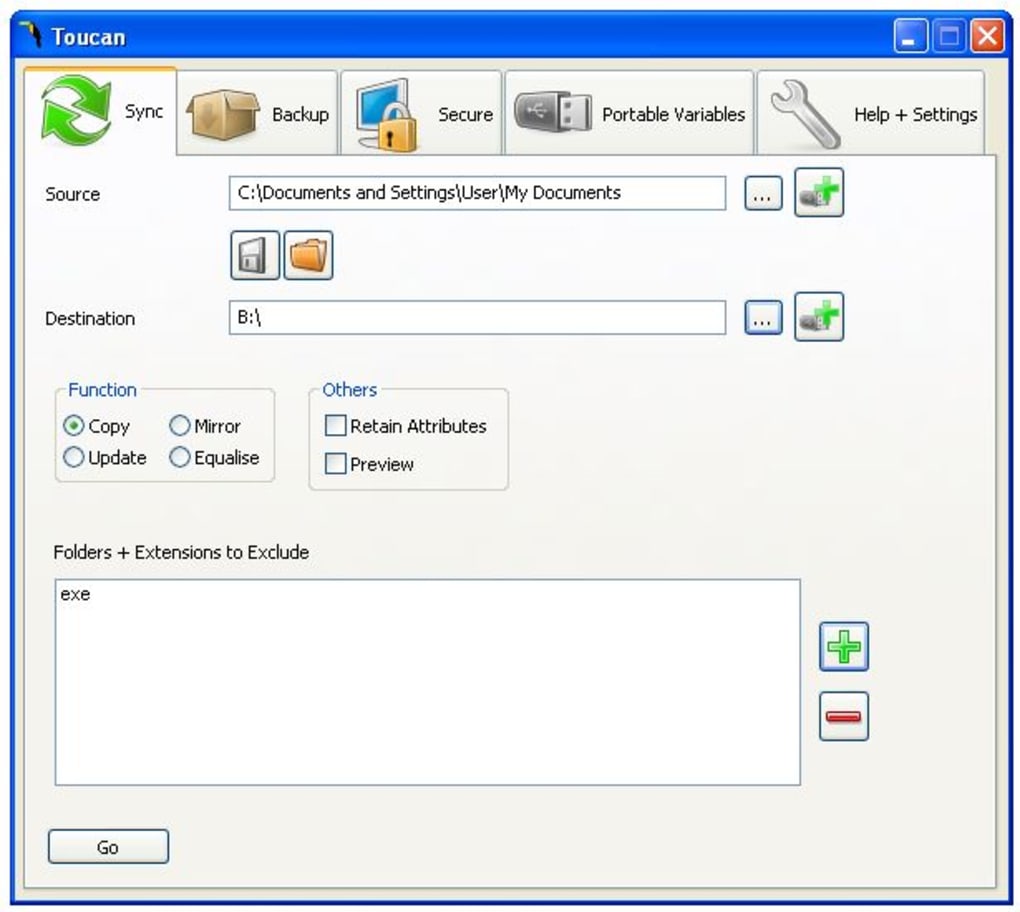
Toucan’s functionality extends beyond the core synchronization, backup, and encryption features. Its advanced capabilities further enhance its value as a comprehensive data management tool.
Command-Line Support: The software provides command-line support, enabling automation through batch files. This feature is invaluable for users who require regular, automated backups or synchronization tasks. It allows for scripting and scheduling, ensuring seamless data management without manual intervention. This capability is particularly useful for system administrators or individuals managing large volumes of data.
Portable Variables: This feature allows you to specify locations on a USB drive irrespective of its assigned drive letter. This is a crucial feature for portable devices, as the drive letter may change depending on the system it’s connected to. By utilizing portable variables, users can ensure that the software consistently accesses the correct location, even when the drive letter changes.
Tabbed Interface: Toucan’s well-organized tabbed interface makes navigating the various functions intuitive and efficient. This enhances user experience by providing quick and easy access to all features. The clarity of the interface makes the software accessible to users of all technical skill levels.
User Experience and Interface
Toucan’s design prioritizes ease of use. The clean and uncluttered interface simplifies the process of selecting tasks, configuring options, and managing data. The straightforward layout ensures a positive user experience, irrespective of the user’s technical expertise. The prominent placement of essential features and intuitive navigation makes the software highly accessible.
The program’s tabbed design allows users to easily switch between the different functionalities without confusion or unnecessary complexity. This feature-rich yet simple interface makes Toucan suitable for a wide range of users, from casual home users to professional data managers.
Strengths and Weaknesses
While Toucan offers a compelling array of features, understanding both its strengths and limitations is crucial for informed decision-making.
Strengths:
- All-in-one solution: Combines synchronization, backup, and encryption into a single, user-friendly package.
- Ease of use: The intuitive interface makes it accessible to users of all technical skill levels.
- Multiple synchronization modes: Provides flexible options for various data management needs.
- Robust encryption: Utilizes a strong encryption algorithm to protect sensitive data.
- Command-line support: Enables automation through scripting and batch processing.
- Portable variables support: Ensures consistent data access regardless of drive letter assignments.
- Industry-standard backup formats: Supports ZIP and 7-ZIP for compatibility and ease of access.
Weaknesses:
- Documentation accessibility: The documentation is not readily accessible, posing a challenge for users seeking help or clarification.
- Stability concerns: Some users have reported stability issues and occasional crashes. These reports suggest the need for ongoing software optimization and improvement.
Comparison with Alternatives
Several alternative applications offer similar data synchronization and backup functionalities. However, Toucan’s unique combination of features and its user-friendly interface distinguishes it from many competitors. While other software may specialize in specific aspects of data management, Toucan provides a comprehensive solution that streamlines these diverse tasks into a single application.
Conclusion
Toucan is a powerful and versatile utility that simplifies data synchronization, backup, and encryption processes. Its user-friendly interface and comprehensive feature set make it an ideal solution for individuals and businesses alike. While some minor shortcomings exist, such as documentation accessibility and reported stability issues, the overall benefits of Toucan’s integrated approach to data management outweigh these limitations for many users. The potential for automation through command-line support and the inclusion of robust encryption make it a valuable tool in any digital environment. The software’s efficiency and streamlined design contribute to a positive user experience, making data management a less daunting and more manageable task.
File Information
- License: “Free”
- Latest update: “May 24, 2023”
- Platform: “Windows”
- OS: “Windows 8.1”
- Language: “English”
- Downloads: “12.9K”
- Size: “4.84 MB”


