
TouchRetouch is a straightforward image editing application designed to efficiently remove unwanted elements from your photographs. Unlike complex professional software like Photoshop or GIMP, TouchRetouch provides a streamlined and intuitive experience, making it perfect for casual users and those who need quick, effective image retouching without a steep learning curve. This review will delve into the software’s usability, features, pros and cons, and compare it to alternative applications.
Ease of Use and Core Functionality
TouchRetouch excels in its simplicity. The application’s interface is clean and uncluttered, making it incredibly easy to navigate, even for users with minimal photo editing experience. Its core function revolves around removing unwanted objects or imperfections from images with minimal effort. This includes a variety of common image flaws and intrusive elements.
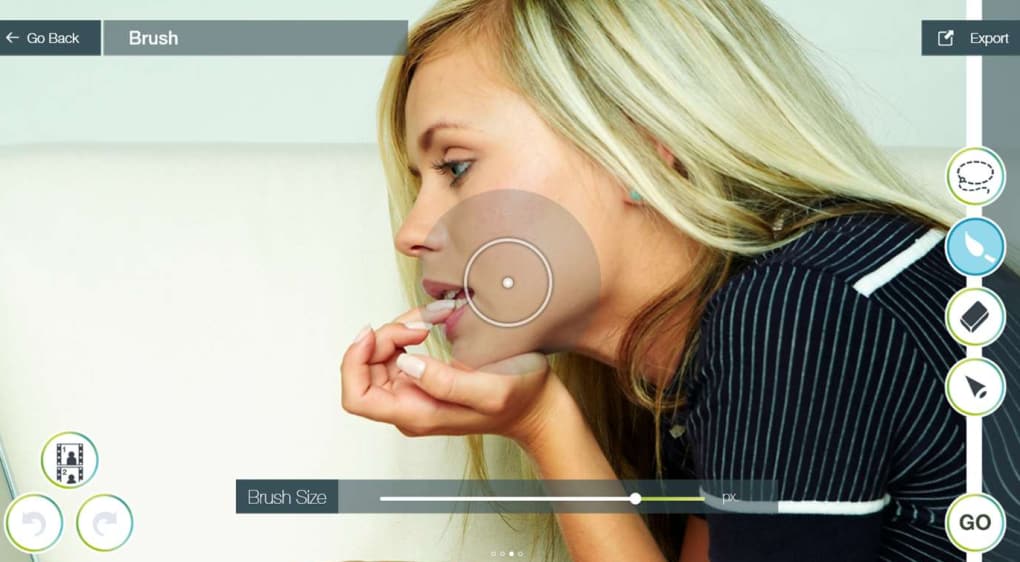
The process is remarkably straightforward. Users simply select the object they wish to remove by tracing around it with their finger or mouse. TouchRetouch’s intelligent algorithms then analyze the surrounding pixels and seamlessly blend the area, making the removed object virtually invisible. This “smart” removal functionality reduces the need for pixel-perfect selection, significantly accelerating the editing process. The software provides a preview of the changes before saving, allowing users to fine-tune their selections and ensure the desired outcome before committing to the edit.
This capability extends to a range of scenarios:
-
Removing Obstructions: Telephone poles, street signs, stray pedestrians, or other unwanted elements in landscape or portrait photography can be effortlessly removed. This is particularly useful for enhancing the aesthetic appeal of images without the need for complex masking or selection techniques.
-
Correcting Lens Flaws: Scratches or blemishes on the camera lens often result in imperfections on the captured image. TouchRetouch effectively addresses these issues, restoring clarity and improving the overall image quality. This is especially beneficial for those using older cameras or smartphones which might exhibit such imperfections.
-
Eliminating Photobombers: Unwanted individuals inadvertently entering the frame during a photo shoot can easily be removed. TouchRetouch efficiently removes these distractions, leaving behind a cleaner, more focused image.
-
Retouching Skin Imperfections: The application effectively removes blemishes, pimples, and other minor skin imperfections, providing a simple solution for basic portrait retouching. While not as comprehensive as dedicated skin retouching software, it offers a quick and effective solution for minor imperfections.
This ease of use extends to the minimal system requirements. TouchRetouch consumes minimal system resources, making it accessible even on older or lower-powered devices. The option to save the application to an SD card further enhances its portability and accessibility.
Beyond Basic Removal: The Intelligent Algorithm
One of TouchRetouch’s key strengths lies in its intelligent algorithm. The software goes beyond simple object removal by intelligently analyzing the surrounding area and context to create seamless blends. This contrasts sharply with more rudimentary applications that may leave noticeable artifacts or unnatural-looking patches after object removal.
The algorithm’s effectiveness depends on several factors, such as the complexity of the background and the size and nature of the object being removed. For instance, removing a small, uniformly colored object against a simple background is much easier than removing a large, complex object against a detailed and intricate background.
However, the algorithm generally performs well in a wide variety of scenarios. The ability to preview changes before finalizing the edits allows users to make adjustments and ensure a satisfactory result. The intuitive swipe-based selection tool further streamlines the process, making even complex removals relatively straightforward. While professional-grade software might offer more granular control and sophisticated tools, TouchRetouch’s intelligent approach provides a remarkably effective and efficient solution for most everyday editing needs.
Advantages and Disadvantages of TouchRetouch
Pros:
-
User-Friendly Interface: The application is exceptionally intuitive, requiring minimal learning curve. Even novice users can quickly grasp its functionality and start editing their images.
-
Efficient Object Removal: TouchRetouch excels at quickly and effectively removing unwanted objects and imperfections from photographs.
-
Intelligent Algorithm: The software’s smart algorithms provide seamless blending, minimizing the appearance of artifacts after removal.
-
Minimal System Requirements: The application runs smoothly on a wide range of devices, consuming minimal system resources.
-
SD Card Compatibility: Users can save the application to an SD card, making it highly portable.
-
Preview Feature: The preview function allows users to see the changes before saving, guaranteeing user satisfaction with the final results.
Cons:
-
Limited Editing Features: TouchRetouch primarily focuses on object removal. It lacks more comprehensive image editing tools such as cropping, resizing, color correction, or advanced filter options. Users needing these features will require a more robust image editing suite.
-
Potential for Imperfect Removals: While the intelligent algorithm generally performs well, complex removals might occasionally produce less-than-perfect results, potentially requiring manual adjustments or using a different tool for more refined results.
-
No Batch Processing: The application doesn’t support batch processing, requiring users to edit images individually. This can become time-consuming when dealing with a large number of photographs.
Comparison to Alternative Applications
Several alternative applications offer similar functionalities to TouchRetouch. However, the choice of application often depends on the specific needs and priorities of the user. Some alternatives include:
-
Retouch Pilot: A free application, primarily focused on removing dust, scratches, and spots from older photographs. While it can remove some objects, it generally lacks the sophistication and user-friendliness of TouchRetouch.
-
Remove Objects From Photo PRO: This application offers similar object removal capabilities to TouchRetouch but often comes at a higher cost and may have a less intuitive interface.
-
PhotoWipe: Another free option, PhotoWipe provides basic object removal features. Its functionality is often less efficient and effective compared to TouchRetouch, particularly in complex scenes.
The key differentiators for TouchRetouch often center around its ease of use, intelligent algorithm performance, and overall efficiency in removing unwanted image elements. While alternative options exist, TouchRetouch’s streamlined interface and robust algorithm make it an attractive choice for many users. Other applications might offer additional functionalities, but at the cost of increased complexity and a steeper learning curve.
Conclusion
TouchRetouch presents a compelling solution for users seeking a simple, effective, and user-friendly approach to image retouching. Its primary focus on efficient object removal, coupled with its intelligent algorithm and intuitive interface, makes it a powerful tool for quickly cleaning up photographs. While it may lack the advanced features of professional-grade software, its streamlined approach and excellent performance in its core functionality make it an excellent choice for casual users, those needing quick fixes, and anyone who appreciates a simple, intuitive editing experience. The balance of ease of use and effective results makes TouchRetouch a valuable tool in any digital photographer’s arsenal.
File Information
- License: “Full”
- Version: “3.2.2”
- Latest update: “July 12, 2023”
- Platform: “Windows”
- OS: “Windows 8.1”
- Language: “English”
- Downloads: “33.2K”


