
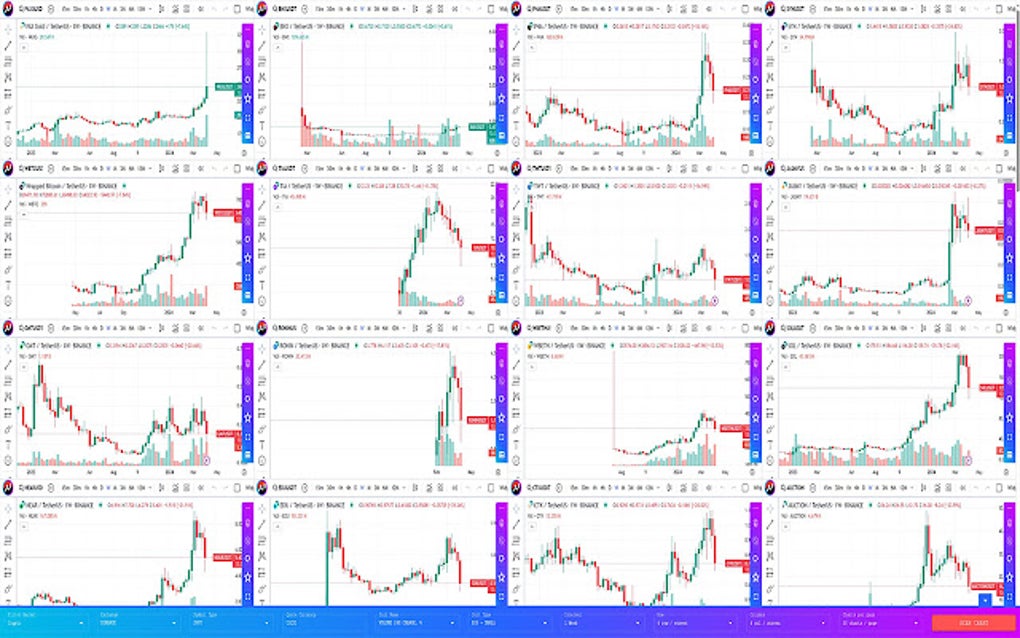
TraderView is a free Google Chrome extension designed to provide users with real-time access to a wide range of financial charts. This review delves into its functionality, features, pros, cons, and overall user experience. The extension offers a powerful, albeit limited, tool for traders who need quick access to market data within their browser.
Accessing and Monitoring Financial Markets
TraderView’s core strength lies in its ability to consolidate multiple financial market data streams into a single, easily accessible interface. This allows traders to monitor stocks, indices, futures contracts, forex pairs, and Bitcoin prices simultaneously. The platform supports various exchanges and data providers, including (but not limited to) Bitstamp and Bittrex for cryptocurrency data, and a wide range of other exchanges for Forex and traditional markets. This multi-market approach is a significant advantage, enabling users to perform comparative analysis and develop trading strategies informed by broader market trends. The simultaneous display of diverse asset classes is particularly beneficial for traders employing strategies that involve diversification or hedging across different asset classes.
The extension’s capacity to display charts offers a visual representation of price movements, enabling users to quickly identify trends and patterns. This visual information is crucial for both technical and fundamental analysis. However, the lack of customizable technical indicators beyond basic chart types (candlesticks, line charts, etc.) might limit its appeal to traders who rely heavily on advanced technical indicators. The availability of multiple chart types enables traders to choose the most appropriate presentation of market data according to their individual preferences and analytical needs. The ability to sync charts and settings across different browsers ensures data consistency and avoids the frustration of reconfiguring settings on multiple devices.
User-Friendliness and Functionality
The extension aims for simplicity and ease of use. Its interface is relatively straightforward, presenting the data in a clear and uncluttered manner. However, the lack of a built-in notification system represents a significant drawback. Many traders rely on alerts to notify them of important price movements or breaking news. The absence of this feature necessitates the use of external alert services or constant manual monitoring, potentially impacting the efficiency of the trader’s workflow. Similarly, the inability to add custom scripts further restricts customization and limits the potential for advanced technical analysis or automated trading strategies.
Furthermore, the dependency on a pre-existing TraderView account is a potential barrier to entry. While this requirement might ensure data security and user authentication, it adds an extra step in the onboarding process and might dissuade users unfamiliar with TraderView’s services. This requirement could potentially reduce the accessibility of the tool to a broader audience of individual traders or beginners.
Limitations and Missing Features
As a free tool, TraderView naturally involves some compromises. While the extension provides access to a vast amount of financial data, its functionality remains limited compared to dedicated, often subscription-based, trading platforms. The lack of advanced charting capabilities, particularly customizable indicators, could be a major shortcoming for experienced technical traders accustomed to more sophisticated analytical tools.
The absence of a dedicated notification system, as previously mentioned, also negatively affects its overall usability. Real-time alerts are crucial for timely decision-making in dynamic markets. The necessity to constantly monitor the charts or rely on external notification systems undermines the convenience and efficiency that a comprehensive trading tool should offer. The absence of scripting capabilities further restricts the extent of customization and automation possible within the platform, limiting its suitability for traders who rely on personalized scripts for automated trading or advanced technical analyses.
Another crucial limitation is the reported instances of the add-on not functioning as expected for some users. This underscores the need for continuous improvement and bug fixes to ensure a reliable user experience. Inconsistent performance can be particularly problematic for traders who depend on the accuracy and timeliness of the data provided by the extension. Addressing these performance issues is critical to enhance user confidence and ensure the reliability of the platform.
Pros and Cons: A Balanced Perspective
Pros:
- Multi-market Coverage: Access to a wide array of markets, including stocks, indices, futures, forex, and Bitcoin.
- Real-time Data: Provides up-to-the-minute market data for informed decision-making.
- Free to Use: Offers all features without any subscription fees or hidden costs.
- Cross-Browser Sync: Maintains consistency of settings and charts across multiple browsers.
- Simple Interface: Intuitive design makes the platform easy to navigate and understand.
Cons:
- Requires TraderView Account: Necessary for accessing the extension’s features.
- No Notification System: Lacks real-time alerts for crucial market events.
- Limited Charting Capabilities: Does not offer advanced charting tools or customizable indicators.
- No Scripting Support: Prevents the implementation of customized trading strategies or automated trading systems.
- Reported Instances of Malfunction: Some users have experienced unexpected issues with the extension’s functionality.
Conclusion: TraderView - A Niche Tool
TraderView serves as a useful, albeit basic, tool for users who need quick access to real-time financial data within their Google Chrome browser. Its strength lies in its free access to a wide range of markets and its user-friendly interface. However, its limitations, specifically the lack of advanced charting tools, notifications, and scripting capabilities, restrict its appeal to more experienced traders or those requiring sophisticated analytical tools. The occasional reported malfunctions highlight the need for continuous improvement and updates.
Ultimately, TraderView’s value proposition rests on its simplicity and free accessibility. It’s an ideal choice for casual traders, beginners, or those seeking a straightforward overview of multiple markets without the need for complex features. However, seasoned traders with advanced analytical needs or a reliance on automated trading systems will likely find its functionality insufficient and might prefer dedicated trading platforms offering a more comprehensive suite of tools. The extension’s success depends on addressing the reported functionality issues and potentially adding features like notifications and script support to appeal to a broader user base and enhance its overall competitiveness in the market.
File Information
- License: “Free”
- Version: “2.9.8”
- Latest update: “October 15, 2024”
- Platform: “chrome”
- Downloads: “24.3K”


