
In an increasingly digital world, the enduring appeal of physical and digital trading cards remains a testament to human creativity and our innate desire for collection, strategy, and storytelling. From classic sports cards to intricate fantasy game sets, these small, often art-laden pieces of cardboard (or their digital counterparts) have captivated generations. But what if the power to craft these miniature universes was placed directly into your hands, free of charge? Enter the Free Trading Card Maker, a remarkable graphics and design application for Windows that empowers users to design, create, and print their own custom trading cards with unparalleled ease.
This isn’t just another niche utility; it’s a versatile tool that transcends the boundaries of mere entertainment. While its name clearly suggests a primary use for gaming, its capabilities extend far beyond, offering a practical solution for educational content creation, personal organization, and even small-scale entrepreneurial endeavors. Developed by Media Freeware, this application embodies accessibility, providing a clear-cut, wizard-style interface that guides users through the entire card-making process, making it approachable for novices while still offering sufficient depth for more ambitious projects.
The concept of a “trading card maker” might initially conjure images of complex graphic design suites requiring steep learning curves. However, the Free Trading Card Maker deliberately eschews this complexity. Instead, it offers a streamlined experience, focusing on a guided input system that brings your conceptual cards to life without requiring advanced design skills. This focus on user-friendliness is one of its most compelling attributes, allowing anyone with an idea to translate it into a tangible, printable card in just a few simple steps. Whether you’re envisioning a new character for a tabletop RPG, a personalized learning aid, or a unique commemorative item, this free tool opens up a world of possibilities for creative expression.
The Essence of Digital Card Crafting: Free Trading Card Maker Explained
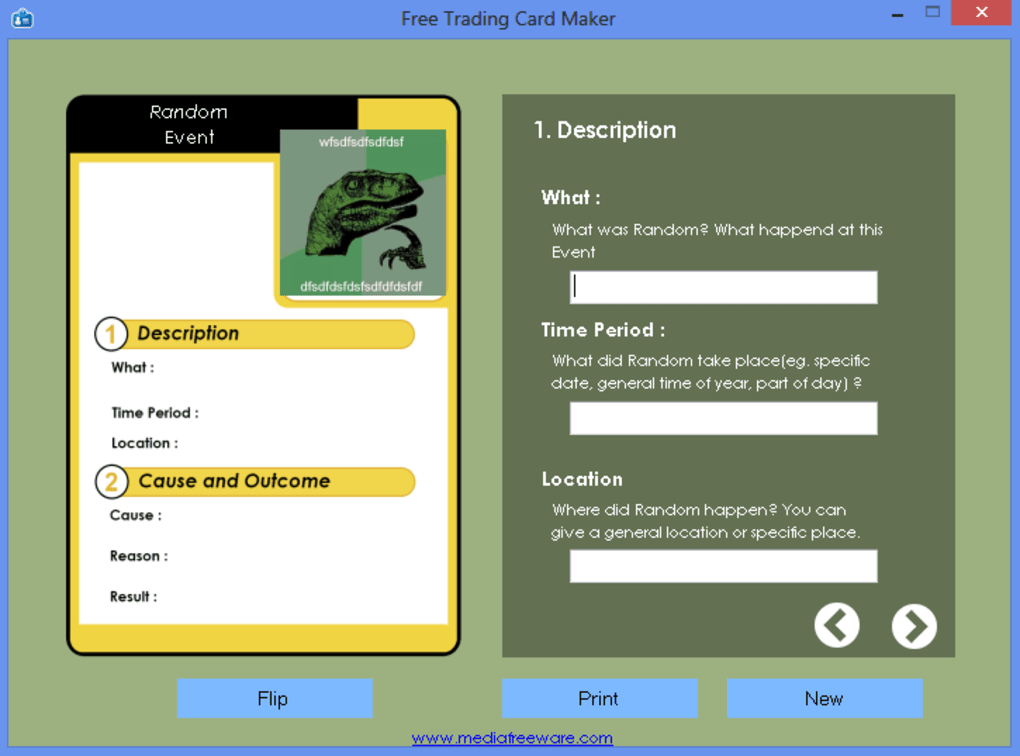
At its core, the Free Trading Card Maker is an intuitive bridge between concept and creation. It’s designed not to overwhelm but to facilitate, making the often intricate process of design as straightforward as filling out a form. This approach democratizes card creation, inviting individuals from all walks of life to participate in the rewarding act of bringing their imaginative visions to fruition.
A Wizard-Style Approach to Card Creation
The defining feature of the Free Trading Card Maker is its “wizard-style” interface. This means that instead of presenting users with a blank canvas and a bewildering array of tools, it guides them step-by-step through a predefined process. This sequential method ensures that even those with no prior graphic design experience can navigate the application with confidence.
Upon launching the application, users are prompted to define the core essence of their trading card. This crucial first step involves selecting the type of subject matter the card will represent. The flexibility here is notable, accommodating a broad spectrum of ideas:
- Fictional Person: For character cards in games, stories, or fan fiction. Imagine creating a profile for your Dungeons & Dragons character or a new superhero.
- Physical Object: Ideal for item cards, equipment, or artifacts within a game, or even educational cards describing specific objects.
- Event: Perfect for chronicling historical moments, fictional occurrences, or game-changing actions.
- Abstract Concept: This opens doors for cards representing emotions, ideologies, magical spells, or scientific principles.
- Fictional Place: For location cards, world-building elements, or settings within a narrative.
- Real Person: Excellent for biographical cards, historical figures, or even personalized cards for friends and family.
Once the subject type is selected, the wizard gently leads you through a series of prompts. These prompts are designed to gather specific details pertinent to your chosen card type. For example, if you choose “Fictional Person,” you might be asked for their name, attributes (strength, intelligence, speed), a brief biography, and an image. If it’s a “Physical Object,” you might define its properties, effects, and rarity.
The beauty of this system lies in its adaptability. While the application “visualizes” your card based on the information you input, the steps are not strictly mandatory. This means you have the freedom to skip certain fields if they don’t apply to your specific vision, allowing for a degree of customization within the structured framework. In total, users will navigate through approximately eight steps, each contributing a layer of detail and personality to the card.
Upon completing these steps, the “Print” button doesn’t just send it to a physical printer; it also serves as a preview function. This allows you to review your creation before finalizing it. Crucially, the Free Trading Card Maker offers versatile saving options, enabling you to store your newly minted cards in various formats to suit different needs:
- PDF: Ideal for high-quality printing and sharing, ensuring layout consistency across devices.
- HTML: Useful for integrating cards into web pages or digital archives.
- TXT: For extracting raw textual data from the cards, perhaps for database management or simple documentation.
- Image Format (e.g., JPEG, PNG): Perfect for digital use, sharing on social media, or incorporating into other digital projects.
This straightforward, guided process ensures that the learning curve is virtually non-existent, making card creation accessible to everyone from hobbyists to educators.
Versatile Applications: Beyond Just Gaming
While the initial thought might lean towards creating cards for fantasy RPGs or collectible sports sets, the Free Trading Card Maker’s true strength lies in its surprising versatility. The ability to define diverse card types opens up a multitude of practical and creative applications beyond traditional gaming.
For educators, this tool is a godsend. Imagine creating custom flashcards for vocabulary lessons, historical figures, scientific concepts, or geographical landmarks. The visual nature of trading cards, combined with concise information, can significantly enhance retention and engagement for students of all ages. Teachers can design personalized learning aids tailored precisely to their curriculum, making abstract concepts more tangible and memorable.
In a business context, while not explicitly designed for corporate use, the application can serve as a simple tool for creating informational cards. Perhaps for employee profiles, product feature highlights, or even simplified process steps. For small businesses or independent creators, it could be a way to design unique promotional materials or business cards with a distinct, collectible flair.
Hobbyists and enthusiasts of all kinds can find value. Role-playing game masters can quickly generate non-player character cards, monster stat blocks, or magic item descriptions. Writers can create character profiles for their novels or world-building elements for their fictional universes. Even individuals looking for a fun, creative outlet can design cards celebrating personal milestones, family members, or beloved pets. The “fictional person,” “physical object,” “event,” and “abstract concept” categories are particularly powerful here, allowing for boundless creative interpretation.
It’s important to acknowledge the limitations: the app does not allow users to design cards “from the ground up” or edit them directly within the interface once created. This means it’s not a full-fledged graphic design suite. For advanced customization or iterative design, users would need to export their cards as images and then utilize a separate image editing tool. However, for its intended purpose – quick, guided card generation – these limitations are less of a drawback and more a reflection of its specialized, user-friendly design philosophy. The focus is on rapid creation and content population, making it an excellent starting point before any advanced graphical refinement might be needed.
Navigating the Digital Canvas: Graphic & Design Principles for Custom Cards
The Free Trading Card Maker, while simplified, operates within the broader realm of graphic and design software. Understanding its place within this ecosystem, and how its output can be further refined, sheds light on its utility and potential. The application provides the foundational structure and content, but the world of graphic design offers pathways to elevate these creations.
The Role of Design in Information Dissemination
Effective trading cards, whether for games or educational purposes, rely heavily on clear and engaging design. Even with the wizard-style interface, the choices you make for text, images, and overall layout (which the app assists with) significantly impact the card’s effectiveness. The Free Trading Card Maker simplifies the design process by providing templates and structure, ensuring that information is presented coherently.
Consider the elements of a well-designed card:
- Hierarchy of Information: The most important details (e.g., character name, core stat) should be prominent. The Free Trading Card Maker’s prompts naturally guide this, but users can choose how succinctly they phrase descriptions.
- Visual Appeal: An appropriate image is crucial. While the app allows you to upload an image, selecting one that is high-quality, relevant, and visually engaging will significantly elevate the card.
- Legibility: The text needs to be easy to read. The app uses standard fonts, ensuring this aspect is handled.
- Branding/Theming: Even within the app’s framework, consistency across a set of cards—in terms of type of imagery or tone of text—creates a more professional and cohesive collection.
The Free Trading Card Maker serves as a fantastic entry point into understanding these principles. By seeing how different inputs generate different visual outputs, users implicitly learn about design structure and the impact of information organization. It’s an accessible way to engage with the elements of visual communication without the daunting complexity of professional tools.
When to Seek Advanced Graphic & Design Tools
Despite its utility, the Free Trading Card Maker is not a comprehensive graphic design suite. Its deliberate simplicity is its strength, but it also defines its boundaries. For users who require greater creative control, advanced visual effects, or pixel-perfect adjustments, complementary tools become essential.
Applications listed under “Graphic & Design” on platforms like PhanMemFree.org, such as Adobe Illustrator CC, Inkscape, or Blender, offer a stark contrast in capabilities. These tools allow for:
- Creation from Scratch: Unlike the Free Trading Card Maker, these applications provide a blank canvas, allowing artists to design every single element of their card’s layout, borders, text boxes, and iconography.
- Advanced Editing: Once a card is generated by the Free Trading Card Maker and saved as an image, an external image editor becomes necessary for any post-production work. This includes tweaking colors, applying filters, adding complex overlays, refining text placement, or integrating intricate artwork.
- Vector Graphics: Tools like Adobe Illustrator or Inkscape specialize in vector graphics, which allow designs to be scaled infinitely without loss of quality – a critical feature for professional-grade printing. The Free Trading Card Maker outputs raster images or PDFs, which are suitable for most uses but might lack the crispness of true vector graphics at extreme scales.
- Customization of Templates: While the Free Trading Card Maker uses internal templates, advanced tools allow for the creation and extensive modification of custom templates, giving designers complete autonomy over the visual language of their cards.
Therefore, the Free Trading Card Maker is best seen as a powerful generator of card content and basic structure. For users who wish to push their cards into the realm of professional-grade aesthetics or unique artistic expressions, exporting the generated output (preferably as an image or PDF) and then importing it into a more robust graphic design or image editing program is the recommended workflow. This two-stage process leverages the efficiency of the Free Trading Card Maker for content population and the artistic freedom of advanced tools for visual refinement, providing a holistic solution for comprehensive card design.
The Broader Spectrum: How Custom Cards Intersect with Education, Productivity, and Gaming
The value of the Free Trading Card Maker is amplified when considering its potential across diverse sectors. Its simple output – information organized visually – makes it remarkably adaptable, tapping into fundamental human needs for learning, efficiency, and entertainment. Let’s explore its multifaceted impact, linking it to broader categories found within the PhanMemFree.org ecosystem.
Empowering Education with Personalized Learning Tools
The educational potential of the Free Trading Card Maker is immense and often underestimated. In an era where personalized learning is gaining traction, tools that allow educators to create tailored materials are invaluable. Under the “Education & Reference” category on PhanMemFree.org, one finds everything from digital dictionaries to e-readers, all aimed at knowledge acquisition and dissemination. The Free Trading Card Maker fits seamlessly into this landscape by facilitating the creation of bespoke learning aids.
Imagine a history teacher crafting “Historical Figures” cards, each detailing a person’s life, key achievements, and impact. A science teacher could develop “Element Profile” cards, listing atomic numbers, properties, and uses. For language learners, “Vocabulary Builder” cards with a word, its definition, an example sentence, and perhaps a small illustrative image could be far more engaging than rote lists.
The act of creating these cards itself can be an educational exercise. Students, particularly those engaged in project-based learning, could use the Free Trading Card Maker to present research findings in a structured, visually appealing, and digestible format. For example, a student researching different animal species could create a set of “Animal Kingdom” cards, each detailing diet, habitat, and conservation status. This transforms a research project from a mere report into a creative, tangible outcome. The structured input process inherently encourages organization and concise summarization of information, valuable skills for any student.
Enhancing Productivity Through Visual Organization
Beyond education, the Free Trading Card Maker can subtly contribute to “Productivity.” While not a project management suite or an accounting tool, its capacity for information organization, especially when dealing with various discrete pieces of data, offers a unique angle.
Consider the practical application for individuals managing complex hobbies or small projects. A collector of physical items might create “Inventory Cards” for each item, detailing its acquisition date, condition, value, and origin. A DIY enthusiast could make “Project Component Cards” listing specifications, suppliers, and costs for each part of a larger build. Even home organization could benefit from “Recipe Cards” or “Home Maintenance Cards” (e.g., “Air Filter Replacement: Every 3 months, Type X, Last Replaced Y”).
The ability to export cards into various formats, particularly PDF and image files, allows for integration into digital productivity workflows. You could print them out and categorize them physically, or integrate them into digital document management systems. For instance, a small business owner might use them to create quick “Product Information” cards for internal reference or sales training, summarizing key features of new offerings. This visual, card-based approach to data organization can often be more intuitive and quicker to reference than dense spreadsheets or lengthy documents, fitting into the “Utilities & Tools” category by acting as a specialized information formatter.
The Enduring Appeal of Card Games and User-Generated Content
The most direct and perhaps most celebrated application of the Free Trading Card Maker lies within the realm of “Games,” specifically “Card” games. PhanMemFree.org features a vast array of games, from action to strategy, and card games hold a special place, appealing to those who enjoy tactical thinking, collection, and social interaction.
The desire to create one’s own card game or expand an existing one is a powerful creative impulse. The Free Trading Card Maker directly addresses this by making the design process accessible. Game designers, aspiring or established, can use it to rapidly prototype card sets for board games, role-playing games, or even digital card game concepts.
Imagine crafting a custom expansion for a beloved tabletop game, introducing new characters, spells, or artifacts that align with your unique vision. Or perhaps an entirely new game from scratch, where the card mechanics are defined by the information you input into the maker. The simplified interface allows for iteration and experimentation, enabling creators to focus on game balance and mechanics rather than wrestling with complex design software.
Furthermore, the rise of user-generated content (UGC) is a significant trend across many digital platforms. The Free Trading Card Maker empowers individuals to contribute to this trend within the card game community. Fan-made content, custom scenarios, and personalized game components can enhance the longevity and appeal of existing games, fostering a vibrant community around shared interests. By making card creation easy and free, Media Freeware has provided a foundational tool for a new wave of digital artisans to contribute to the rich tapestry of card game culture.
Technical Specifications and Community Insights
Understanding the technical underpinning of an application is often as important as its functionality. For the Free Trading Card Maker, its specifications reveal its accessibility and efficiency, while community feedback offers a qualitative measure of its performance and utility.
System Requirements and Accessibility
The Free Trading Card Maker is designed with accessibility in mind, particularly regarding its system requirements.
- License: Free Version – This is a core selling point, removing any financial barrier to entry.
- Version: 1.1.1 (as of the last update) – Indicates a stable, albeit perhaps not frequently updated, release.
- Latest update: November 4, 2019 – While not a very recent update, for a focused utility, stability often outweighs continuous feature additions. The core function remains relevant.
- Platform: Windows OS – Exclusively for Windows users.
- OS Compatibility: Windows XP and later versions – This broad compatibility makes it accessible to users with older systems, not just those with the latest Windows iterations. This is particularly beneficial for schools or individuals with legacy hardware.
- Language: English – The primary interface language. PhanMemFree.org, however, lists various language options for downloading the application page, indicating a global reach for the hosting platform itself.
- Downloads: 3.5K lifetime downloads, 8 last month’s downloads (as of reference time) – These figures suggest a consistent, if niche, user base.
- Size: 13.75 MB – An extremely lightweight application, ensuring quick download and minimal impact on system resources. This low footprint is ideal for users with limited storage or slower internet connections.
- Developer: Media Freeware – A developer known for providing free, straightforward utility applications.
These specifications highlight an application that prioritizes ease of access and minimal system overhead. Its small size and broad OS compatibility make it a practical choice for a wide range of Windows users, ensuring that almost anyone can download and run it without concerns about hardware limitations.
The Ecosystem of Digital Tools and Alternatives
On PhanMemFree.org, the Free Trading Card Maker is categorized under “Multimedia” and specifically “Graphic & Design.” This placement correctly identifies its function. However, the broader ecosystem of “Graphic & Design for Windows” includes much more complex and powerful tools such as AutoCAD, Adobe Illustrator CC, Inkscape, Blender, and MS Paint. These tools offer varying degrees of complexity and specialization, from CAD design to vector art and 3D modeling.
The Free Trading Card Maker stands out among these by offering a highly specialized, simplified approach. It’s not trying to compete with the feature sets of professional design software; instead, it carves out its own niche by providing a single, well-executed function: guided trading card creation.
When considering “Alternative apps,” one might look for other “Card Maker” tools. While the prompt doesn’t list direct competitors within PhanMemFree.org for this specific type of free, wizard-driven trading card maker, the general category of graphic design tools offers broader alternatives if the user needs more control. For example, a user who wants to design a card from scratch might opt for Inkscape (a free vector editor) or even GIMP (a free raster image editor). These would require a much steeper learning curve but offer limitless design freedom.
The “Related topics” section on PhanMemFree.org further contextualizes the Free Trading Card Maker: “To Do For Windows Free,” “Card Games For Windows Free,” “Card Games Free,” “Trading,” “Card Maker.” These topics confirm the app’s relevance to both gaming enthusiasts (card games, trading) and individuals seeking simple creation tools (“Card Maker”). The “To Do” references might tangentially link to its use as a personal organization or educational tool, reinforcing its versatile nature as an information-structuring utility.
User reviews, although few for this specific app, are crucial for future development and community perception. The current rating of 2.3 out of 5 from 14 reviews suggests that while it fulfills a need, there might be areas for improvement or aspects that users find limiting (likely the “cannot edit” or “cannot create from ground up” cons). Encouraging users to “Be the first to leave your opinion!” is vital for building a community dialogue around the tool.
In summary, the Free Trading Card Maker occupies a unique and valuable space within the digital utilities landscape. It’s a testament to the power of specialized, free software to democratize creative processes and empower a broad user base to bring their ideas to life, whether for gaming, education, or personal projects. Its lean design and accessible nature ensure it remains a practical tool for anyone looking to quickly generate custom trading cards without the complexities of professional design suites.
The Free Trading Card Maker stands as an excellent example of a highly specialized, free utility that addresses a specific creative need with remarkable simplicity. In a digital world often dominated by complex, feature-rich software, its wizard-style interface offers a refreshing alternative, making the art of card creation accessible to everyone. From generating characters for a new tabletop adventure to crafting engaging educational flashcards or even unique personal mementos, this application empowers users to transform their ideas into tangible, printable assets.
While it may not offer the granular control of professional graphic design suites, its strengths lie in its ease of use, speed, and versatility across various applications. The ability to output cards in multiple formats ensures they can be integrated into both digital and physical workflows, extending their utility. For Windows users seeking a straightforward, no-cost solution to design custom trading cards, the Free Trading Card Maker from Media Freeware, available on PhanMemFree.org, represents an invaluable tool that unlocks a world of creative possibilities without the typical barriers of cost or technical expertise. It’s a small download with a surprisingly broad impact on how individuals can visualize and disseminate their unique stories and information.
File Information
- License: “Free”
- Latest update: “November 4, 2019”
- Platform: “Windows”
- OS: “Windows XP”
- Language: “English”
- Downloads: “3.5K”
- Size: “13.75 MB”


