TrafficMonitor is a free, open-source utility for Windows that provides real-time monitoring of your system’s performance, including network speed, memory usage, and CPU utilization. Developed by zhongyang219, this lightweight application offers a minimalist approach to system monitoring, allowing you to easily keep track of your computer’s vital statistics without overwhelming you with unnecessary information. Unlike many paid monitoring services such as NetWorx, Datadog, and DU Meter, TrafficMonitor offers a powerful feature set completely free of charge. This makes it an excellent choice for users seeking a simple yet effective way to monitor their system’s health and performance.
A Minimalist Interface for Maximum Information
TrafficMonitor’s strength lies in its intuitive and uncluttered user interface. The application presents key performance metrics in a small, floating window that can be easily repositioned anywhere on your desktop. By default, this window displays your current upload and download speeds, providing a clear and immediate picture of your network activity. However, the true power of TrafficMonitor lies in its customizability.
Through a simple right-click context menu, you can add or remove additional metrics such as CPU and memory usage, providing a more comprehensive view of your system’s resource consumption. This flexibility allows you to tailor the displayed information to your specific needs and preferences, ensuring that you see only the data most relevant to your monitoring requirements. The floating window itself can be customized as well. You can easily change the icon for better recognition amongst other applications, making it stand out or blend in seamlessly with your desktop environment depending on your preference.
Extensive Customization Options for a Personalized Experience
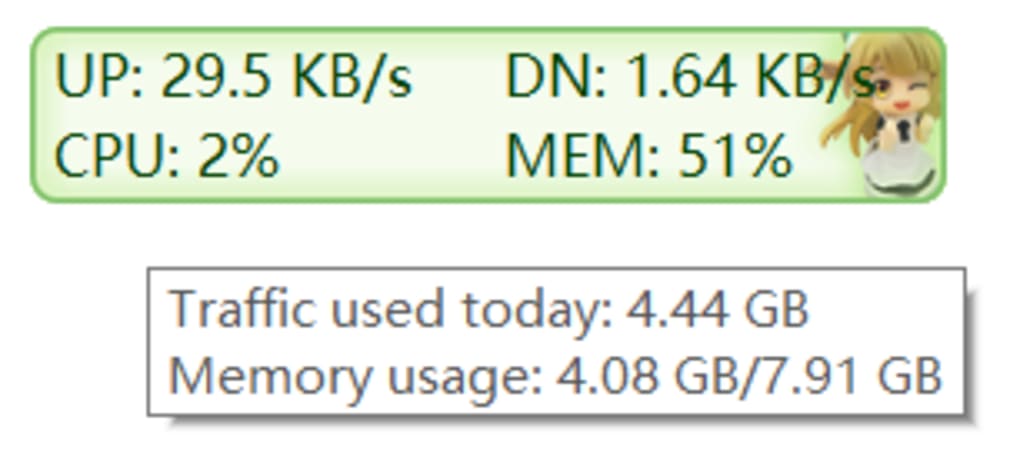
TrafficMonitor goes beyond simply displaying performance data; it empowers you to personalize the application’s appearance and functionality to match your workflow. A wide range of customization options are available, allowing you to fine-tune the displayed information and the overall aesthetic of the application. These options include:
-
Font and Text Color: Adjust the font and text color to enhance readability and ensure that the information is easily discernible against your desktop background. Choose from a variety of fonts and colors to create a display that suits your visual preferences.
-
Display Text: Customize the labels used for each metric to reflect your personal naming conventions or to improve clarity. This allows for more intuitive comprehension of the data being presented.
-
CPU and Memory Appearance: Modify the appearance of the CPU and memory usage displays, providing visual cues that highlight potential bottlenecks or resource exhaustion. Different visual styles can be chosen to easily identify potential issues.
-
Value Alignment and Number of Digits: Control the alignment of numerical values and specify the number of digits displayed for each metric. This allows you to present the information in a way that is both concise and informative.
-
Value and Unit Separation: Adjust the spacing between numerical values and their corresponding units (e.g., MB/s, %), improving readability and enhancing the overall presentation.
This level of customization allows TrafficMonitor to adapt perfectly to individual needs and preferences. Whether you prefer a highly visible display or a subtle, unobtrusive monitoring tool, TrafficMonitor offers the flexibility to achieve your desired level of visibility.
Data Storage for Troubleshooting and Analysis
Beyond its real-time monitoring capabilities, TrafficMonitor also offers data storage functionality. The application stores historical traffic statistics, allowing you to review past performance trends and identify potential issues. This historical data can prove invaluable for troubleshooting performance problems, diagnosing network bottlenecks, or investigating unexpected system behavior. By reviewing historical data, you can gain insights into how your system has performed over time and identify patterns that might indicate underlying issues. This feature is particularly useful for pinpointing the root cause of recurring problems, enabling more effective system optimization and problem resolution.
This historical data logging feature, combined with the real-time monitoring, makes TrafficMonitor a comprehensive tool for managing and optimizing your system’s performance. You can use the current data to get an immediate snapshot of the system’s state and consult the historical data to understand how the system has behaved over longer periods.
Keeping a Close Eye on Your PC’s Performance: The Benefits of TrafficMonitor
TrafficMonitor provides a user-friendly and efficient way to monitor several key aspects of your computer’s performance. Its benefits extend beyond mere convenience and include:
-
Real-time Network Monitoring: Accurately track your upload and download speeds, identifying potential network bottlenecks or slowdowns. This is particularly useful for troubleshooting network connectivity problems or for understanding how much bandwidth your applications are consuming.
-
CPU and RAM Usage Tracking: Monitor CPU and RAM usage to identify resource-intensive processes and prevent performance degradation. Identifying resource-intensive processes can help you optimize your system by closing unnecessary applications or upgrading your hardware.
-
Unobtrusive Design: The minimalist interface ensures that TrafficMonitor remains unobtrusive, minimizing its impact on your workflow while still providing essential performance information.
-
High Customizability: The extensive customization options allow you to tailor the application to your preferences, optimizing its visibility and the data displayed. This ensures that the tool integrates seamlessly into your existing workflow.
-
Free and Open Source: TrafficMonitor is completely free to download and use, providing a cost-effective solution for system monitoring. The open-source nature of the software also fosters community involvement and contribution, leading to ongoing improvements and enhancements.
-
Historical Data Storage: TrafficMonitor stores historical performance data, enabling detailed analysis of past performance trends for troubleshooting and optimization.
Addressing Potential Limitations
While TrafficMonitor offers numerous advantages, some minor limitations should be considered:
- Skin Compatibility: Some user-submitted skins might not function correctly, potentially affecting the application’s appearance. While the default skin is functional and well-designed, some users might encounter issues with third-party skins.
However, these limitations are relatively minor and do not significantly detract from the overall functionality and usability of the application. The benefits of TrafficMonitor, including its free, open-source nature, its extensive customization features, and its combination of real-time and historical data analysis, significantly outweigh these minor drawbacks.
Conclusion
TrafficMonitor presents a compelling alternative to paid system monitoring applications. Its combination of a user-friendly interface, extensive customization options, data storage capabilities, and free, open-source nature makes it an ideal choice for users seeking a lightweight yet powerful tool to monitor and manage their Windows system’s performance. Whether you’re a casual user or a seasoned system administrator, TrafficMonitor provides a valuable resource for maintaining optimal system performance and troubleshooting potential problems. Its ease of use and powerful features make it a highly recommended tool for any Windows user.
File Information
- License: “Free”
- Version: “1.80.3”
- Latest update: “January 31, 2023”
- Platform: “Windows”
- OS: “Windows 10”
- Language: “English”
- Downloads: “22.3K”
- Size: “2.25 MB”