
Transitions DJ is a versatile digital audio workstation (DAW) designed for DJs of all skill levels, from beginners experimenting with mixing to seasoned professionals crafting intricate sets. Available for Windows, macOS, and Google ChromeOS, this software offers a comprehensive suite of tools and features designed to streamline the music mixing process and enhance the overall DJ experience. This review delves into its capabilities, ease of use, and overall effectiveness as a DJ mixing solution.
User-Friendly Interface and Core Functionality
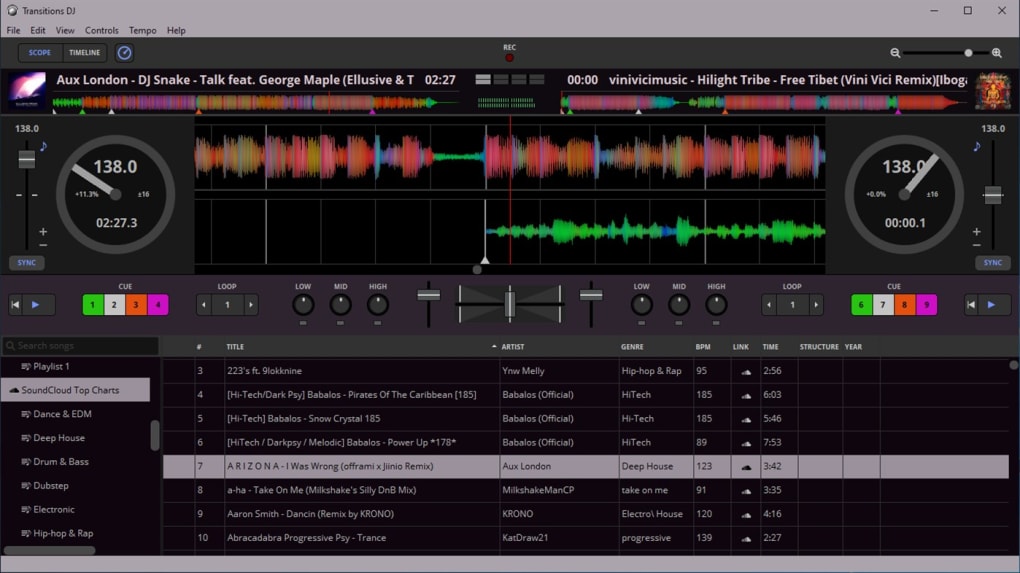
Transitions DJ boasts an intuitive interface, making it accessible to users with varying levels of technical expertise. The layout is clean and uncluttered, allowing DJs to focus on the creative aspects of mixing rather than navigating complex menus or settings. The software provides essential DJ mixing tools such as crossfading, looping, tempo synchronization, and cue points – all crucial elements for seamless transitions between tracks. These features are seamlessly integrated into the interface, facilitating smooth and efficient workflow.
The crossfader, a cornerstone of DJ mixing, allows for smooth transitions between two tracks, eliminating jarring interruptions and maintaining a consistent musical flow. The looping function enables DJs to isolate and repeat sections of a track, adding creative flair and building intensity within a mix. Precise tempo synchronization ensures that tracks blend harmoniously, preventing awkward speed discrepancies that can detract from the overall listening experience. Cue points, which allow DJs to mark specific points within a track for easy access, are essential for precise mixing and cueing, enabling seamless transitions and creative manipulation of the music.
Advanced Features and Creative Control
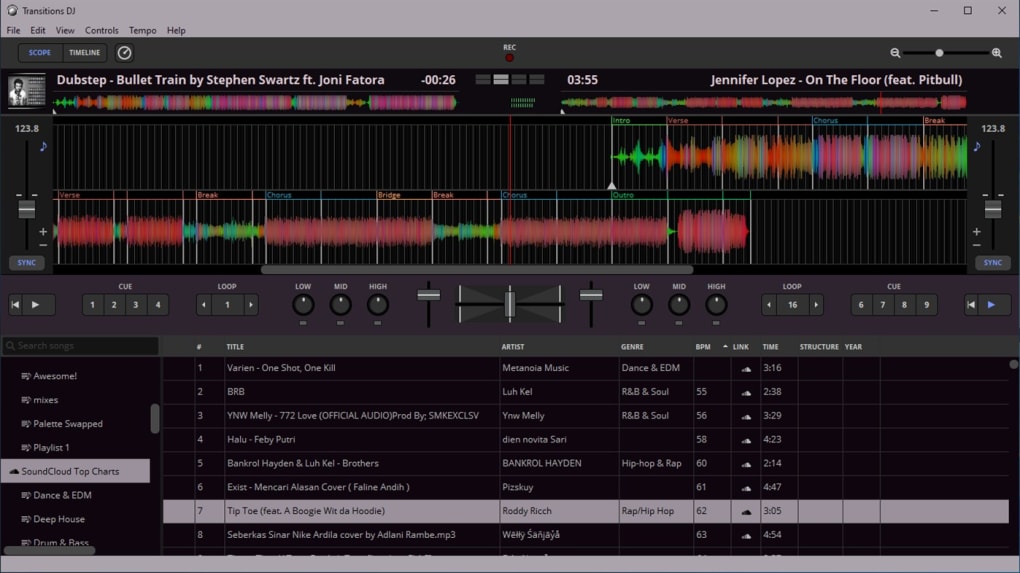
Beyond the core functionalities, Transitions DJ offers several advanced features that elevate the mixing experience. The software incorporates a free, crowd-sourced database of song structures, providing valuable information on beats, bars, and phrases. This feature can significantly aid DJs in identifying ideal transition points and crafting more sophisticated mixes. Understanding the underlying structure of a song allows for more creative and nuanced transitions, pushing the boundaries of conventional mixing techniques. The access to this database is a significant advantage, giving users valuable insights that would otherwise require extensive analysis and musical expertise.
Moreover, Transitions DJ provides a range of sound effects to further enhance creativity and add personality to mixes. These effects can be used subtly to blend tracks together or more aggressively to create unique soundscapes and dynamic transitions. This feature allows DJs to personalize their sets and express their individual styles, distinguishing their mixes from others. The incorporation of sound effects enhances the overall creative potential of the software, offering a wider range of possibilities for musical expression.
Preparing Tracks for Seamless Transitions: A DJ’s Perspective
Effective DJing relies heavily on track preparation. Before a performance, DJs need to meticulously analyze and prepare their tracks to ensure smooth transitions. This involves several key steps:
- Tempo Matching: One of the most crucial aspects of track preparation is matching the tempo of the tracks to be mixed. Transitions DJ simplifies this process by providing tools to analyze and adjust the tempo of tracks to ensure they align seamlessly. Differences in tempo can lead to jarring transitions that disrupt the musical flow.
-
Beatmatching: Beyond tempo, precise beatmatching is essential for harmonious transitions. Transitions DJ helps users ensure the beats of the tracks align, preventing phasing or clashing rhythmic elements. Inaccurate beatmatching can result in an unpleasant and unprofessional listening experience.
-
Bass Cut Mixing: A critical technique for preventing phasing and clipping is bass cut mixing. This technique involves gradually fading in the bass of the incoming track while fading out the bass of the outgoing track. This prevents the low frequencies from clashing, ensuring a smoother and more powerful sound. Transitions DJ’s intuitive interface facilitates this process.
-
Phrase Matching: Matching musical phrases between tracks provides a much more organic and pleasing transition. The software, with its access to the crowd-sourced song structure database, can significantly aid in this process, highlighting suitable points for blending tracks together.
Transitions DJ vs. Competitor Software
While Transitions DJ offers a comprehensive suite of features, it’s important to compare it with other popular DJ software options available in the market. Several competitors, such as VirtualDJ, djay Pro, and DJ Mixer Express, also provide robust mixing capabilities. However, Transitions DJ’s unique strengths lie in its user-friendly interface, integrated song structure database, and focus on simplifying the mixing process, making it an appealing choice, particularly for beginners or DJs who prefer a more streamlined workflow.
The choice between different DJ software packages often depends on individual preferences and specific needs. Some DJs may prefer the advanced features and extensive customization options offered by professional-grade software like djay Pro, while others might prioritize the ease of use and intuitive design of Transitions DJ. Careful consideration of the individual requirements and a comparison of features and functionality are crucial in selecting the most suitable software.
Conclusion: Transitions DJ – A Worthy Contender in the DJ Software Arena
Transitions DJ emerges as a compelling option in the competitive landscape of DJ software. Its user-friendly interface, comprehensive set of features, and integrated song structure database make it accessible to both novice and experienced DJs. While some professional DJs might prefer software with more advanced features or extensive customization, Transitions DJ excels in its balance between user-friendliness and functionality. The ease of use and intuitive design make it a particularly attractive option for aspiring DJs or those seeking a straightforward yet effective mixing solution. Its accessibility and powerful features make it a valuable tool for anyone looking to mix music with ease and professionalism. Its crowd-sourced database provides a unique advantage, making it a strong contender in the ever-evolving world of DJ software.
File Information
- License: “Free”
- Version: “1.0”
- Latest update: “July 15, 2022”
- Platform: “Windows”
- OS: “Windows 10”
- Language: “English”
- Downloads: “15.1K”


