
This article delves into the capabilities and applications of a browser extension designed to manipulate video audio. This tool allows users to transpose pitch, adjust playback speed, and loop specific sections of audio within online videos, enhancing learning, creative endeavors, and entertainment. We will explore its features, uses, and limitations.
Key Features and Functionality
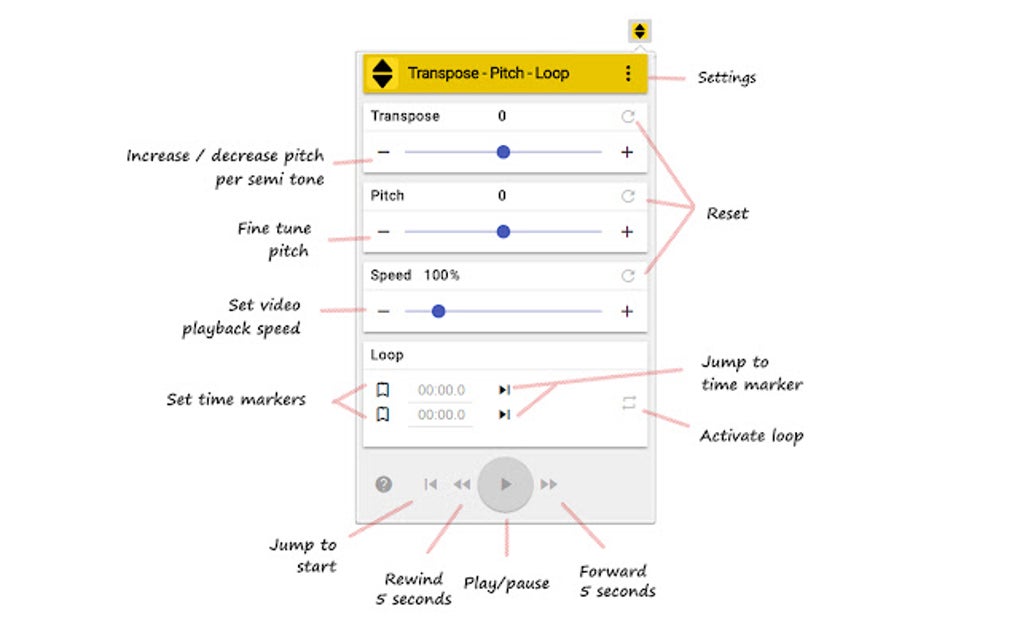
The core functionality revolves around three key audio manipulations: pitch transposition, speed adjustment, and looping. Let’s examine each:
Pitch Transposition: This feature allows users to change the pitch of the audio without altering the playback speed. This is invaluable for musicians, students learning music theory, or anyone who needs to analyze a melody in different keys. By shifting the pitch up or down, users can easily identify intervals, chords, and harmonic structures. The intuitive interface makes it simple to experiment with different tonal variations, facilitating a deeper understanding of musical composition.
Speed Adjustment: Beyond simple playback speed changes, this feature offers granular control over the tempo of the audio. Slowing down the audio without affecting the pitch can significantly improve comprehension and allow for detailed analysis, especially beneficial for learning complex musical passages or understanding nuanced vocal performances. Conversely, speeding up audio can help users quickly scan through large amounts of content or isolate critical segments. The precise control offered ensures that users can find the ideal speed for their needs.
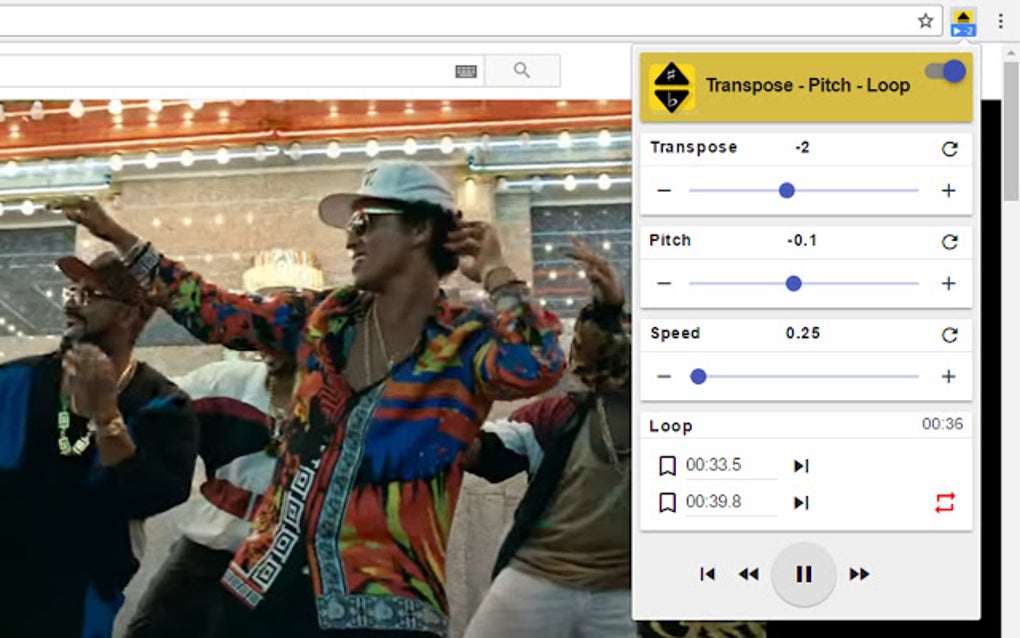
Looping: The looping function allows users to repeat a selected section of the audio. This feature is vital for focused learning and practice. Musicians can repeatedly play challenging sections until mastery is achieved, while students can listen repeatedly to crucial segments of lectures or tutorials for better comprehension. This focused repetition is a powerful tool for memorization and enhanced understanding.
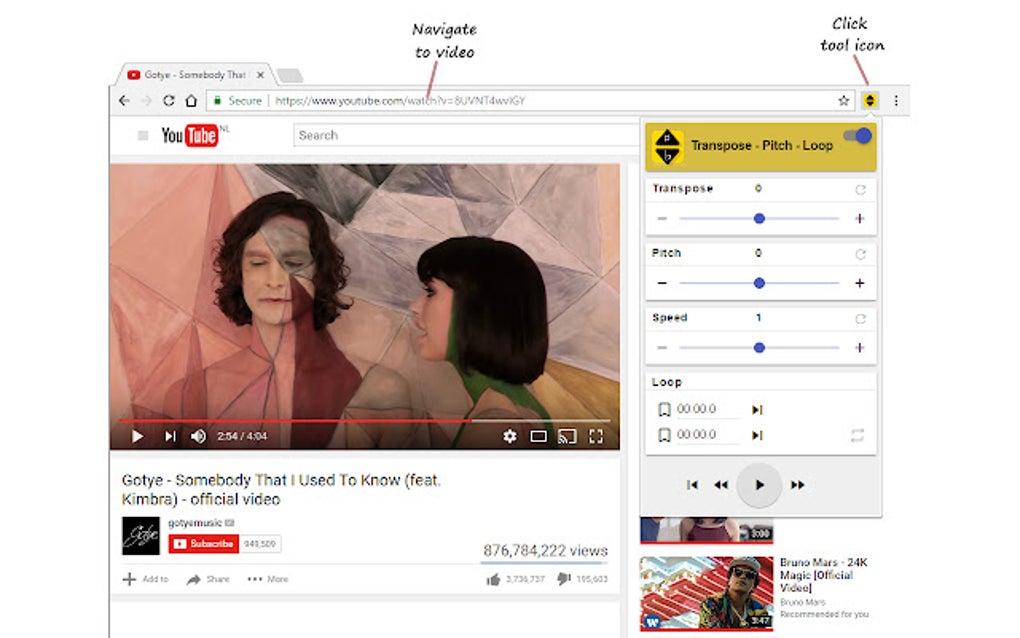
The extension operates directly within the browser, requiring no downloads or installations beyond the initial addition of the extension itself. This makes it exceptionally user-friendly and accessible to users with varying levels of technical expertise. The online processing ensures that the user’s computer resources remain unaffected.
Practical Applications and Use Cases
The versatility of this extension extends across various fields. Its primary applications lie in music education, audio analysis, and content creation:
Music Education: For musicians and music students, this tool offers unparalleled learning opportunities. Transposing melodies allows for in-depth analysis of harmonic structures and chord progressions. Adjusting the playback speed enables slower practice of challenging passages, facilitating better technique development and memorization. The loop function empowers targeted practice on difficult phrases, accelerating the learning process.
Audio Analysis: Beyond music, the audio manipulation capabilities are valuable for audio engineers, linguists, and speech therapists. Slowing down speech samples enhances clarity and comprehension, making it useful for analysis of accents, speech patterns, or audio quality issues. Similarly, looping specific segments of recorded dialogue or audio commentary allows for focused examination of inflection, emphasis, and vocal nuances.
Content Creation: The ability to manipulate audio provides creative content creators with additional flexibility. They can adjust the pace and tone of their own videos, enhance their creative projects, or use pitch alteration to create unique vocal effects. Looping can be used to craft compelling musical arrangements or accentuate specific audio cues for dramatic impact.
Accessibility: The features of this extension can significantly enhance the accessibility of online video content for individuals with specific learning differences or disabilities. Adjusting playback speed can help those who struggle with rapid speech comprehension or rapid changes in musical tempo. Likewise, looping allows for focused review of information, ensuring better understanding and retention.
Technical Aspects and Limitations
The extension’s ease of use masks its underlying technical sophistication. It utilizes real-time audio processing techniques to perform the pitch transposition, speed adjustment, and looping functions seamlessly within the browser environment. This means that no local processing is required, minimizing the load on the user’s computer.
However, some limitations exist:
Online Dependency: The reliance on online processing introduces a dependence on internet connectivity. Without a stable internet connection, the functionality of the extension is severely compromised.
Resource Intensive Videos: While the extension is generally efficient, extremely high-resolution or long videos may experience slight latency or delays due to the real-time audio processing.
Compatibility: While designed to work with a wide range of video platforms, specific compatibility issues may arise with certain browsers or video players. Although generally compatible with YouTube, full compatibility across all platforms cannot be guaranteed.
Audio Quality: While the extension strives for minimal audio quality degradation, some minor artifacts or distortions might be noticeable with extreme pitch changes or speed adjustments. This is a common limitation of real-time audio processing.
Comparison with Similar Tools
While several other applications and extensions offer similar functionality, this specific extension holds certain advantages. Many standalone audio editors require downloads and installations, consuming significant disk space and computer resources. Moreover, they often lack the seamless integration with online video platforms that this extension offers. Other online tools may lack the same level of control over pitch and speed adjustments, or they might offer a less intuitive user interface.
This browser extension simplifies the process by operating directly within the user’s preferred browser, providing convenient access to video audio manipulation without requiring additional software. The user-friendly interface and focus on simplicity make it accessible to a wider range of users.
Conclusion
This browser extension provides a valuable and accessible tool for manipulating the audio of online videos. Its intuitive interface, powerful features, and online processing make it ideal for a diverse range of users, from musicians and students to content creators and those seeking enhanced video accessibility. While minor limitations exist, such as online dependency and potential resource consumption for large files, the overall benefits of its ease of use and powerful capabilities outweigh the drawbacks. Its functionality serves as a versatile tool for enriching learning, enhancing creative projects, and providing greater accessibility to online video content.
File Information
- License: “Free”
- Version: “5.1.7”
- Latest update: “May 10, 2024”
- Platform: “chrome”
- Downloads: “2.3K”


