
TreeDBNotes is a free, user-friendly personal database application designed for Windows operating systems. This software offers a straightforward approach to database management, eliminating the need for complex coding languages like MySQL. Its intuitive, tree-structured interface, combined with built-in word processing capabilities, password protection, and encryption, makes it a compelling option for individuals seeking a simple yet effective solution for organizing various types of data. This review delves into the features, functionality, pros, cons, and overall usability of TreeDBNotes, providing a comprehensive assessment of its strengths and limitations.
Key Features and Functionality
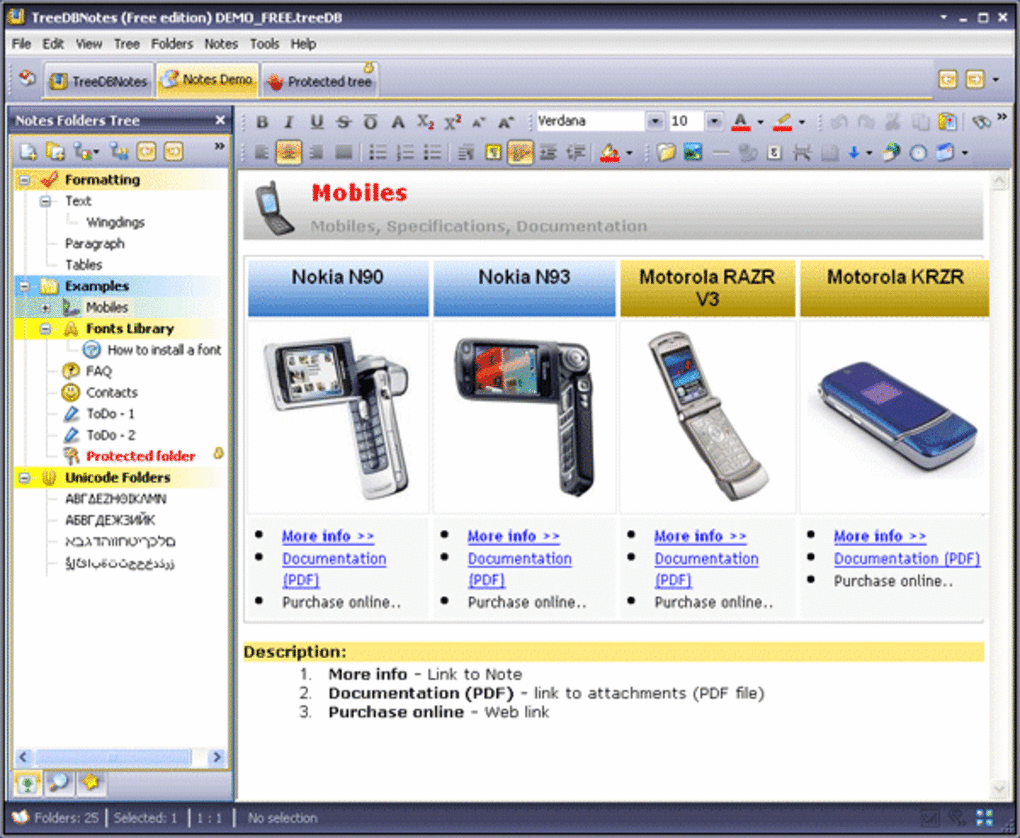
TreeDBNotes stands out for its ease of use and its ability to handle various data types. Its core functionality revolves around its tree-structured organization, allowing users to create hierarchical databases, mirroring a file system structure but with added functionality. This approach makes navigation and organization incredibly intuitive, particularly for users unfamiliar with traditional database management systems. Beyond the core structure, TreeDBNotes boasts several notable features:
-
Integrated Word Processor: Unlike many simple database applications, TreeDBNotes incorporates a built-in word processor, allowing users to directly create and edit documents within the database. This eliminates the need for switching between applications, streamlining the workflow for tasks involving note-taking, report writing, or other text-based activities directly linked to database entries.
-
Import/Export Capabilities: The program supports a wide range of file formats, enabling users to import data from various sources. This includes common formats like TXT, RTF, HTML, Word documents (.doc, .docx), and Excel spreadsheets (.xls, .xlsx). Furthermore, it allows for exporting data in various formats, facilitating data sharing and transfer to other applications or systems. This versatility ensures compatibility with existing files and workflows.
-
Search and Replace Functionality: TreeDBNotes includes a robust search and replace engine, enabling efficient searching for specific content within the database. This is particularly valuable for managing large databases, allowing users to quickly locate and retrieve information, edit specific entries, or delete unwanted content. The integrated search simplifies the process of managing and maintaining large volumes of stored data.
-
Password Protection and Encryption: Security is paramount, and TreeDBNotes addresses this with built-in password protection and encryption features. Users can secure their entire database with a password, preventing unauthorized access to sensitive information. This encryption layer provides an added layer of protection for confidential data, making it a suitable choice for storing sensitive information like passwords, financial details, or personal notes.
-
Multimedia Limitations: While versatile in many respects, TreeDBNotes exhibits limitations when dealing with multimedia files. It’s primarily optimized for text-based data, documents, images, URLs, and contact details. Its capabilities for handling audio and video files are notably limited, making it less suitable for users seeking a comprehensive multimedia storage solution.
User Interface and Experience
The user interface of TreeDBNotes is straightforward and intuitive, contributing significantly to its ease of use. The tree-structured view provides a clear visual representation of the database hierarchy, simplifying navigation and organization. The integrated word processor is seamlessly incorporated into the main interface, making it convenient to switch between text editing and database management. This integration is a key strength, reducing the friction often associated with using multiple applications to manage related data.
The program’s simplicity is both a strength and a weakness. While its ease of use is advantageous for novice users, experienced database managers might find it lacking in advanced features and customization options. The straightforward design is deliberately minimalist, focusing on core functionality without unnecessary complexity. However, this minimalism might limit the flexibility and power for users with more complex database needs.
Pros and Cons of TreeDBNotes
Pros:
-
Ease of Use: The intuitive interface and simple design make TreeDBNotes accessible even for users with limited technical expertise. The learning curve is remarkably low, allowing users to quickly become productive with the application.
-
Free and Open Source: The free-to-use nature of TreeDBNotes makes it an attractive option for users on a budget or those wanting to test its features before committing to a paid solution.
-
Versatile Data Handling: The program supports a wide range of data types, from simple text notes to complex documents and spreadsheets, catering to a variety of organizational needs.
-
Integrated Features: The integration of a word processor, search engine, and password protection within a single application simplifies workflows and reduces the need for external tools.
-
Reliable and Stable: TreeDBNotes has a history of reliable performance, minimizing disruptions and ensuring data integrity. User reviews generally indicate a stable and reliable application experience.
Cons:
-
Multimedia Limitations: The limited support for multimedia files is a significant drawback for users needing to manage audio, video, or other large multimedia assets.
-
Lack of Advanced Features: Compared to more sophisticated database management systems, TreeDBNotes lacks advanced features such as relational database capabilities, complex query languages, or robust reporting tools.
-
Limited Customization: The program offers limited customization options. Users cannot extensively modify the interface or add custom fields or functionalities.
-
No Cloud Integration: TreeDBNotes lacks cloud integration, hindering collaborative work and data backup capabilities. This is a significant limitation in today’s interconnected digital landscape.
- Outdated Last Update: The last update of the software was in November 2015, which suggests limited ongoing development and potential compatibility issues with modern operating systems.
Comparison with Alternative Applications
Several alternative applications offer similar functionalities, but with different strengths and weaknesses. Treepad, for instance, provides a more advanced tree-structured note-taking and organizational system but comes with a price tag. Wikidpad offers wiki-style linking and collaborative editing, but may have a steeper learning curve. Other applications, such as CintaNotes and CherryTree, provide niche features catering to specific note-taking styles or technical users. The choice depends on the specific needs and priorities of the user.
Conclusion
TreeDBNotes is a valuable tool for individuals seeking a free, easy-to-use personal database application for managing text-based data, documents, and simple multimedia. Its intuitive interface, integrated features, and straightforward approach make it an excellent choice for novice users or those needing a simple solution for personal organization. However, its limitations regarding multimedia support, advanced features, and lack of cloud integration restrict its usefulness for users with more complex requirements. Users should carefully assess their specific needs and priorities before deciding whether TreeDBNotes aligns with their workflow and expectations. While it’s a powerful tool for its intended purpose, it’s not a one-size-fits-all solution for all database management tasks.
File Information
- License: “Free”
- Latest update: “November 17, 2015”
- Platform: “Windows”
- OS: “Windows XP”
- Language: “English”
- Downloads: “10.2K”
- Size: “9.27 MB”


