
In today’s digital age, managing disk space efficiently is more critical than ever, whether you’re a casual computer user struggling with a cluttered hard drive or an IT professional overseeing vast server environments. The relentless accumulation of files, applications, and system data can quickly lead to performance bottlenecks, slow loading times, and the dreaded “disk full” error. This is where specialized software like TreeSize Professional steps in, offering a powerful, intuitive, and comprehensive solution to analyze, visualize, and manage disk usage across local drives, network shares, and even cloud storage. Developed by JAM Software GmbH, TreeSize Professional has established itself as a go-to utility for anyone looking to gain deep insights into their storage landscape and take control of their data.
Since its introduction to the market, TreeSize Professional has garnered significant attention, becoming a popular choice within the category of software utilities, specifically for disk analysis. Its ability to provide granular details about what’s consuming space, coupled with its robust feature set for identification and remediation, makes it an indispensable tool. This article will delve into the multifaceted capabilities of TreeSize Professional, exploring its core functions, user experience, performance benchmarks, and addressing both the glowing praises and the critical feedback from its user base. We will also examine how this software helps users worldwide, from individual enthusiasts in the United Kingdom to professionals in Greece and the Russian Federation, in maintaining optimized storage environments.
What is TreeSize Professional? An Overview
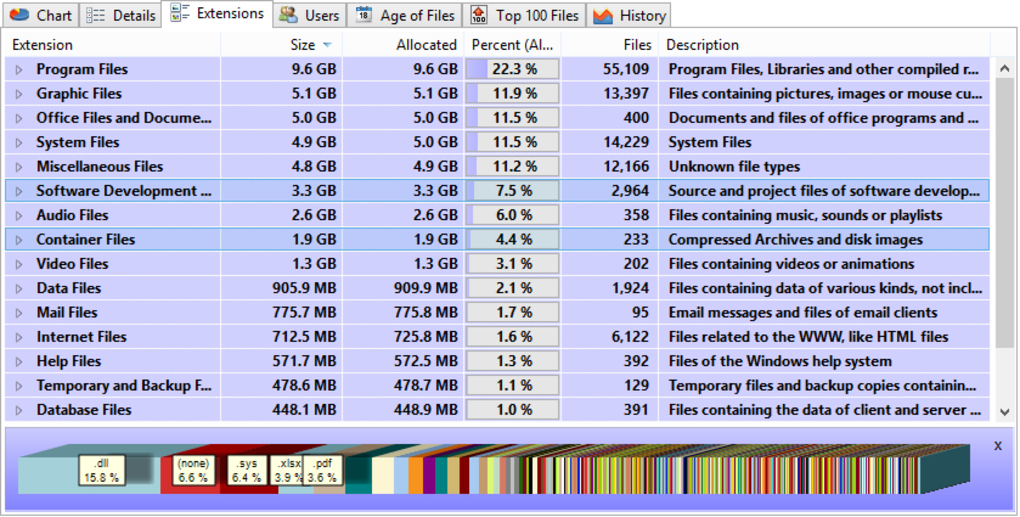
At its heart, TreeSize Professional is a powerful and flexible hard disk space manager designed for Windows operating systems (supporting versions from Windows XP up to the latest releases like Windows 11). Its primary function is to help users quickly identify which folders and files are occupying the most space on their drives, thus facilitating informed decisions about data management and cleanup. Far beyond a simple file explorer, TreeSize Professional employs advanced scanning techniques to present a detailed, hierarchical view of disk usage, enabling users to drill down into folders and understand their contents at a glance.
The software’s development by JAM Software GmbH, a company known for its focus on utility software, underscores its commitment to robust functionality and user-centric design. It operates as a trial version, allowing prospective users to explore its capabilities before committing to a purchase. This approach aligns with the common practice of offering a taste of premium features to demonstrate value. The history of TreeSize Professional, with its first entry into the PhanMemFree catalog in 2006, highlights its long-standing presence and evolution in the software utilities landscape. Over the years, it has accumulated a significant number of downloads and continues to see active installations, a testament to its enduring relevance and utility.
One of the standout characteristics of TreeSize Professional is its lightweight footprint. Despite its extensive capabilities, it requires less storage space compared to many other programs in the software utilities category. This efficiency ensures that the application itself doesn’t become a burden on the very storage it aims to manage. Furthermore, its availability in multiple languages, including English and German, broadens its accessibility to a global audience, reflecting JAM Software’s understanding of diverse user needs. The consistent updates, with the software version frequently being refined, demonstrate a continuous effort to enhance features, improve performance, and address user feedback, ensuring TreeSize Professional remains a cutting-edge solution for disk space management.
Core Features and Capabilities: A Deep Dive into Disk Management
TreeSize Professional distinguishes itself through a rich array of features that go beyond basic disk scanning. It’s designed to provide a panoramic view of your storage, coupled with the tools to act on that information.
Granular Disk Analysis and Visualization
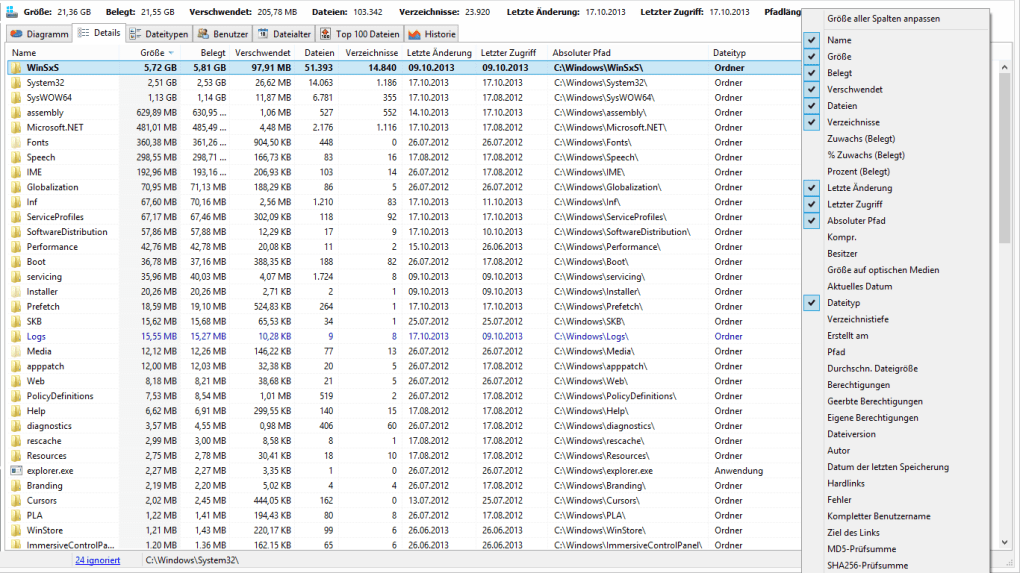
The cornerstone of TreeSize Professional’s utility lies in its unparalleled ability to dissect disk usage with remarkable precision. When you initiate a scan, the software delves deep into your chosen drives, folders, or even entire servers and networks, extracting a wealth of information. This includes not just the size of files and folders, but also the allocated space (the actual space reserved on the disk, which might differ from the logical size due to cluster allocation), and critically, the wasted space. Understanding wasted space is crucial for optimizing storage, as it highlights inefficient cluster usage on traditional hard drives.
Beyond raw numbers, TreeSize Professional provides the number of files within each directory, the last access date, the file owner, and permissions. For NTFS-formatted drives, it even reports the NTFS compression rate, offering insights into potential savings through compression. This level of detail empowers users to make informed decisions, such as identifying old, forgotten files that haven’t been accessed in years, or pinpointing folders with excessive permissions that could pose security risks.
Perhaps one of the most celebrated features is its sophisticated data visualization. TreeSize Professional doesn’t just present tables of numbers; it transforms complex data into easily digestible formats, notably through its 3D charts. These dynamic visualizations allow users to intuitively grasp the distribution of storage space, making it simple to spot large directories or unexpected consumption patterns at a glance. The visual representation dramatically cuts down the time required to interpret scan results, making the process of identifying space hogs almost instantaneous. This blend of detailed data and intuitive presentation sets TreeSize Professional apart, catering to both analytical and visual learners.
Powerful Search and Cleanup Utilities
Identifying where disk space is being consumed is only half the battle; the other half is taking action. TreeSize Professional equips users with powerful search functionalities that are highly customizable and extremely efficient. It can scour your drives, entire servers, or even the whole network for specific types of files that are often candidates for cleanup. This includes:
- Old Files: Files that haven’t been accessed or modified in a long time, often indicating forgotten data that may no longer be needed.
- Big Files: Identifying the largest files on your system, which are prime targets for archiving, moving to external storage, or deletion if redundant.
- Temporary Files: Remnants of software installations, system operations, or browsing sessions that accumulate over time and offer easy targets for recovery.
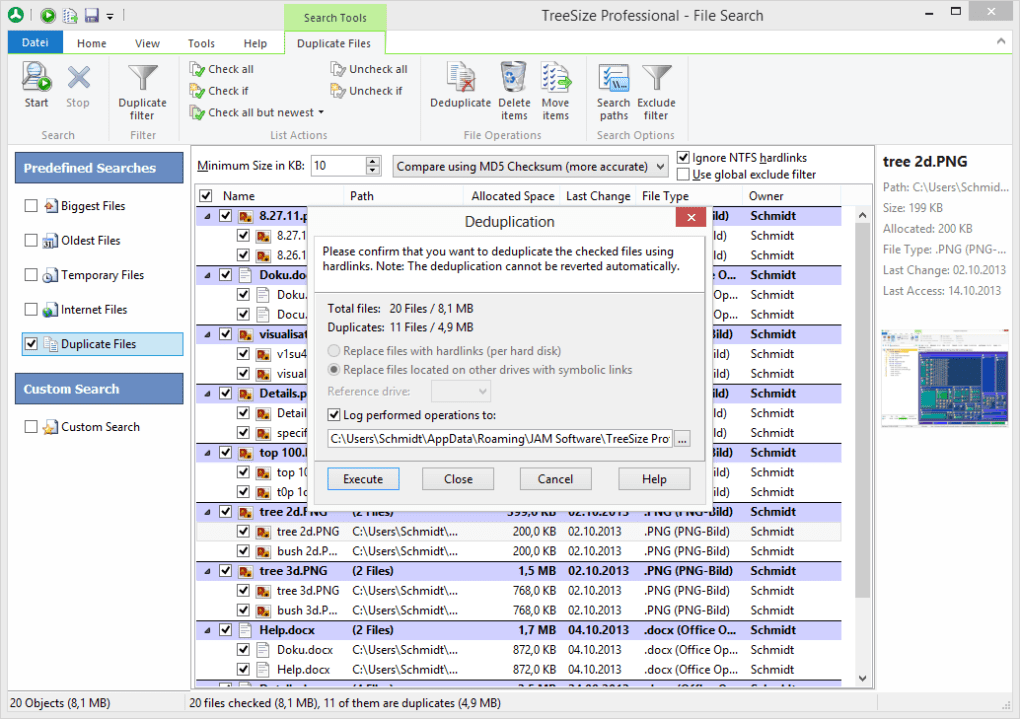
- Duplicate Files: A notorious cause of wasted space, especially in environments with frequent backups or multiple copies of documents and media. TreeSize Professional’s duplicate file finder is a highly praised tool, capable of locating identical files even if they have different names, across various locations. As one user aptly noted, it helped eliminate “how many duplicates… present on the first backup,” which is a common scenario.
Once the search results are presented, TreeSize Professional doesn’t leave you stranded. The application provides direct options to move, delete, or export these files. This integrated approach means you can go from identification to remediation within the same interface, streamlining the cleanup process. For instance, you could search for all files older than two years and larger than 100MB, then review the list and archive or delete them directly, recovering significant megabytes or even gigabytes of disk space. This actionable intelligence is what makes TreeSize Professional an invaluable utility for proactive disk management.
Comprehensive Reporting and Integration
The ability to generate detailed reports and integrate seamlessly into the Windows environment further enhances TreeSize Professional’s utility. For professionals who need to document disk usage, present findings to management, or track changes over time, the reporting features are indispensable. Users can print detailed reports directly from the application or export the collected data to various formats, including Excel, HTML, XML, or a plain text file. This flexibility ensures that the information can be easily shared, analyzed further in other applications, or integrated into existing IT documentation systems. The export functionality is particularly useful for creating baseline reports and comparing them against future scans to monitor storage trends.
Beyond formal reporting, TreeSize Professional boasts excellent integration into the Windows operating system. It can be started directly from the context menu of any folder or drive, a feature that significantly improves workflow. This means you don’t have to launch the application separately and then navigate to the desired location; a simple right-click on a drive or folder offers the “TreeSize Professional” option, immediately initiating a scan of that specific target. This convenience is a small but significant detail that exemplifies the software’s user-friendly design philosophy.
Furthermore, the application supports scheduled scans, allowing administrators and power users to automate the process of monitoring disk space. This is particularly beneficial for servers or shared network drives where continuous oversight is required. Unicode support ensures that file and folder names in any language are correctly displayed and processed, reflecting its global applicability. The combination of multi-threaded operation and efficient algorithms contributes to its reputation for speed, completing scans much faster than many comparable tools, even on large volumes of data.
Performance and User Experience: Speed, Interface, and Efficiency
The performance and user experience of a disk utility are paramount, as users often turn to such tools when faced with slow systems or frustrating storage limitations. TreeSize Professional consistently receives high marks in these areas, primarily due to its emphasis on speed, a clean interface, and efficient operation.
The feedback from users often highlights the software’s exceptional speed. Phrases like “FAST? No, faster than FAST! SUPER FAST” from one reviewer are common, indicating that TreeSize Professional lives up to its promise of rapid scanning. This performance is largely attributed to its multi-threaded architecture, which allows it to leverage modern multi-core processors to scan multiple parts of a disk or multiple drives simultaneously. For users dealing with terabytes of data or vast network shares, this speed translates directly into significant time savings and a less disruptive analysis process. Older, slower utilities could take hours to scan large volumes, whereas TreeSize Professional aims to complete the task in minutes, providing near real-time insights.
The user interface of TreeSize Professional is another strong point, often described as intuitive and Explorer-like. This design choice means that anyone familiar with Windows File Explorer will find the application immediately accessible. The hierarchical tree view, similar to that in Explorer, makes navigating through directories and understanding their relationships straightforward. The inclusion of 3D charts adds a visual layer that simplifies complex data, making it easier for users to identify patterns and anomalies quickly. This blend of familiarity and powerful visualization reduces the learning curve and enhances overall usability. Users appreciate how “unintrusive” the program is, noting that it “never slows down anything” in the background, further solidifying its reputation as a well-engineered utility.
The efficiency of TreeSize Professional extends to its system resource usage. It’s a “light program that requires less storage than many programs in the category Software utilities,” and it imposes a “light memory load on the operating system.” This means that while it’s performing intensive disk analysis, it doesn’t bog down your computer or interfere with other running applications. This characteristic is particularly important for users who need to run disk scans during regular work hours without impacting productivity. The seamless integration into the Windows subsystem, including the “right-click tree options,” is a testament to its well-thought-out design, making it feel like an extension of the operating system itself rather than a standalone, heavy application.
Navigating the User Experience: Pros, Cons, and Licensing Considerations
While TreeSize Professional is widely lauded for its technical prowess and usability, a balanced perspective requires addressing both its strengths and any potential drawbacks, particularly those related to its commercial model. User reviews on PhanMemFree.org offer a candid look at these aspects.
On the positive side, the sentiment is overwhelmingly strong. Users consistently praise its ability to serve as an excellent “organizational tool,” helping individuals and businesses “keep not only my files in perfect order but, my operating system as well.” Its utility for finding and eliminating duplicate files is frequently highlighted, with one user detailing how it helped clean up a large collection of JPEGs and GIF files during backup. The “Fast to load. Fast to scan.” nature, combined with a “light memory load,” are recurring benefits. IT professionals, like Senior Solution Architect Inaki Simon, commend its “Full storage coverage” and “Export capabilities,” underscoring its value in complex enterprise environments for “providing Drive/Folder/File analysis.” The deep insights into “ownership, access and modification date-time as well as size information” are crucial for auditing and compliance.
However, a significant concern emerged from one detailed anonymous review regarding the licensing and support policy. This user expressed frustration over being required to pay an annual fee for updates and support, even for software they had already “purchased.” The core issue revolved around the inability to re-download the installer or reactivate the software after a year without an active subscription, effectively turning a “purchased” perpetual license into an annual one for ongoing benefits. The developer’s response, citing the costs of maintaining infrastructure for old versions and aiming to keep prices low, did not fully alleviate the user’s dissatisfaction. This highlights a potential friction point for consumers accustomed to traditional perpetual licenses with indefinite reinstallation rights or free minor updates.
This particular feedback serves as a critical reminder for prospective buyers to “always read the fine print.” It emphasizes the importance of understanding the precise terms of a software license, especially concerning update policies, support duration, and reinstallation rights. For TreeSize Professional, it suggests that users should proactively keep an offline copy of their installer and product key to avoid potential re-installation hurdles if their update/support period lapses. While this licensing model might be a pragmatic choice for a “small company” like JAM Software GmbH to sustain development, it’s a point of contention for some users and warrants careful consideration before purchase.
Despite this specific licensing issue, the general consensus remains that TreeSize Professional is an “Extremely usefull tool” that helps users “maintain his disks and files in correct order.” The developers are recognized for their “outstanding talents” and for creating a product that continually “gets better” with every upgrade, demonstrating a clear vision for application design encompassing “Goal, Speed, Interface, Looks, Integration of it all.” The only other minor “con” mentioned by users is that “Some of the tools available are difficult to find for a beginner,” suggesting a potential area for interface refinement or improved in-app guidance.
Why Choose TreeSize Professional? Alternatives and Final Thoughts
In a landscape filled with disk space analyzers, TreeSize Professional manages to stand out through a combination of raw power, thoughtful design, and comprehensive features. Its robust scanning engine, multi-threaded operations, and detailed data presentation make it exceptionally efficient for anyone needing to delve deep into their storage. For system administrators, IT managers, and even advanced home users, the ability to quickly identify large files, temporary clutter, and duplicate content across local, network, and cloud drives is invaluable for maintaining system performance and ensuring optimal storage utilization.
While there are alternatives available, each with its own merits, TreeSize Professional often emerges as a preferred choice for its blend of speed and functionality.
- TreeSize Free: The free version offers basic disk space tracking and is an excellent starting point for casual users, but lacks the advanced features of its professional counterpart.
- WinDirStat: Another popular free hard disk analyzer, known for its treemap visualization. It’s effective but often perceived as slower than TreeSize Professional and less feature-rich in terms of detailed reporting or advanced search capabilities.
- SpaceSniffer: A fast disk scanning tool for Windows that also uses a treemap visualization, offering a portable option for quick analysis.
- Folder Size: Provides more detail on the size of folders, often integrating into File Explorer for convenience.
TreeSize Professional differentiates itself from these alternatives through its comprehensive suite of features: granular details on allocated/wasted space, NTFS compression rates, user and permission information, 3D charts for superior visualization, powerful search filters (old, big, temp, duplicates) with direct action capabilities (move, delete, export), extensive reporting options (Excel, HTML, XML), scheduled scans, and seamless context menu integration. These features together offer a more holistic and actionable approach to disk space management than many of its competitors.
In conclusion, TreeSize Professional represents a formidable solution for disk space analysis and management. Its ability to turn daunting storage challenges into manageable tasks makes it a highly recommended utility. Despite the important licensing considerations highlighted by some users, the core functionality, performance, and the sheer depth of information it provides are undeniable strengths. For anyone serious about optimizing their disk space, preventing storage-related performance issues, or simply understanding where their digital data resides, TreeSize Professional offers an indispensable toolkit. It empowers users to reclaim valuable disk space, improve system efficiency, and maintain a cleaner, more organized digital environment, making it a wise investment for proactive computer maintenance. Before making a purchase, users should review the most current licensing terms on JAM Software GmbH’s website to ensure it aligns with their expectations for software ownership and ongoing support.
File Information
- License: “Trial version”
- Latest update: “July 17, 2025”
- Platform: “Windows”
- OS: “Windows 7”
- Language: “English”
- Downloads: “18.4K”
- Size: “42.66 MB”


