
TreeView X is an open-source software application designed for the visualization and display of phylogenetic trees across various operating systems, including Linux, Unix, macOS, and Windows. This versatile tool offers a user-friendly interface for researchers, students, and anyone working with evolutionary relationships. This guide will provide a detailed overview of TreeView X’s functionalities, features, and its significance in the field of phylogenetics.
Understanding Phylogenetic Trees and Their Importance
Before delving into the specifics of TreeView X, it’s crucial to understand the fundamental concept of phylogenetic trees. A phylogenetic tree, also known as a cladogram or evolutionary tree, is a visual representation of the evolutionary history of a group of organisms or genes. These trees depict the relationships between different species or sequences, showing how they are related through common ancestors. The branches of the tree represent lineages, and the nodes represent the points where lineages diverge, indicating speciation or other evolutionary events. Branch lengths can represent evolutionary time or genetic distance, depending on the method used to construct the tree.
Phylogenetic trees are invaluable tools in various scientific disciplines, including biology, evolutionary biology, ecology, and genomics. They are used to:
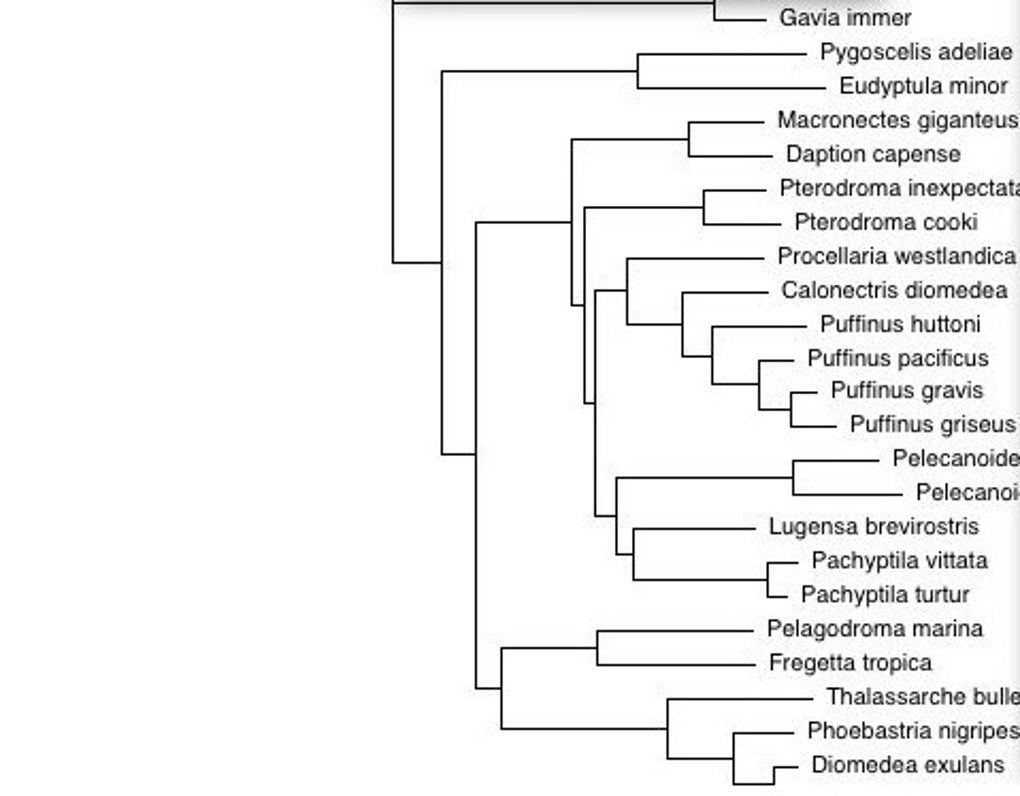
- Infer evolutionary relationships: Determine how closely related different species or genes are.
- Reconstruct evolutionary history: Trace the evolutionary path of a group of organisms or genes over time.
- Identify ancestral characteristics: Determine the traits present in common ancestors.
- Study the evolution of traits: Analyze how traits have changed over evolutionary time.
- Develop hypotheses about evolutionary processes: Investigate the factors that have driven evolutionary change.
The accurate construction and interpretation of phylogenetic trees are crucial for drawing valid conclusions about evolutionary processes and relationships. Software like TreeView X plays a vital role in this process by providing a convenient and effective way to visualize and analyze these complex datasets.
Key Features and Functionality of TreeView X
TreeView X offers a range of features designed to simplify the process of viewing and analyzing phylogenetic trees. Unlike some more complex phylogenetic software packages, TreeView X prioritizes ease of use while maintaining essential functionalities. Its core strengths lie in its ability to:
-
Support Multiple File Formats: TreeView X is compatible with both NEXUS and Newick file formats, two of the most widely used formats for storing phylogenetic tree data. This broad compatibility makes it a versatile choice for researchers using different phylogenetic software packages for tree construction. This interoperability is a significant advantage, ensuring compatibility with a wide range of upstream phylogenetic analysis tools.
-
Cross-Platform Compatibility: One of TreeView X’s most appealing aspects is its cross-platform compatibility. It runs seamlessly on Windows, Linux, Unix, and macOS, eliminating the need for platform-specific software. This makes it accessible to researchers using different operating systems and simplifies collaboration across different research groups.
-
User-Friendly Interface: TreeView X boasts an intuitive and straightforward user interface, making it easy to navigate and use, even for users with limited experience in phylogenetic analysis. The simple layout minimizes the learning curve, enabling researchers to focus on the interpretation of their data rather than struggling with complex software.
-
Efficient Tree Display: The software is optimized to display trees efficiently, even those with a substantial number of taxa. While the number of taxa is limited by available memory, TreeView X handles large trees effectively, providing a clear and easily interpretable visual representation of evolutionary relationships.
-
Drag-and-Drop Functionality: The inclusion of drag-and-drop functionality significantly streamlines the process of opening and loading tree files. Users can simply drag a tree file from their file explorer onto the TreeView X interface to open it, speeding up the workflow and simplifying data management.
-
Navigation of Multiple Trees within a File: Many phylogenetic analyses produce multiple trees reflecting different possible evolutionary scenarios (e.g., Bayesian analyses). TreeView X supports files containing multiple trees, allowing users to easily navigate between these alternative phylogenetic hypotheses using “Previous” and “Next” buttons or a “Choose Tree” command. This feature is crucial for understanding the uncertainty and variability inherent in many phylogenetic analyses.
Comparing TreeView X to Other Phylogenetic Software
TreeView X, while powerful for its simplicity, occupies a specific niche in the phylogenetic software landscape. It’s not a replacement for comprehensive phylogenetic analysis packages like RAxML, MrBayes, or PhyML, which are used to construct phylogenetic trees from sequence data. Instead, TreeView X is a visualization tool – it excels at displaying and managing already-constructed trees. It lacks the sophisticated features of these analytical packages, such as model selection, parameter estimation, and bootstrap analysis.
Its strength lies in its ease of use and broad compatibility. While other visualization tools exist, many are either more complex to use or lack the cross-platform compatibility that TreeView X provides. Therefore, TreeView X finds its place as a valuable tool for quickly and efficiently visualizing and sharing phylogenetic trees, especially in situations where the focus is on the presentation and interpretation of existing tree files rather than their initial construction.
Applications and Use Cases of TreeView X
TreeView X finds application in a wide range of scenarios involving phylogenetic data visualization:
- Teaching and Education: Its simplicity makes it an ideal tool for teaching undergraduate and graduate students about phylogenetic trees and evolutionary relationships. Its straightforward interface allows students to focus on understanding the tree’s structure and interpretation without being bogged down by complex software features.
-
Research Presentations and Publications: TreeView X is a valuable tool for creating publication-quality figures of phylogenetic trees. The generated visualizations can be easily exported for inclusion in presentations, papers, and other forms of scientific communication, enhancing the clarity and impact of the presented results.
-
Data Exploration and Preliminary Analysis: Researchers may use TreeView X to quickly visualize trees during the initial stages of a project, providing a first impression of the data and informing subsequent analysis. This allows researchers to quickly assess the quality of their data and guide further processing steps.
-
Collaboration and Data Sharing: Due to its ease of use and cross-platform compatibility, TreeView X is suitable for collaboration among researchers using different operating systems. The simplified file format support facilitates easy exchange of phylogenetic tree data between different collaborators.
-
Public Outreach and Science Communication: TreeView X can also be useful for communicating phylogenetic information to non-specialists. The visually intuitive nature of the tree representations aids in conveying complex evolutionary concepts to a broader audience.
In conclusion, TreeView X is a valuable and versatile tool for anyone working with phylogenetic trees. Its ease of use, cross-platform compatibility, and support for multiple file formats make it an essential asset for researchers, educators, and anyone seeking an efficient method for visualizing and sharing evolutionary relationships. While not a replacement for the powerful analytic tools used in phylogenetic inference, TreeView X provides a critical and user-friendly final step in the process: displaying and sharing the results effectively.
File Information
- License: “Free”
- Version: “0.5.1”
- Latest update: “July 15, 2022”
- Platform: “Windows”
- OS: “Windows 2000”
- Language: “English”
- Downloads: “36.2K”
- Size: “2.42 MB”


