
Trelby: An Overview of a Free Screenwriting Powerhouse
In the dynamic and often demanding world of film, television, and theatrical production, the foundational element remains the script. A well-crafted screenplay is the blueprint for any visual narrative, guiding directors, actors, and crew alike. However, the process of writing a professional-grade script is far from simple, requiring adherence to stringent formatting standards, meticulous organization, and a suite of tools that can streamline the creative flow rather than hinder it. For years, aspiring and professional screenwriters often faced a dilemma: invest in expensive industry-standard software or struggle with generic word processors ill-suited for the specific demands of scriptwriting.
Enter Trelby, a game-changer in the screenwriting landscape. Trelby is a remarkably powerful, free, open-source, and cross-platform screenwriting program explicitly designed to meet the rigorous requirements of creating scripts for movies, TV series, or plays. Its existence offers a compelling alternative to costly commercial solutions, democratizing access to professional-grade screenwriting tools for writers across the globe, regardless of their financial resources or operating system preferences.
The core philosophy behind Trelby is to simplify and enhance the script-writing process through an intuitive interface paired with a plethora of advanced features. This combination aims to empower writers, allowing them to focus primarily on their narrative and dialogue, rather than getting bogged down by formatting intricacies. As observed in a review from PhanMemFree, Trelby stands out for its comprehensive screenplay editor, which ensures that scripts not only adhere to correct industry-standard structures but also facilitate a smooth and efficient writing experience. This introduction to Trelby highlights its commitment to fostering creativity by removing technical barriers, making it an invaluable asset for anyone serious about screenwriting.
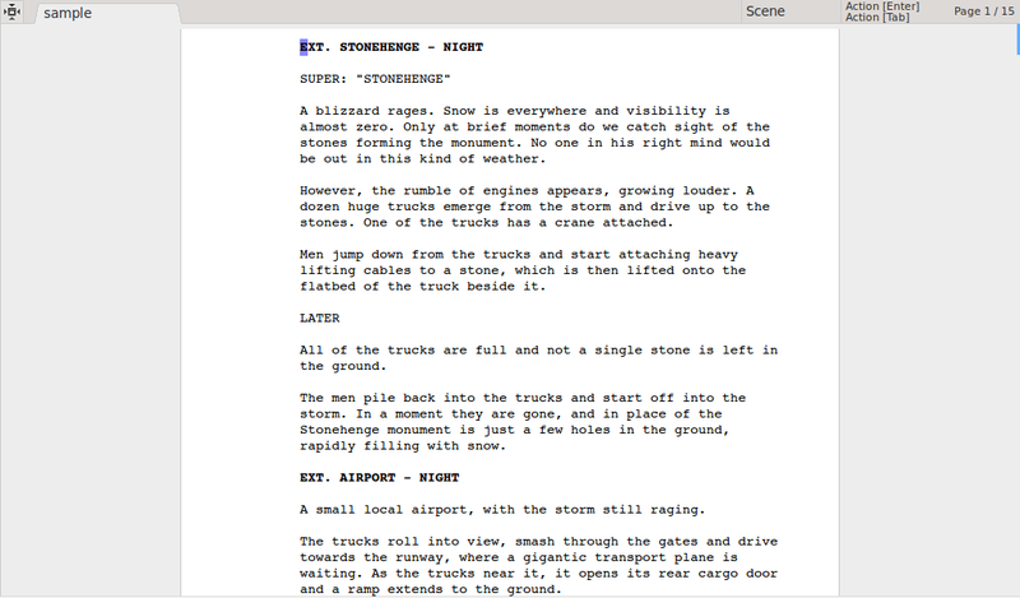
The journey of a script, from an initial idea to a polished, production-ready document, is fraught with challenges. Trelby addresses these head-on, providing an environment where writers can concentrate on character development, plot progression, and dialogue intricacies, trusting that the software will handle the often-tedious technical details of formatting. Its commitment to being free and open-source also fosters a community-driven development model, meaning the software can evolve and adapt based on real-world user feedback and contributions, further solidifying its utility and longevity in a rapidly changing media landscape. Whether you are a novice taking your first steps into screenwriting or a seasoned professional seeking a robust, no-cost alternative, Trelby presents itself as an indispensable tool, ready to transform your creative vision into a tangible, industry-standard script.
Key Features for Seamless Script Development
Trelby’s design philosophy centers on making the complex task of screenwriting more manageable and efficient. It achieves this through a carefully curated set of features that address the specific needs of writers at every stage of script development. From the moment a writer types their first character name to the final generation of a PDF, Trelby is engineered to provide support, ensuring compliance with industry norms and enhancing productivity.

Automated Formatting and Editing Tools
One of the most significant hurdles for new screenwriters, and a continuous time-sink for experienced ones, is mastering and maintaining industry-standard formatting. Screenplays adhere to very specific conventions for scene headings, character names, dialogue, parentheticals, and transitions. Deviating from these can make a script appear unprofessional and potentially get it overlooked. Trelby tackles this challenge head-on with its intelligent and automated formatting capabilities.
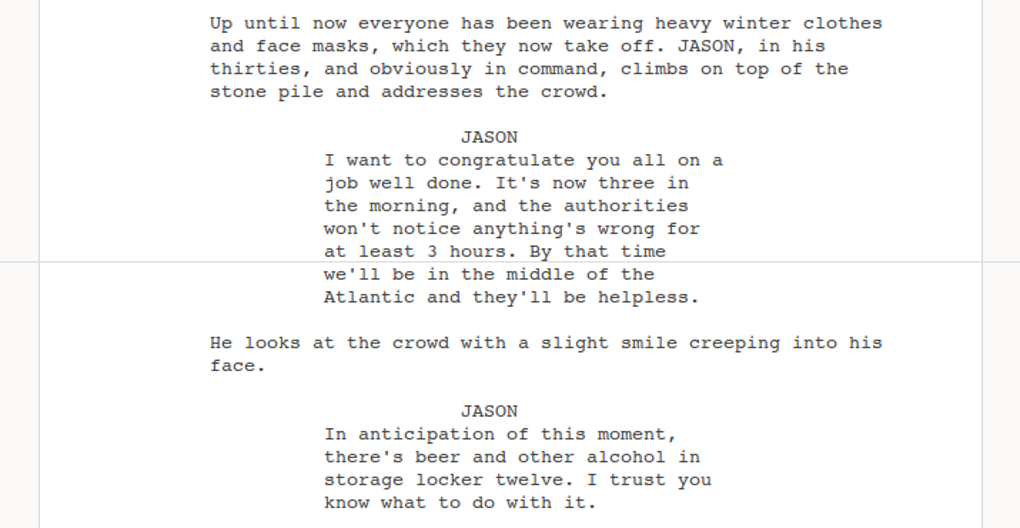
As a writer types, Trelby intuitively recognizes script elements and applies the correct formatting. For instance, typing “INT.” or “EXT.” at the beginning of a line will automatically format it as a scene heading. Similarly, after a scene heading, the program anticipates an action line, and after an action line, it often anticipates a character name, automatically centering it and capitalizing it. This predictive formatting significantly speeds up the writing process, freeing the writer from constantly adjusting margins, indents, and font styles. It ensures consistency across the entire document, which is critical for readability and adherence to submission guidelines.
Beyond automatic formatting, Trelby integrates several essential editing and proofreading tools that are crucial for refining a script:
- Pagination: Professional screenplays are paginated in a very specific way, with page numbers typically appearing in the top right corner, usually starting on page two. Trelby handles automatic pagination, ensuring that page numbers are correctly placed and updated as the script grows or is edited. This seems like a minor detail but is essential for production teams who refer to specific page numbers for scheduling and breakdown purposes.
- Auto-completion: This feature is a tremendous time-saver, particularly for recurring elements. As a writer begins to type a character name, scene heading, or transition that has been used before, Trelby suggests the full term. This not only accelerates typing but also ensures consistency in naming conventions and prevents typos in frequently used elements. Imagine having dozens of characters; auto-completion helps maintain accurate spellings throughout a 120-page script.
- Built-in Spell Checker: No script is perfect in its first draft, and grammatical or spelling errors can detract from the writer’s professional image. Trelby’s integrated spell checker actively monitors the text as it is written, highlighting potential errors. This immediate feedback loop allows writers to correct mistakes on the fly, ensuring a polished and error-free manuscript before it ever leaves their desktop. The spell checker works across various languages, enhancing its utility for a global user base.
These automated and assistive tools collectively transform the often-tedious aspects of script preparation into a smooth, almost effortless experience. They allow writers to maintain a creative flow, minimizing interruptions for technical adjustments and maximizing the time spent on storytelling.
Versatile Viewing Modes
The way a writer interacts with their text can significantly impact their focus and productivity. Trelby understands this and provides multiple viewing modes, catering to diverse preferences and stages of the writing process. This flexibility allows writers to tailor their workspace to their current task, whether it’s brainstorming, detailed drafting, or final review.
- Draft View: This mode strips away most of the visual clutter, presenting the text in a simplified, often monospaced font, focusing purely on content. It’s ideal for early drafts and rapid idea generation, where the writer wants to get thoughts down without worrying about how it will look on the page. In draft view, the emphasis is on the words and the narrative flow, unencumbered by the precise layout of a printed script.
- WYSIWYG (What You See Is What You Get) Mode: This is perhaps the most crucial view for professional scriptwriting. It displays the script exactly as it will appear when printed, complete with all formatting, margins, and pagination. WYSIWYG mode allows writers to immediately see how their dialogue fits on the page, if their scene headings are correctly formatted, and if the overall visual presentation meets industry standards. This mode is invaluable for final reviews and for making minor adjustments to improve readability and pacing, as the visual impact of a script can be as important as its content.
- Full Screen Mode: For writers who thrive on complete immersion, Full Screen mode eliminates all distractions from the desktop environment. It expands the Trelby window to fill the entire display, hiding operating system elements, other applications, and even Trelby’s own menus and toolbars. This creates a focused, minimalist writing environment, encouraging deep concentration and helping to combat writer’s block by minimizing external stimuli. It’s particularly useful during intense writing sessions where every ounce of focus is needed.
The ability to effortlessly switch between these views provides writers with the agility to adapt their workspace to their mental state and the task at hand. This adaptability ensures that Trelby supports a wide range of writing styles and maximizes concentration, whether the goal is raw output or meticulous refinement.
Comprehensive Resources: Character Database and PDF Export
Beyond the core writing and formatting tools, Trelby extends its utility with supplementary features that address other practical aspects of screenwriting, such as character development and professional output.
- Vast Character Name Database: Naming characters can be surprisingly challenging. A good character name often reflects personality, origin, or simply sounds right for the narrative. To assist writers, Trelby houses an extensive character name database, boasting over 200,000 names sourced from various countries and cultures. This invaluable resource allows writers to quickly search for and select appropriate names, adding depth and authenticity to their character roster. It saves time on external research and helps in ensuring a diverse and believable cast of characters, an essential element in compelling storytelling.
- Highly Customizable PDF Generator: The final output format for most professional screenplays is PDF. Trelby’s built-in PDF generator is not just a basic export function; it is highly customizable, offering features that cater to professional standards and security needs.
- Embedding Fonts: This ensures that the script will look exactly the same on any computer, regardless of whether the recipient has the specific fonts installed. This is critical for maintaining the intended aesthetic and readability of the script.
- Personalized Watermarks: For intellectual property protection and tracking, Trelby allows users to embed personalized watermarks into their PDFs. This could be the writer’s name, “Draft,” “For Review Only,” or specific dates. Watermarks deter unauthorized sharing and help track copies of the script, an important consideration in an industry where ideas are highly valuable.
These features, from the automated formatting to the comprehensive character database and customizable PDF export, demonstrate Trelby’s commitment to providing a holistic screenwriting solution. It anticipates the writer’s needs at every turn, offering tools that not only streamline the writing process but also enhance the professionalism and security of the final product.
Why Choose Trelby? Advantages and Comparisons
In a market saturated with various writing tools, ranging from simple text editors to highly specialized and expensive screenwriting software, Trelby carves out a unique and compelling niche. Its advantages stem primarily from its fundamental principles: being free, open-source, and cross-platform. These characteristics, combined with its robust feature set, make it an attractive option for a diverse group of writers.
The Power of Being Free and Open-Source
The most obvious advantage of Trelby is its cost – it’s completely free. This eliminates a significant barrier to entry for aspiring screenwriters, students, and independent filmmakers who may not have the budget for premium software like Final Draft (which often comes with a hefty price tag and is listed as a trial version alternative on many platforms, including PhanMemFree). The “free” aspect is not just about cost savings; it’s about accessibility and equity. It levels the playing field, allowing talent to emerge irrespective of economic background.
Beyond just being free, Trelby is open-source. This means its source code is publicly available, allowing anyone to inspect, modify, and contribute to its development. The benefits of an open-source model are manifold:
- Transparency and Security: Users can examine the code, ensuring there are no hidden malicious elements, fostering a high level of trust. PhanMemFree, for example, emphasizes its security checks, noting that Trelby is “Clean,” indicating a thorough scan for potential threats. This trust is inherent in open-source projects where the community acts as auditors.
- Community-Driven Development: Bugs are often found and fixed quickly by a global community of developers. New features can be suggested, developed, and integrated based on real user needs rather than corporate agendas. This agile development cycle ensures Trelby remains relevant and responsive to the evolving demands of screenwriters.
- Longevity and Flexibility: Open-source projects are less prone to being discontinued due to business decisions. Even if the original developer moves on, the community can continue to maintain and evolve the software. Furthermore, advanced users or organizations can customize the software to their specific workflows, offering unparalleled flexibility.
- No Vendor Lock-in: Users are not tied to a specific company or proprietary format. This freedom ensures that writers retain full control over their work and their tools.
Cross-Platform Accessibility
Trelby’s cross-platform nature is another significant advantage. While the PhanMemFree entry specifies “Trelby for Windows,” it’s important to remember that Trelby is designed to run on various operating systems, including Linux. This flexibility is crucial in today’s multi-OS environment, where writers might use different computers for different tasks or collaborate with individuals using diverse platforms. A cross-platform tool ensures seamless workflow and file compatibility, eliminating the frustration of conversion issues or being forced to use a specific OS for a particular application. This broad compatibility truly embodies the spirit of accessibility.
User Experience and Learning Curve
Despite its advanced features, Trelby is renowned for its intuitive interface. This means that new users can get up and running quickly, without having to spend hours learning complex menus or keyboard shortcuts. The design prioritizes the writing experience, keeping tools accessible but out of the way, allowing writers to focus on their craft. For those accustomed to basic word processors, the transition to Trelby is surprisingly smooth, largely due to its intelligent automation of formatting. This makes it an excellent choice for beginners, while its depth of features ensures it remains useful for seasoned professionals.
Comparison with Alternatives
While Trelby offers robust features, it’s helpful to understand its position relative to other screenwriting software.
- Against expensive commercial software (e.g., Final Draft): Trelby competes strongly on features, often offering a comparable set for core screenwriting tasks. Its primary differentiating factor is its cost-free model. While commercial software might offer more niche features for production (like budgeting integration), Trelby provides the essentials, and often more, for the actual writing process. For many writers, the return on investment for the extra features of paid software doesn’t justify the significant cost, making Trelby an incredibly compelling value proposition.
- Against other free/low-cost alternatives (e.g., KIT Scenarist, yWriter, Story Architect): The landscape of free screenwriting tools is growing. Trelby distinguishes itself through its long-standing presence, active open-source community, and a focused, streamlined approach that prioritizes pure screenwriting without unnecessary bloat. Each alternative has its strengths, but Trelby’s balance of features, ease of use, and strong community support makes it a standout choice.
In essence, choosing Trelby means opting for a powerful, reliable, and continually evolving tool that respects your budget and your freedom as a writer. It represents a commitment to open access and community-driven excellence, positioning itself as a vital resource for screenwriters worldwide.
Getting Started with Trelby: Installation and System Requirements
Embarking on your screenwriting journey with Trelby is a straightforward process, designed to get you writing as quickly as possible. The simplicity of installation and its modest system requirements ensure that a broad range of users can access this powerful tool without encountering technical hurdles.
System Requirements and Compatibility
Trelby is known for being lightweight and efficient, meaning it doesn’t demand a high-end computer to run smoothly. While the PhanMemFree listing specifically mentions “Platform: Windows” and “OS: Windows 11,” it’s important to reiterate that Trelby is a cross-platform application. This means it is also available for Linux operating systems, ensuring accessibility for users across different computing environments.
For Windows users, Trelby supports a wide range of versions, including Windows 11, indicating its ongoing compatibility with the latest operating systems. The software’s small footprint is reflected in its file size, noted as “9.56 MB” in its specifications. This minimal size means quick downloads and a negligible impact on your system’s storage, a stark contrast to some larger, more resource-intensive applications. Most modern computers, even older ones, will easily meet the processing power and RAM requirements to run Trelby effectively, providing a smooth writing experience without lag or crashes.
Downloading and Installation
Downloading Trelby is a simple process. As highlighted by PhanMemFree, it’s available as a “Free Download for Windows” (or PC generally). Users can typically find the installation package directly from the official Trelby website or through trusted software distribution platforms like PhanMemFree.org.
The installation process usually follows a standard wizard-based approach common to most desktop applications:
- Download the Installer: Locate and download the appropriate installer file for your operating system (e.g.,
Trelby-x.x.x-windows.exefor Windows). - Run the Installer: Double-click the downloaded file to initiate the installation wizard.
- Follow On-Screen Prompts: The wizard will guide you through the necessary steps, which typically include agreeing to a license agreement (the open-source GPL v2 license for Trelby), choosing an installation directory, and selecting whether to create desktop shortcuts.
- Complete Installation: Once the wizard finishes, Trelby will be installed on your system, ready for use.
The entire process is usually quick, taking just a few minutes, thanks to the small file size and streamlined installation package. The fact that it’s a direct download and installation, rather than relying on complex dependencies or cloud-based setups, makes it accessible even for users with limited technical expertise. The PhanMemFree listing indicates a version “V2.25(1)” and a “Latest update: July 11, 2024,” suggesting continuous maintenance and updates, which bodes well for new users. The statistics showing “1.2K Downloads Last month’s downloads: 159” (on PhanMemFree) demonstrate a consistent interest and user base for the application.
After installation, Trelby is ready to launch. Users can typically find it in their Start Menu (Windows) or Applications folder (Linux). Upon launching, the intuitive interface greets the user, inviting them to start their first screenplay. The minimal setup required ensures that writers can transition from installation to actual writing with virtually no friction, emphasizing Trelby’s commitment to user-friendliness and efficiency.
The Trelby Community and Future Development
The nature of Trelby as an open-source project inherently means it thrives on community engagement and collaborative development. Unlike proprietary software, where updates and features are dictated solely by a company, Trelby’s evolution is shaped by its users, developers, and enthusiasts. This collective effort not only ensures the software remains robust and relevant but also fosters a supportive ecosystem for screenwriters.
A Community-Driven Ecosystem
The open-source model empowers users to be more than just consumers; they become active participants. This means:
- Reporting Bugs and Requesting Features: Users are encouraged to report any issues they encounter or suggest new features that would enhance their workflow. This direct feedback loop is crucial for the continuous improvement of the software.
- Contributing Code: For those with programming skills, the ability to access and modify the source code allows them to contribute directly to Trelby’s development. This could involve fixing bugs, implementing new features, or optimizing existing ones. Such contributions ensure that the software is constantly refined and adapted to real-world needs.
- Providing Documentation and Support: The community also plays a vital role in creating user guides, tutorials, and offering peer-to-peer support. Forums, mailing lists, and online communities become hubs where writers can ask questions, share tips, and help each other master Trelby. This collective knowledge base is often far richer and more accessible than official support channels for commercial products.
This collaborative environment creates a sense of ownership and shared purpose. It means that Trelby is not just a tool, but a living project sustained by the passion and dedication of its users and contributors. The “Developer: Trelby” listed in the PhanMemFree specs refers to this collective entity, rather than a single corporate body.
Continuous Improvement and Future Prospects
The “Latest update: July 11, 2024” (as of the reference content) for version V2.25(1) is a testament to Trelby’s ongoing development. This regular updating cycle is critical for:
- Bug Fixes and Stability: Addressing reported bugs and improving overall software stability ensures a reliable and frustration-free writing experience.
- Feature Enhancements: New features or improvements to existing ones are regularly introduced, based on user feedback and technological advancements in the screenwriting domain.
- Compatibility: Regular updates help Trelby maintain compatibility with newer operating system versions and hardware, preventing obsolescence.
The future development of Trelby is inherently tied to the dynamism of its community. As screenwriting evolves, with new formats, collaboration tools, or storytelling techniques emerging, the open-source nature of Trelby allows it to adapt and integrate these changes. This ensures that Trelby remains a relevant and cutting-edge tool for screenwriters for years to come.
For writers considering Trelby, this active community and commitment to continuous improvement offer significant reassurance. It means that while the software is free, it is far from abandoned or stagnant. Instead, it is a vibrant project backed by a dedicated group of individuals passionate about providing accessible and powerful tools for storytelling. By choosing Trelby, writers are not just downloading a program; they are becoming part of a community dedicated to empowering creativity through open-source innovation. This collaborative spirit, combined with its robust feature set and user-friendly design, positions Trelby not just as an alternative, but as a leading choice for screenwriters seeking a powerful and supported solution without the prohibitive cost.
Conclusion
Trelby stands as a testament to the power of open-source development and the enduring need for accessible, high-quality tools in creative industries. From its inception, it has addressed a critical gap in the screenwriting software market, offering a free, cross-platform solution that does not compromise on professional functionality. As highlighted throughout this overview, Trelby provides a comprehensive suite of features tailored specifically for the nuanced demands of scriptwriting, making it an indispensable asset for writers at any stage of their career.
Its intuitive interface and automated formatting capabilities liberate writers from the tedious mechanical aspects of script preparation, allowing them to immerse themselves fully in the creative process. The intelligent pagination, auto-completion, and integrated spell checker collectively ensure that scripts not only meet industry standards but are also polished and error-free. Furthermore, Trelby’s versatile viewing modes cater to diverse writing styles, enabling focused drafting, precise layout review, and immersive full-screen sessions.
Beyond the core writing tools, Trelby extends its utility with practical resources such as its vast character name database, which significantly aids in character development. The highly customizable PDF generator, with its options for font embedding and personalized watermarks, provides professional-grade output for sharing and protecting intellectual property.
The “why choose Trelby” argument is compelling: its free and open-source nature ensures accessibility, transparency, and a community-driven development model that fosters continuous improvement. Its cross-platform compatibility further broadens its appeal, ensuring that writers can work seamlessly across different operating systems. For those seeking an alternative to expensive proprietary software, Trelby presents itself not merely as a compromise but as a robust and often superior solution, delivering exceptional value without financial burden.
As a PhanMemFree review implies, Trelby has consistently evolved since its initial release, with regular updates demonstrating an ongoing commitment to stability and feature enhancement. Its active community of users and developers is a strong indicator of its sustained relevance and future potential.
In conclusion, Trelby is more than just a piece of software; it’s an enabler of stories. By democratizing access to professional screenwriting tools, it empowers a new generation of storytellers to bring their visions to life, unhindered by financial constraints or technical complexities. For anyone with a story to tell, Trelby provides the perfect digital canvas, proving that the best tools for creativity don’t always come with a price tag. It is a powerful, reliable, and continually evolving platform that fully deserves its reputation as a leading choice for screenwriters globally.
File Information
- License: “Free”
- Version: “2.2”
- Latest update: “July 11, 2024”
- Platform: “Windows”
- OS: “Windows 11”
- Downloads: “1.3K”
- Size: “9.56 MB”


