
TTSReader is a free, versatile text-to-speech (TTS) application designed for Windows users. It offers a straightforward interface and a robust feature set, making it a valuable tool for anyone needing to convert written text into audible speech. Whether you’re reviewing documents, creating audio content, or simply want to listen to your writing, TTSReader provides a convenient solution. This comprehensive guide delves into the features, capabilities, and potential uses of TTSReader.
Understanding TTSReader’s Core Functionality
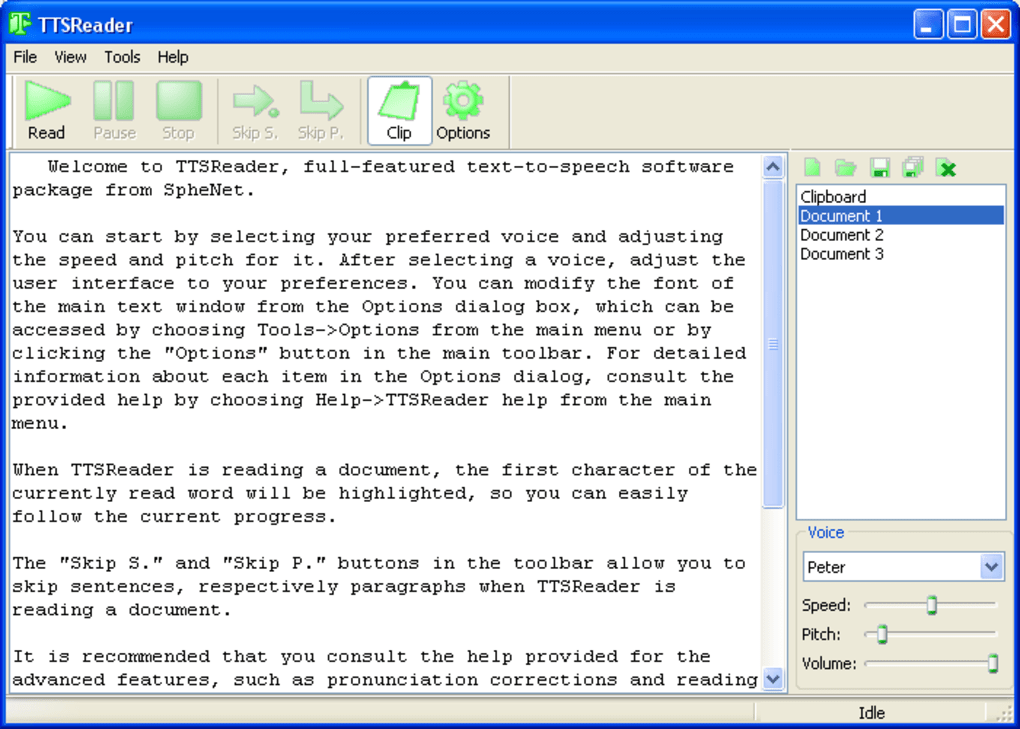
At its heart, TTSReader is a simple yet powerful text-to-speech program. Its primary function is to read aloud any text input, offering users a variety of customization options. You can paste or type text directly into the application’s text box, and TTSReader will immediately begin reading it aloud. A blue cursor highlights the currently spoken text, providing visual feedback. This real-time conversion makes it ideal for proofreading, reviewing lengthy documents, or simply listening to articles and webpages.
Beyond the basic read-aloud feature, TTSReader offers several key advantages:
-
Multiple Voice Options: TTSReader comes pre-installed with a selection of voices, allowing users to choose the tone and style that best suits their needs. Should the included voices not meet your preferences, the developer’s website offers additional voices for download, further enhancing the customization possibilities. This flexibility ensures a personalized listening experience.
-
Audio File Export: Once the text has been read, you can save the output as a WAV or MP3 file. The MP3 format is particularly recommended due to its smaller file size and broader compatibility with various devices and applications. This capability allows for easy sharing of audio files or convenient playback on mobile devices, eliminating the need for a constant connection to the computer.
-
Selective Reading: Need only a portion of the document read? TTSReader allows users to selectively read or skip sentences and paragraphs, providing granular control over the reading process. This precision is crucial for focusing on specific sections of a longer document without having to manually navigate through the text.
-
Clipboard Integration: The application includes a feature to save read segments directly to the clipboard for later use. This is especially convenient for quick retrieval of important audio snippets, eliminating the need to re-process the entire text again.
-
Voice Customization: Users can further fine-tune their auditory experience by adjusting the pitch, volume, and speed of the selected voice. This granular control allows for optimal clarity and personalized listening preferences, catering to individual needs and preferences.
Exploring the TTSReader Interface and User Experience
TTSReader boasts an intuitive and uncluttered interface, making it user-friendly for both novice and experienced users. The primary interface consists of a large text box for input, complemented by a simple set of controls for playback, voice selection, and audio export. The lack of unnecessary complexities makes the application accessible and easy to navigate, even for those unfamiliar with text-to-speech software.
The addition of a floating toolbar streamlines the user experience by making frequently used functions readily accessible. A tray icon also adds a layer of convenience, providing status updates, such as whether clipboard monitoring is active, without cluttering the main interface. These design elements focus on providing efficient and enjoyable interaction with the software.
Advanced Features and Customization Options
While TTSReader’s core functionality is straightforward, several advanced features cater to more demanding users:
-
Floating Toolbar: The inclusion of a floating toolbar ensures quick access to frequently used controls, enhancing workflow efficiency. This eliminates the need to constantly search for commands within menus, streamlining the overall process.
-
Read Clipboard Hotkey: A dedicated hotkey for reading clipboard contents adds a layer of convenience. This eliminates extra steps when dealing with text that needs to be copied from other applications.
-
Tray Icon Status: The tray icon provides informative feedback, specifically displaying whether the clipboard monitoring feature is active. This simple, yet efficient approach ensures users are always aware of the application’s status.
TTSReader: Applications and Use Cases
TTSReader’s versatility makes it a valuable tool across various applications and use cases:
-
Accessibility: For individuals with visual impairments, TTSReader provides an essential means of accessing written content. The ability to convert text to speech enables them to consume information and engage with digital content more readily.
-
Education: Students can use TTSReader to listen to their assignments, improving comprehension and making learning more engaging. The ability to selectively read specific sections aids in focused learning.
-
Productivity: Professionals can use TTSReader to review documents, emails, and reports, freeing up their eyes for other tasks. This multi-tasking capability enhances productivity and efficiency.
-
Content Creation: TTSReader can be used to create audio versions of written content, such as podcasts or audiobooks. The flexibility in voice selection and audio output options makes it well-suited for content creation.
-
Proofreading: By listening to written content, users can identify potential errors and improve the clarity of their writing. The ability to highlight text while it’s read aids in identifying and correcting issues.
-
Language Learning: Listening to texts in various voices can be beneficial for language learners. The ability to adjust speed and pitch allows for tailored learning experiences.
In conclusion, TTSReader stands out as a user-friendly and effective text-to-speech application. Its simple interface, robust features, and versatile applications make it a valuable tool for a wide range of users. Whether you are seeking a straightforward solution for reading text aloud or a more sophisticated tool for content creation and accessibility, TTSReader provides a comprehensive and accessible option. The continual development and addition of features solidify its place as a practical and useful application in the ever-evolving landscape of text-to-speech technology.
File Information
- License: “Free”
- Version: “1.30”
- Latest update: “July 20, 2021”
- Platform: “Windows”
- OS: “Windows 2000”
- Language: “English”
- Downloads: “35.5K”
- Size: “2.42 MB”


