
TubeDigger is a robust video downloading application designed to simplify the process of acquiring video content from a multitude of online sources. Its functionality extends beyond simple downloads, offering features like online video recording and audio extraction, making it a versatile tool for managing and enjoying online videos. This comprehensive guide delves into the capabilities of TubeDigger, exploring its features, advantages, and potential limitations.
Downloading Videos from Diverse Platforms
TubeDigger’s core strength lies in its ability to download videos from a wide array of platforms. Unlike many downloaders restricted to specific websites, TubeDigger boasts compatibility with numerous sources, enabling users to access content from diverse online video repositories. This broad compatibility extends to popular sites such as MusicMe, MyTV, TV3, CBC, BigFlix, and Arte7, providing users with a convenient way to obtain videos from various genres and regions. The ability to download from such a diverse range of sources eliminates the need for multiple download tools, streamlining the video acquisition process. This universality is a key feature that distinguishes TubeDigger from more specialized or limited downloaders. Further exploration into compatible sites may reveal even more possibilities, keeping the user’s options broad and flexible. The application’s consistent updates likely expand this compatibility over time, adapting to changes in online video platforms and ensuring long-term usability.
Advanced Features Beyond Simple Downloads
TubeDigger goes beyond basic download functionality, offering advanced features that enhance user experience and provide additional control over video management. Its capacity to record online videos directly adds a crucial layer of functionality, particularly useful for live streams or content not readily available for direct download. This feature eliminates the limitations of download-only tools, broadening the scope of content acquisition. Furthermore, the ability to extract audio from downloaded videos expands the application’s versatility. Users can isolate audio tracks from video files for use in podcasts, presentations, or any other application needing separate audio components. This feature demonstrates the flexibility of TubeDigger in adapting to diverse user needs and content management requirements.
Resumable Downloads and Format Conversion: Ensuring Reliability and Flexibility
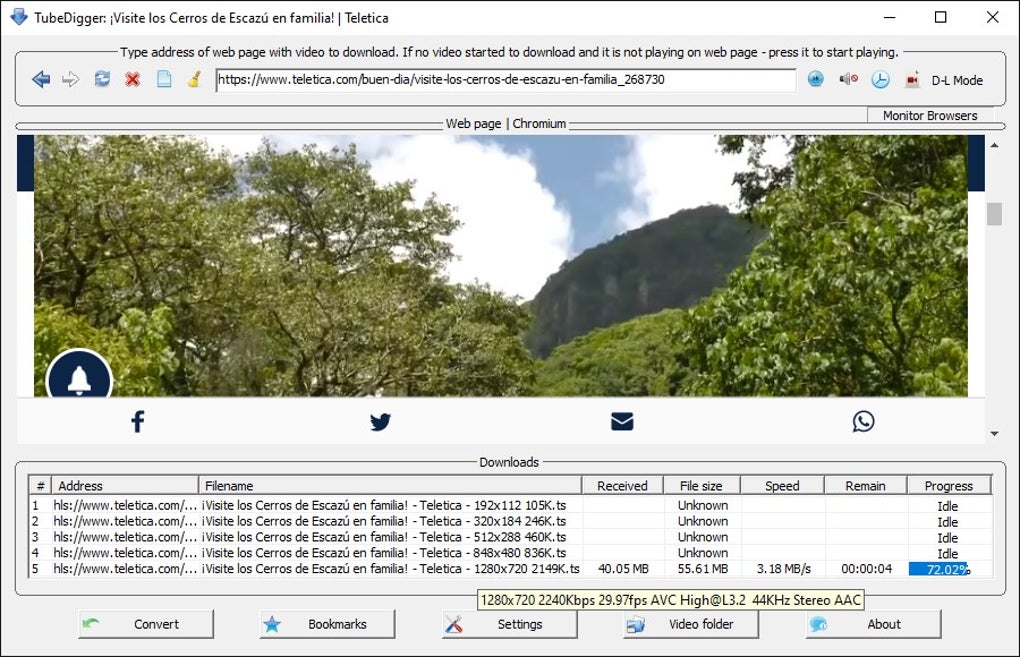
One of TubeDigger’s most valuable features is its ability to resume interrupted downloads. Network interruptions, system crashes, or other unforeseen events can disrupt downloads, leading to wasted time and frustration. TubeDigger’s resumable download functionality mitigates this problem, allowing users to seamlessly continue downloads from where they left off, thus saving significant time and effort. This feature adds a layer of reliability, critical for managing large video files which may take considerable time to download. Adding to this convenience, TubeDigger also offers video format conversion. This enables users to convert downloaded videos into a range of formats optimized for different devices and players, ensuring compatibility across various platforms. Whether it’s converting for mobile devices, older media players, or specific software needs, this feature adds a significant degree of flexibility to video management. The option to convert to mobile-optimized formats is particularly crucial in the increasingly mobile-centric world, ensuring users can enjoy their downloaded content wherever they are.
Subtitle Support and User-Friendly Interface
TubeDigger further enhances its utility with support for subtitles. The ability to download subtitles from sources like SubRip ensures accessibility for users who require subtitles for language understanding or viewing convenience. This feature caters to a broad audience, making the downloaded videos accessible to a wider range of viewers. While the specific details of the user interface aren’t explicitly detailed in the provided text, the implication is that the software is designed for intuitive use. The seamless integration of various features suggests a well-designed and user-friendly interface, facilitating ease of navigation and content management. This focus on usability enhances the overall user experience, making the application accessible even for those less familiar with video downloading software.
Security Considerations and Legal Compliance
While TubeDigger offers a range of powerful features, users must be aware of the legal implications of downloading copyrighted content. Downloading and distributing copyrighted material without permission is illegal in many jurisdictions. TubeDigger, as a tool, does not inherently endorse or condone illegal activity. Users are solely responsible for ensuring compliance with relevant copyright laws in their respective regions. Therefore, it’s crucial to use the software responsibly and ethically, avoiding downloading material protected by copyright unless explicit permission is granted. The software’s security status, as noted by Phanmemfree’s review, suggests that the application itself is secure. However, downloading content from untrusted sources may still pose security risks, highlighting the need for caution when sourcing material online. Users should always exercise due diligence in selecting their download sources to minimize the risk of malware or malicious content.
TubeDigger: A Powerful Tool with Broad Applications
TubeDigger presents a compelling solution for managing and acquiring video content from the internet. Its broad compatibility, advanced features, and resumable downloads significantly enhance the video downloading experience. The ability to record online videos, extract audio, and convert formats expands its utility beyond basic downloading, catering to various user needs. The incorporation of subtitle support further enhances accessibility and usability. While users must be mindful of legal considerations surrounding copyright, the application itself, according to the provided information, appears secure and efficiently designed. Ultimately, TubeDigger provides a potent and versatile tool for anyone seeking efficient and comprehensive video download management capabilities.
Comparing TubeDigger to Other Downloaders
While TubeDigger stands out with its robust features and wide platform compatibility, it’s important to consider its position in the broader landscape of video downloaders. Many other downloaders exist, each with its own strengths and weaknesses. Some may focus on speed, others on specific website compatibility, and others still on advanced editing capabilities. Direct comparisons require detailed specifications and benchmarking of performance across different downloaders and internet conditions. However, TubeDigger’s combination of features, especially the resumable downloads and format conversion, positions it competitively. The ability to record online videos further distinguishes it from downloaders solely focused on pre-recorded content. Ultimately, the “best” video downloader depends on individual user needs and priorities. Users should carefully consider their requirements before selecting a downloader, comparing factors such as speed, compatibility, features, and ease of use. Online reviews and comparisons can provide valuable insights in making an informed decision.
Future Development and Potential Improvements
While TubeDigger currently offers a comprehensive suite of features, there is always room for improvement and expansion. Future development could focus on enhancing download speeds, optimizing compatibility with emerging online video platforms, and integrating advanced features such as batch downloads or automated tagging. Improving the user interface with more advanced customization options could further enhance usability. Adding support for more subtitle formats and integrating AI-powered features for automatic metadata extraction or video enhancement could also be beneficial. Regular updates and community feedback will be instrumental in shaping the future direction of TubeDigger and ensuring it remains a competitive and user-friendly video download solution. Continuous improvement and adaptation to the evolving landscape of online video consumption will be key to maintaining its position in the market.
Conclusion: A Versatile and Powerful Tool for Video Enthusiasts
TubeDigger presents a strong contender in the world of video downloaders, combining a comprehensive feature set with robust functionality. Its ability to download from a wide array of platforms, coupled with advanced features such as resumable downloads, format conversion, and audio extraction, provides significant value to users. The software’s attention to user experience, as indicated by its seemingly intuitive interface, ensures accessibility for a broad range of users. While awareness of legal and copyright issues is essential, TubeDigger, in itself, is a powerful and versatile tool that caters to the diverse needs of video enthusiasts. Its continuous development and adaptation to changing technologies suggest a commitment to providing a valuable and efficient solution for video downloading and management.
File Information
- License: “Full”
- Version: “7.5.4”
- Latest update: “July 8, 2024”
- Platform: “Windows”
- OS: “Windows 11”
- Language: “English”
- Downloads: “203”
- Size: “22.34 MB”


