TubeMate is a free-to-use video utility tool developed by Devian Studio, primarily designed for Android users. Its core functionality revolves around downloading videos directly from YouTube and other platforms, offering a range of customizable options to cater to diverse user needs. This comprehensive guide will delve into the features, functionalities, pros and cons, and alternatives of TubeMate, providing a detailed understanding of this popular video downloader.
TubeMate’s Core Functionality: Downloading and Beyond
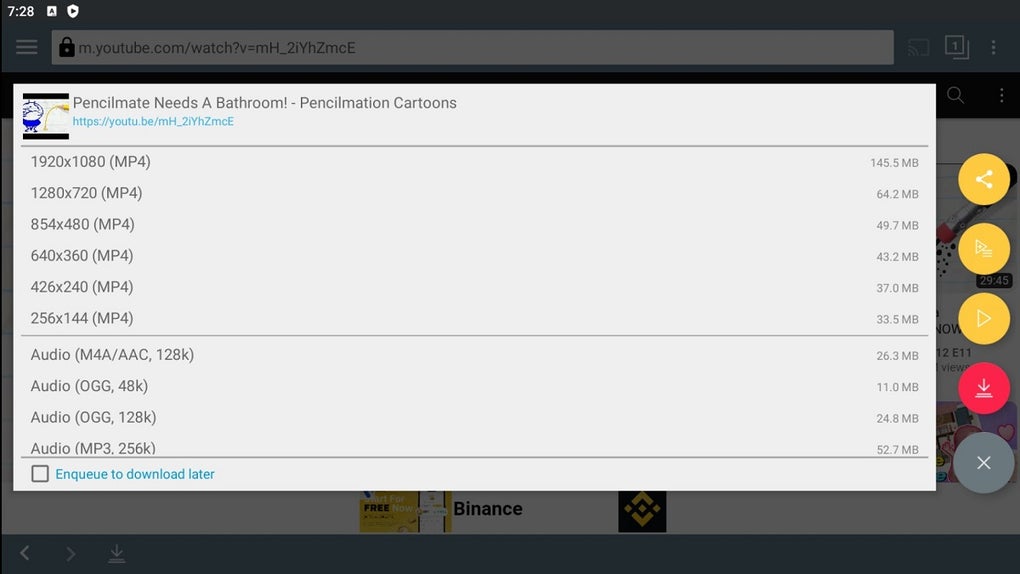
At its heart, TubeMate excels at facilitating the downloading of videos from YouTube. This process goes beyond simply clicking a download button; it provides users with granular control over several critical aspects:
-
Video Quality Selection: TubeMate allows users to choose the desired video quality, ranging from low-resolution options to high-definition (HD) and even ultra-high-definition (UHD) formats, depending on availability and the source video’s encoding. This control is crucial for managing storage space and data usage.
-
Audio Extraction: In addition to downloading full videos, TubeMate permits users to extract only the audio track. This is particularly beneficial for users interested in podcasts, music embedded within videos, or simply saving the audio component without the visual element. While the app inherently supports multiple audio formats like M4A/AAC and OGG, downloading MP3 files necessitates the use of a separate converter.
-
Storage Location Designation: Users have the freedom to specify where downloaded files are stored on their Android devices. This includes options for internal memory or external SD cards, providing flexibility based on individual device storage configurations and preferences.
-
Offline Viewing and Data Conservation: TubeMate significantly reduces data consumption and battery life compared to streaming videos. By downloading the video beforehand, users can enjoy seamless offline playback, even in airplane mode or areas with limited or no internet connectivity. This feature is especially useful for videos with high resolutions, as streaming them can quickly deplete mobile data allowances and increase battery drain. The offline viewing capability makes TubeMate ideal for users in areas with unreliable internet access or those who wish to save mobile data.
Installation and Interface: A User-Friendly Approach
Unlike applications found on the Google Play Store, TubeMate’s distribution relies on APK (Android Package Kit) files sourced from third-party websites. This necessitates a user-initiated step of enabling “Unknown sources” within the Android device’s settings. For devices running Android Oreo or later, this permission is generally granted on a per-app basis during the installation process. The user needs to grant the necessary permissions in order for the installation to succeed.
Despite its external installation method, TubeMate boasts an intuitive and user-friendly interface. Downloading videos typically involves a straightforward single-tap process, followed by a menu allowing users to select preferred quality and format (e.g., MP4, WEBM). The integrated player within the application offers basic playback controls, making for a streamlined user experience.
Beyond YouTube: Multi-Platform Support and Limitations
While YouTube is TubeMate’s primary focus, the app extends its video downloading capabilities to other platforms including Twitter and Facebook. However, it is essential to note that downloading from sources beyond YouTube may encounter occasional glitches or instability. For instance, downloads from Twitter might experience noticeable delays or failures due to the varying structure and protection mechanisms implemented by different social media platforms.
The expansive scope of supported sites, while seemingly beneficial, can introduce complexity. The app attempts to support a wide array of video-hosting websites, which can potentially lead to instability if many downloads are initiated simultaneously.
Performance and Stability: Managing Concurrent Downloads
The simultaneous downloading of multiple videos can strain both the app and the device’s resources, potentially resulting in crashes, freezing, or the complete failure to launch the application. To mitigate such issues, it’s crucial to limit concurrent downloads to a small number, typically two or fewer. This balanced approach helps to maintain a smoother and more reliable experience, preventing the app from becoming overloaded and ensuring optimal performance on the user’s device.
TubeMate: Pros and Cons Summarized
Pros:
- Offline Viewing: Download videos for playback without an internet connection.
- Data Saving: Significant reduction in mobile data usage compared to streaming.
- Format Flexibility: Offers a wide array of video and audio formats for downloading.
- Quality Selection: Users can choose their preferred video resolution.
- Multi-Platform Support: Downloads videos not only from YouTube, but also from selected other platforms.
- Free to Use: The app is entirely free, eliminating any subscription or in-app purchase costs.
Cons:
- External Installation: Requires downloading the APK from external sources, potentially raising security concerns for some users. Care must be taken to download only from trusted websites, ensuring that the APK file hasn’t been modified maliciously.
- App Instability: Potential for crashes or freezing, especially when attempting numerous simultaneous downloads.
- Platform Specific Compatibility Issues: While it supports multiple platforms beyond YouTube, there may be compatibility issues or lower reliability on some platforms.
- Security Concerns: The use of a third-party application to download videos might violate the terms of service of certain platforms.
Alternatives to TubeMate: Exploring the Landscape of Video Downloaders
The market offers several alternatives to TubeMate, each with its own strengths and weaknesses:
- TubeMate 2: An updated version of the original TubeMate, potentially addressing some stability and performance concerns, though it would likely follow a similar installation method.
-
Snaptube: A well-known and relatively popular alternative that offers comparable functionalities with a clean and user-friendly interface. It features built-in support for diverse platforms and provides various download options.
-
VidMate: Another strong contender with a large user base, VidMate is equipped with a vast selection of sources from which to download videos. It also possesses an integrated media player for seamless viewing of downloaded content.
-
NewPipe: A focus on open-source development and privacy, NewPipe prioritizes user privacy in a way that some others might not. However, its features may be more limited than commercially-driven apps.
Choosing an alternative will depend on the user’s priorities. Factors to consider include ease of use, supported platforms, download speed, and app stability.
Conclusion: A Powerful Tool with Caveats
TubeMate remains a powerful and versatile video downloader for Android devices. Its ability to download videos from YouTube and other sources, with options for video quality and audio extraction, makes it a compelling choice for users who need offline viewing capabilities or wish to conserve mobile data. However, the need for external APK installation and potential for app instability necessitate caution and careful usage. Users should weigh the advantages against the potential drawbacks and consider exploring alternative applications if stability and security are paramount concerns. Always prioritize downloading APKs from trusted and reputable websites and regularly update the application to benefit from potential bug fixes and performance improvements.