
TubeVid Screenshot is a free Google Chrome extension developed by DevSquare designed to simplify the process of capturing screenshots from YouTube videos. This intuitive tool eliminates the need for separate screenshot software on Windows, macOS, or Linux operating systems, allowing users to quickly and easily capture images directly from their YouTube viewing experience. Whether you’re watching a full-length video or a short clip, TubeVid Screenshot streamlines the process, saving you valuable time and effort.
Streamlining the Screenshot Process
Before the advent of extensions like TubeVid Screenshot, capturing a precise image from a YouTube video often involved a cumbersome multi-step process. Users might have attempted to use their operating system’s built-in screenshot functionality, leading to potential issues with timing and capturing only the desired portion of the video. Alternatively, they might have resorted to third-party screenshot tools, adding another layer of complexity to an otherwise simple task.
TubeVid Screenshot elegantly solves this problem by integrating directly into the YouTube player. Once installed, the extension operates seamlessly in the background, requiring minimal user interaction. Taking a screenshot becomes as simple as a few clicks, eliminating the need for complex keyboard shortcuts or additional software launches. This streamlined workflow is beneficial for both casual users who occasionally need to capture a video still and for power users who frequently rely on video screenshots for various purposes.
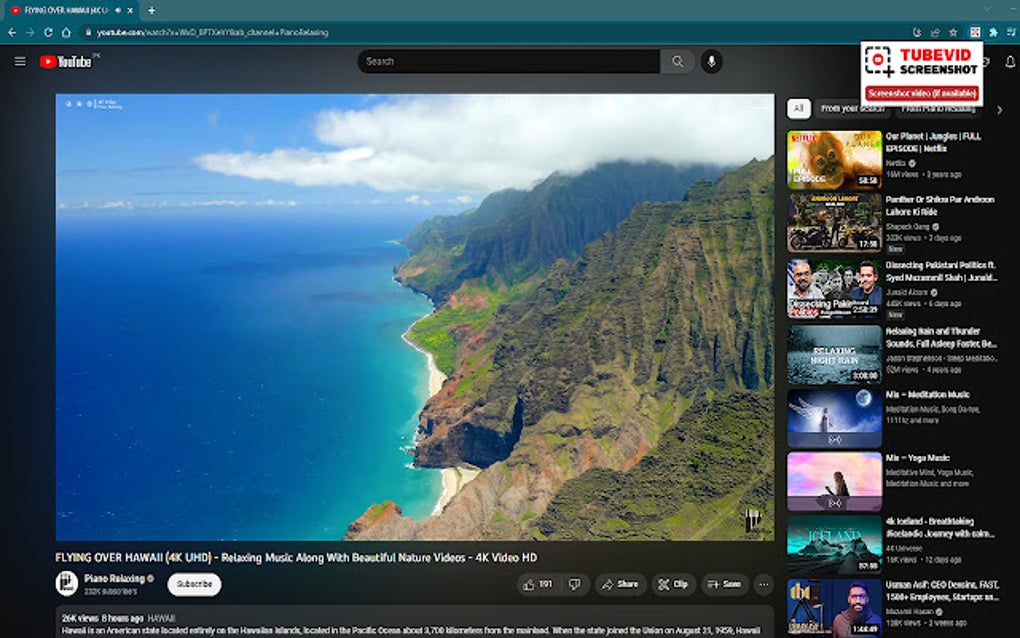
The extension’s unobtrusive design ensures that it doesn’t interfere with the YouTube viewing experience. It focuses solely on providing a straightforward screenshot capture mechanism without adding unnecessary clutter or distractions to the video playback. This minimalist approach allows users to concentrate on the content while maintaining easy access to the screenshot functionality.
Key Features and Benefits
The core functionality of TubeVid Screenshot centers around its ease of use and efficiency. Its key features and benefits include:
- Seamless Integration with YouTube: The extension integrates flawlessly with YouTube, allowing for immediate screenshot capture without switching between applications or interrupting the video playback.
-
Effortless Screenshot Capture: Taking a screenshot is incredibly simple, typically requiring only a few clicks of a button within the extension’s interface. No complex keyboard shortcuts or multiple steps are needed.
-
No Limitations on Screenshot Number: Unlike some screenshot tools that might restrict the number of captures, TubeVid Screenshot allows users to take as many screenshots as needed. This is invaluable for tasks requiring multiple screenshots from a single video, such as creating presentations, documenting research findings, or archiving specific video moments.
-
Focus on Video Content: The extension is carefully designed to focus solely on capturing the video content. It minimizes the inclusion of unwanted interface elements or distractions, ensuring that the resulting screenshot accurately reflects the video’s visuals.
-
Request Feature for New Sites: TubeVid Screenshot acknowledges that users may want to capture screenshots from websites beyond YouTube. The developers have included a feature allowing users to request support for additional websites via email, demonstrating their commitment to user feedback and continuous improvement.
-
Free and Accessible: The extension is offered completely free of charge, making it accessible to a wide range of users regardless of their technical expertise or budget.
Applications Across Diverse Use Cases
The versatility of TubeVid Screenshot extends to a wide spectrum of users and applications. Its simplicity and efficiency make it a valuable tool for various purposes:
- Content Creators: For YouTubers, educators, or other content creators, TubeVid Screenshot facilitates the easy creation of thumbnails, promotional images, and visual aids for their videos. The ability to quickly capture specific moments from a video streamlines the process of creating engaging visuals for their content.
-
Researchers and Academics: Researchers often need to document specific moments from videos for analysis or presentations. TubeVid Screenshot provides a simple and efficient method for capturing these crucial visual data points, ensuring accuracy and minimizing time spent on the technical aspects of image capture.
-
Students and Educators: Students can use the extension to capture relevant clips from educational videos for note-taking or presentations. Similarly, educators can leverage the tool to create engaging teaching materials or document classroom activities.
-
Casual Users: Even for casual users who occasionally need to save a specific moment from a YouTube video, TubeVid Screenshot offers a significantly improved experience over traditional screenshot methods. The ease of use eliminates the frustration associated with trying to time a screenshot perfectly.
-
Business Professionals: Professionals may find TubeVid Screenshot useful for documenting online training sessions, capturing specific data points from online presentations, or creating visual records for client meetings.
Technical Specifications and Availability
TubeVid Screenshot is currently available as a Google Chrome extension. Key technical specifications include:
- License: Free
- Version: 0.0.1 (as of September 28, 2023)
- Platform: Google Chrome
- Developer: DevSquare
The extension is available for download directly from the Chrome Web Store. The simplicity of its installation and operation makes it accessible even for users with limited technical proficiency.
User Reviews and Future Development
While user reviews for TubeVid Screenshot are currently limited, its ease of use and focused functionality suggest it will likely receive positive feedback. The developer’s commitment to adding support for new websites via user requests indicates a willingness to adapt and improve the extension based on community needs. Future development might include features such as:
-
Support for additional video platforms: Expanding compatibility beyond YouTube to include other popular video-sharing sites would significantly enhance the extension’s utility.
-
Enhanced screenshot editing capabilities: Integrating basic editing tools within the extension, such as cropping or resizing, could further streamline the workflow for users.
-
Integration with cloud storage services: Adding the ability to automatically upload screenshots to popular cloud storage platforms would provide a seamless workflow for users who frequently need to back up or share their captured images.
TubeVid Screenshot offers a simple, efficient, and effective solution to capturing screenshots from YouTube videos. Its user-friendly design and valuable features make it a worthwhile addition to the toolkit of anyone who regularly uses YouTube and needs to capture stills from videos for personal or professional use. The developers’ commitment to continuous improvement suggests that TubeVid Screenshot will only become a more powerful and versatile tool in the future.
File Information
- License: “Free”
- Version: “0.0.1”
- Latest update: “September 28, 2023”
- Platform: “chrome”


