
The Tubidy Official App presents itself as a free media player for Android devices, promising seamless streaming of online videos and music. This review delves into its features, functionality, pros, and cons, offering a comprehensive assessment of its capabilities and limitations. We will examine its user interface, search functionality, additional features, and compare it to similar applications.
User Interface and Navigation
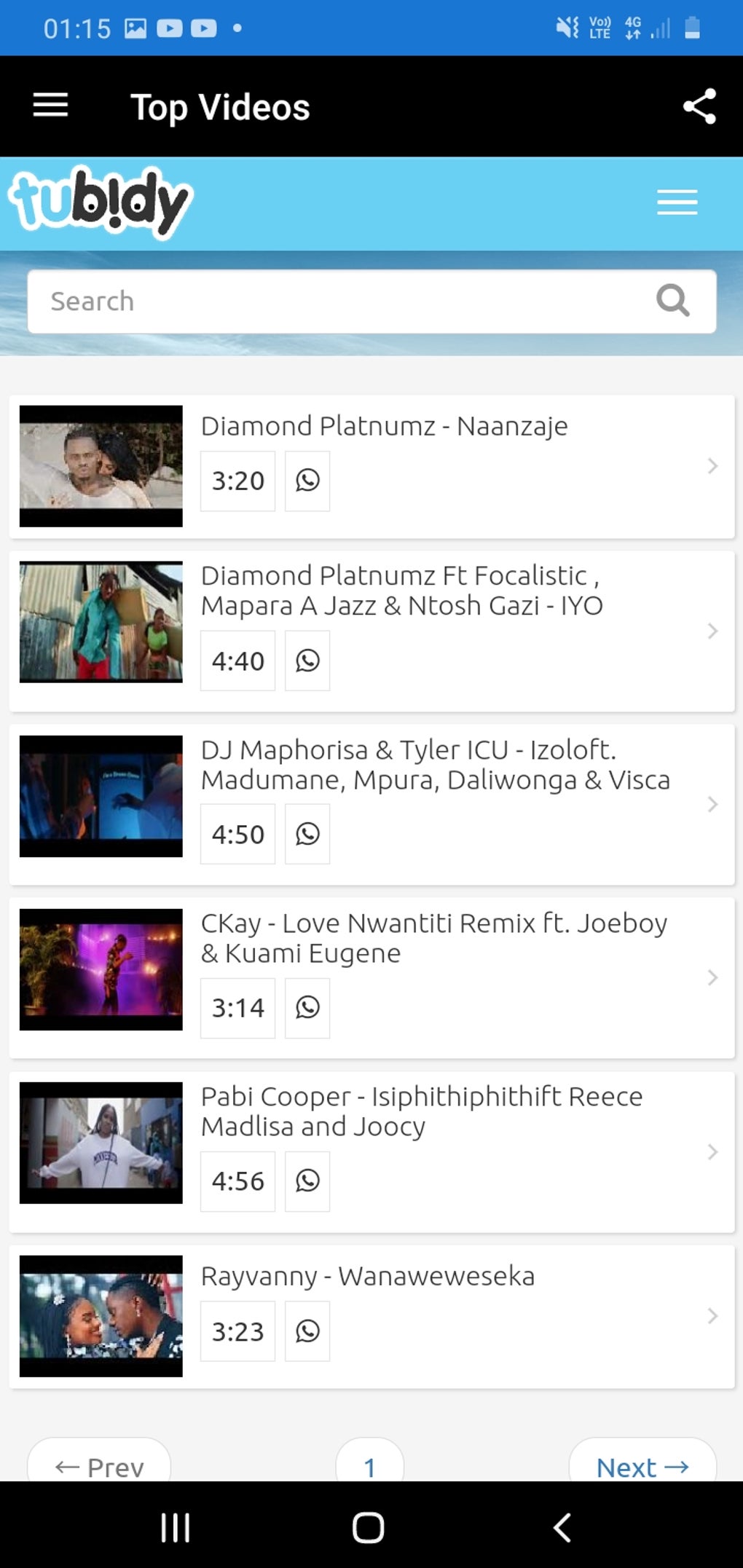
The Tubidy Official App boasts a clean and user-friendly interface, a crucial aspect for any media streaming application. The developers have prioritized ease of navigation, making it relatively simple for users to locate and access their desired content. The app’s layout is intuitive, with clearly labeled sections and buttons. This simplicity makes it accessible to users with varying levels of technological proficiency. The minimal design avoids overwhelming users with unnecessary elements, ensuring a smooth and efficient user experience. While the visual appeal might not be groundbreaking, its straightforward design contributes significantly to its ease of use.

Core Functionality: Searching and Streaming
The app’s core function revolves around searching and streaming online media. Users can input keywords into the search bar to locate videos and music files. A notable feature is the option to switch between local and international search scopes, broadening the potential range of results. This flexibility allows users to target specific regions or languages, improving the accuracy of their searches and enhancing the chances of finding the desired content. The app indexes videos from user-generated content, meaning it doesn’t host its own library. Instead, it acts as a search engine and aggregator, directing users to videos already available online.
The streaming process itself is generally smooth, provided a stable internet connection is available. The quality of the stream depends heavily on the source material and the user’s network speed. However, the app itself appears to handle buffering effectively, minimizing disruptions during playback. This is a significant advantage, ensuring a relatively uninterrupted viewing or listening experience. One notable limitation, however, is the app’s inability to download or save any content locally. All media consumption is restricted to streaming only. This limitation might be a significant drawback for users who prefer to download content for offline access.
Advanced Features and Account Functionality
Beyond its basic search and streaming capabilities, the Tubidy Official App offers several additional features designed to enhance user experience. The presence of a dedicated Help page is noteworthy. This resource provides crucial information on troubleshooting common problems, guiding users through potential issues and offering solutions. This proactive approach to user support significantly improves the overall usability of the app. The Help section is essential for addressing technical difficulties and ensuring a smoother user experience.
The app also allows users to create playlists and upload their own content, a feature that caters to users who wish to organize their preferred media. However, access to these functionalities requires the creation of a user account. This requirement might deter some users who prioritize privacy or prefer applications that do not necessitate account registration.
Further enhancing personalization, users can view their viewing history and recently watched media. Again, this feature is account-dependent, adding another layer to the app’s personalization capabilities but also reinforcing the need for account creation. The option to invite friends is also available, though the app currently lacks any incentives to encourage this social interaction. While this social element is present, it is not a significant driver of user engagement at this point.
Copyright and Legal Considerations
A significant limitation, and a crucial aspect to address, is the app’s policy regarding copyrighted content. The Tubidy Official App explicitly prohibits the search and download of copyrighted material. This is a necessary precaution to avoid legal repercussions and maintain compliance with intellectual property laws. Users should be aware that attempting to circumvent this restriction could lead to consequences. The app’s limitations regarding copyrighted content align with legal standards and ensure a responsible approach to online media consumption.
Comparison with Alternative Apps
The Tubidy Official App competes with a plethora of similar applications in the Android marketplace. Several other apps provide similar functionality, offering both video and music streaming. Some alternatives may offer additional features, such as download capabilities or more extensive playlist management tools. However, the Tubidy Official App’s simple and user-friendly interface could be a compelling factor for users who prioritize ease of use and minimal complexity over a vast array of advanced features.
A direct comparison requires analyzing specific features against competing apps. A feature-by-feature comparison will reveal the advantages and disadvantages of Tubidy Official App relative to its competition. This analysis should include considerations of user interface design, search capabilities, streaming quality, download options (if any), and overall user experience.
Pros and Cons of Tubidy Official App
Pros:
- User-friendly interface: The app’s straightforward design makes it accessible to a broad range of users.
- Effective search functionality: The search options, including local and international scope, enhance the likelihood of finding desired content.
- Smooth streaming: The app generally provides a stable and uninterrupted streaming experience.
- Helpful Help page: The inclusion of a troubleshooting guide is a valuable asset for users encountering issues.
- Playlist creation and content upload (with account): These features cater to users seeking personalized media management.
- Viewing history and recent activity tracking (with account): Enhances personalization and allows users to track their consumption.
Cons:
- No download functionality: The inability to download content is a significant limitation for many users.
- Account required for advanced features: This requirement may deter users prioritizing privacy or simplicity.
- Lack of incentives for social features: The invitation feature lacks engaging incentives.
- Dependence on third-party content: The app’s reliance on user-generated content means content availability and quality can be inconsistent.
Conclusion
The Tubidy Official App offers a straightforward and user-friendly way to stream online videos and music. Its clean interface and effective search capabilities are significant advantages. However, the lack of download functionality and the requirement for an account to access several features might deter some users. Its commitment to avoiding copyrighted content is commendable, ensuring legal compliance. Ultimately, the app’s suitability depends on individual user preferences and priorities. If ease of use and a simple streaming experience are paramount, the Tubidy Official App is a viable option. However, users seeking advanced features such as downloads or offline access may need to explore alternative applications.
File Information
- License: “Free”
- Version: “8.0.6”
- Latest update: “July 11, 2023”
- Platform: “Android”
- OS: “Android 9.0”
- Language: “English”
- Downloads: “32.7K”
- Download Options: “Google Play”


