
Tune Me is a free (with optional subscription) multimedia application developed by B-Side Studios, designed to help musicians refine their vocal and instrumental performances. This innovative audio tool utilizes pitch-shifting technology to automatically correct out-of-tune notes, offering a convenient and effective way to enhance audio quality. Its functionalities extend beyond simple pitch correction, encompassing features like beat generation, multitrack recording, and harmonization effects, making it a versatile tool for both beginners and experienced musicians. This detailed review explores Tune Me’s capabilities, strengths, and weaknesses, providing a comprehensive overview for potential users.
Core Functionality: Pitch Correction and Beyond
At its core, Tune Me’s functionality revolves around its sophisticated pitch-correction algorithm. The app employs sound recognition and signal processing techniques to analyze the pitch of a vocalist’s or instrumentalist’s performance in real-time. This analysis allows the app to identify notes that deviate from the intended pitch and automatically adjust the signal to achieve a more accurate and pleasing tone. This process, similar to the widely known Auto-Tune technology, offers a seamless way to achieve professional-sounding vocals or instruments without extensive musical training or post-production editing.
However, Tune Me’s capabilities extend significantly beyond basic pitch correction. It features a range of tools designed to enhance creativity and refine musical production. The app incorporates a versatile pitch-shifting function, allowing users to manually adjust the pitch of their voice or instrument by a specific interval, such as an octave or a fifth. This provides the flexibility to experiment with different vocal ranges and harmonies, enabling musicians to explore new creative possibilities within their compositions.
Enhancing Musicality: Harmonization and Beat Generation

Another key strength of Tune Me lies in its harmonization effect. This feature allows users to create rich, multi-layered vocal harmonies by generating accompanying vocal lines that blend seamlessly with the primary vocal track. The app’s algorithm intelligently calculates the appropriate harmonies based on the input audio, offering a simple yet effective means of achieving professional-sounding vocal arrangements without the need for multiple vocalists or complex audio editing.
Further enhancing its versatility, Tune Me provides access to a vast library of pre-generated beats and rhythms. These beats cover a wide spectrum of musical genres, providing users with a solid foundation upon which to build their tracks. This eliminates the need for users to create their own beats from scratch, saving them valuable time and effort, allowing them to focus on their performance or songwriting. The inclusion of these beats is particularly beneficial for musicians who may not have access to professional beat-making software or the skills to create their own. This feature greatly expands the application’s usability, making it accessible to a wider range of musicians and music creators.
User Experience and Interface: A Seamless Creative Workflow
The user interface of Tune Me is designed with ease of use in mind. The app provides a clean, intuitive layout, allowing musicians to quickly access its various features and tools. The intuitive design minimizes the learning curve, ensuring that users can begin creating and refining their music effortlessly. This user-friendly approach is especially advantageous for beginners who are unfamiliar with digital audio workstations (DAWs) or other music production software.
Beyond the straightforward interface, the app’s real-time processing capabilities ensure a seamless workflow. Users can hear the effects of the pitch correction and other audio enhancements instantly, allowing them to make adjustments in real-time and achieve precise control over their audio. The immediate feedback loop provided by the app facilitates a more efficient and creative process, making it ideal for both live performance and studio recording applications.
Multitrack Recording and Error Recovery: Professional-Level Capabilities
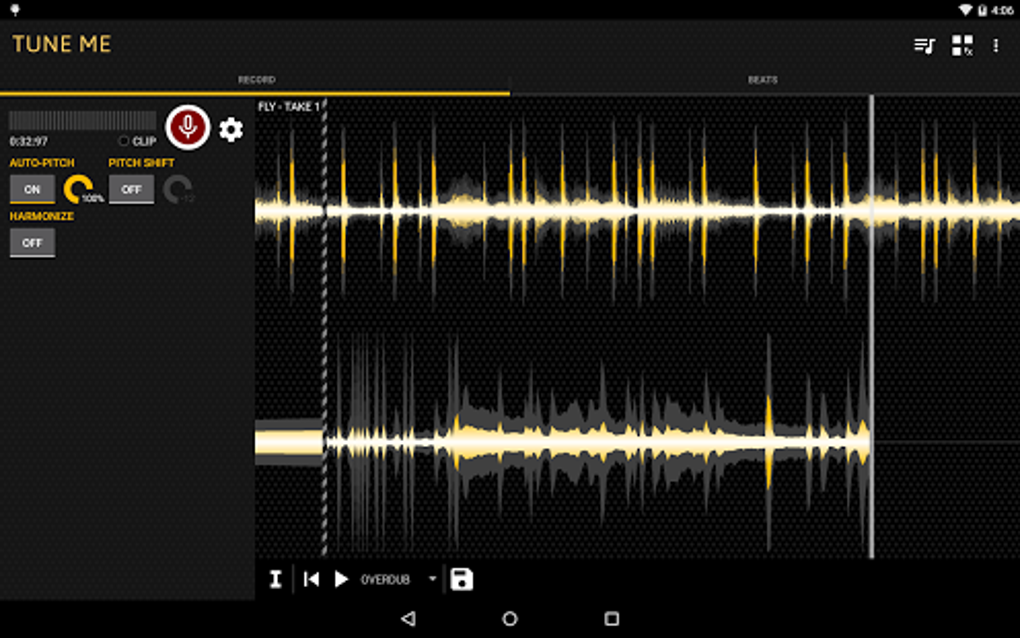
Tune Me stands out from similar applications with its advanced multitrack recording functionality. This feature allows users to simultaneously record multiple audio tracks, creating layered arrangements and complex musical compositions. The ability to record multiple tracks within the application eliminates the need for external recording equipment or software, streamlining the music creation process.
In addition to its multitrack capabilities, Tune Me incorporates a practical error recovery system. This functionality enables users to undo and redo actions, correct mistakes, and refine their recordings without starting from scratch. The undo/redo functionality is particularly useful for capturing spontaneous musical ideas or for making subtle adjustments to existing tracks. The combination of multitrack recording and efficient error correction makes Tune Me a robust and reliable tool for musicians of all skill levels.
Strengths and Weaknesses: A Balanced Perspective
While Tune Me boasts numerous strengths, it’s crucial to acknowledge potential limitations. One notable aspect is that some users may find certain vocal effects to sound overly artificial. While the pitch correction generally enhances the audio quality, it can sometimes result in a processed sound that might not appeal to all listeners. The degree of artificiality can depend on the specific settings used and the input audio, making it crucial for users to experiment with different parameters to achieve the most natural-sounding results.
Pros:
- Powerful pitch-shifting technology: Effectively corrects out-of-tune notes, improving overall audio quality.
- Extensive selection of free beats: Offers a wide range of beat templates across different genres, accelerating the music-making process.
- Calibration effect: Enables precise synchronization between vocals and the beat, creating well-structured melodies.
- Harmonization effect: Generates multi-layered vocal harmonies, enriching the musical texture.
- Multitrack recording: Allows for simultaneous recording of multiple audio tracks for complex arrangements.
- Error recovery system: Facilitates the correction of mistakes and refinement of recordings.
- User-friendly interface: Provides an intuitive and accessible experience for musicians of all skill levels.
- Real-time processing: Allows for immediate feedback and precise adjustments during recording and performance.
Cons:
- Some vocal effects may sound unnatural: The pitch correction, while effective, may sometimes produce an overly processed sound that some users find undesirable. Experimentation with settings is necessary to mitigate this.
Alternative Applications and Conclusion
While Tune Me offers a compelling set of features, it’s worthwhile to explore alternative applications to determine which best suits individual needs and preferences. Several applications provide similar pitch-correction and audio-enhancement capabilities, each with unique strengths and weaknesses. A comparison of these applications based on factors such as pricing, features, and user interface could inform a well-informed decision.
In conclusion, Tune Me presents a potent and versatile solution for musicians seeking to enhance their vocal or instrumental performances. Its advanced pitch-correction technology, coupled with its intuitive interface and extensive library of beats and effects, makes it a valuable tool for both professional and amateur musicians. While the potential for overly processed vocals exists, careful experimentation with settings can largely mitigate this issue. Overall, Tune Me is a strong contender in the world of audio-editing applications, deserving serious consideration by anyone looking to elevate the quality of their musical endeavors.

File Information
- License: “Free”
- Latest update: “August 1, 2025”
- Platform: “Android”
- OS: “Android 13.0”
- Language: “English”
- Downloads: “80.2K”
- Download Options: “Google Play”


