
Spotify has revolutionized the way we consume music, offering an unparalleled library of songs accessible at our fingertips. However, even with the convenience of streaming, users often encounter limitations that hinder their complete enjoyment and control over their music library. These restrictions, primarily stemming from Digital Rights Management (DRM) protection and the streaming-only nature of the service, can be a source of frustration for many. This is where specialized tools like TuneFab Spotify Music Converter step in, offering a robust and intuitive solution to break free from these constraints and truly own your Spotify music experience.
Developed by TuneFab Software Inc., TuneFab Spotify Music Converter is a premium multimedia utility designed to empower Spotify users – whether on free or premium accounts – to download and convert their favorite tracks into universally compatible audio formats. It’s an all-encompassing solution for anyone looking to enjoy their Spotify playlists offline, on any device, without the need for an active internet connection or a Spotify subscription. This comprehensive article delves deep into the capabilities of TuneFab Spotify Music Converter, exploring its features, how it works, and why it has become an indispensable tool for music enthusiasts worldwide.
Understanding the Spotify Music Conundrum: Why a Converter is Essential
Despite its immense popularity, Spotify operates within a closed ecosystem designed to protect its copyrighted content and maintain its subscription model. While Spotify Premium users can download songs for offline listening, these downloads are not true ownership. They are encrypted files accessible only within the Spotify app and on a limited number of authorized devices. If your subscription lapses, or if you wish to play your music on an unsupported device (like an older MP3 player, certain car systems, or for use in video editing software), you’re out of luck.
The core of this limitation lies in Digital Rights Management (DRM). Spotify utilizes OGG Vorbis format for its audio streams, which is further protected by DRM encryption. This encryption prevents users from freely copying, transferring, or converting the music files to other formats, even if they have paid for a premium subscription. This creates a significant barrier for users who desire more flexibility and control over their purchased or favorited music.
Consider these common scenarios:
- Device Compatibility: You want to listen to your Spotify playlist on an MP3 player that doesn’t support the Spotify app, or on a home stereo system via USB.
- Data Usage: You’re constantly streaming music on the go, draining your mobile data and battery, and wish to have truly offline copies.
- Creative Projects: You’re a content creator who needs background music for a video or podcast, and while Spotify offers millions of songs, direct use of their protected files is not permitted.
- Long-Term Archiving: You’ve curated extensive playlists over years and want to ensure you have access to them independently of Spotify’s service, protecting against potential changes in licensing or service availability.
TuneFab Spotify Music Converter directly addresses these pain points. By removing DRM protection and converting tracks into standard, open formats like MP3, M4A, WAV, or FLAC, it essentially “frees” your music from Spotify’s walled garden. This means you can store your downloaded songs on any device, play them with any media player, and have full control over your personal music library, offering a level of freedom that Spotify’s native service simply cannot provide.
TuneFab Spotify Music Converter: A Comprehensive Overview of Its Capabilities
TuneFab Spotify Music Converter distinguishes itself as an intuitive and highly capable utility, drawing comparisons to other well-regarded converters like NoteBurner Spotify Music Converter and Sidify Music Converter for Spotify. However, TuneFab carves its own niche by offering a balanced blend of robust features, high performance, and an exceptionally user-friendly interface. It’s designed for anyone, from casual listeners to avid audiophiles, who seeks an efficient and reliable method to manage their Spotify music offline.
At its core, the software functions as an all-in-one downloader and converter. It integrates an embedded Spotify web player, allowing users to log in directly within the application. This eliminates the need to have the Spotify desktop app running simultaneously, streamlining the entire conversion process. Once logged in, TuneFab can seamlessly scan your Spotify library, playlists, albums, and podcasts, making it incredibly easy to select the content you wish to convert. The program supports batch processing, meaning you can add entire playlists or albums to the conversion queue, significantly saving time and effort compared to converting tracks one by one.
The application also prioritizes audio quality, providing various conversion options that let you tailor the output to your specific needs. Users have the flexibility to choose from a wide array of output formats and adjust advanced settings such as sample rate and bitrate, ensuring that the converted files retain the highest possible fidelity, often comparable to the original Spotify stream.
While a free demo version is available, it serves primarily as a limited trial to showcase the software’s basic functionality. The full suite of features, including unlimited conversions, batch processing, and access to all output options, is unlocked with a subscription or a one-time purchase license. This model allows users to experience the software firsthand before committing to a full purchase, ensuring satisfaction with its capabilities. The positive reception from users, often highlighting its ease of use and reliability, further solidifies TuneFab’s position as a leading solution in the realm of Spotify music conversion.
Liberating Your Music: DRM Removal Explained
The cornerstone of TuneFab Spotify Music Converter’s functionality lies in its ability to circumvent Spotify’s Digital Rights Management (DRM) protection. As previously discussed, Spotify encodes its music in OGG Vorbis format with an added layer of DRM encryption. This protection, while standard for digital media services, significantly restricts how users can interact with their music outside the official app. TuneFab is specifically engineered to smoothly handle this DRM removal process. By stripping away the encryption, the software transforms the restricted OGG files into unprotected audio formats, thereby granting users true ownership and unrestricted access to their Spotify tracks. This process is crucial for anyone who wants to preserve their music library independently of Spotify’s platform, ensuring long-term accessibility and versatility.
Versatile Output Formats for Universal Playback
Beyond DRM removal, TuneFab Spotify Music Converter excels in its extensive support for various output audio formats. This versatility is paramount for ensuring that your converted Spotify music is compatible with virtually any device or media player you possess. The program allows you to convert Spotify OGG files into several common and high-quality formats, including:
- MP3 (MPEG-1 Audio Layer III): The most widely supported audio format globally, ideal for maximum compatibility with almost all devices and software.
- M4A (MPEG-4 Audio): Often used for Apple devices (iTunes, iPhone, iPad), known for good quality at smaller file sizes.
- FLAC (Free Lossless Audio Codec): A lossless compression format that retains the original audio quality without any data loss, perfect for audiophiles.
- WAV (Waveform Audio File Format): An uncompressed, high-quality format, favored for professional audio editing due to its fidelity.
- AIFF (Audio Interchange File Format): Apple’s equivalent to WAV, also uncompressed and high quality, often used in professional audio applications on macOS.
- ALAC (Apple Lossless Audio Codec): Apple’s lossless compression format, similar to FLAC but primarily used within the Apple ecosystem.
This comprehensive selection ensures that whether you’re converting for a simple MP3 player, an iOS device, or seeking uncompromised audiophile quality, TuneFab has an option tailored to your needs. The ability to choose the optimal format provides unparalleled flexibility for managing your personal music collection.
Preserving Pristine Quality and Essential Metadata
A common concern with any audio conversion process is the potential loss of quality or important song information. TuneFab Spotify Music Converter addresses these worries by prioritizing both high-fidelity conversion and meticulous metadata preservation. The software provides options to customize the output quality, allowing users to set the sample rate and bitrate according to their preferences. This means you can choose to convert your Spotify tracks with settings that mirror or even exceed the original streaming quality, particularly when converting to lossless formats like FLAC or WAV.
Furthermore, TuneFab ensures that all essential song information, including ID3 tags and metadata, is fully preserved during the conversion process. This includes details such as:
- Song Title
- Artist Name
- Album Title
- Genre
- Year
- Track Number
- Album Artwork
This meticulous preservation means that your converted music library will be perfectly organized, searchable, and aesthetically pleasing in any media player, maintaining the rich information that makes managing a large music collection manageable and enjoyable. You won’t have to manually re-enter data for hundreds of songs, saving a significant amount of time and effort.
Efficiency Meets Simplicity: High Speed and Batch Processing
Time is a valuable commodity, and TuneFab Spotify Music Converter respects that by offering a remarkably high conversion speed. Users can expect each song to be converted anywhere from 10 to 20 seconds, depending on the track’s length and the user’s internet connection speed (for initial analysis and download). This efficiency is complemented by the software’s robust batch processing capability. Instead of converting individual tracks, users can add entire playlists, albums, or multiple selected songs to the conversion queue. The program then processes these tracks simultaneously or sequentially, significantly reducing the overall time required to convert large music libraries. This combination of speed and batch processing makes TuneFab an exceptionally productive tool for building a comprehensive offline music collection without lengthy waiting times.
Intuitive Interface for Seamless User Experience
A powerful tool is only truly effective if it’s easy to use. TuneFab Spotify Music Converter prides itself on its intuitive and straightforward user interface, designed to be accessible even for those who are not tech-savvy. The software features an embedded Spotify web player, which means you don’t need to juggle between applications. All interactions, from logging in to selecting tracks and initiating conversions, occur within a single, clean window. The drag-and-drop functionality for adding tracks to the conversion list further simplifies the process, making it as effortless as managing files on your computer. With clear prompts and a logical workflow, users can navigate the features with ease, making the entire experience of converting Spotify music hassle-free and enjoyable.
A Step-by-Step Guide to Using TuneFab Spotify Music Converter
Using TuneFab Spotify Music Converter is a straightforward process, thanks to its user-friendly design. Here’s a detailed, step-by-step guide to help you convert your favorite Spotify tracks:
- Download and Install: First, download the TuneFab Spotify Music Converter for Windows from PhanMemFree.org and install it on your computer.
- Launch the Program and Log In: Open the TuneFab application. You will be prompted to log in to your Spotify account through the embedded web player. Use your Spotify credentials (email/username and password) to access your library. This secure login allows TuneFab to access your playlists and tracks for conversion.
- Scan Your Music Library: Once logged in, TuneFab will display your Spotify library within its interface. You can browse your playlists, albums, artists, or individual songs just as you would on the regular Spotify web player.
- Add Tracks to the Conversion List:
- Method 1 (Drag and Drop): Find the playlist, album, or individual song you want to convert. Simply drag it directly from the Spotify web player interface within TuneFab and drop it onto the “+” button or the designated conversion area on the right side of the software window.
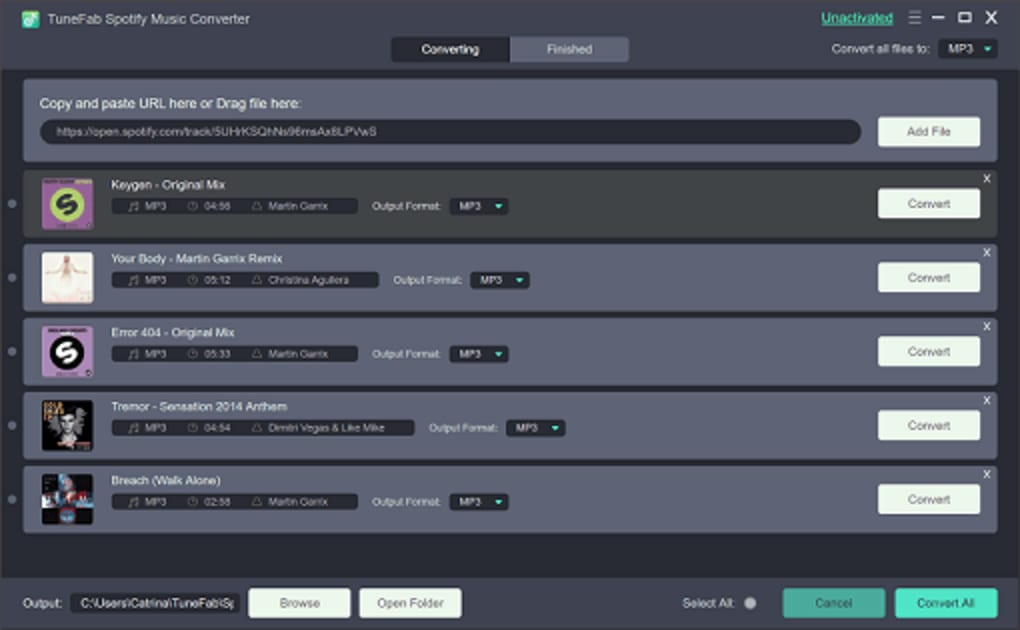
- Method 2 (Using the “+” Button): Click the “+” button, and a pop-up window will appear showing your Spotify library. Select the tracks by checking the boxes next to them. You can select multiple tracks, an entire playlist, or an album.
- Select Output Format and Quality: After adding your desired tracks, they will appear in the conversion list.
- At the top or bottom of this window, you’ll find options to select the output format. Choose from MP3, M4A, FLAC, WAV, AIFF, or ALAC.
- You can also adjust the sample rate and bitrate to control the output quality. These settings can be applied globally to all selected tracks or configured individually for specific songs if you have diverse quality requirements.
- Choose Output Folder: Specify a destination folder on your computer where the converted files will be saved. This ensures you can easily locate your DRM-free music after the process is complete.
- Start Conversion: Once all settings are configured, click the “Convert All” button. TuneFab will begin processing the tracks in your list.
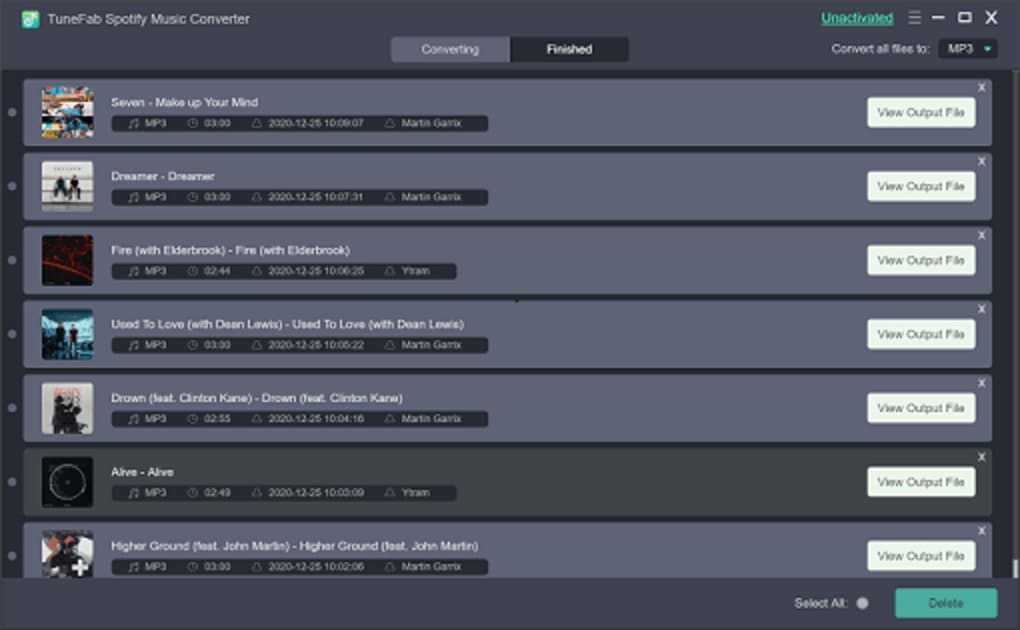
- Monitor Progress and Preview: You can monitor the conversion progress in the “Converting” or “Finished” tab within the application. Once a song is converted, it will move to the “Finished” tab, where you can preview the converted audio file to ensure quality and completeness.
With these simple steps, you can efficiently convert your entire Spotify music collection into a versatile, DRM-free format, ready for playback on any device.
Beyond the Basics: Why TuneFab Stands Out
While the market offers several Spotify music converters, TuneFab Spotify Music Converter consistently receives high marks for its reliability, feature set, and user experience. Its intuitive interface makes it accessible to a broad audience, distinguishing it from potentially more complex alternatives. The comprehensive support for multiple output formats, including various lossless options, caters to both casual listeners and audiophiles who prioritize sound quality.
The batch processing capability, coupled with high conversion speeds, makes it an exceptionally efficient tool for handling large music libraries, saving users countless hours. Furthermore, its commitment to preserving original ID3 tags and metadata ensures that your converted library remains organized and rich with information, a critical detail often overlooked by lesser converters. User reviews frequently praise TuneFab for “working most of the time” and being a “well-known tool,” highlighting its dependable performance in a field where consistency is key. Its robust DRM removal technology effectively tackles the core limitation of Spotify, providing a truly unrestricted listening experience.
Unlocking the Full Potential: Trial Limitations and Full Version Benefits
TuneFab Spotify Music Converter offers a free trial version, allowing potential users to experience its core functionalities firsthand. This demo is excellent for getting a feel for the interface, understanding the workflow, and verifying basic compatibility with your system. However, it’s important to note that the free trial is quite limited. Typically, trial versions impose restrictions such as:
- Limited Conversion Length: Only a portion (e.g., the first three minutes) of each song can be converted.
- Limited Number of Conversions: A cap on how many songs can be converted in total.
- No Batch Processing for Full Tracks: While you might be able to add multiple tracks, only a limited portion of each will be converted.
These limitations are designed to encourage users to opt for the full version, which unlocks the software’s complete capabilities. A subscription or one-time purchase license grants access to:
- Unlimited Conversions: Convert as many songs, albums, and playlists as you desire.
- Full Track Conversion: Convert entire songs without any length restrictions.
- Full Batch Processing: Efficiently convert multiple entire playlists or albums in one go.
- Access to All Output Formats and Quality Settings: Utilize the full range of MP3, M4A, WAV, FLAC, AIFF, ALAC, and customize sample rates and bitrates without restriction.
- Priority Customer Support: Receive dedicated assistance for any issues or queries.
- Lifetime Updates (for one-time purchase): Ensure your software remains compatible with future Spotify updates.
Given the comprehensive features and the freedom it offers, upgrading to the full version is a highly recommended investment for any dedicated Spotify user looking for an unrestricted music experience.
Conclusion: Your Gateway to Unrestricted Spotify Music
In an era dominated by streaming services, tools like TuneFab Spotify Music Converter stand out by offering a bridge between convenient access and true music ownership. By efficiently removing DRM protection and converting Spotify tracks into universally playable formats, TuneFab empowers users to take full control of their digital music libraries. Its intuitive design, robust feature set, and commitment to preserving audio quality and metadata make it an invaluable utility for anyone seeking to enjoy their Spotify music offline, on any device, and for any purpose. Whether you’re an audiophile, a casual listener, or simply someone who values flexibility, TuneFab Spotify Music Converter provides an elegant and effective solution to unlock the full potential of your Spotify experience.
Technical Specifications and Important Disclaimer
Developer: TuneFab Software Inc. Latest Version: V3.1.193(3) (as of March 8, 2024, with updates potentially available) Operating System: Windows 10/8.1/8/7 (32 & 64bits) Supported Input Format: Spotify OGG format Supported Output Formats: MP3, M4A, WAV, FLAC, AIFF, ALAC Language: English (available in multiple languages) File Size: Approximately 712.06 KB
Disclaimer: Laws concerning the use of this software vary from country to country. PhanMemFree does not encourage or condone the use of this program if it is in violation of these laws. Users are solely responsible for ensuring their use of the software complies with all applicable legal regulations and Spotify’s terms of service. This software is intended for personal use and backup purposes only, where legally permissible.
File Information
- License: “Trial version”
- Latest update: “March 8, 2024”
- Platform: “Windows”
- OS: “Windows 8”
- Language: “English”
- Downloads: “3.1K”
- Size: “712.06 KB”


