
TunesKit AceMovi Video Editor presents itself as a versatile video editing solution for both novice and experienced users. This review delves into its features, usability, and overall performance to determine its suitability for various video editing needs. From basic cutting and merging to advanced techniques like keyframing and green screen effects, AceMovi aims to provide a comprehensive editing experience within a user-friendly interface.
User Interface and Ease of Use
One of AceMovi’s key strengths is its intuitive design. The software boasts a clean and uncluttered interface, making navigation straightforward, even for users with limited video editing experience. The layout logically organizes tools and functions, minimizing the learning curve often associated with professional-grade video editors. Essential tools are readily accessible, while more advanced features are neatly categorized and easily discoverable as needed. This thoughtful design ensures a smooth workflow, allowing users to focus on their creative vision rather than struggling with the software itself.
The intuitive drag-and-drop functionality further enhances ease of use. Users can effortlessly add media, arrange clips, and apply effects with simple mouse actions. This streamlined approach significantly accelerates the editing process, particularly beneficial for those aiming for quick edits or smaller projects. The software’s responsiveness is also commendable, minimizing lag and ensuring a fluid editing experience, even when working with larger files. This combination of intuitive design and responsive performance contributes significantly to a positive user experience, making AceMovi accessible to a wide range of users.
Editing Capabilities and Features
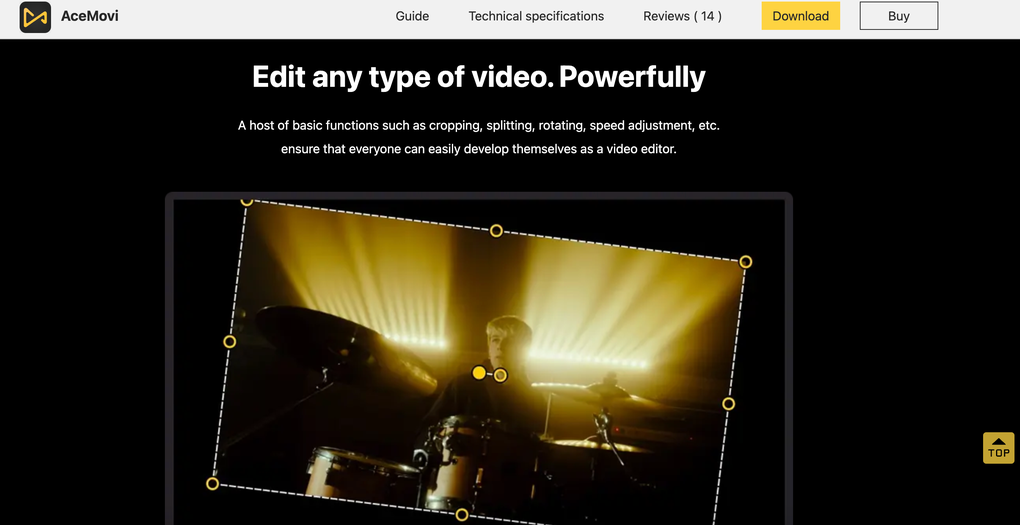
AceMovi offers a substantial array of editing tools, catering to diverse skill levels and project complexities. Basic functionalities like trimming, splitting, merging, and rotating video clips are readily available and easily executed. Beyond these foundational tools, AceMovi incorporates more advanced capabilities to enhance creative control.
Basic Editing Tools: The software’s intuitive interface ensures seamless execution of basic tasks. Trimming clips to precise lengths is straightforward, while merging multiple clips into a cohesive sequence is a simple drag-and-drop operation. Rotating clips to correct orientation is equally effortless, streamlining the initial stages of video editing.
Advanced Editing Features: AceMovi extends its functionality beyond basic editing, offering advanced features that elevate the quality and sophistication of video projects. Keyframing allows for precise control over animations and transitions, enabling users to create smooth and professional-looking effects. The green screen functionality provides capabilities for chroma keying, allowing the removal of backgrounds and the integration of other video or image elements. This feature opens possibilities for creating visually stunning projects with professional-level effects.
Effects and Transitions: A wide selection of filters, transitions, and text styles is integrated into AceMovi, offering creative avenues for enhancing visual appeal. The filters range from subtle color adjustments to dramatic stylistic effects, providing flexibility in shaping the overall mood and aesthetics of a video. Transitions between clips are equally diverse, offering various styles to create a seamless flow or emphasize specific moments. Text customization options are robust, allowing users to add titles, subtitles, and annotations with complete control over font, size, color, and positioning. This wide array of visual effects and styling options allows for a significant degree of creative expression.
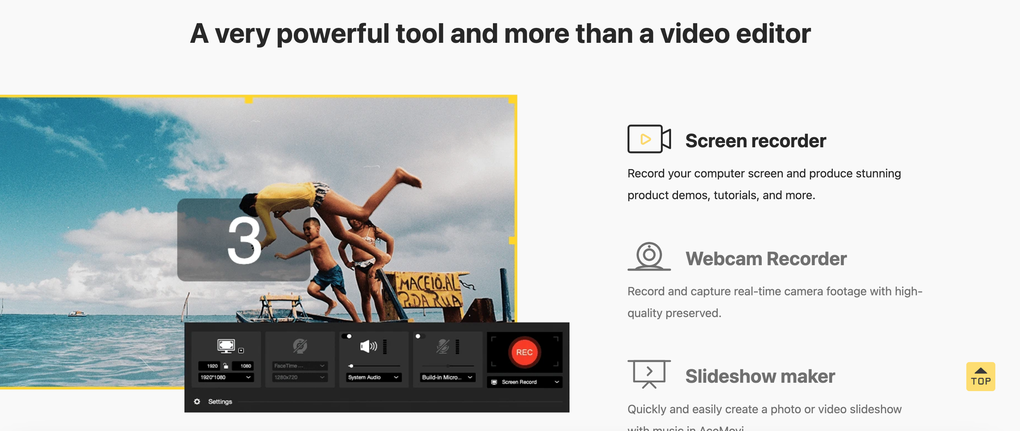
Screen and Webcam Recording: AceMovi’s integrated screen and webcam recording capabilities provide further versatility. Users can record their computer screen, capturing tutorials, gameplay, or other screen-based activities. Simultaneous webcam recording allows for the incorporation of personal commentary or reaction videos, enhancing the viewer experience. This dual recording functionality broadens the range of content creation possibilities, making AceMovi a comprehensive solution for diverse video production needs.
Export Options and Format Support
AceMovi provides a commendable range of export options, ensuring compatibility with various platforms and devices. Users can export videos in multiple formats, including MP4, MOV, AVI, and more, catering to diverse output requirements. The software also supports a variety of resolutions, allowing optimization for different viewing environments, from smaller mobile screens to larger computer monitors or high-definition displays. This flexibility ensures seamless content sharing across multiple platforms and devices.
The export process itself is straightforward and efficient, allowing users to quickly share their completed projects. Customizable settings allow users to adjust video quality and bitrate to balance file size with video quality. This control is particularly beneficial when sharing videos online or via email, allowing users to optimize file size for efficient transmission without compromising visual fidelity. The availability of presets streamlines the export process, particularly for users who frequently export videos in specific formats or resolutions.
Performance and System Requirements
AceMovi’s performance is generally smooth and efficient, even when handling relatively large video files. The software’s responsiveness minimizes lag during editing, contributing to a productive workflow. However, performance can vary depending on the system specifications. Users with lower-end hardware may experience some slowdown when working with very high-resolution or long video clips. The software’s system requirements are generally modest, making it accessible to a wide range of users. However, it is crucial to check the official specifications before installation to ensure compatibility.

Pricing and Value
The pricing model for AceMovi falls within the range of comparable video editing software. While a paid product, it offers considerable value considering the breadth of its features and functionality. The software’s user-friendly interface, extensive editing capabilities, and versatile export options justify the price for users seeking a powerful and accessible video editor. The balance between cost and the features provided makes AceMovi a competitive option in the market.
Conclusion
TunesKit AceMovi Video Editor emerges as a strong contender in the video editing software arena. Its intuitive design makes it approachable for beginners, while its advanced features cater to experienced users. The extensive range of editing tools, coupled with versatile export options and robust performance, solidifies its position as a versatile and powerful video editing solution. While system performance can be influenced by hardware limitations, the overall user experience is consistently positive, making AceMovi a valuable asset for content creators of all skill levels. The combination of accessibility and powerful features makes it a compelling choice for both casual users and those seeking professional-level video editing capabilities.
File Information
- License: “Full”
- Latest update: “July 17, 2025”
- Platform: “Windows”
- OS: “Windows 11”
- Language: “English”
- Downloads: “864”
- Size: “171.65 MB”


