
TuneUp, a now-defunct iTunes plugin, once offered a compelling solution for users struggling with disorganized music libraries. This review delves into its features, functionality, user experience, and ultimately, its legacy in the landscape of music management software. While no longer actively supported, understanding TuneUp’s strengths and weaknesses provides valuable insight into the evolution of digital music organization tools.
Streamlining iTunes: Core Functionality and Features
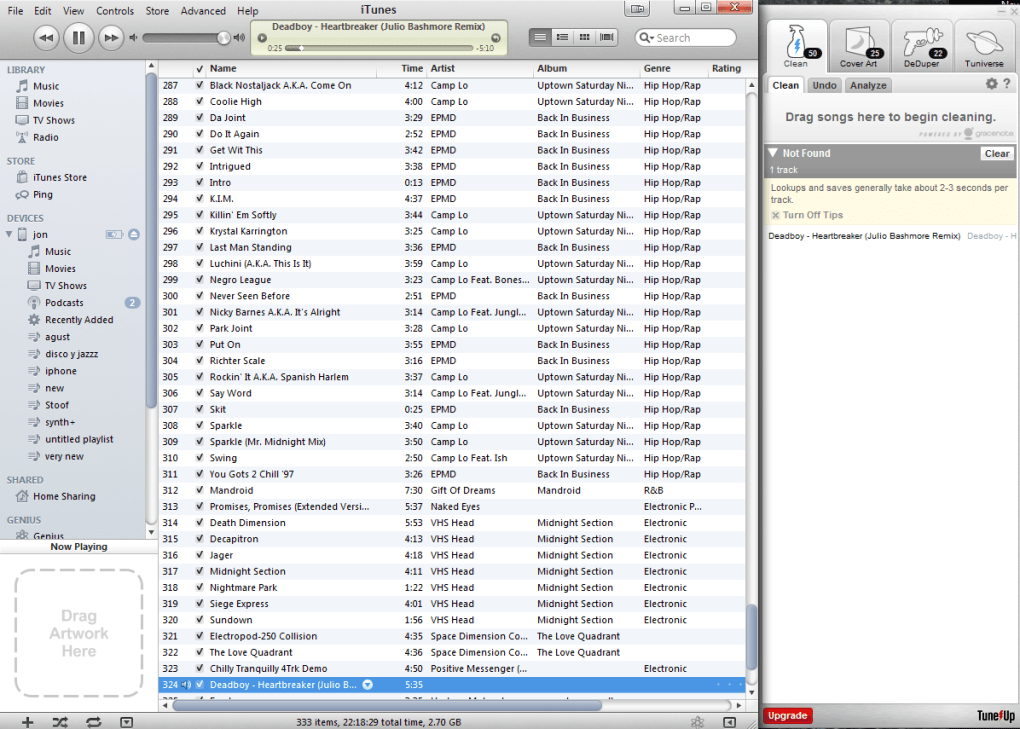
TuneUp’s primary function was to alleviate the common frustrations associated with managing large and poorly organized iTunes libraries. It offered a suite of tools designed to automatically clean, correct, and enhance music metadata, ultimately improving the overall user experience within iTunes. The software operated as a companion application, sitting alongside the iTunes window, providing a streamlined interface for accessing its capabilities.
The core features included:
-
Clean: This was the flagship function, utilizing what was described as “cutting-edge acoustic fingerprinting technology” to identify and correct mislabeled song information. This was particularly useful for tracks with generic titles like “Track 01” or those suffering from incorrect artist or album attributions. The algorithm compared audio fingerprints against a vast database, identifying potential matches and automatically updating the file tags accordingly.
-
Cover Art Retrieval: A visually appealing iTunes library is greatly enhanced by proper album art. TuneUp addressed this by searching for and adding missing cover art. Users simply dragged and dropped albums lacking artwork into the TuneUp interface, and the software would locate and apply suitable images. This feature significantly improved the aesthetic appeal of the “Cover Flow” view in iTunes.
-
Duplicate Removal (DeDuper): Duplicate tracks are a common ailment of digital music collections. TuneUp included a “DeDuper” feature that scanned the library for identical songs, allowing users to identify and remove redundant files, thereby saving valuable storage space and streamlining their music collection.
- Tuniverse: This unique feature extended beyond basic organization, offering a social and discovery component. Tuniverse integrated with social media platforms like Facebook and Twitter, enabling users to share currently playing tracks. Beyond social sharing, it provided access to related YouTube videos, artist biographies from Freebase, and concert/event notifications via StubHub. This contextual information added an extra layer of engagement and enhanced the user’s musical experience.
The free version of TuneUp imposed limitations on the number of songs that could be cleaned (500) and album covers that could be added (50). Beyond these limits, a subscription was required to unlock the full capabilities of the software. However, the “Now Playing” and “Concerts” features, along with YouTube video access, remained unlimited even in the free version.
User Interface and System Performance
TuneUp’s user interface was designed for simplicity and efficiency. Its compact design, placed adjacent to the iTunes window, minimized disruption while providing easy access to its functions. The software was reportedly efficient in terms of system resource usage, avoiding significant performance impacts on the user’s computer. The developers emphasized a focus on minimizing memory consumption, particularly beneficial for users with large music libraries. This lightweight nature made it a suitable option for a wider range of computer systems.
A notable feature was the ability to detach TuneUp from both iTunes and Windows Media Player, providing flexibility for users who wanted to utilize the software’s capabilities independently from their media players. This separated functionality allowed for more targeted organization without the constant presence of the plugin within the media player interface. The updates included improvements to the user interface, resulting in a more intuitive and user-friendly experience. The status and progress messaging were also enhanced, providing clear and concise feedback during processes like cleaning and cover art retrieval. The developers also actively worked to improve the software’s robustness against intermittent internet connection issues, ensuring a smoother experience for users with unreliable network connections.
Pros and Cons: A Balanced Perspective
TuneUp presented a compelling proposition for users seeking a streamlined approach to iTunes organization. Its strengths are undeniable:
Pros:
- Efficient File Cleaning: The core cleaning function effectively tackled the problem of mislabeled and disorganized music files. Its automated nature saved considerable time and effort compared to manual tagging.
- Ease of Use: The intuitive interface and straightforward workflow made TuneUp accessible to both novice and experienced users. The drag-and-drop functionality for cover art retrieval simplified an otherwise tedious process.
- Abundant Additional Information: The Tuniverse feature added a layer of value beyond simple organization, providing access to contextual information, social sharing capabilities, and concert notifications. This enhanced the overall music listening experience.
- Free Version Availability: The availability of a free version, albeit with limitations, allowed users to test the software and experience its capabilities before committing to a subscription.
- Improved Stability and Resource Management: Later versions showcased enhancements in stability, particularly for large music collections, and minimized memory usage, optimizing performance.
However, certain limitations and drawbacks were reported, particularly in later versions:
Cons:
- Limited Free Functionality: The restrictions on the number of songs and album covers processed in the free version could be limiting for users with extensive libraries.
- Post-Cleaning Utility: After the initial library cleaning, the everyday utility of TuneUp diminished for some users. The value proposition became less clear outside of the initial organizational phase.
- Version 3.0 Issues: Several user reviews highlighted significant problems with version 3.0, including slow loading times, crashing issues, and a failure to correctly identify and fix broken or mislabeled tracks. This negatively impacted the user experience and trust in the software’s reliability.
- Unresponsive Customer Support: A recurring complaint among users centered on the lack of responsiveness from customer support, hindering troubleshooting and resolving issues encountered with the software.
TuneUp’s Legacy and Alternatives
TuneUp’s discontinuation leaves a gap in the market for an automated iTunes (and other music player) organizer with a similar feature set. While the software had its limitations, particularly in later versions, its core concept remains relevant. The need for efficient tools to manage and enhance digital music libraries persists.
Several alternative applications emerged, offering similar or expanded functionalities. These alternatives often addressed some of the shortcomings experienced with TuneUp, focusing on improved stability, broader compatibility, and more responsive customer support. Examples of such alternatives mentioned in the provided text include Wondershare TidyMyMusic, Media Tagger, and KiwiG PhonTunes, each offering unique strengths and addressing specific user needs.
In conclusion, TuneUp represented a significant attempt to tackle the common challenges of digital music library organization. While plagued by issues in its later iterations and ultimately discontinued, it holds a place in the history of music management software as a pioneering effort to automate a previously manual and often frustrating process. The lessons learned from its successes and failures continue to inform the development of modern music management tools.
File Information
- License: “Trial version”
- Latest update: “August 27, 2013”
- Platform: “Windows”
- OS: “Windows XP”
- Language: “English”
- Downloads: “43.2K”
- Size: “51.84 MB”


