
Tunnelier, Bitvise’s SSH client, offers a robust and feature-rich approach to secure remote connections. While perhaps slightly more complex than some alternatives like PuTTY, its advanced capabilities and graphical SFTP integration make it a compelling choice for users who require a high degree of customization and control over their SSH sessions. This in-depth review will explore Tunnelier’s strengths and weaknesses, comparing it to other SSH clients and highlighting its key features.
Key Features and Functionality
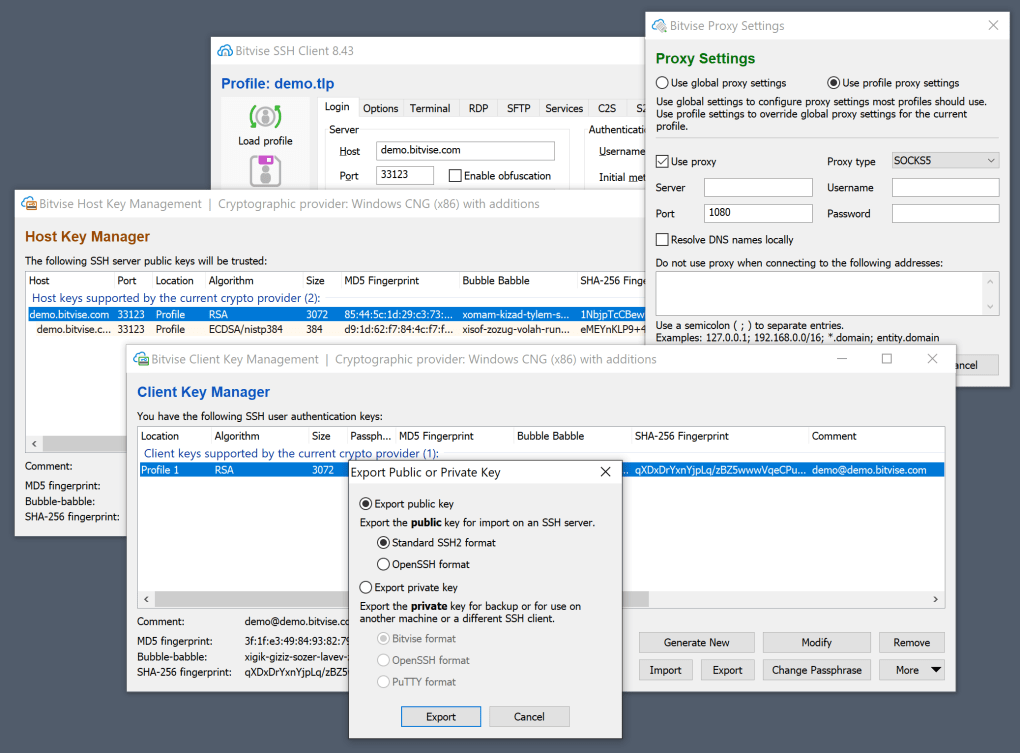
Tunnelier distinguishes itself through its comprehensive feature set, extending beyond the basic functionalities of many other SSH clients. At its core, it provides secure shell access to remote servers using the SSH protocol, supporting both RSA and DSA authentication methods. This allows for secure remote logins, command execution, and file transfers. Beyond this foundational capability, Tunnelier offers several noteworthy advantages:
-
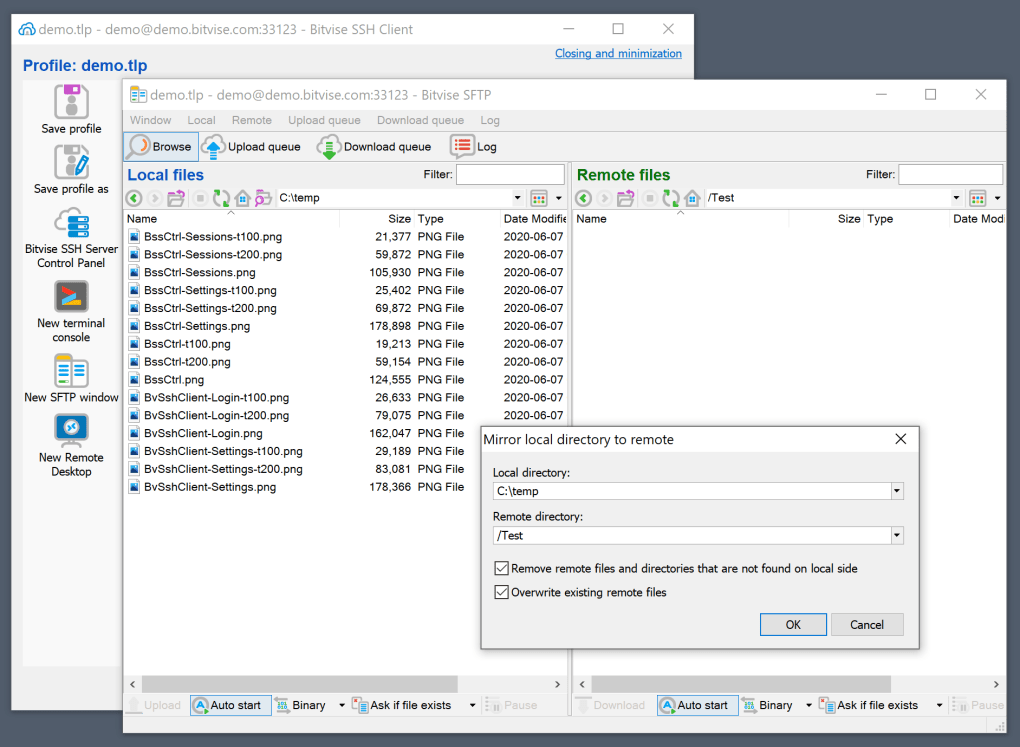
Graphical SFTP Client: Unlike many command-line-centric SSH clients, Tunnelier incorporates a fully functional graphical SFTP client. This visual interface simplifies file browsing, uploading, downloading, and management, eliminating the need for separate SFTP software. Users can easily navigate remote directories, perform file operations (copy, move, delete, rename), and manage file permissions directly within the Tunnelier interface. This graphical SFTP capability enhances user-friendliness and efficiency, especially for those unfamiliar with command-line SFTP tools.
-
Terminal Emulation: Tunnelier provides robust terminal emulation, supporting protocols like bvterm, xterm, and vt100. This allows for seamless integration with various remote server environments, ensuring consistent and reliable terminal behavior regardless of the underlying system. The accurate emulation of these widely used terminal protocols enhances compatibility and reduces the potential for display or formatting issues.
-
Port Forwarding and Tunneling: Tunnelier facilitates advanced network configurations through its support for dynamic port forwarding and SOCKS proxying. This functionality is essential for users needing to securely access internal network resources or bypass network restrictions. By establishing secure tunnels, Tunnelier enables applications running on the local machine to access services on a remote network as if they were directly connected. This feature proves invaluable in situations requiring secure access to sensitive internal systems or when working behind firewalls or network address translation (NAT).
-
Customization and Configuration: Tunnelier offers extensive customization options. Users can configure various settings to tailor the client to their specific needs. These configurations can include adjusting terminal appearance, defining keyboard shortcuts, customizing connection profiles, and managing authentication methods. This level of customization ensures a personalized and optimized user experience, enhancing both efficiency and productivity.
-
Integration with Bitvise SSH Server: While functional with other SSH servers, Tunnelier achieves optimal performance and synergy when paired with Bitvise’s own SSH server software. This integration enhances overall stability, simplifies configuration, and often unlocks additional features or streamlined workflows unavailable with other server software.
Comparison with Other SSH Clients
Compared to popular alternatives like PuTTY, Tunnelier presents a trade-off between ease of use and functionality. PuTTY, known for its simplicity and lightweight nature, prioritizes ease of use and quick setup. It excels in scenarios requiring straightforward SSH connections with minimal configuration. However, PuTTY lacks the advanced graphical SFTP features and extensive customization options found in Tunnelier.
Tunnelier, on the other hand, prioritizes comprehensive features and customization. While its initial learning curve might be steeper than PuTTY’s, its powerful capabilities and advanced options cater to experienced users and complex network environments. The graphical SFTP client significantly enhances productivity for users who frequently handle file transfers, and the extensive configuration possibilities allow users to fine-tune their SSH experience precisely to their workflow.
Other SSH clients, such as Termius, offer a blend of features and user-friendliness that might appeal to users seeking a middle ground between PuTTY’s simplicity and Tunnelier’s complexity. However, these alternatives might not match Tunnelier’s depth of functionality or its level of customization. The optimal choice ultimately depends on the specific needs and technical expertise of the user.
Strengths and Weaknesses
Tunnelier’s strengths lie in its advanced feature set and extensive customization. The graphical SFTP client significantly streamlines file management, while the support for various terminal protocols and port forwarding options makes it suitable for complex networking scenarios. The ability to deeply personalize settings ensures an optimized user experience.
However, Tunnelier’s complexity might pose a challenge for novice users. The learning curve is steeper compared to simpler clients like PuTTY. Some features may only be accessible through command-line interfaces, potentially frustrating users accustomed to entirely graphical workflows. Additionally, the client’s performance, particularly during connection establishment, can sometimes be slower than some competitors.
Target Audience and Use Cases
Tunnelier is best suited for users who require advanced SSH functionality and extensive customization options. Its ideal users are system administrators, developers, and IT professionals who work with complex network environments and benefit from the power and flexibility of the graphical SFTP client and advanced port forwarding capabilities. The ability to tailor the client’s settings precisely to individual workflows makes it a valuable tool for those who prioritize efficiency and customization. It is less suited to users requiring a simple, lightweight, and quick-to-learn solution for occasional SSH connections.
Conclusion
Tunnelier presents a powerful and versatile SSH client, excelling in functionality and customization. While its complexity might deter novice users, its rich feature set, graphical SFTP integration, and extensive configuration options make it an invaluable tool for experienced users handling intricate network configurations and demanding remote access scenarios. The trade-off between its advanced features and its somewhat steeper learning curve makes it a superior choice for those who prioritize comprehensive control and functionality over simple ease of use. Ultimately, the decision of whether Tunnelier is the right SSH client hinges on balancing the user’s technical expertise and their specific needs in terms of functionality and customization.
File Information
- License: “Free”
- Latest update: “May 23, 2023”
- Platform: “Windows”
- OS: “Windows Vista”
- Language: “English”
- Downloads: “52.5K”
- Size: “26.69 MB”


