
TuxGuitar is a powerful and versatile, free, open-source software application designed for creating, editing, and playing music tablature. While its interface might initially seem daunting to novice users, its extensive feature set and helpful documentation make it a valuable tool for musicians of all skill levels, from beginners experimenting with music notation to seasoned professionals composing complex arrangements. This comprehensive guide explores TuxGuitar’s capabilities, its user interface, and its strengths and weaknesses.
TuxGuitar’s Feature-Rich Interface: A Deep Dive
TuxGuitar’s interface, while initially appearing complex, is thoughtfully designed for efficient music composition. The central workspace displays a blank musical staff, ready to be populated with notes, rhythms, and other musical elements. The software supports a wide array of note values, allowing for precise control over the nuances of your composition. You can easily input whole, half, quarter, eighth, sixteenth, thirty-second, and sixty-fourth notes, providing a high degree of flexibility in musical expression.
Beyond basic note input, TuxGuitar provides comprehensive tools for creating a fully realized musical score. You can define the time signature, set the tempo, and select the appropriate clef (treble or bass), all crucial aspects of musical notation. The software also allows for fine-tuning individual notes, adjusting their pitch to achieve the desired melodic contour. Essentially, TuxGuitar replicates all the functionalities found in traditional music notation software, offering a digital equivalent to pen and paper composition.
The software integrates a virtual fretboard and piano keyboard, offering alternative input methods for those who prefer a more hands-on approach. This feature is especially beneficial for users who find traditional notation challenging or those who wish to visualize the finger positions on a guitar or piano while composing. The addition of these visual aids significantly enhances the user experience, enabling a more intuitive composition process.
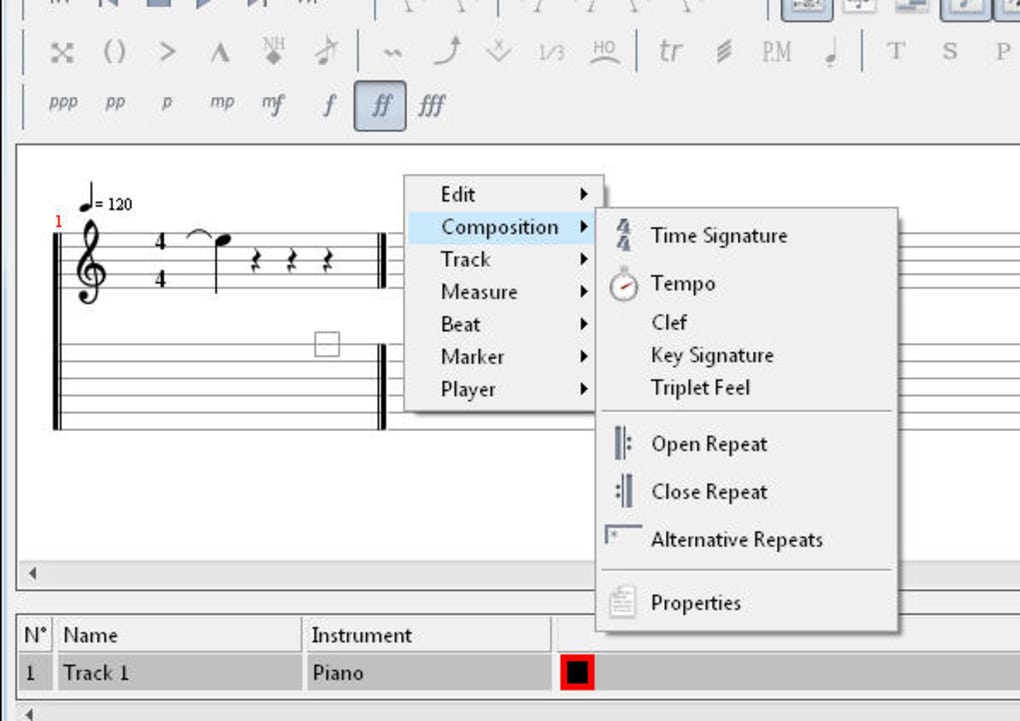
Furthermore, TuxGuitar boasts a built-in player that accurately renders the composed music in real-time. This feature is invaluable for immediate feedback on your work, allowing you to identify and correct any inconsistencies or errors in timing or pitch. As you compose, you can seamlessly listen to your progress and fine-tune your piece with ease. This interactive composition process streamlines the workflow and significantly enhances the creative process.
Importing, Exporting, and File Compatibility
TuxGuitar supports the import and export of files in GP3, GP4, and GP5 formats. This compatibility with widely used guitar pro formats ensures seamless integration with other music notation software and a broad range of existing musical scores. This interoperability is crucial for collaboration and the sharing of musical ideas among musicians. The ability to import pre-existing files allows users to build upon existing compositions, experiment with different arrangements, and learn from the work of other composers. Similarly, the export function facilitates the sharing of your creations with others or the incorporation of your work into larger projects.
TuxGuitar’s Strengths: A Powerful Composition Tool
The strength of TuxGuitar lies in its comprehensive feature set and versatility. Its capabilities extend far beyond basic note input, encompassing a wide range of tools and features that cater to various musical styles and composition techniques. Here’s a breakdown of some key advantages:
-
Multitrack capabilities: TuxGuitar allows for multitrack recording and editing, enabling the creation of complex musical arrangements with multiple instruments or vocal parts. This is a particularly valuable feature for creating more elaborate pieces or collaborating with other musicians.
-
Extensive effects: The software supports a wide variety of effects such as bending, slides, vibrato, hammer-on, and pull-off, all essential elements in guitar tablature. These effects allow for the nuanced expression of musical ideas and the creation of a rich sonic palette.
-
Triplet support: TuxGuitar supports various triplet rhythms (5, 6, 7, 9, 10, 11, 12), offering flexibility for more advanced rhythmic compositions.
-
Repeat functionality: Repeat sections are easily managed, ensuring that repetitive sections can be efficiently handled in the composition process.
-
Time and tempo control: Precise control over time signatures and tempo ensures that your music maintains accuracy and reflects the intended rhythmic feel.
-
Built-in player: The real-time playback feature provides immediate feedback on your composition, allowing you to identify and correct errors.
-
Multiple plugin support: TuxGuitar supports a range of plugins, further expanding its capabilities and allowing for customization to suit individual workflows and preferences.
TuxGuitar’s Challenges: A Learning Curve for Beginners
While TuxGuitar’s feature-rich environment is a significant advantage for experienced musicians, it can also present a challenge for beginners. The sheer number of features and options might feel overwhelming for those unfamiliar with music notation software. The learning curve associated with mastering the software’s capabilities should be considered.
The interface, while functional, might not be as intuitive as some other music notation programs, especially for users without prior experience in this type of software. A significant investment of time and effort might be required to become proficient in using all of TuxGuitar’s features effectively. However, the extensive documentation and help section available within the software mitigate this challenge somewhat, offering users resources to navigate the complexities of the interface and learn its capabilities.
Recent Updates and Improvements
Recent versions of TuxGuitar have incorporated several significant improvements, addressing user feedback and enhancing functionality. These include:
-
Expanded measure range for loops: This enhancement provides greater flexibility in handling looping sections within musical compositions.
-
Enhanced transposition features: The improved transposition capabilities offer more precise control over pitch adjustments.
-
Improved note transposition options: Greater control over which notes are affected by transposition operations enhances precision in musical editing.
-
Enhanced beat movement support: Easier and more intuitive movement of beats within a measure streamlines the editing process.
-
Expanded song properties options: More detailed metadata can be added to compositions, improving organization and identification.
-
Multiple measure support: Support for multiple measures enhances the software’s usability for larger and more complex musical pieces.
-
Improved plugin support: Enhancements to plugin functionality integrate better with external tools and expand the possibilities for customization.
-
Numerous bug fixes: Addressing previously reported bugs enhances overall stability and performance.
Conclusion: A Powerful Tool for Serious Musicians
TuxGuitar is a compelling free and open-source music notation software that offers a comprehensive feature set comparable to commercial alternatives. Its intuitive (once learned) interface, built-in player, and robust import/export capabilities make it a valuable tool for musicians of all skill levels. While the initial learning curve might deter some beginners, the extensive documentation, active community support, and regular updates continuously improve the software, making it a powerful and versatile option for serious music composition. The trade-off between a steeper learning curve and the vast functionality offered is likely a worthwhile one for those willing to invest the time and effort needed to master its capabilities.
File Information
- License: “Free”
- Latest update: “February 25, 2025”
- Platform: “Windows”
- OS: “Windows XP”
- Language: “English”
- Downloads: “317.8K”
- Size: “275.33 MB”


