
TV Wave, a now outdated application, promised to bring the convenience of television and radio streaming directly to personal computers. While its ambition was laudable, aiming to provide a streamlined interface for accessing various media sources, its execution fell significantly short of expectations, hampered by a difficult-to-navigate interface and a lack of essential support documentation. This review examines the application’s strengths, weaknesses, and ultimately, why it failed to gain lasting traction in the ever-evolving landscape of streaming media.
The Promise of TV Wave: Streaming on Your PC
At its core, TV Wave aimed to simplify access to television and radio broadcasts on Windows PCs. The concept was attractive – the ability to watch your favorite shows and listen to your preferred radio stations without needing a dedicated television set or radio receiver. The application boasted a compact and straightforward user interface, promising a hassle-free experience for its users. This ease of access was a significant selling point in an era where streaming technology was still relatively nascent. Its intended user base likely comprised individuals seeking a convenient way to consume media content directly on their computers, circumventing the need for multiple devices. The inclusion of a built-in web browser, allowing users to access YouTube videos, further enhanced its appeal, albeit in a rather clumsy manner. The prospect of recording broadcasts added another layer of functionality, allowing users to build a personal library of their preferred content.
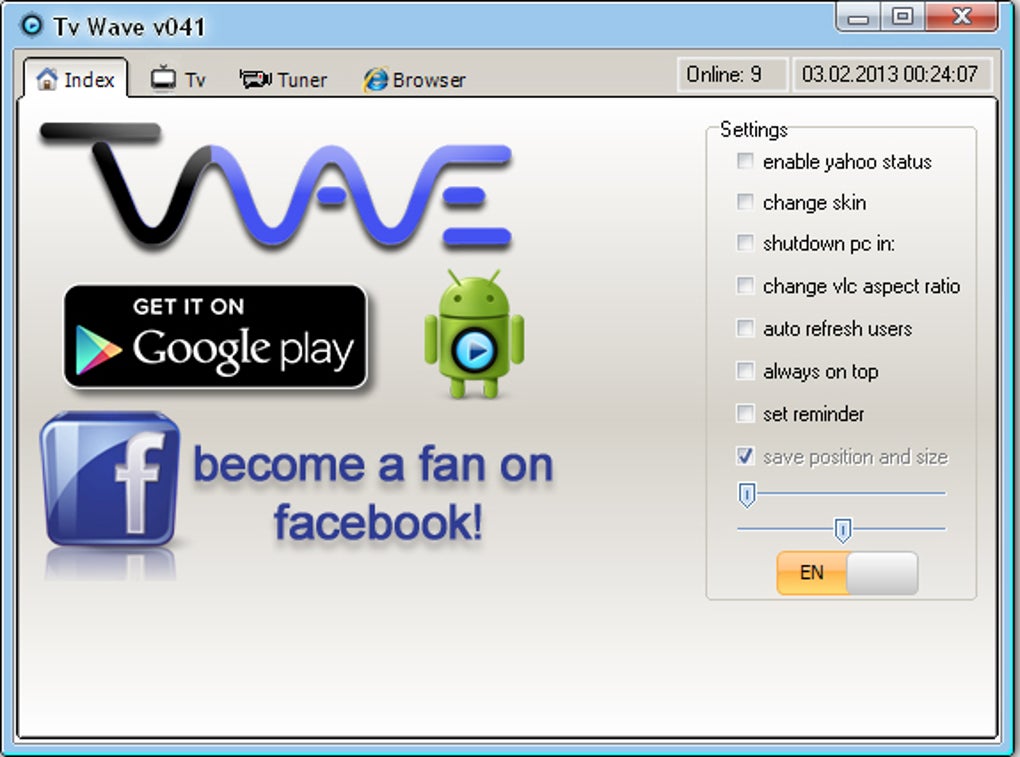
However, the reality of using TV Wave proved far more challenging than its initial presentation suggested. The application’s simplicity was, ironically, its downfall. The lack of intuitive design and comprehensive instructions created a frustrating user experience. Navigating the application’s features and accessing the desired content proved remarkably difficult, even for technically savvy individuals. This lack of usability severely undermined its potential, and its failure to provide adequate support in the form of help files or online tutorials exacerbated the problem. The core functionality, while potentially useful, was effectively rendered unusable due to poor design and implementation.
A Critical Analysis of TV Wave’s Strengths and Weaknesses
While TV Wave’s shortcomings significantly overshadowed its advantages, it is important to acknowledge its few positive aspects. The small interface footprint was undoubtedly a positive feature in the context of limited screen real estate on many older computer systems. The application’s design, while ultimately unintuitive, did possess a certain aesthetic appeal, showcasing a degree of effort towards creating a visually pleasing user experience.
However, these minor strengths paled in comparison to its overwhelming weaknesses. The primary and most significant drawback was the application’s extreme difficulty of use. The lack of any form of guidance or tutorial severely hindered users’ ability to effectively utilize its functions. Without comprehensive instructions, even seemingly simple tasks became incredibly complex and time-consuming. The absence of help files or readily available support channels effectively left users to grapple with the application’s intricacies entirely independently, leading to frustration and abandonment.
This lack of support also hindered any potential for improvement. User feedback was critical to identify areas needing refinement and to address usability issues. Without a feedback mechanism or active community support, TV Wave remained static, unable to adapt to user needs or incorporate essential improvements.
The limited functionality also hampered its wider appeal. While providing access to television and radio stations and YouTube videos was commendable, the overall functionality was too restrictive. The inability to seamlessly integrate with other popular streaming services significantly reduced its appeal to potential users. In the rapidly evolving world of streaming media, it struggled to remain competitive.
Furthermore, the absence of regular updates and maintenance contributed to its eventual obsolescence. As technological advancements continued, the application’s underlying framework likely became increasingly incompatible with newer systems and browsers, further hindering its usability.
The Context of TV Wave’s Failure: The Rise of Streaming Platforms
TV Wave’s failure should be viewed within the broader context of the rise and dominance of major streaming platforms. By the time TV Wave was released (or perhaps even conceived), established players like Netflix, Hulu, and others had already gained significant market share and user loyalty. These platforms offered superior user interfaces, far more extensive content libraries, and significantly better support and accessibility. TV Wave, with its limited content, frustrating interface, and complete lack of support, simply couldn’t compete.
The landscape of streaming media had undergone a significant transformation, moving from niche applications towards mainstream platforms offering sophisticated user interfaces, curated content, and seamless integration with various devices. TV Wave, unfortunately, remained stagnant, failing to adapt to this rapidly changing technological and media consumption environment. Its limited functionality, coupled with its flawed user interface, rendered it a less than optimal choice even compared to its less polished peers.
This competition highlights the crucial role of user experience in the success of any digital product. A technically sound application with poor usability is ultimately destined to fail. The focus on ease of use, intuitive navigation, and comprehensive support are crucial factors that TV Wave fundamentally neglected. The failure of TV Wave serves as a cautionary tale for developers, underscoring the importance of thorough testing, user feedback incorporation, and ongoing support in creating successful software applications.
Lessons Learned from TV Wave’s Demise
The case of TV Wave is a valuable lesson in software development and the importance of user experience. While the initial idea of bringing TV and radio to the PC was sound, its execution lacked critical components for success. The following key takeaways emerge from TV Wave’s demise:
-
Prioritize User Experience: A seamless and intuitive user interface is paramount. The complexities of the application’s functionality should be hidden behind a simple, user-friendly interface. Intuitive navigation and clear instructions are critical for adoption and retention.
-
Comprehensive Documentation is Essential: Clear, comprehensive documentation, including tutorials and FAQs, is indispensable, especially for applications with even a moderately complex feature set. Users should be able to easily find answers to their questions and troubleshoot problems without external assistance.
-
Regular Updates and Maintenance are Crucial: Software needs continuous updates and maintenance to stay relevant, compatible, and secure. Neglecting these aspects can lead to the application’s rapid obsolescence and ultimately, its failure.
-
Embrace User Feedback: Actively soliciting and responding to user feedback is key to identifying and addressing usability issues. A responsive development team that actively integrates user input is far more likely to create a successful product.
-
Competitive Analysis is Vital: Understanding the competitive landscape and adapting to market trends is crucial. TV Wave failed to adapt to the evolving streaming landscape, leading to its irrelevance.
In conclusion, TV Wave represents a missed opportunity. Its core concept held promise, but its flawed execution ultimately sealed its fate. Its story serves as a stark reminder of the importance of user-centric design, continuous improvement, and adaptability in the dynamic world of software development. The application’s legacy is not one of innovation but rather a testament to the consequences of neglecting fundamental principles of software design and user experience.
File Information
- License: “Free”
- Version: “0.4.2”
- Latest update: “October 22, 2018”
- Platform: “Windows”
- OS: “Windows Vista”
- Language: “English”
- Downloads: “70.1K”
- Size: “16.89 MB”


