
Tweaking.com Windows Repair is a free utility designed to diagnose and resolve a wide array of common Windows problems. This powerful tool offers a user-friendly interface and a step-by-step approach, making it accessible to both novice and experienced computer users. Whether you’re dealing with registry errors, file permission issues, problems with Internet Explorer, Windows Updates, or your Windows Firewall, Tweaking.com Windows Repair provides a comprehensive solution to restore your system’s optimal performance. This detailed guide explores the features, functionalities, and benefits of this indispensable Windows maintenance tool.
Understanding the Need for Windows Repair
Modern operating systems, particularly Windows, are complex ecosystems susceptible to various issues that can significantly impact performance and stability. Malware infections, poorly installed software, corrupted system files, and incorrect configurations can all lead to a range of problems, from sluggish performance to complete system crashes. These issues often manifest in various ways:
- Slow system startup: A prolonged boot time indicates potential issues with startup programs, registry bloat, or damaged system files.
- Application crashes: Frequent crashes of applications suggest conflicts with other software, corrupted program files, or underlying system instability.
- Internet connectivity problems: Issues with Internet Explorer or other network settings can disrupt your online experience.
- Windows Update failures: Problems with Windows updates can leave your system vulnerable to security threats and prevent the installation of essential patches.
- Firewall inconsistencies: Incorrect firewall settings can leave your system exposed to malware and other online threats.
- Registry errors: A cluttered and corrupted Windows registry can negatively impact system performance and stability.
- File permission conflicts: Incorrect file permissions can prevent access to certain files and programs, causing functionality issues.
These are just some of the common symptoms indicating a need for system repair. Attempting to manually diagnose and fix these problems can be daunting and time-consuming, even for experienced users. Tweaking.com Windows Repair streamlines this process, offering a user-friendly interface and a comprehensive suite of tools to address these issues effectively.
Key Features and Functionalities of Tweaking.com Windows Repair
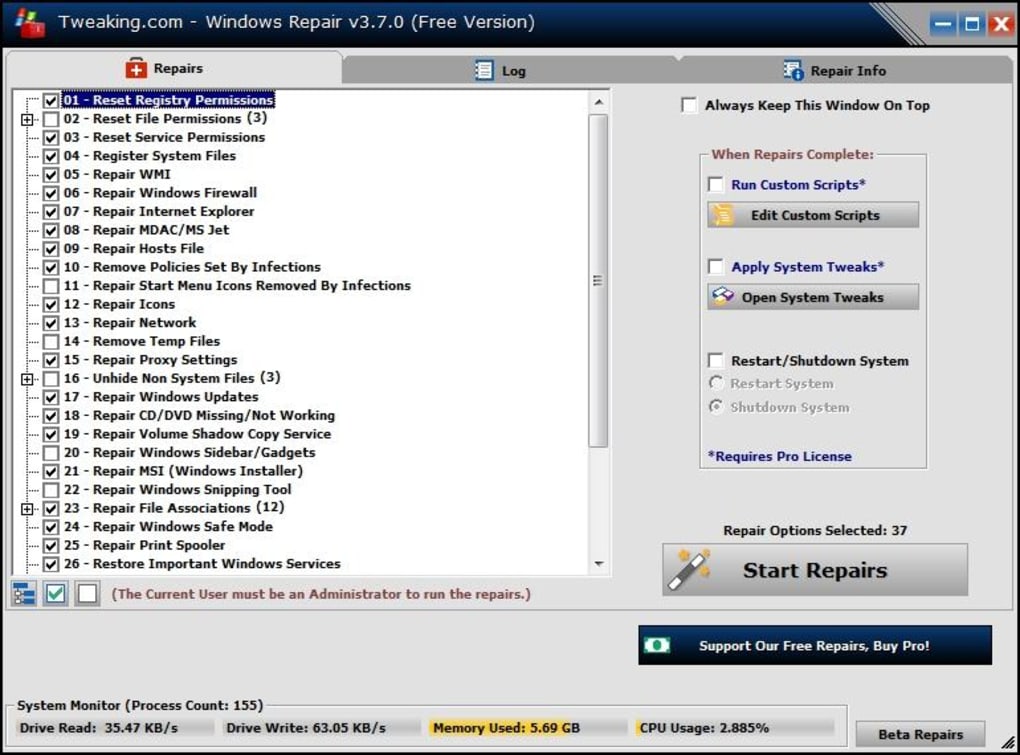
Tweaking.com Windows Repair’s strength lies in its straightforward approach and the breadth of its capabilities. The program’s intuitive interface guides users through a step-by-step process, making even complex repairs manageable. Key features include:
- Interactive Repair Assistant: This guided assistant leads users through common repair scenarios, making the process easily understandable for users of all skill levels. It provides clear instructions and prompts, reducing the risk of accidental misconfigurations.
- Pre-configured Repair Options: The program offers a range of pre-configured repair options, addressing specific problems such as malware removal, permission correction, Windows Update troubleshooting, and general system optimization. This eliminates the need for manual configuration, simplifying the repair process significantly.
- Malware Removal Capabilities: Tweaking.com Windows Repair incorporates tools to identify and remove malicious software, helping to restore system stability and security. While not a full-fledged antivirus solution, it assists in cleaning up the aftermath of infections.
- Registry Cleaning and Repair: The tool can scan and repair registry errors, helping to optimize system performance and resolve issues stemming from corrupted registry entries. It addresses unnecessary clutter that slows down the system.
- File Permission Restoration: Tweaking.com Windows Repair can identify and correct incorrect file permissions, ensuring applications and system files function correctly. This is particularly useful after malware infections or software installation issues.
- Windows Update Fixer: The program helps to resolve problems with Windows Updates, ensuring your system receives the latest security patches and updates. This is crucial for maintaining system security and performance.
- Firewall Management Assistance: Tweaking.com Windows Repair helps to restore and optimize Windows Firewall settings, ensuring adequate system protection.
The program’s modular approach allows users to select the specific repairs they need, focusing on individual issues or applying a comprehensive system clean-up. This flexibility is crucial for users who might only need to fix a specific problem, while also catering to users who require a complete system overhaul.
User-Friendly Interface and Step-by-Step Guidance
One of the most significant advantages of Tweaking.com Windows Repair is its user-friendly interface. Unlike some advanced system repair tools that can overwhelm users with complex options and technical jargon, this utility employs a straightforward, intuitive design. The interactive assistant guides users through each step of the repair process, providing clear explanations and prompts.
This simple yet effective approach ensures that users of all skill levels can confidently use the tool without needing extensive technical knowledge. The step-by-step guidance eliminates the risk of making accidental changes that could further damage the system. The clearly labeled options and concise instructions make the entire process straightforward and accessible.
Addressing Specific Windows Problems
Tweaking.com Windows Repair effectively tackles a wide range of common Windows problems. Its effectiveness stems from a combination of automated processes and carefully crafted repair options. The tool can:
- Repair corrupted registry keys: The Windows registry is a central database storing system settings and configuration information. Corruption in the registry can lead to various system errors. Tweaking.com Windows Repair scans the registry, identifies corrupted entries, and attempts to repair them.
- Fix file permission issues: Files and folders have associated permissions determining which users or groups have access. Incorrect permissions can prevent applications from functioning correctly. The tool analyzes file permissions and restores them to their default settings, resolving access problems.
- Resolve Windows Update errors: Failures during Windows updates are frequent. The program helps to diagnose and fix issues preventing the successful installation of updates, ensuring the system remains secure and up-to-date.
- Clean up startup programs: Excessive startup programs can significantly impact boot times and system performance. Tweaking.com Windows Repair helps identify and disable unnecessary startup programs to optimize the system’s startup speed.
- Repair Internet Explorer issues: Internet Explorer problems, particularly related to settings and configurations, can be addressed by the tool, restoring the browser’s functionality.
- Restore Windows Firewall settings: Incorrect firewall configurations can compromise system security. Tweaking.com Windows Repair helps restore and optimize Windows Firewall settings, improving system protection.
Beyond the Basic Repairs: Advanced Capabilities
While Tweaking.com Windows Repair excels in resolving common problems, it also offers advanced functionalities for experienced users who might need more granular control over the repair process. These options provide users with the ability to customize their repair experience, ensuring that only necessary changes are made. However, caution is advised when using advanced options, as improper configuration could lead to unexpected consequences.
Conclusion: A Powerful and Accessible Solution
Tweaking.com Windows Repair is a valuable tool for maintaining a healthy and performant Windows system. Its intuitive interface, comprehensive features, and step-by-step guidance make it accessible to a wide range of users, from novices to experienced technicians. The program’s ability to address a multitude of common Windows problems, from registry errors to malware removal, positions it as an essential utility for any Windows user seeking to optimize their system’s performance and stability. Its free availability further enhances its value, making it a readily accessible solution for users needing to address various Windows-related issues. While it is not a replacement for a comprehensive antivirus program or a full system backup solution, Tweaking.com Windows Repair serves as an excellent supplement to these measures, providing valuable tools for maintaining system health and optimal performance.
File Information
- License: “Free”
- Latest update: “December 10, 2024”
- Platform: “Windows”
- OS: “Windows 11”
- Language: “English”
- Downloads: “4.3K”


