
Twitter has become an indispensable platform for sharing information, news, and multimedia content. However, a minor inconvenience for many users involves the way Twitter handles image downloads. Images downloaded from Twitter often appear as .jfif files instead of the more common and universally recognized .jpg format. While functionally identical, this difference necessitates a manual renaming process, adding an unnecessary step to an otherwise simple task. This is where the Twitter JFIF Renamer Chrome extension comes to the rescue. Developed by aeggydev, this free and straightforward add-on automates the renaming process, ensuring a smooth and efficient image download experience.
Understanding the .JFIF and .JPG File Format Issue
The JPEG (Joint Photographic Experts Group) image format is a ubiquitous standard used for storing and transmitting photographic images. It employs a lossy compression algorithm, meaning some data is discarded during compression to achieve smaller file sizes. This results in a balance between image quality and file size efficiency. The .jpg file extension is the most common way to identify and denote this format.
JFIF (JPEG File Interchange Format) is closely related to JPEG. In essence, it’s a specification that provides a standard way to store metadata within JPEG files, such as color spaces and resolution information. Many image editing and viewing applications handle both .jpg and .jfif files interchangeably because they essentially represent the same compressed image data. The difference lies primarily in the file extension and potentially in how the metadata is handled.
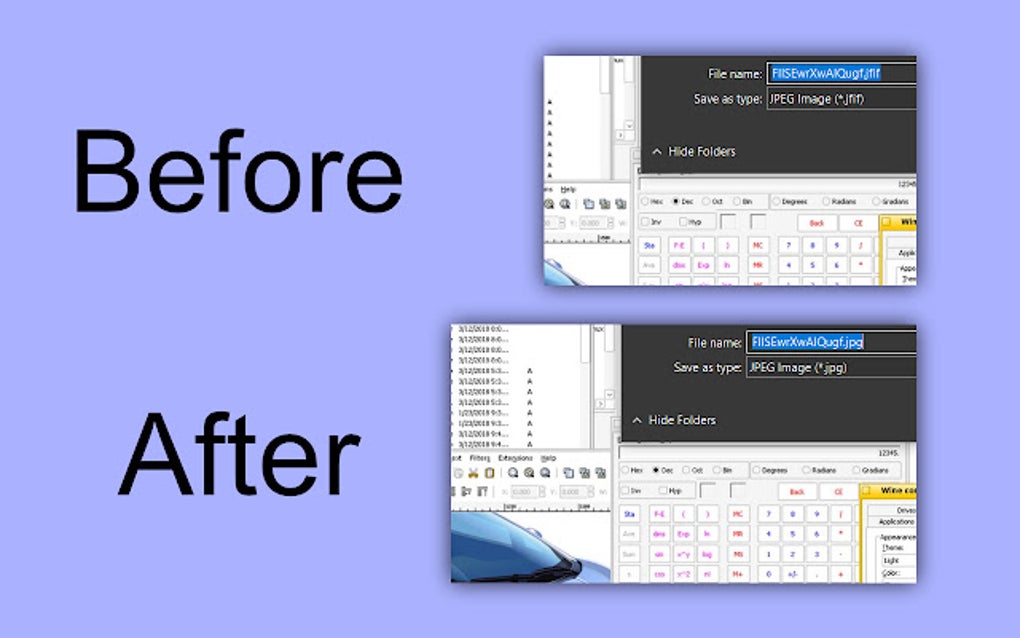
The issue with Twitter’s image download mechanism is that it frequently defaults to the .jfif extension even though the underlying image data is identical to a standard .jpg. While this doesn’t affect the image itself, it forces users to manually rename the files if they want to maintain consistency in their file organization or avoid compatibility issues with certain applications that might not automatically recognize .jfif files. This seemingly trivial inconvenience becomes a significant burden for frequent Twitter users who download many images.
How Twitter JFIF Renamer Solves the Problem
The Twitter JFIF Renamer Chrome extension elegantly solves this problem by acting as an intermediary between Twitter’s download process and your local file system. Once installed, the extension automatically intercepts image downloads from Twitter and renames the downloaded files from .jfif to .jpg before they are saved to your computer. This seamless process happens in the background, making it entirely transparent to the user. The result is that downloaded images are instantly available in the correct .jpg format, eliminating the need for any post-download file manipulation.
The beauty of this approach is its simplicity and efficiency. Users don’t need to understand the technical intricacies of file formats or engage in any manual renaming procedures. The extension handles everything automatically, ensuring a streamlined and hassle-free experience. This makes it a particularly useful tool for individuals who frequently download images from Twitter for personal use, professional projects, or content creation.
Features and Benefits of Twitter JFIF Renamer
-
Automated Renaming: The core function of the extension is the automatic renaming of downloaded
.jfiffiles to.jpg. This eliminates the manual renaming step, saving significant time and effort, especially when dealing with numerous images. -
Seamless Integration: The extension integrates seamlessly with the Twitter website. It works silently in the background, requiring no user interaction beyond the initial installation.
-
Transparency: The renaming process is entirely transparent to the user. There are no pop-up windows or prompts interrupting the download process.
-
Efficiency: The extension significantly improves efficiency by automating a repetitive task, allowing users to focus on other activities.
-
Improved File Management: By ensuring all downloaded images are saved with the
.jpgextension, the extension contributes to better file organization and consistency. -
Enhanced Compatibility: Using the standard
.jpgextension ensures greater compatibility with various applications and operating systems, preventing potential issues arising from the less common.jfifextension. -
Free and Easy to Use: The extension is completely free to download and install. Its simple, intuitive design requires no special technical skills or knowledge.
Installing and Using Twitter JFIF Renamer
Installing the Twitter JFIF Renamer extension is a straightforward process:
- Open the Google Chrome web browser.
- Navigate to the Chrome Web Store and search for “Twitter JFIF Renamer”.
- Locate the extension developed by aeggydev.
- Click the “Add to Chrome” button.
- Confirm the installation by clicking “Add extension”.
Once installed, the extension works automatically in the background. There are no settings to configure or options to adjust. Whenever you download an image from Twitter that is initially saved as a .jfif file, the extension will automatically rename it to .jpg before it is saved to your designated download folder. There’s no need to restart your browser or take any other action. The renaming happens silently and efficiently.
Comparison to Alternative Solutions
While manual renaming is always an option, it is inefficient and time-consuming, especially when downloading multiple images. Other potential solutions might involve using third-party download managers or bulk renaming tools after the downloads are complete. However, these methods are often more complex, requiring additional software installations and steps. The Twitter JFIF Renamer extension offers a far more streamlined and efficient solution by handling the renaming process directly within the browser.
Conclusion: A Simple Solution to a Common Problem
The Twitter JFIF Renamer Chrome extension provides a simple yet effective solution to a common problem faced by many Twitter users. Its automated renaming functionality saves users valuable time and effort, ensuring a smooth and efficient image download experience. By seamlessly integrating with the Twitter platform and working silently in the background, it improves workflow and enhances the overall user experience. For anyone who regularly downloads images from Twitter, the Twitter JFIF Renamer is a valuable and highly recommended free tool. The ease of installation and the immediate benefit of automated renaming make it a worthwhile addition to any Chrome user’s browser extension collection. Its straightforward functionality addresses a specific user need, making it a practical and efficient solution that improves the overall Twitter image download experience.
File Information
- License: “Free”
- Version: “1.0.0”
- Latest update: “September 10, 2023”
- Platform: “chrome”
- Downloads: “11”


