
TypingClub is a free utility application designed to improve typing speed and accuracy. It employs a structured, step-by-step approach to teach touch typing, a skill that enables users to type without looking at the keyboard, utilizing all fingers efficiently. This review will delve into its features, benefits, drawbacks, and compare it to alternative typing tutors available on the market.
The TypingClub Methodology: A Step-by-Step Approach to Mastery
TypingClub’s core strength lies in its systematic curriculum. The application doesn’t simply throw you into the deep end; instead, it provides a carefully structured learning path designed to gradually build typing proficiency. Each lesson focuses on a specific aspect of typing, whether it’s improving speed, enhancing accuracy, or mastering the use of particular fingers. This targeted approach allows users to address weaknesses and build upon strengths in a controlled and progressive manner. The lessons are designed to be short and manageable, preventing users from feeling overwhelmed. This approach, while beneficial for maintaining engagement and preventing burnout, also receives some criticism, as discussed later.
The program’s methodology emphasizes consistent practice and feedback. After each practice session, TypingClub provides detailed performance results, meticulously tracking accuracy, typing speed (measured in words per minute or WPM), and the duration of the session. This granular data empowers users to monitor their progress, identify areas requiring improvement, and celebrate achievements along the way. This data-driven approach offers a clear pathway to improvement, allowing users to track their journey towards becoming proficient typists.
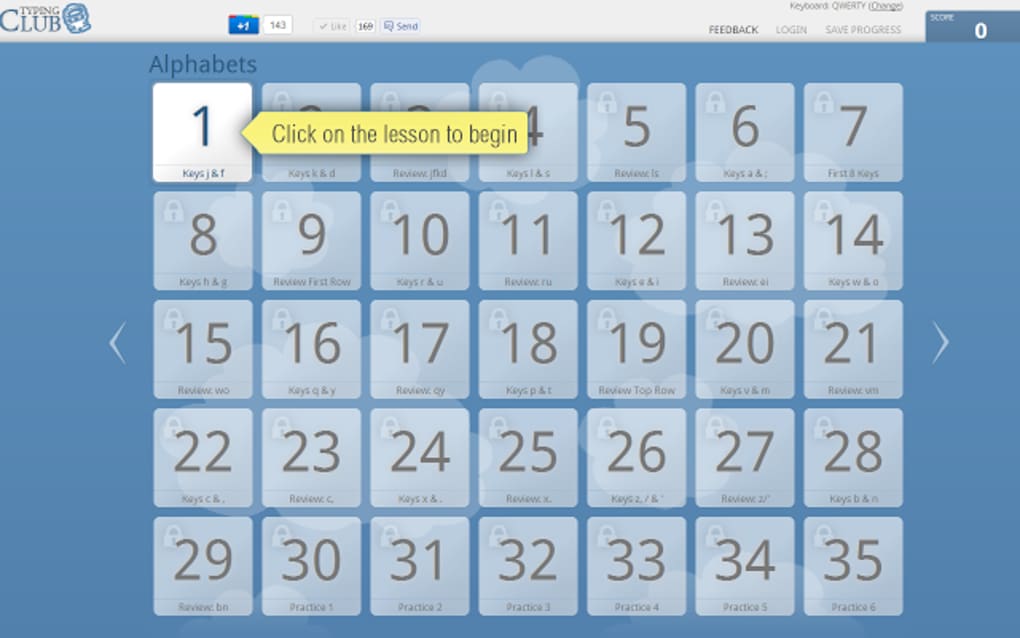
A key feature designed to boost engagement is the incorporation of mini-games. These games provide a welcome change of pace from the standard practice drills, reinforcing learned skills in a fun and interactive format. This gamified element helps to maintain motivation, particularly for users who might find repetitive practice exercises monotonous. The integration of these games cleverly combats the potential for boredom that can arise from sustained focus on a single skill.
Features and Functionality: Beyond the Basics
Beyond the core typing lessons, TypingClub offers several additional features that contribute to its overall effectiveness. One notable feature is a placement test. This initial assessment helps to gauge a user’s existing typing skills, enabling the program to tailor the learning path to their specific needs and proficiency level. This personalized approach ensures that users are not stuck practicing material that is either too easy or too challenging.
The program’s interface is generally intuitive and easy to navigate, even for users with minimal computer experience. The clean and uncluttered design ensures that the focus remains on the typing lessons themselves, rather than being distracted by complex menus or confusing options. The simplicity of the user interface contributes significantly to the overall user experience, making it accessible to a broad range of users, regardless of their technical skills.
While TypingClub’s primary function is typing instruction, it is also designed with accessibility in mind. The application is available in multiple languages, broadening its reach to a global audience. This multilingual support contributes to its accessibility and makes it a useful tool for learners in diverse language backgrounds.
Strengths and Weaknesses: A Balanced Perspective
TypingClub boasts several undeniable strengths. Its structured curriculum, detailed performance tracking, and engaging mini-games combine to create a well-rounded and effective learning experience. The program’s accessibility, including its multilingual support and intuitive interface, further enhances its appeal. The personalized learning path, dictated by the initial placement test, ensures users receive targeted training. This adaptive approach caters to the diverse needs and skill levels of its user base.
However, the program is not without its limitations. A common criticism revolves around the brevity of the lessons. While short lessons maintain engagement, some users find them insufficient for thorough skill development. They desire longer, more in-depth practice exercises to reinforce learned concepts and further hone their skills. This shorter lesson structure, while a strength in preventing user fatigue, might be considered a weakness for users seeking more intensive training sessions.
Comparing TypingClub to Alternative Typing Tutors
TypingClub stands alongside several other typing tutors in the market. Many offer similar features, such as progressive lessons, performance tracking, and gamified elements. However, the specifics of their approach, curriculum design, and interface differ significantly. Some alternative tutors, for instance, may offer more extensive lessons, more advanced features, or a more visually stimulating interface. Others may specialize in particular typing styles or cater to specific user demographics.
The choice between TypingClub and alternative typing tutors often boils down to individual preferences and learning styles. Some users might prefer the structured and progressive approach of TypingClub, while others might find a tutor with longer lessons or more interactive elements more effective. A potential point of comparison lies in the level of customisation; some tutors may offer more advanced customisation options for users to tailor their learning experience, while TypingClub’s focus is more on a streamlined and easy-to-use system.
The selection process should involve considering the user’s typing experience level, learning preferences, and the desired pace of learning. Reviewing several different tutors, comparing their features and user reviews, is vital before making a decision.
Conclusion: A Valuable Tool for Typing Improvement
TypingClub is a valuable tool for individuals looking to improve their typing skills. Its structured lessons, comprehensive performance tracking, and engaging mini-games create a highly effective learning environment. While the brevity of lessons might be a drawback for some users seeking more extensive practice, the program’s strengths outweigh its limitations for many.
The program’s accessibility, intuitive interface, and data-driven approach make it suitable for a wide range of users, from beginners to those seeking to refine their existing skills. Its comprehensive approach makes it a strong contender in the typing tutor market, offering a solid foundation for improving typing proficiency. Whether TypingClub is the best option for a particular individual will depend on their unique needs and learning preferences, but it undoubtedly serves as a useful and effective tool for boosting typing skills. Consider carefully your needs and preferences before selecting a typing tutor, but do not overlook TypingClub as a viable and potentially excellent choice for your typing journey.
File Information
- License: “Free”
- Version: “varies-with-device”
- Latest update: “February 20, 2025”
- Platform: “Windows”
- OS: “Windows 8.1”
- Language: “English”
- Downloads: “123.5K”


