
In an increasingly digital world, the ability to type quickly and accurately is no longer just a secretarial skill but a fundamental requirement across almost all professions and educational pursuits. From crafting emails and reports to coding software or simply engaging in online communication, efficient typing can significantly boost productivity and reduce frustration. This is where tools like TypingMaster Typing Test come into play, offering a comprehensive platform designed to assess, improve, and perfect your keyboarding skills.
TypingMaster Typing Test is a premier educational application meticulously crafted to enhance your familiarity with the keyboard and dramatically improve your typing speed and accuracy. Similar to other reputable programs like RapidTyping and KP Typing Tutor, TypingMaster serves as an indispensable tool for individuals at all skill levels, from absolute beginners taking their first steps in touch-typing to seasoned professionals aiming to refine their proficiency. It provides a structured and interactive learning environment, moving beyond mere assessment to active skill development. While a free trial is available, offering a glimpse into its capabilities, multiple subscription options are provided for those committed to a deeper and continuous improvement journey.
1. Unleashing Your Typing Potential: The Initial Assessment
Before embarking on any training regimen, it’s crucial to understand your current standing. TypingMaster intelligently begins your journey with a precise typing speed test, establishing a baseline measurement of your existing fluency. This initial assessment is not merely a formality; it’s a diagnostic tool that reveals your current strengths and weaknesses, providing a clear starting point from which to gauge your future progress.
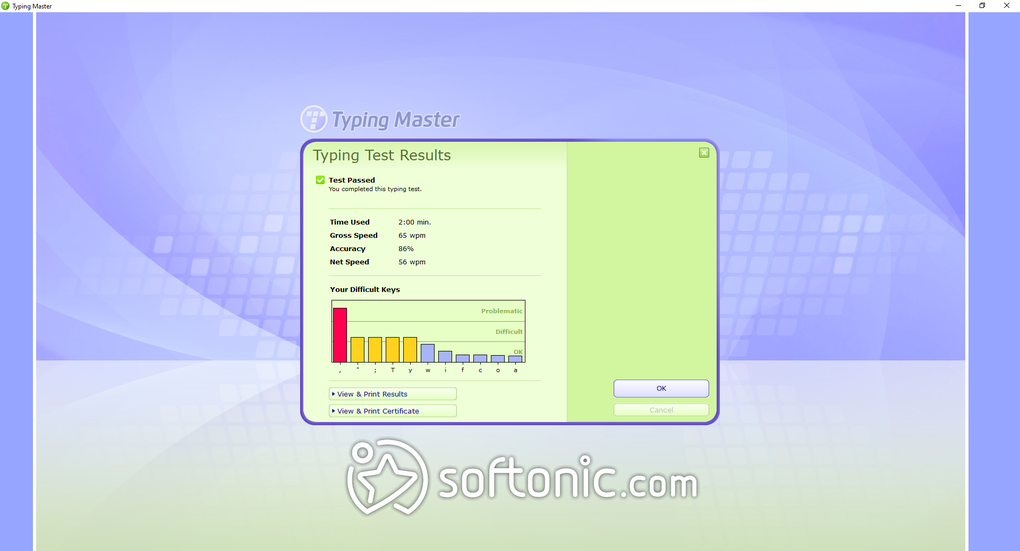
Establishing Your Baseline
The typing test itself is straightforward yet highly effective. Users are presented with various typing pieces and can select the duration of the test, though a one-minute interval is typically recommended for an accurate snapshot of performance. This flexibility allows individuals to tailor the assessment to their comfort level or specific needs. Beyond English, TypingMaster proudly supports seven other languages, making it a versatile tool for a global audience and for those who type in multiple linguistic contexts. This multilingual support is a significant advantage, as typing habits and keyboard layouts can vary across different languages, and the program accommodates these nuances.
To begin, you simply need to type the displayed words on your screen as swiftly and accurately as possible. The interface is clean and intuitive, minimizing distractions and allowing you to focus purely on the task at hand. The real magic happens once the timer expires. TypingMaster doesn’t just present a raw speed; it delivers a detailed analysis of your performance, showcasing your words per minute (WPM) alongside a critical evaluation of your mistyped words. It’s imperative to approach this test by typing naturally, rather than rushing or consciously altering your usual rhythm. Any attempt to artificially inflate your speed by sacrificing accuracy will skew the results, leading to an inaccurate baseline and potentially misleading training recommendations. The system is designed to penalize errors, ensuring that the WPM score accurately reflects practical typing efficiency.
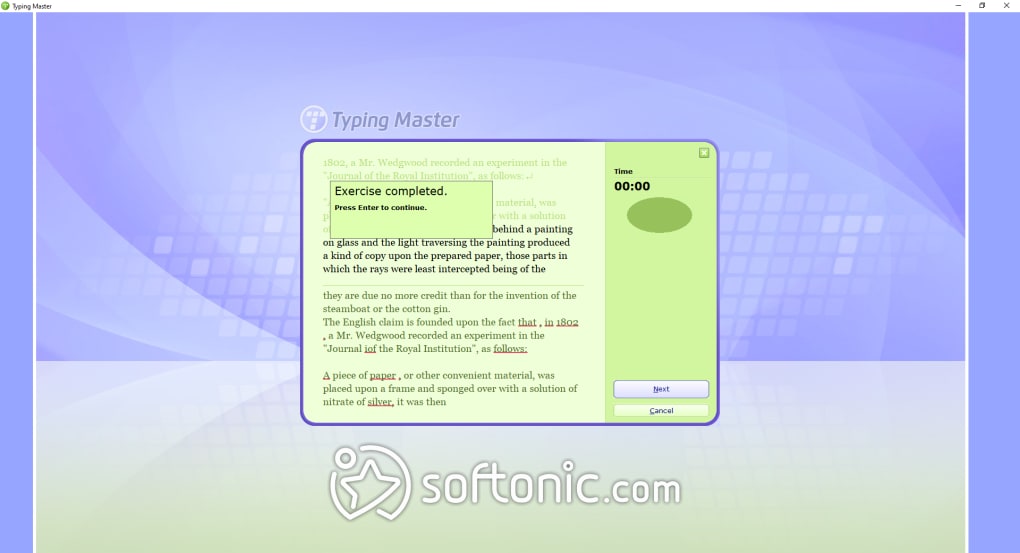
Understanding Your Score and Proficiency Levels
TypingMaster categorizes typing speeds into five distinct levels, providing a clear framework for understanding your performance and setting improvement goals. These levels are:
- Slow: Indicative of a beginner or someone who relies heavily on “hunt and peck” methods.
- Average: Represents a moderate level of proficiency, suitable for basic digital tasks but with room for significant improvement.
- Fluent: Characterizes a comfortable and relatively efficient typist, capable of handling most daily typing demands without much effort.
- Fast: Signifies a highly competent typist, demonstrating excellent speed and accuracy, often a result of consistent practice.
- Pro: The pinnacle of typing proficiency, achieved by those who can type at exceptional speeds with minimal errors, often through touch-typing mastery.
Upon receiving your results, TypingMaster offers a crucial decision point: you can choose to retake the test if you believe you can perform better, or you can immediately dive into the training modules designed to enhance your speed and accuracy. This immediate feedback loop and actionable next steps are central to the program’s effectiveness, transforming a simple test into a gateway for skill development.
2. Comprehensive Training: Lessons and Exercises for Mastery
The true power of TypingMaster Typing Test lies not just in its assessment capabilities but in its extensive and well-structured training curriculum. With over 500 typing exercises, meticulously organized into progressive lessons, the program systematically guides users through the journey of becoming a proficient typist. Each lesson is designed to focus on and hone one specific typing skill at a time, ensuring a thorough and incremental learning process.
From Familiarity to Fluent Touch-Typing
The initial lessons, typically the first 14, are dedicated to building foundational keyboard familiarity. This stage is paramount for beginners, as it focuses on teaching the correct finger placement on the home row and gradually introducing new keys. The ultimate goal here is to help users develop muscle memory, enabling them to type without ever needing to look down at their fingers – the core principle of touch-typing. This phase is critical because it establishes good habits from the outset, preventing the development of inefficient “hunt and peck” methods that can be hard to unlearn later. The exercises are repetitive by design, reinforcing the correct finger movements until they become second nature.
Diversifying Your Skill Set: Speed, Numbers, and Symbols
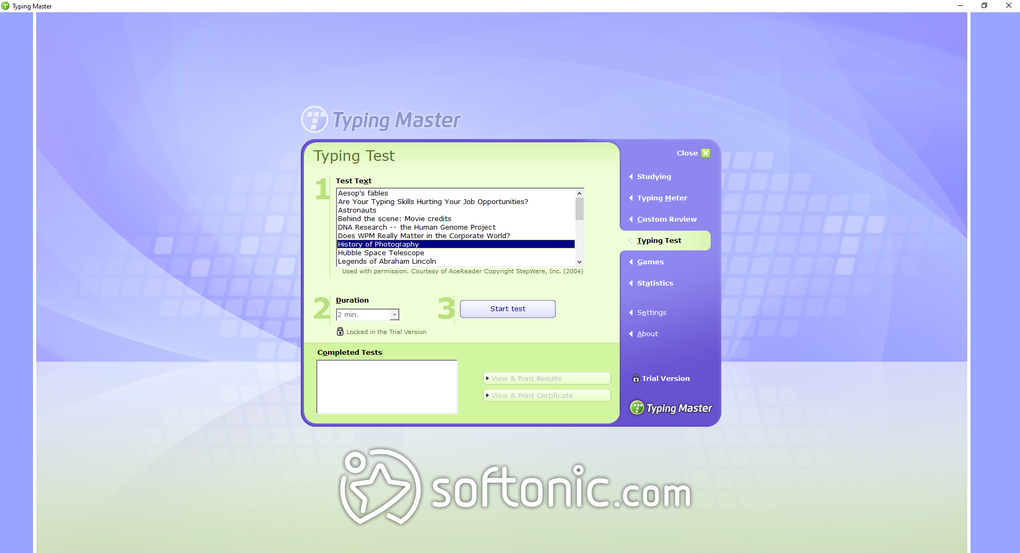
As you progress beyond the initial familiarity lessons, TypingMaster introduces a diverse range of secondary practice tests. These modules are strategically designed to expand your typing repertoire and address specific areas of improvement:
- Speed Building: These exercises are tailored to incrementally increase your typing pace. They often involve typing common words and phrases, pushing you to maintain accuracy while accelerating your WPM. The program might highlight areas where your speed falters or where you frequently pause, providing targeted practice.
- Number Row Practice: Typing numbers efficiently is often a challenge, especially for those accustomed to only alphabetical typing. These lessons focus on mastering the top number row, ensuring that your fingers instinctively know where each numeral lies without visual aid.
- Symbol Entry: Many professions require frequent use of symbols (e.g., punctuation, mathematical symbols, special characters). These exercises integrate symbol practice, helping you seamlessly switch between alphanumeric characters and symbols, which is crucial for tasks like coding, data entry, or academic writing.
- Number Pad Training: For individuals who frequently work with numerical data, such as accountants, data analysts, or cashiers, proficiency with the number pad is invaluable. TypingMaster includes dedicated lessons for the numeric keypad, teaching efficient finger placement and data entry techniques.
Each lesson within TypingMaster typically comprises a series of activities that, collectively, take approximately 10 to 25 minutes to complete. This manageable duration ensures that practice sessions are engaging and prevent fatigue, encouraging consistent engagement over time. The modular structure allows users to revisit specific lessons as needed, reinforcing areas where they feel less confident.
3. The Art of Touch-Typing: A Core Benefit
Beyond merely improving speed and accuracy, one of the most profound benefits of consistently using TypingMaster is the development and refinement of touch-typing skills. Touch-typing is the highly efficient method of typing without looking at the keyboard, relying instead on muscle memory and spatial awareness of the key placements. It’s a fundamental concept that many typists aspire to achieve, representing a significant leap in keyboard proficiency.
Why Touch-Typing Matters
The advantages of mastering touch-typing are multifaceted and far-reaching:
- Increased Speed and Productivity: By eliminating the need to constantly shift gaze between the screen and keyboard, touch-typists can process information and input text at a much faster rate. This translates directly into higher productivity in academic, professional, and personal tasks.
- Enhanced Accuracy: When your focus remains on the screen, you are more likely to catch errors as you make them, leading to fewer mistakes overall. The consistent finger positioning also reduces the likelihood of hitting incorrect keys.
- Reduced Physical Strain and Fatigue: Continuously looking down at the keyboard can lead to neck and eye strain. Touch-typing allows for a more ergonomic posture, reducing physical discomfort and enabling longer, more comfortable typing sessions.
- Improved Cognitive Flow: Without the visual distraction of the keyboard, your mind can remain fully engaged with the content you are producing. This leads to better concentration, smoother thought processes, and a more natural flow of ideas from your mind to the digital page.
- Professionalism: In many professional settings, rapid and error-free typing is seen as a mark of efficiency and competence.
TypingMaster’s Approach to Skill Development
TypingMaster employs a structured pedagogical approach to facilitate the acquisition of touch-typing. It starts with the basics: correct finger placement on the home row (ASDF JKL;), and then gradually introduces adjacent keys. The lessons emphasize rhythm and repetition, training your fingers to move instinctively to the correct keys. The visual cues within the program often highlight which finger should press which key, reinforcing proper technique. Through consistent practice of its diverse exercises, TypingMaster effectively guides users from a visual-dependent typing style to a confident, efficient, and effortless touch-typing mastery. The combination of targeted lessons, immediate feedback on errors, and progressive challenges ensures that learners are consistently improving and internalizing the mechanics of touch-typing.
4. User Experience, Features, and Value
TypingMaster Typing Test distinguishes itself not only through its robust training modules but also through its user-centric design and engaging features, making the learning process both effective and enjoyable.
Ease of Use and Engaging Learning
One of the standout attributes of TypingMaster is its ease of use and convenient access. The tests and lessons can be initiated without the cumbersome requirement of signing up or inputting personal information like usernames and age. This frictionless entry point removes barriers to immediate practice, allowing users to dive straight into improving their skills. The interface is designed to be intuitive and clean, ensuring that navigation is straightforward, even for those who are not particularly tech-savvy.
Beyond its core lessons, TypingMaster understands that sustained motivation is key to long-term skill development. To address this, it incorporates “fun typing games” that inject an element of action and playfulness into what might otherwise be a monotonous training routine. These games challenge users in various ways, often requiring quick reflexes and accurate keystrokes in a gamified environment, which can significantly enhance engagement and make practice sessions feel less like work and more like entertainment. This blend of structured learning and recreational practice ensures a well-rounded and appealing user experience.
Pros, Cons, and System Requirements
Like any software, TypingMaster Typing Test comes with its own set of advantages and minor drawbacks:
Pros:
- Easy to use and navigate: The intuitive interface makes it accessible for users of all ages and technical proficiencies.
- Helpful typing exercises: The extensive library of over 500 structured exercises ensures comprehensive skill development.
- Accurate tests for speed and accuracy: The detailed scoring system provides clear insights into performance and progress.
- Features fun typing games: Gamified learning keeps users engaged and motivated.
- No sign-up required for basic use: Facilitates immediate access to practice.
- Multilingual support: Offers tests and practice in multiple languages beyond English.
Cons:
- Pages can take time to load: Some users might experience occasional delays when navigating between sections.
- Lessons can be time-consuming: While thorough, the depth of the curriculum means significant time investment is required for full mastery.
- Limited languages available in free trial: While the full version supports more, the trial might have fewer options. (Note: The reference content says “seven other available languages besides English” for the full version, implying it’s not “limited” per se, but perhaps for the free trial or comparison to other software with even more languages).
System Specifications and Availability: TypingMaster Typing Test is a free, full-featured typing tester for Windows. The application’s version V11.0.8823.7 (2884) as of its last update five months ago, signifies continuous development and refinement. It runs on Windows 2000 and newer operating systems, with a relatively small file size of 11.37 MB, making it lightweight and easy to download. Developed by TypingMaster itself, it has garnered significant popularity with millions of downloads. The user reviews on PhanMemFree.org generally echo its efficacy, with users praising its ability to improve typing speed for office work and overall career development.
5. The Indispensable Skill in the Digital Age
In the contemporary landscape of work, education, and social interaction, typing proficiency has transcended being a mere technical skill to become a cornerstone of digital literacy. Its importance cannot be overstated, influencing everything from individual productivity to effective communication.
Beyond Speed: Accuracy and Efficiency
While speed often grabs the headlines, accuracy and overall efficiency are equally, if not more, critical. Fast typing riddled with errors requires constant backtracking and correction, ultimately negating any time saved. TypingMaster’s emphasis on both WPM and mistyped words ensures that users develop a balanced skill set. Efficient typists are those who can produce clean, error-free text at a reasonable pace, making their digital interactions seamless and effective. This efficiency extends beyond just data entry; it impacts the speed at which ideas can be articulated in writing, the fluidity of online conversations, and the overall pace of project completion. In a world driven by digital communication, the ability to rapidly and precisely convey thoughts is a powerful asset.
TypingMaster in a Broader Context
The value proposition of TypingMaster Typing Test extends beyond personal skill enhancement. For students, it means faster note-taking, more efficient essay writing, and quicker research compilation. For professionals, it translates to increased output in report generation, email correspondence, coding, and countless other computer-based tasks. Businesses can benefit from employees who are proficient typists, leading to higher overall operational efficiency. The software fits perfectly into the larger ecosystem of educational and productivity tools, complementing learning management systems and office suites by addressing a foundational skill often taken for granted.
Considering its comprehensive approach to typing education, from initial assessment and structured lessons to engaging games and progress tracking, TypingMaster Typing Test remains a highly recommended tool for anyone looking to invest in their digital future. Available for free on PhanMemFree.org, it provides an accessible pathway to unlocking your full typing potential, ensuring that your interaction with the keyboard is as efficient, accurate, and effortless as possible. In an era where communication is predominantly digital, mastering your keyboard is not just an advantage—it’s a necessity, and TypingMaster is an excellent guide on that journey.
File Information
- License: “Free”
- Latest update: “February 18, 2025”
- Platform: “Windows”
- OS: “Windows 2000”
- Language: “English”
- Downloads: “2.5M”
- Size: “11.37 MB”


