
uBook, a free eBook reader for Windows and Pocket PCs, holds a significant place in the history of digital reading software. Released in 2007, it garnered considerable attention for its simplicity and functionality, offering a straightforward approach to accessing digital books on early computing platforms. While it’s no longer actively developed and faces stiff competition from modern eBook readers, understanding its features and impact provides valuable context within the evolution of digital reading technology. This review delves into uBook’s capabilities, its historical significance, and its position within the broader landscape of eBook readers.
uBook’s Functionality and Features
uBook was designed to provide a basic yet functional eBook reading experience. Its core functionality centered on supporting a range of common eBook formats, including HTML, TXT, RTF, PDB, and PRC (though the security of PRC support was noted as questionable). This broad format support allowed users to access eBooks from various sources without needing format conversion. A noteworthy feature was its ability to read directly from ZIP archives, eliminating the need for manual extraction before reading.
Beyond basic reading, uBook offered customizable display settings to cater to individual preferences. Users could switch between portrait and landscape orientations, adjust font type, color, and size, enhancing readability and visual comfort. This level of personalization was a notable feature for its time, empowering users to create a tailored reading experience.
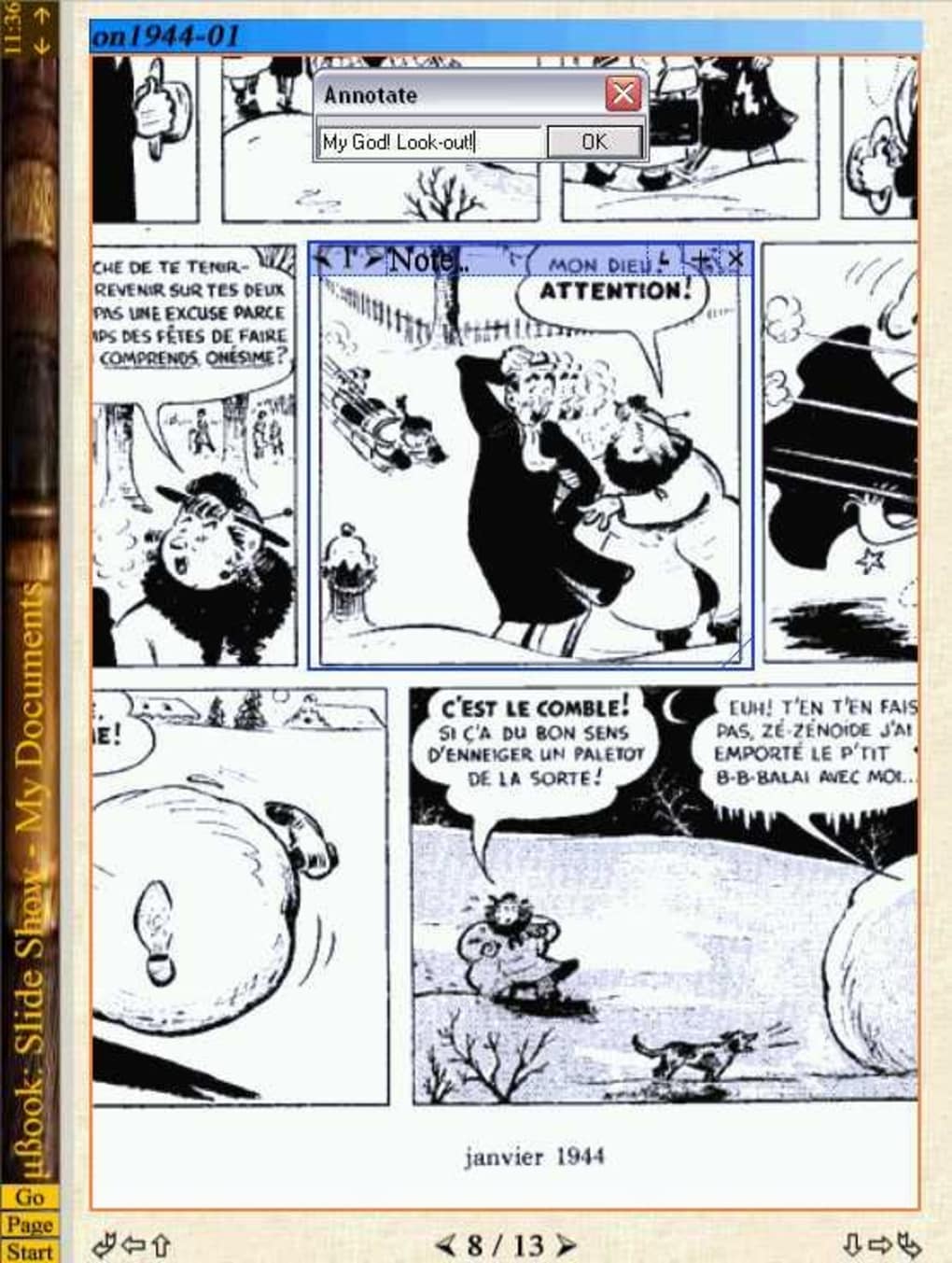
The software also boasted a resizable and skinnable user interface. This allowed users to modify the appearance of the reader, although the extent of customization options isn’t detailed in available information. The flexibility in UI modification suggests an attempt to provide a degree of personalization beyond text formatting, aligning with the growing interest in user interface customization across software applications.
The inclusion of image support for BMP, GIF, PNG, and JPG formats was another notable aspect. This allowed for a more visually rich reading experience, particularly valuable for eBooks incorporating images, illustrations, or diagrams. While not groundbreaking in modern standards, this feature contributed to the reader’s ability to handle more diverse eBook content.
uBook’s Historical Context and Impact
Released in 2007, uBook emerged during a pivotal period in the development of digital reading technology. While dedicated eBook readers like the Kindle were gaining traction, software-based solutions for PCs and Pocket PCs still held relevance. uBook aimed to fill the need for a versatile and accessible eBook reader on these platforms, offering a viable alternative to less flexible or less user-friendly options.
The program’s success, as evidenced by over 54,000 installations by 2007, speaks to its adoption within a specific user base. This suggests a significant demand for a simple, functional, and free eBook reader on Windows systems of the era. The geographical spread of its usage across countries like the United States, Egypt, and Bulgaria hints at its wider reach beyond geographical boundaries.
Comparison to Contemporary and Modern eBook Readers
Compared to contemporary eBook readers of the time, uBook’s strengths lay in its simplicity and cross-platform compatibility. Unlike dedicated hardware devices, uBook ran on existing Windows systems, reducing the barrier to entry. While it lacked advanced features common in modern readers (e.g., advanced text-to-speech, extensive annotation tools, cloud synchronization), it provided a robust foundation for basic eBook reading.
Modern eBook readers have significantly surpassed uBook in terms of features and functionality. Today’s readers offer features like sophisticated text reflow, integrated dictionaries, extensive annotation capabilities, cloud synchronization for accessing libraries across multiple devices, and advanced search functions. Furthermore, modern readers are optimized for touchscreen interfaces and offer better battery life than software-based alternatives.
uBook’s Legacy and Decline
uBook’s last update in 2007 signifies its eventual decline. The lack of ongoing development left it unable to compete with the rapid advancements in eBook reader technology. The rise of dedicated eBook readers, smartphones, and tablets with integrated eBook reading apps provided more user-friendly and feature-rich alternatives. The software’s limited support for newer eBook formats and the absence of cloud integration further contributed to its obsolescence.
While uBook might be considered outdated by today’s standards, its legacy lies in its contribution to early digital reading on PCs. It served a specific need in a specific time, demonstrating the value of accessible and functional reading software even in the face of evolving technology. The program’s history offers a glimpse into the evolution of eBook reading, highlighting how technology advancements have transformed the way we access and interact with digital books.
Conclusion
uBook stands as a historical artifact in the realm of eBook readers. While its functionality is limited compared to modern alternatives, its impact during its active period should not be overlooked. Its success showcased the demand for a user-friendly and free eBook reading solution on older Windows systems. Its simplicity and format support made it an accessible option for users at a time when digital reading technology was still developing. While no longer actively maintained or updated, uBook provides a fascinating study in how software evolves to meet the demands of technological progress and changing user expectations within the constantly evolving landscape of digital reading. It serves as a reminder of how far the technology has advanced while simultaneously acknowledging the foundational role software like uBook played in shaping the modern digital reading experience.
File Information
- License: “Free”
- Version: “0.9”
- Latest update: “August 12, 2019”
- Platform: “Windows”
- OS: “Windows 98 SE”
- Language: “English”
- Downloads: “48.9K”
- Size: “569.34 KB”


