
UDL Client is a versatile, free download manager specifically designed for Windows operating systems. It excels as a YouTube video downloader, offering a wide range of video quality options and extending its capabilities to encompass audio extraction and support for a vast array of online video platforms. This in-depth guide will explore its features, functionality, ease of use, security aspects, and overall user experience.
UDL Client’s Core Functionality: Downloading and Converting Media
At its heart, UDL Client provides a streamlined method for downloading videos from YouTube and numerous other online video-sharing services. Its strength lies in its ability to download videos in various resolutions, catering to different bandwidths and viewing preferences. Users can choose from standard definition (360p, 480p) to high-definition (720p HD, 1080p Full HD), and even ultra-high definition (4K Ultra HD) formats, depending on the availability of the source video. This flexibility ensures users can optimize their downloads for their specific device and internet connection.
Beyond its video downloading prowess, UDL Client functions effectively as an MP3 converter. This integrated feature allows users to extract the audio from downloaded videos, converting them into MP3 format for convenient offline listening. This eliminates the need for separate audio extraction software, streamlining the overall media management process.
The software’s versatility extends far beyond YouTube. UDL Client boasts compatibility with over 900 online video platforms, significantly expanding its practical utility. This extensive support list includes popular services such as TikTok, Instagram, Facebook, Twitter, SoundCloud, VK, and OK.ru, ensuring a broad range of online content can be readily downloaded and converted. This vast compatibility makes UDL Client an invaluable tool for users who frequently access content from diverse online sources.
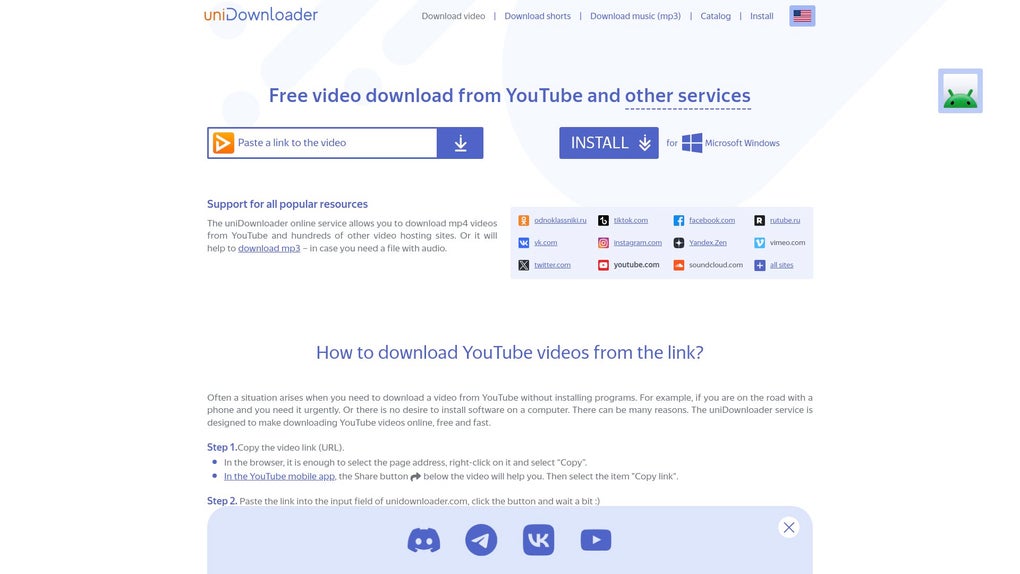
User Interface and Ease of Use: A Streamlined Experience
UDL Client prioritizes a user-friendly interface, making navigation and content management intuitive, even for users unfamiliar with download managers. Its clean and uncluttered design simplifies the downloading process, preventing overwhelming complexity. The intuitive layout ensures users can quickly locate and utilize the core features without encountering unnecessary hurdles.
The straightforward approach minimizes the learning curve, allowing users to focus on downloading and converting their desired media without needing to navigate intricate menus or configurations. This ease of use significantly enhances the overall user experience, making UDL Client accessible to a broader audience, irrespective of their technical proficiency.
Security and Privacy Considerations: Protecting User Data
While UDL Client provides convenient access to online media, it is crucial to address potential security and privacy concerns associated with downloading and using third-party software. The developers, Argon Digital, should prioritize transparent security practices and implement measures to protect user data. This includes regularly updating the software to address any vulnerabilities and ensuring secure data transmission during downloads.
Users should always exercise caution when downloading and using any third-party software. It’s recommended to download the software only from trusted sources like the official website to minimize the risk of malware or unwanted bundled software. Furthermore, users should review the software’s privacy policy to understand how their data is collected and used.
Regularly checking for updates ensures users have access to the latest security patches, mitigating potential threats. A reliable antivirus program should also be used alongside UDL Client to provide an additional layer of protection. Users should be vigilant about the websites from which they download content, avoiding suspicious or untrusted sources.
Supported Platforms and System Requirements: Compatibility and Optimization
UDL Client is currently designed exclusively for Windows operating systems. This platform-specific approach allows the developers to optimize the software for a particular environment, potentially resulting in enhanced performance and stability. However, the lack of cross-platform support might limit accessibility for users on other operating systems like macOS, Linux, or Android.
The software’s system requirements should be clearly specified on the official website to help users determine compatibility with their specific hardware configurations. Users should ensure their systems meet or exceed the minimum requirements to ensure optimal performance and stability. Insufficient system resources could lead to slow download speeds, instability, or even crashes.
Beyond the Basics: Advanced Features and Customization
While the core functionality of UDL Client is straightforward, it may include additional features that enhance the overall user experience. These advanced features could include options for scheduling downloads, setting download speed limits, managing multiple simultaneous downloads, or integrating with other software applications.
Customization options, such as the ability to select specific download locations, change the default download format, or configure various other preferences, could further enhance user control and flexibility. These advanced features and customization options, if available, would greatly improve the software’s versatility and cater to users’ individual needs and preferences.
Comparing UDL Client to Other Download Managers: A Competitive Analysis
UDL Client competes in a market crowded with various download managers. Direct comparisons with popular alternatives such as Internet Download Manager (IDM), Free Download Manager (FDM), and JDownloader, can reveal UDL Client’s strengths and weaknesses.
A comparative analysis should consider factors like download speeds, ease of use, supported platforms, features, security, and pricing. While some features might overlap, unique functionalities or performance differences could influence user choice based on their individual requirements and priorities.
Conclusion: UDL Client’s Strengths and Limitations
UDL Client presents a compelling solution for users seeking a convenient way to download videos and audio from YouTube and a wide range of online platforms. Its ease of use, broad platform support, and integrated MP3 conversion feature are significant strengths.
However, limitations exist, such as its current Windows-only availability and the potential security concerns associated with downloading content from online sources. Users should always exercise caution and prioritize their online security practices when utilizing such software. Regular software updates, utilization of antivirus software, and awareness of online security best practices are crucial for maintaining a secure online environment.
Despite its limitations, UDL Client’s streamlined design and comprehensive functionality make it an attractive option for many users seeking an efficient and user-friendly download manager. The software’s ongoing development and potential for future enhancements could further solidify its position in the competitive download manager market. Continuous improvement and addressing user feedback would be key to its continued success and user satisfaction.
File Information
- License: “Free”
- Latest update: “May 15, 2025”
- Platform: “Windows”
- OS: “Windows 11”
- Language: “English”
- Downloads: “3.2K”


