
UDPixel, a now-defunct Windows utility, once held a prominent position in the realm of monitor diagnostics. Released in 2007, this free program offered a simple yet effective solution for identifying and locating problematic pixels on computer displays. While no longer actively maintained or updated, its legacy provides a valuable case study in the evolution of software tools and the ongoing need for efficient monitor diagnostics. This review examines UDPixel’s features, historical context, and its place within the broader landscape of screen analysis software.
UDPixel’s Functionality: Identifying and Locating Bad Pixels
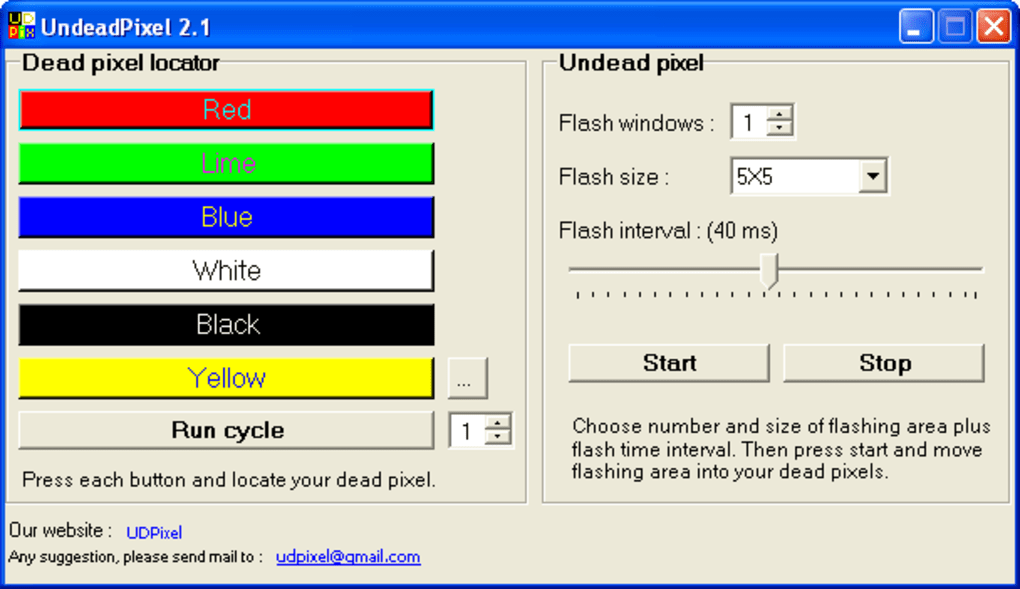
UDPixel’s primary function was to detect and pinpoint “dead” or “stuck” pixels on a computer monitor. These faulty pixels can manifest as consistently black (dead pixels) or brightly colored (stuck pixels) areas on the screen, significantly impacting the visual quality of the display. The program achieved this by presenting the user with a series of solid-color screens – red, green, blue, and white – allowing the user to visually inspect the monitor for any irregularities.
The simplicity of the program was its strength. Users didn’t need technical expertise or complicated configurations to utilize UDPixel. The straightforward interface presented the color screens sequentially, making the detection process intuitive even for novice users. This user-friendly approach contributed to its widespread popularity during its active years. The program’s ability to highlight potential problems without requiring specialized hardware or deep technical knowledge was a significant advantage.
UDPixel’s Technical Specifications and Historical Context
UDPixel was a lightweight application, boasting a small file size, which minimized its impact on system resources. This was beneficial for users with older hardware, a common scenario in 2007 when the software was released and prevalent throughout its operational lifespan. The program’s compatibility with Windows 2000 and prior versions underscores its relevance during a time of significant technological transitions. The fact that it was available only in English reflects the dominant position of English in the software market at the time, albeit limiting its accessibility to non-English-speaking users.
The software’s developer, Samuel Larché, contributed to the community by providing a free and readily available tool to address a common computer problem. The program’s release date of March 16, 2007, places it firmly within a period of rapidly evolving display technology. While LCD monitors were becoming increasingly prevalent, many users still relied on CRT monitors, which were susceptible to various pixel defects. UDPixel served as a valuable tool for both LCD and CRT users.
UDPixel’s Impact and Legacy in the Software Landscape
Despite no longer being actively maintained, UDPixel’s impact remains noteworthy. Its widespread adoption (over 72,000 installations reported at one point) illustrates a clear user demand for a simple, effective pixel detection tool. The program’s consistent use across various countries – notably the United States, Iran, and India – further highlights its accessibility and practicality.
The absence of user reviews on platforms like Phanmemfree, where it was hosted, may reflect the program’s age and the subsequent decline in user activity around it. The lack of current user feedback prevents a complete assessment of its performance within contemporary systems. While its functionality was limited compared to modern tools, UDPixel met a specific need effectively within the technological constraints of its time.
Comparing UDPixel to Modern Alternatives
Modern screen testing software offers a significantly expanded range of capabilities beyond simple pixel detection. These advanced tools often incorporate automated tests, advanced diagnostic algorithms, and the ability to identify a wider range of display issues, including dead or stuck pixels, backlight bleeding, color banding, and response time issues. Many of these newer tools are also cross-platform, compatible with Windows, macOS, and Linux, reflecting the changes in the operating system landscape.
The evolution from UDPixel’s manual, visual inspection method to automated diagnostics represents a significant advancement in monitor testing capabilities. Modern software often uses sophisticated algorithms to analyze screen output for irregularities, providing more objective and comprehensive results. The increased processing power available in current computing systems facilitates the use of these advanced techniques, allowing for faster and more accurate diagnostics.
Furthermore, modern screen testing software often integrates with other diagnostic tools, allowing for a holistic assessment of a computer’s hardware and software performance. This integrated approach contrasts with the standalone nature of UDPixel, further emphasizing the advancements in software design and integration.
Conclusion: UDPixel’s Role in the History of Monitor Diagnostics
UDPixel serves as a fascinating example of a simple yet effective tool that met a specific user need during a particular technological era. While its age and lack of maintenance prevent its use in contemporary contexts, its legacy lies in highlighting the evolution of monitor diagnostics. The shift from manual, visually-based pixel detection to sophisticated automated analysis reflects broader trends in software development and the continuous improvement in diagnostic capabilities. While UDPixel may be obsolete, it remains a testament to the enduring need for tools that simplify complex technical processes and make them accessible to a broad range of users. The program’s simplicity and its focus on solving a specific problem highlight valuable lessons for modern software developers. Its success in addressing a prevalent issue with minimal complexity serves as a reminder of the importance of simplicity and practicality in software design, particularly for tools aimed at addressing common user challenges. In the rapidly evolving world of software and hardware, UDPixel’s story reminds us of the cyclical nature of technology, where simpler solutions often pave the way for more complex, sophisticated alternatives.
File Information
- License: “Free”
- Version: “2.2”
- Latest update: “March 16, 2007”
- Platform: “Windows”
- OS: “Windows 2003”
- Language: “English”
- Downloads: “42.6K”
- Size: “52.24 KB”


