
In the rapidly evolving landscape of web development, the ability to create and manage content efficiently and intuitively is paramount. For many, navigating the intricacies of HTML code can be a significant barrier, limiting their ability to contribute to or manage website content effectively. This is where tools like UEditor WYSIWYG HTML Editor step in, offering a bridge between complex code and user-friendly design. As a free, open-source HTML text editor, UEditor has carved a niche for itself by simplifying website content creation, bringing the power of desktop word processors directly into the web environment.
UEditor is more than just a basic text editor; it’s a comprehensive solution designed to empower web designers, PHP programmers, webpage designers, and even those less familiar with direct coding, to craft engaging web content with ease. Developed by hangren, this application for Windows (compatible with Windows 2000 and above, including Windows NT) stands out for its commitment to open-source principles and its array of robust features. Since its initial publication on PhanMemFree.org on February 25th, 2014, and with its latest update on June 12, 2023, UEditor version 1.3.6 has continually evolved, incorporating modern web technologies and user-centric enhancements. Its lightweight footprint of just 2.53 MB and availability exclusively in English further underscore its focused utility and accessibility.
The essence of UEditor lies in its WYSIWYG (What You See Is What You Get) approach, which allows users to see their content as it will appear on the web page in real-time, eliminating the need for constant previewing or deep knowledge of HTML tags. This paradigm shift in content editing has profoundly impacted how websites are built and maintained, making it a critical tool for both seasoned professionals and budding developers alike. This article will delve into UEditor’s core functionalities, explore its innovative features, discuss its technical specifications, and place it within the broader context of web development tools, illustrating why it remains a valuable asset for anyone involved in web content creation.
The Evolution of Web Content Creation: Why WYSIWYG Matters
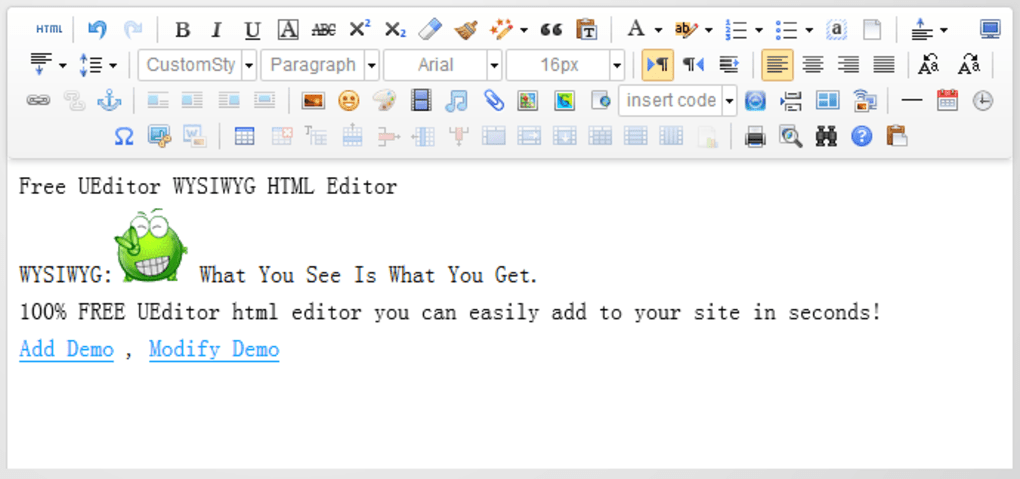
The journey of web content creation has been marked by a continuous quest for efficiency and accessibility. In the early days of the internet, crafting a webpage required a deep understanding of HTML, CSS, and often JavaScript. This code-centric approach, while powerful, inherently limited web content creation to a specialized group of developers. The advent of WYSIWYG editors revolutionized this process, democratizing content creation and enabling a broader spectrum of users to contribute to the digital landscape without necessarily becoming coding experts. UEditor stands as a testament to this evolution, embodying the principles of intuitive design and powerful functionality.
The term “WYSIWYG” itself, meaning “What You See Is What You Get,” encapsulates the core promise of these editors: to provide a visual interface where content can be manipulated directly, much like working with a document in a word processor. This visual representation frees users from the cognitive load of translating code into design, allowing them to focus on the content and its presentation. For a small application like UEditor, delivering this experience on the Windows platform offers immense value, especially for those who manage website content daily. It transforms the often-abstract process of coding into a tangible, interactive design experience, making web development more approachable and less intimidating.
Bridging the Code Gap: The WYSIWYG Advantage
The primary advantage of a WYSIWYG editor like UEditor is its ability to bridge the gap between technical code and visual design. For a web designer or content creator, this means they can focus on the aesthetic and structural integrity of their page without getting bogged down in the minutiae of HTML tags. Imagine wanting to make a piece of text bold; in a traditional code editor, you’d type <strong>your text</strong>. In UEditor, you simply select the text and click a “bold” button, just as you would in Microsoft Word. The editor then automatically generates the correct HTML code in the background, making the process seamless and error-free for the user.
This abstraction of code has several profound implications. Firstly, it significantly lowers the barrier to entry for content management. Individuals who are proficient in desktop publishing software can quickly adapt to a WYSIWYG environment, enabling them to update website content, write articles, or design simple pages without requiring extensive training in HTML. This is particularly beneficial for small businesses, educational institutions, and non-profit organizations where dedicated web developers may not always be available for routine content updates.
Secondly, it enhances productivity. Developers can use UEditor for rapid prototyping or for handing off content creation tasks to non-technical team members, freeing up their time for more complex programming challenges. The ability to visualize changes instantly reduces the feedback loop and speeds up the revision process. By providing a familiar interface, UEditor minimizes the learning curve and allows users to quickly become proficient in managing web content, contributing to a more dynamic and responsive web presence. This ease of use is a cornerstone of UEditor’s appeal and a key driver behind its adoption.
UEditor’s Foundational Features: A Toolkit for Designers and Developers
UEditor distinguishes itself by incorporating a suite of foundational features that are indispensable for efficient web content creation. These features mirror the functionalities commonly found in high-end desktop word processors, bringing a familiar and intuitive experience to the web development workflow.
One of the most basic yet crucial features is styles formatting, encompassing options like bold, italic, and underline. These tools allow users to emphasize text, distinguish different types of content, and improve readability, all with a simple click. Beyond basic formatting, UEditor provides web resource linking, enabling users to easily insert hyperlinks to other web pages, documents, images, or multimedia files. This function is vital for creating interconnected content and enhancing user navigation. The editor handles the underlying <a> tag creation, ensuring correct syntax and functionality.
An often-underestimated feature is a safe undo function. In any content creation process, mistakes are inevitable. A robust undo capability allows users to revert unintended changes without losing significant work, fostering a sense of security and encouraging experimentation. UEditor’s implementation of this feature ensures that users can confidently make edits, knowing they can always step back if needed.
Another powerful tool is the paste from Word functionality. Copying content from Microsoft Word and pasting it directly into an HTML editor can often result in messy, proprietary, or unnecessarily verbose HTML code. UEditor intelligently handles this, aiming to strip out extraneous formatting while retaining the core content and its intended structure. This feature is a massive time-saver for anyone repurposing existing documents for web publication, preventing the need for manual cleanup of “dirty” HTML.
Finally, UEditor includes various common HTML formatting tools. While not explicitly detailed, these typically encompass features like list creation (ordered and unordered), text alignment (left, center, right, justify), indentation, and basic table creation. These tools collectively empower users to structure their content effectively, ensuring it is not only visually appealing but also semantically correct and accessible. Together, these foundational features form a robust toolkit that streamlines the content creation process, making UEditor an invaluable asset for anyone managing web pages.
UEditor 1.3.6: Innovations and Enhancements
The continuous development and refinement of software are crucial for its relevance and utility in a fast-paced technological world. UEditor, through its various iterations, has demonstrated a commitment to integrating modern web standards and enhancing user experience. Version 1.3.6, released by hangren, introduced several significant innovations that further solidify its position as a powerful and accessible HTML editor for Windows. These enhancements not only improved the aesthetic appeal and functionality of the editor but also pushed the boundaries of how users interact with web content.
The updates in 1.3.6 focused on key areas: revamping the visual interface, enabling more direct content manipulation, fostering community engagement, and providing tools for deeper customization. These changes collectively aimed to make UEditor more intuitive, more powerful, and more adaptable to the diverse needs of its user base. By embracing HTML5 features and promoting a collaborative environment, UEditor 1.3.6 signaled a forward-looking approach to web content creation, ensuring its users benefit from the latest advancements in web technology.
Modernizing the User Experience: New Skin and Inline Editing
One of the immediately noticeable improvements in UEditor 1.3.6 was the introduction of a new skin. While seemingly a superficial change, a refreshed visual interface can significantly impact user experience. A modern, clean, and intuitive design can reduce cognitive load, improve navigation, and make the editing process more enjoyable and efficient. A new skin often implies an updated icon set, a more logical layout of tools, and better visual feedback, all contributing to a more polished and professional feel. This aesthetic upgrade helps UEditor compete with more contemporary tools and provides a more pleasant environment for extended editing sessions.
Beyond aesthetics, a truly revolutionary feature introduced in UEditor 1.3.6 was Inline Editing, leveraging the capabilities of HTML5. This feature fundamentally transforms how website content is managed. Traditionally, editing a webpage involves working within a separate text area or editor window, then previewing the changes, and finally saving them to see the final result on the live page. Inline Editing removes this iterative process by allowing website users to edit pages directly in their final state. This means the editing controls appear directly within the content of the webpage itself, enabling real-time, in-context modifications.
The benefits of Inline Editing are manifold. Firstly, it offers an unparalleled “What You See Is What You Get” experience, as users are literally editing the content as it appears on the live site. This eliminates guesswork and ensures that formatting and layout decisions are made with immediate visual feedback. Secondly, it streamlines the workflow for content managers, allowing them to make quick updates without navigating through complex backend interfaces. For a dynamic website, where content updates are frequent, this can drastically improve efficiency and responsiveness. Developers can integrate UEditor’s inline editing capabilities into their content management systems (CMS), providing a seamless experience for their clients. This direct manipulation of content significantly enhances usability and provides a more intuitive way to maintain and update web pages.
Community and Customization: Add-ons Repository and Editor Building Tools
The open-source nature of UEditor is inherently conducive to community involvement, and version 1.3.6 made significant strides in formalizing and leveraging this aspect with the introduction of a centralized add-ons repository. In the world of open-source software, community contributions are the lifeblood of innovation. A centralized repository provides a platform where all community plugins and skins can be submitted and freely shared. This fosters a vibrant ecosystem around UEditor, allowing users to extend its functionality beyond its core features.
This repository serves multiple purposes:
- Expansion of Functionality: Users can develop and share plugins that add new tools, integrate with other services, or provide specialized formatting options, tailoring UEditor to specific project needs.
- Thematic Customization: New skins can be shared, allowing users to personalize the editor’s appearance to match their branding or preference.
- Knowledge Sharing: The repository acts as a hub for best practices and innovative solutions, benefiting the entire user base.
- Democratization of Development: Even users with moderate coding skills can contribute, making UEditor a truly collaborative project.
Alongside the add-ons repository, UEditor 1.3.6 also introduced a dedicated UEditor tool for building customized editors. This powerful feature elevates UEditor from a standalone application to a customizable framework. For developers, this means they are not confined to the default UEditor interface or feature set. Instead, they can use this tool to create highly specialized versions of UEditor, selecting only the necessary buttons, functionalities, and plugins for a particular project.
For example, a developer building a blogging platform might create a custom UEditor instance with specific blogging-related tools (e.g., image upload, markdown conversion, shortcode insertion), while stripping away features irrelevant to blogging. Conversely, a developer building an e-commerce product description editor might customize UEditor with specific formatting options for product specifications. This level of customization ensures that UEditor can be seamlessly integrated into various applications and workflows, providing a highly tailored and efficient editing experience. It underscores UEditor’s flexibility and its potential as a foundational component for diverse web content management solutions.
Technical Specifications and Platform Compatibility
Understanding the technical underpinnings and compatibility of any software is crucial for its effective deployment and use. UEditor WYSIWYG HTML Editor, while offering advanced features, maintains a lean and efficient profile, making it a practical choice for a wide range of users, particularly within the Windows ecosystem. Its design reflects a philosophy of delivering powerful functionality without excessive resource demands, a hallmark of well-engineered open-source projects. This section delves into the specifics of UEditor’s system requirements, its compact nature, and the foundational principles of its open-source development.
The detailed specifications provide insights into UEditor’s accessibility and its suitability for various operating environments. From its minimal size to its broad Windows compatibility, these aspects highlight the editor’s practicality and ease of integration into existing developer toolkits or content management workflows. This technical transparency is a key benefit of open-source software, allowing users to assess its fit for their needs without ambiguity.
System Requirements and Installation
UEditor WYSIWYG HTML Editor is designed primarily for the Windows operating system, ensuring broad accessibility for a vast majority of desktop users. Specifically, it boasts compatibility with Windows 2000 or above, which includes widely used versions such as Windows XP, Vista, 7, 8, 10, and even older systems like Windows NT. This extensive backward compatibility means that users don’t necessarily need the latest hardware or operating system to run UEditor effectively, making it a versatile tool for various computing environments. This wide range of supported operating systems highlights its commitment to being an accessible solution for many.
One of UEditor’s most appealing technical attributes is its remarkably small size, weighing in at just 2.53 MB. This compact footprint translates into several advantages:
- Quick Download: Users can download the application almost instantaneously, even on slower internet connections.
- Minimal Storage Impact: It occupies very little disk space, which is beneficial for systems with limited storage or for developers who maintain a large suite of tools.
- Fast Installation: The installation process is typically swift and straightforward, getting users up and running in a matter of minutes.
The installation process itself is generally designed to be user-friendly, consistent with standard Windows application installations. Once downloaded from a reputable source like PhanMemFree.org, users can expect a simple wizard-driven setup that guides them through the necessary steps. Because it’s a standalone application for Windows, it doesn’t require complex server-side configurations for its basic operation, making it ideal for local development, rapid prototyping, or individual content management tasks. Its low overhead and ease of deployment contribute significantly to its utility as a practical tool for web content creators.
Open-Source Ethos and Developer Engagement
At its core, UEditor is a testament to the power and principles of open-source software. This foundational aspect profoundly influences its development, distribution, and community interaction. Being open-source means that its source code is freely available for anyone to view, modify, and distribute under specific licensing terms. This philosophy offers numerous benefits for users and the broader development community.
The developer, hangren, embodies the spirit of open-source contribution by providing UEditor as a free utility. This approach fosters:
- Transparency: Users can inspect the code to understand how it works, identify potential issues, or verify its security, as evidenced by PhanMemFree.org’s “Clean” security status report, which involves scanning files with over 50 leading antivirus services.
- Community Contributions: The open-source model encourages developers worldwide to contribute to UEditor’s improvement. This can take the form of bug fixes, new features, language translations, or, as seen in version 1.3.6, the development of plugins and skins shared via a centralized repository. This collective intelligence often leads to more robust, innovative, and secure software.
- Cost-Effectiveness: For individuals and organizations, UEditor being free eliminates licensing costs, making professional-grade HTML editing accessible to everyone, regardless of budget constraints.
- Flexibility and Customization: Developers have the freedom to modify UEditor’s code to suit highly specific project requirements, integrate it into proprietary systems, or adapt it to unique workflows, something that is often restricted with commercial software. The UEditor tool for building customized editors is a direct manifestation of this open-source flexibility.
- Longevity: Open-source projects often have longer lifespans because they are not tied to the commercial viability of a single company. As long as there is an active community, the software can continue to be maintained and evolved.
UEditor’s open-source ethos not only makes it a highly accessible tool but also positions it within a collaborative ecosystem where continuous improvement and community-driven innovation are paramount. This engagement ensures that UEditor remains a relevant and evolving solution for the challenges of modern web content creation.
UEditor in the Broader Ecosystem of Web Development Tools
The landscape of web development tools is vast and constantly expanding, encompassing everything from barebones text editors to sophisticated integrated development environments (IDEs) and comprehensive content management systems (CMS). UEditor WYSIWYG HTML Editor finds its place within this ecosystem as a focused, user-friendly tool, particularly valuable for specific use cases. Understanding its position relative to other tools helps in appreciating its strengths and identifying scenarios where it excels. While it may not offer the full breadth of features found in a complex IDE, its targeted approach to WYSIWYG editing provides significant advantages for content creators and web designers.
The comparisons with alternatives and the identification of its primary beneficiaries underscore UEditor’s unique value proposition. It is a tool designed to simplify, not complicate, the process of bringing content to the web, making it an excellent choice for those who prioritize ease of use and direct visual feedback in their editing workflow.
Comparing UEditor with Alternatives
When evaluating UEditor, it’s helpful to consider it alongside other popular HTML editors and WYSIWYG web creation studios. The market offers a diverse range of options, each with its own strengths and target audience.
- Commercial WYSIWYG Editors: Tools like CoffeeCup HTML Editor (a paid option) or WYSIWYG Web Builder (trial version) often come with extensive features, dedicated support, and polished interfaces. UEditor, being free and open-source, offers a compelling alternative for those seeking similar functionality without the financial investment. While CoffeeCup emphasizes a sleek website builder, UEditor focuses purely on the editing aspect, which can be preferable for integration into existing systems.
- Free WYSIWYG Alternatives: openElement and BlueGriffon are other free WYSIWYG web creation studios. openElement is noted for its “many practical and graphical elements,” suggesting a more comprehensive site building capability. BlueGriffon is an “innovative WYSIWYG web designer.” UEditor differentiates itself by its focus on being an HTML text editor rather than a full site builder, making it more suitable for embedding within larger applications or for specific content editing tasks. Its direct Inline Editing feature, leveraging HTML5, is a specific innovation that gives it an edge in real-time content manipulation.
- Code Editors with HTML Support: Tools like Adobe Brackets (an open-source code editor written in JavaScript, HTML, and CSS) are primarily code-focused. While they offer excellent features for writing HTML, CSS, and JavaScript, they require users to work directly with code. UEditor caters to a different need, allowing users to avoid direct code interaction for most content creation tasks. Its “RichTextEdi” and “Fresh HTML” (other free apps) are simpler, often more basic text editors, whereas UEditor incorporates more advanced features like “paste from Word” and the add-ons repository.
- Niche Tools: .NET WYSIWYG HTML Editor and Total Validator serve more specific functions. The .NET editor is likely geared towards developers working within the Microsoft .NET framework, while Total Validator focuses on validation rather than creation. UEditor’s strength lies in its general-purpose HTML content creation capabilities.
UEditor shines particularly through its combination of being free, open-source, and offering specific advanced features like HTML5 Inline Editing and a community-driven add-ons repository. Its compact size and Windows compatibility further enhance its appeal as a practical and accessible tool for many users who need a robust editor without the overhead of a full web development suite.
Who Benefits Most from UEditor?
UEditor’s design and features cater to a specific demographic within the web development and content creation sphere, making it an ideal choice for several key user groups:
- Website Designers: For designers who prefer a visual approach to content layout and styling, UEditor’s WYSIWYG interface is invaluable. They can quickly mock up or refine content, apply formatting, and integrate multimedia elements without diving deep into code, streamlining their design workflow.
- PHP Programmers: While PHP programmers are proficient in backend logic, they often need to manage or generate HTML for their applications. Integrating UEditor into a custom CMS or web application allows them to provide a user-friendly interface for clients or non-technical team members to manage content, thereby reducing their own workload for routine content updates. The ability to build customized editors with UEditor’s tools is particularly beneficial for this group.
- Webpage Designers: Similar to general website designers, webpage designers focusing on individual page layouts and content benefit from UEditor’s intuitive tools. The “paste from Word” feature and common HTML formatting tools significantly accelerate the process of populating pages with content, ensuring consistency and proper structure.
- WYSIWYG Editor Developers: This group, perhaps the most technical, benefits from UEditor’s open-source nature and the tool for building customized editors. They can use UEditor as a foundation or a reference point for developing their own WYSIWYG solutions, leveraging its existing functionalities and contributing to its evolution.
Beyond these core groups, UEditor is also highly beneficial for:
- Content Managers: Individuals responsible for updating blog posts, news articles, or product descriptions on a website can use UEditor to make changes directly, ensuring accuracy and timeliness without needing developer intervention.
- Small Business Owners: For those managing their own websites with limited technical resources, UEditor provides an affordable and easy-to-use solution for maintaining their online presence.
- Educators and Students: Learning HTML and web design can be augmented by a tool that visually demonstrates the impact of code, making UEditor an excellent educational resource.
Ultimately, anyone who needs to create or edit HTML content on a Windows machine, values ease of use, appreciates open-source solutions, and seeks a tool that bridges the gap between raw code and visual design, will find UEditor WYSIWYG HTML Editor a compelling and highly effective solution.
Conclusion
The UEditor WYSIWYG HTML Editor stands as a testament to the power of open-source development in providing robust, user-friendly solutions for complex tasks. In an era where web content is king, tools that simplify its creation and management are indispensable. UEditor, developed by hangren and championed by platforms like PhanMemFree.org, offers a compelling answer to this need, particularly for Windows users. Its core appeal lies in its commitment to the WYSIWYG philosophy, effectively abstracting the complexities of HTML code to present an intuitive, word processor-like interface.
From its foundational features that echo the familiarity of desktop publishing—such as styles formatting, web resource linking, and a reliable undo function—to its advanced innovations like HTML5 Inline Editing and a centralized add-ons repository in version 1.3.6, UEditor consistently aims to empower its users. The introduction of inline editing dramatically streamlines content workflows by allowing direct, real-time modifications, while the add-ons repository and the tool for building customized editors foster a vibrant community and unparalleled flexibility. This allows developers to tailor UEditor precisely to their project’s requirements, showcasing the true strength of open-source collaboration.
Technically, UEditor remains a lean, efficient application. Its minimal footprint of 2.53 MB and broad compatibility with Windows 2000 and above make it accessible to a wide range of users, ensuring that powerful HTML editing capabilities are not confined to the latest hardware or software. The inherent transparency and collaborative nature of its open-source model ensure ongoing development, community support, and freedom from licensing fees, making it an exceptionally cost-effective solution.
In the broader ecosystem of web development tools, UEditor successfully carves out its niche by prioritizing user-friendliness and direct visual feedback, positioning it as an ideal choice for web designers, PHP programmers, webpage designers, and even content managers who wish to update their sites without deep coding knowledge. While alternatives offer various functionalities, UEditor’s unique blend of free access, open-source flexibility, and innovative features like inline editing makes it a standout choice for those seeking an efficient and intuitive HTML editing experience. As the digital landscape continues to evolve, UEditor WYSIWYG HTML Editor remains a valuable and relevant tool, continuously simplifying the art of web content creation for all.
File Information
- License: “Free”
- Version: “1.3.6”
- Latest update: “June 12, 2023”
- Platform: “Windows”
- OS: “Windows NT”
- Language: “English”
- Downloads: “3.6K”
- Size: “2.53 MB”


