
Ulead Cool 3D Production Studio emerges from the annals of digital design as a testament to the pioneering spirit of early 3D graphics software, specifically tailored for video production. Published by Corel Corporation’s Digital Media Business, this program carved out a significant niche for itself by offering professional-grade 3D text and graphics capabilities within an accessible package. For anyone looking to elevate their video content with dynamic titles, striking logos, or animated visual elements, Ulead Cool 3D Production Studio was, for a considerable period, an indispensable tool. PhanMemFree.org, a platform dedicated to software dissemination, features this remarkable application, highlighting its enduring legacy and unique place in the history of multimedia creation.
At its core, Ulead Cool 3D Production Studio is categorized under Design & Photography software, with a specialized focus on 3D Design and Modelling. However, its true strength lay not in complex architectural rendering or intricate character animation, but in its ability to transform mundane text and static graphics into compelling three-dimensional visual assets ready for integration into video projects. The application quickly gained traction for its “slick program” interface and efficient resource utilization, requiring less storage space than many of its more cumbersome counterparts. This efficiency, combined with its powerful output, contributed to its widespread adoption, particularly in regions like India, Bangladesh, and Pakistan, where digital video production was rapidly expanding and accessible tools were highly valued.
Historically, Ulead Cool 3D Production Studio was developed for users operating on Windows 98 and earlier versions, underscoring its roots in a nascent era of personal computing and digital content creation. The software, initially released as version 1, saw updates throughout its active lifespan, with PhanMemFree.org noting a significant update on August 23, 2016, and a “Latest update” listed for October 20, 2021, showcasing its continued presence on download platforms even after its peak popularity. Since its inclusion in the PhanMemFree.org catalog in 2005, it has accumulated over 80,365 downloads, with a more recent record showing 49.5K total downloads and 18 last month, indicating that while its heyday may have passed, a segment of users still seeks out this classic piece of software, perhaps for niche projects, legacy system compatibility, or even a touch of creative nostalgia. The availability of a trial version allowed prospective users to explore its robust features, making it an attractive option for both amateur enthusiasts and professional video editors alike. With a modest size of 38.94 MB, it remains a lightweight yet potent tool in the realm of 3D graphic design for video.
Unleashing Creativity: Core Features and Capabilities
Ulead Cool 3D Production Studio distinguished itself through a suite of features meticulously designed to empower users to create stunning 3D visual elements without the steep learning curve typically associated with complex 3D modeling software. Its focus on text and graphics meant that it provided intuitive tools for manipulating these elements in three dimensions, making it an ideal companion for video editors and motion graphic designers.
Professional 3D Text
The cornerstone of Ulead Cool 3D Production Studio’s appeal was its exceptional handling of 3D text. Users could transform any standard font into a dynamic 3D object with remarkable ease. This wasn’t merely about adding depth; the software offered extensive customization options:
- Extrusion and Beveling: Users could control the depth of their text (extrusion) and apply various bevel styles to the edges, creating effects from smooth rounded corners to sharp, chiseled surfaces. This allowed for significant stylistic variation, from corporate professionalism to edgy, modern designs.
- Font Customization: Beyond basic font selection, the software allowed for per-character adjustments, enabling designers to fine-tune kerning, tracking, and even individual letter rotation or scaling in 3D space.
- Material and Texture Application: A wide array of material presets, including metals, plastics, glass, and fabrics, could be applied to the text. Users could also import custom textures, maps, and even apply reflections and refractions, adding a layer of realism and sophistication to their textual creations. This was crucial for branding, allowing logos and titles to perfectly match existing visual identities.
Dynamic Graphics and Object Manipulation
While renowned for its text capabilities, Ulead Cool 3D Production Studio also offered tools for integrating and manipulating other graphic elements in 3D space.
- Object Libraries: The software came with a collection of pre-defined 3D objects and shapes, which could be customized, scaled, and positioned alongside 3D text. These included basic geometric forms, arrows, symbols, and more, providing building blocks for complex compositions.
- Import Capabilities: Users could import 2D graphics, such as company logos or custom illustrations, and convert them into 3D objects, allowing for branding elements to be seamlessly integrated and animated within the 3D environment. This feature was particularly powerful for creating animated brand identities or product showcases.
- Transformation Tools: Intuitive controls for translation (moving), rotation (spinning), and scaling (resizing) of objects and text allowed for precise placement and dynamic visual arrangements within the 3D scene.
Lighting, Textures, and Camera Control
To bring 3D scenes to life, Ulead Cool 3D Production Studio provided robust tools for lighting and camera work, essential for creating depth, mood, and visual interest.
- Advanced Lighting System: Users could add and manipulate multiple light sources, including spot, directional, and ambient lights. Parameters like light color, intensity, falloff, and shadows were adjustable, allowing for dramatic effects, realistic illumination, or stylized artistic expression. The interplay of light and shadow was fundamental in making 3D objects appear truly three-dimensional.
- Environmental Effects: Beyond direct lighting, the software offered options for background environments, skyboxes, and even fog effects, which could significantly enhance the atmosphere of a scene.
- Camera Control: A crucial aspect of 3D animation, the virtual camera in Ulead Cool 3D Production Studio could be positioned, rotated, and animated along complex paths. This allowed for cinematic fly-throughs, dramatic zooms, and dynamic perspectives, giving video producers the power to guide the viewer’s eye and create engaging visual narratives. Camera depth of field and lens distortion could also be simulated for added realism.
Animation Tools and Rendering
The “Production Studio” in its name signifies its focus on output for video, and its animation and rendering capabilities were central to this.
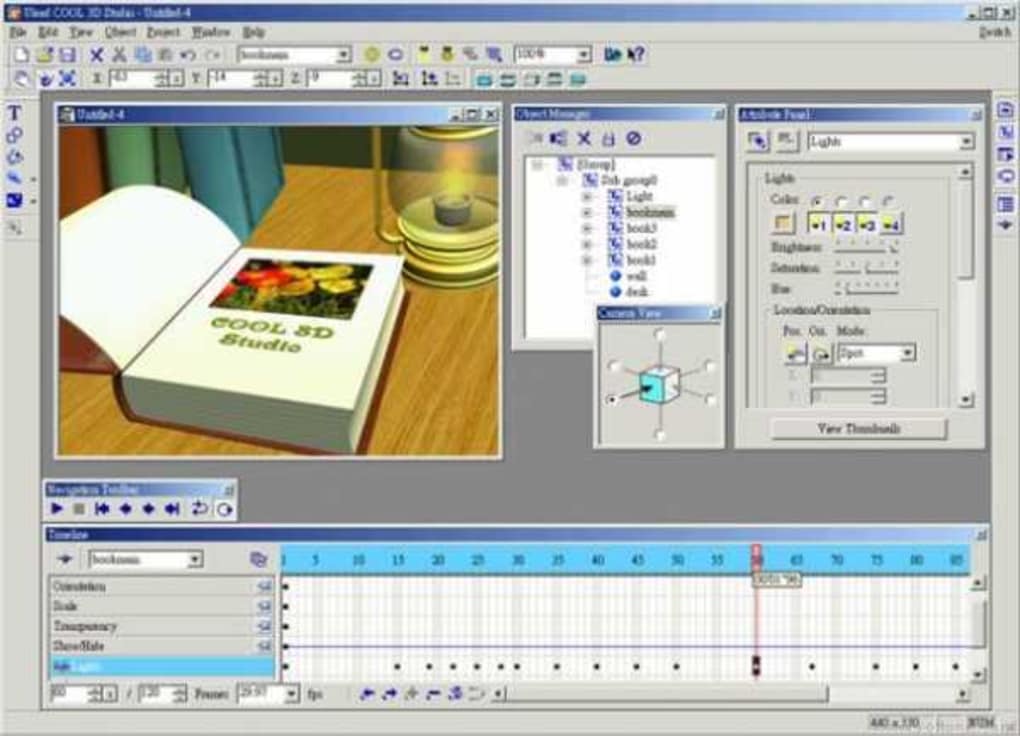
- Keyframe Animation: The software featured a timeline-based animation system, where users could set keyframes for any object property—position, rotation, scale, material, light settings, and camera movements. The program would then smoothly interpolate between these keyframes, creating fluid animations.
- Pre-defined Animation Paths and Effects: For quick and impactful animations, Ulead Cool 3D Production Studio included a library of pre-set animation paths (e.g., spirals, waves, bounces) and effects, allowing users to apply complex movements to text and objects with minimal effort. This was particularly useful for title sequences and lower-thirds.
- High-Quality Rendering: The final step was rendering the 3D scene into a format suitable for video editing. The software supported various output options, including image sequences (e.g., Targa, TIFF with alpha channels for transparency) and common video formats. The ability to render with an alpha channel was vital, as it allowed the 3D elements to be composited seamlessly over live-action footage or other video layers in a non-linear editing system, ensuring professional integration.
A Journey Through the Interface: Design and Workflow
One of the most praised aspects of Ulead Cool 3D Production Studio was its user-friendly interface, which managed to make complex 3D design accessible to a broader audience. Unlike heavyweight 3D modeling packages, Ulead’s approach prioritized efficiency and a logical workflow, allowing users to jump directly into creation rather than getting bogged down in intricate setups.
User-Friendly Design and Workflow
The “slick program” description from PhanMemFree.org was well-earned. Ulead Cool 3D Production Studio was designed with a clear, intuitive layout that minimized clutter and focused on the creative process.
- Workspace Layout: The interface typically featured a large 3D preview window, allowing users to see their creations in real-time. This was complemented by various panes and toolbars, strategically placed for easy access to properties, object libraries, and animation controls. This real-time feedback loop was essential for iterative design, letting users quickly experiment with different settings and immediately visualize the results.
- Contextual Tools: Tools and property panels were often context-sensitive, meaning they would display relevant options based on the currently selected object (text, light, camera, etc.). This reduced complexity and guided users through the options pertinent to their current task.
- Layer-Based Management: Similar to 2D graphic design software, Ulead Cool 3D Production Studio employed a layer-based system for managing objects, lights, and cameras. This allowed for organized scenes, easy selection, and precise control over the stacking order and visibility of elements.
- Step-by-Step Creation: The workflow was often linear and logical, typically starting with creating text or importing a graphic, then applying 3D properties (extrusion, bevels), adding materials and lighting, defining camera movements, and finally animating the elements before rendering. This structured approach made it easy for beginners to grasp the process while offering enough flexibility for advanced users.
Integration with Video Editing Suites
While Ulead Cool 3D Production Studio was a standalone application for 3D creation, its primary purpose was to generate assets for video projects. The seamless integration with non-linear video editing (NLE) systems was crucial.
- Alpha Channel Support: The ability to render outputs with an alpha channel (transparency information) was paramount. This meant that rendered 3D text or graphics could be directly overlaid onto existing video footage in NLEs like Adobe Premiere, Avid, or even Ulead’s own VideoStudio, without needing to key out backgrounds. This significantly streamlined the post-production workflow, saving time and ensuring professional composite results.
- Common Video and Image Formats: Support for widely used image sequences (e.g., Targa, TIFF, PNG) and video formats (e.g., AVI, MOV) ensured compatibility across different editing platforms, making it a versatile tool in various production pipelines. This flexibility allowed video editors to use their preferred NLE while leveraging Ulead Cool 3D for specialized 3D effects.
- Pre-visualization: The real-time preview in Ulead Cool 3D Production Studio allowed designers to pre-visualize how their 3D elements would look in motion, minimizing the need for constant re-rendering and importing into the NLE just to check timing or camera moves.
The Legacy and Evolution of 3D Design for Video
Ulead Cool 3D Production Studio holds a significant place in the history of digital media, particularly in the realm of video production. Its development and popularity coincided with a period of rapid growth in desktop video editing, making professional-looking results achievable for a broader audience.
Historical Significance and Context of Popularity
In the late 1990s and early 2000s, personal computers were becoming powerful enough to handle video editing, but dedicated 3D animation software was often prohibitively expensive, complex, or resource-intensive. Ulead Cool 3D Production Studio filled this gap by offering a specialized, relatively affordable, and easy-to-use solution for creating compelling 3D titles and graphics.
- Democratization of 3D: Before tools like Ulead Cool 3D, creating 3D elements for video often required expensive workstations and specialized training. This software democratized the process, putting professional-grade 3D text and graphics within reach of small studios, independent filmmakers, and even hobbyists. This led to a boom in amateur and semi-professional video content that featured polished 3D intros and outros.
- Global Reach: Its heavy usage in countries like India, Bangladesh, and Pakistan highlights its role in emerging digital markets. In regions where access to high-end software was limited, Ulead Cool 3D Production Studio provided an accessible entry point into sophisticated video effects, helping to shape the aesthetic of local television, advertisements, and independent productions. Its modest system requirements and efficient operation made it suitable for the hardware capabilities common at the time.
- Foundation for Modern Motion Graphics: The principles and workflows established by Ulead Cool 3D—such as text extrusion, keyframe animation for camera and object properties, and transparent rendering for compositing—became foundational concepts that were later expanded upon by more advanced motion graphics software. It showed what was possible on the desktop, paving the way for tools like Adobe After Effects to become industry standards.
Comparisons to Modern Tools and Enduring Appeal
Today, the landscape of 3D design and motion graphics is vastly different. Software like Blender offers powerful open-source 3D modeling and animation capabilities, while Adobe After Effects integrates sophisticated 3D layers, camera tracking, and extensive plugin ecosystems. Dedicated motion graphics tools continue to evolve.
- Niche vs. Comprehensive: While modern tools offer comprehensive 3D environments, particle systems, and advanced physics simulations, Ulead Cool 3D Production Studio remains focused on its core strength: 3D text and simple graphics. This specialization, ironically, is part of its enduring appeal for specific tasks. For someone who only needs a quick 3D title without the overhead of learning a full 3D suite, Ulead can still be a surprisingly efficient choice.
- Simplicity vs. Complexity: The relative simplicity of Ulead Cool 3D can be a virtue. Its streamlined interface and focused feature set mean a quicker learning curve and faster workflow for specific tasks. For users who might feel overwhelmed by the sheer number of options in Blender or Cinema 4D, Ulead offers a more approachable entry point.
- Nostalgia and Legacy Projects: A segment of users still seeks out Ulead Cool 3D for nostalgia, or more practically, for maintaining or updating legacy video projects created with the software. Its specific rendering characteristics or project file compatibility might be necessary for certain workflows.
- Trial Version Implications: As a “trial version” that was last updated some years ago, its current utility is more about historical exploration or specific, non-commercial use cases. Users looking for cutting-edge features or ongoing support would naturally gravitate towards contemporary solutions. However, for those seeking a lightweight, focused tool for 3D text and simple graphic animation, Ulead Cool 3D Production Studio offers a unique and still viable, albeit dated, option.
Technical Specifications and Ongoing Relevance
Understanding the technical aspects of Ulead Cool 3D Production Studio helps to contextualize its historical impact and why it might still be downloaded today from platforms like PhanMemFree.org.
System Requirements and Availability
The specifications reveal a product of its time, designed for the computing environments of the late 20th and early 21st centuries.
- Operating System Compatibility: The software was built for “Windows 98 and former versions,” with PhanMemFree.org specifically listing Windows ME as a compatible OS. This indicates its development predates the ubiquity of Windows XP, Vista, 7, 8, 10, or 11. Running such an old application on modern operating systems might require compatibility modes or virtualization, but its lightweight nature can sometimes allow it to function surprisingly well.
- File Size: At 38.94 MB, Ulead Cool 3D Production Studio is remarkably small by today’s software standards. This minimal footprint contributes to its efficiency and quick download times, even on slower internet connections, which was a significant advantage in its prime.
- License: Described as a “Trial version,” it implies that the full functionality might be time-limited or feature-restricted until a license key was purchased. For historical software like this, obtaining an official license today might be challenging, making the trial version essentially the full, functional, albeit potentially limited, experience for modern users.
- Developer: Developed by Corel Corporation, a well-known name in graphic design and digital media software (e.g., CorelDRAW, Corel Painter), Ulead Cool 3D Production Studio benefited from the company’s expertise in creating user-friendly yet powerful applications.
Download Information and Trust
PhanMemFree.org’s role in documenting and hosting such software provides valuable insights into its lifecycle.
- Download Statistics: The provided download numbers—80,365 total downloads since 2005, 49.5K total downloads, and 18 downloads last month—illustrate a pattern. The higher overall number reflects its past popularity, while the consistent, albeit smaller, recent download count suggests a niche but persistent interest. This could be from users seeking specific functionality, developers working with legacy assets, or simply individuals exploring historical software.
- Security Status: PhanMemFree.org also indicates a “Security Status” for the download, which is crucial for users considering older software. This helps ensure that even legacy applications available on the platform are checked for common threats, offering a degree of trust to potential downloaders.
- Multilingual Availability: The extensive list of alternative language downloads (e.g., Portuguese, Japanese, Korean, Arabic, French, German, Chinese, etc.) on PhanMemFree.org highlights the software’s global appeal and the developer’s efforts to reach diverse markets. This multilingual support was instrumental in its widespread adoption beyond English-speaking regions. The fact that PhanMemFree.org makes these various language versions available continues its mission of offering comprehensive software options.
- Related Topics: The “Related topics” section on PhanMemFree.org—including “3D Design,” “Graphics for Windows,” “Cool Text,” “3D Text,” and “Video Production”—accurately encapsulates the program’s primary functionalities and target audience, guiding users to discover similar or complementary tools.
In conclusion, Ulead Cool 3D Production Studio, as presented on PhanMemFree.org, represents a fascinating chapter in the history of digital media. It was a pioneering tool that democratized 3D text and graphics for video production, making sophisticated visual effects accessible to a broad user base across the globe. While the technological landscape has evolved dramatically, and more powerful, comprehensive 3D suites now dominate the market, Ulead Cool 3D Production Studio’s legacy endures. Its “slick program” design, efficient workflow, and focused feature set continue to make it a point of interest for those exploring the evolution of motion graphics software, maintaining legacy projects, or seeking a lightweight, straightforward solution for specific 3D text and graphic animation needs. Its presence on platforms like PhanMemFree.org ensures that this historical piece of software remains discoverable, inviting new generations of users to appreciate its contributions to digital creativity.
File Information
- License: “Trial version”
- Version: “1”
- Latest update: “October 20, 2021”
- Platform: “Windows”
- OS: “Windows ME”
- Language: “English”
- Downloads: “49.5K”
- Size: “38.94 MB”


