
In an increasingly digital world, data is the lifeblood of our personal and professional lives. From cherished family photos and critical work documents to financial records and creative projects, the information stored on our computers represents invaluable assets. However, the fragility of digital data is a constant concern. Accidental deletions, unexpected system crashes, virus attacks, power outages, and even hardware failures can lead to the sudden and devastating loss of precious files. The emotional distress and potential professional setbacks that follow such incidents can be immense, making a reliable data recovery solution not just a convenience, but an absolute necessity.
Among the myriad of data recovery tools available, UltData - Windows Data Recovery by Tenorshare stands out as a powerful and user-friendly application designed to retrieve lost or inaccessible files from a wide range of scenarios. Whether you’re a casual computer user who accidentally emptied your Recycle Bin or a professional facing a corrupted hard drive, UltData aims to be your digital lifesaver. This comprehensive review will delve into the features, functionality, pros, cons, and overall effectiveness of UltData - Windows Data Recovery, helping you determine if it’s the right tool to safeguard your digital world.
The Indispensable Role of Data Recovery in the Digital Age
The proliferation of digital devices and the sheer volume of data we generate daily mean that the risk of data loss has never been higher. While proactive measures like regular backups are highly recommended, they are often overlooked or incomplete. This is where robust data recovery software steps in, offering a crucial safety net when all else fails.
Understanding Data Loss Scenarios
Data loss can manifest in countless ways, each presenting its own set of challenges. UltData - Windows Data Recovery is engineered to tackle a broad spectrum of these scenarios, providing a versatile solution for common and less common incidents alike.
- Accidental Deletion: This is arguably the most frequent cause of data loss. We’ve all been there – hitting the “Delete” key or emptying the Recycle Bin without realizing a critical file was among the selected items. UltData can effectively recover files even after they’ve been removed from the Recycle Bin, as long as the space they occupied hasn’t been overwritten by new data.
- Formatting Errors: Accidentally formatting a hard drive, USB stick, or memory card can wipe out all its contents. While a quick format doesn’t completely erase data, it removes the file system, making data invisible. UltData is often capable of reconstructing the file system and recovering files from formatted drives.
- Partition Loss or Damage: Hard drive partitions can become corrupted or accidentally deleted, rendering large sections of a disk inaccessible. This can be caused by disk management errors, viruses, or system failures. UltData can scan for lost partitions and attempt to recover data from them.
- System Crashes and OS Reinstallation: An abrupt operating system crash or a necessary reinstallation can lead to the loss of files if they weren’t backed up beforehand. UltData can be used to scan the hard drive after such events, often recovering files from the previous installation.
- Virus or Malware Attacks: Malicious software can delete, corrupt, or encrypt files, making them unusable. While an antivirus program is essential for prevention, data recovery software can sometimes retrieve files that have been damaged or made inaccessible by malware.
- Power Outages: Sudden power loss can lead to unsaved work being lost or even corrupt files that were actively being written to storage. UltData specializes in retrieving files that were unsaved due to such unforeseen interruptions.
- Hardware Failure: While severe physical damage to a storage device may require professional data recovery services, minor logical errors or corruption that might be perceived as hardware failure can sometimes be addressed by software like UltData. It can recover data from external devices like USB drives, external hard drives, and SD cards that might be experiencing minor issues.
Why a Reliable Recovery Tool is Crucial
The importance of a reliable data recovery tool cannot be overstated. For individuals, it means preserving irreplaceable memories and personal achievements. For businesses, it translates into safeguarding critical operational data, intellectual property, and client information, preventing significant financial losses and reputational damage. In an era where data breaches and digital incidents are increasingly common, having a go-to solution for data retrieval offers peace of mind and a vital layer of protection against the unpredictability of digital life. Without such a tool, a single oversight or unforeseen event could lead to irreparable loss.
UltData - Windows Data Recovery: Features and Functionality
Tenorshare’s UltData - Windows Data Recovery is designed with simplicity and effectiveness at its core. Its primary goal is to make the complex process of data recovery accessible to users of all technical skill levels.
Unparalleled File Recovery Capabilities
The core strength of UltData lies in its ability to recover a vast array of file types and handle various data loss scenarios. This versatility makes it a comprehensive solution for most users.
- Extensive File Type Support: UltData is not limited to just documents or photos. It boasts the capability to recover hundreds of different file types, including:
- Documents: Word (DOC/DOCX), Excel (XLS/XLSX), PowerPoint (PPT/PPTX), PDF, TXT, RTF, and more.
- Photos: JPG, PNG, GIF, BMP, TIFF, RAW camera images (CR2, NEF, ARW, DNG, etc.), and many others.
- Videos: MP4, AVI, MOV, WMV, FLV, MKV, and various other video formats.
- Audio: MP3, WAV, WMA, AAC, OGG, FLAC, and more.
- Emails: PST, OST, EML, EMLX, MSG from email clients like Outlook.
- Archives: ZIP, RAR, 7Z, TAR, GZ, and other compressed file formats.
- Other Files: Executables, database files, system files, and many other data types that might be crucial for specific applications.
- Recovery from Any Device: Beyond your internal hard drive, UltData extends its recovery prowess to a wide range of storage devices. This includes:
- External Hard Drives: USB-connected HDD/SSD.
- USB Flash Drives: Pen drives, thumb drives.
- SD Cards and Memory Cards: Used in cameras, drones, and smartphones.
- Digital Cameras and Camcorders: Direct recovery from the device or its memory card.
- Music Players: iPods and other portable media players.
- Other Removable Media: Floppy disks (if still in use), ZIP disks, etc. This broad device compatibility ensures that almost any storage medium connected to your Windows PC can be scanned for lost data.
Intuitive Interface and User Experience
One of the most praised aspects of UltData - Windows Data Recovery is its user-friendly design. Tenorshare has clearly prioritized a straightforward experience, making data recovery less daunting for the average user.
- Simple Interface: The application presents a clean and uncluttered interface upon launch. Users are not overwhelmed with complex options or jargon. The main screen typically offers clear choices for where to begin the scanning process. This simplicity contributes significantly to the overall user satisfaction, as noted in user reviews.
- Easy to Use: The entire recovery process is distilled into a few logical steps, ensuring that even novices can navigate it without difficulty. The guided approach minimizes confusion and reduces the learning curve significantly.
- Organized Partitions and Scan Results: After a scan, UltData organizes the found files into logical categories or by their original directory structure, making it easier for users to locate specific files. This organization prevents users from sifting through an undifferentiated mass of recovered data.
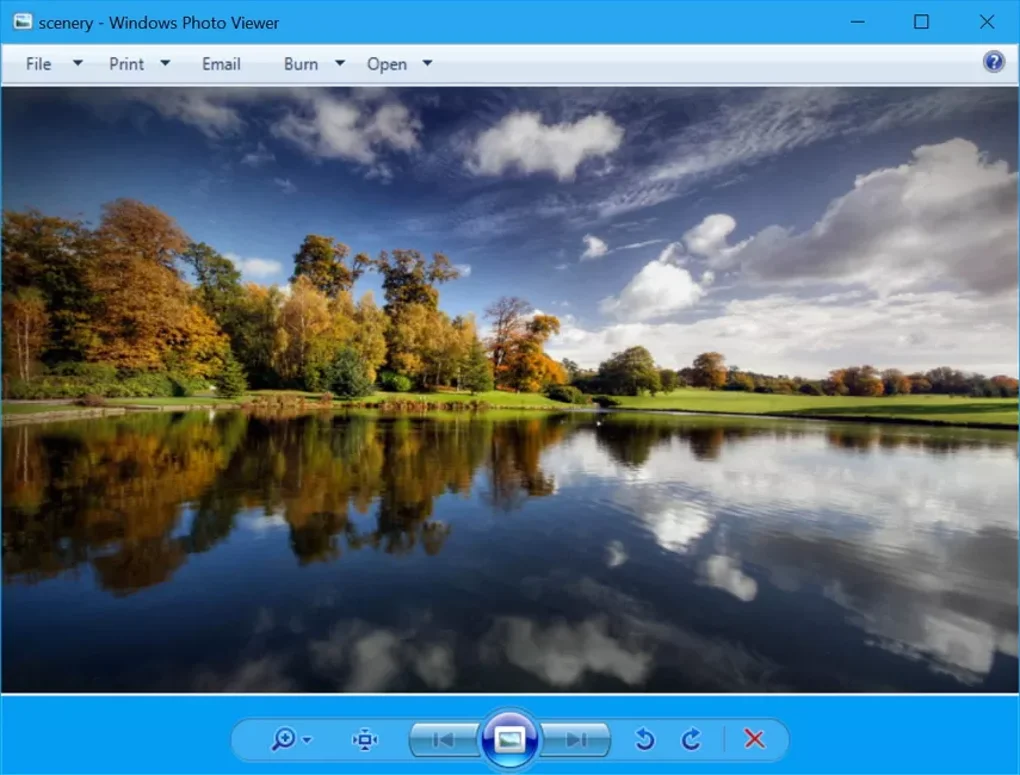
- Previews Files: Before committing to a full recovery, UltData allows users to preview recoverable files. This is an indispensable feature, especially for images, documents, and videos. Previews confirm the integrity of the file and ensure that the user is recovering the correct version, saving time and disk space by avoiding unnecessary recoveries. This feature is crucial for verifying the quality of the recovered data before spending time and resources on saving them.
Broad Compatibility and Versatility
UltData - Windows Data Recovery is designed to be compatible with a wide range of Windows operating systems, ensuring a broad user base can benefit from its capabilities. The software supports Windows 7, 8, 8.1, 10, and 11, covering most modern PCs. Its relatively small size (6.39 MB) means it’s light on system resources and quick to download and install. The developer, Tenorshare Co. Ltd., is a reputable company known for its utility software, adding a layer of trust to the product.
How UltData Works: A Simple 3-Step Process
The recovery process with UltData is streamlined into three easy steps:
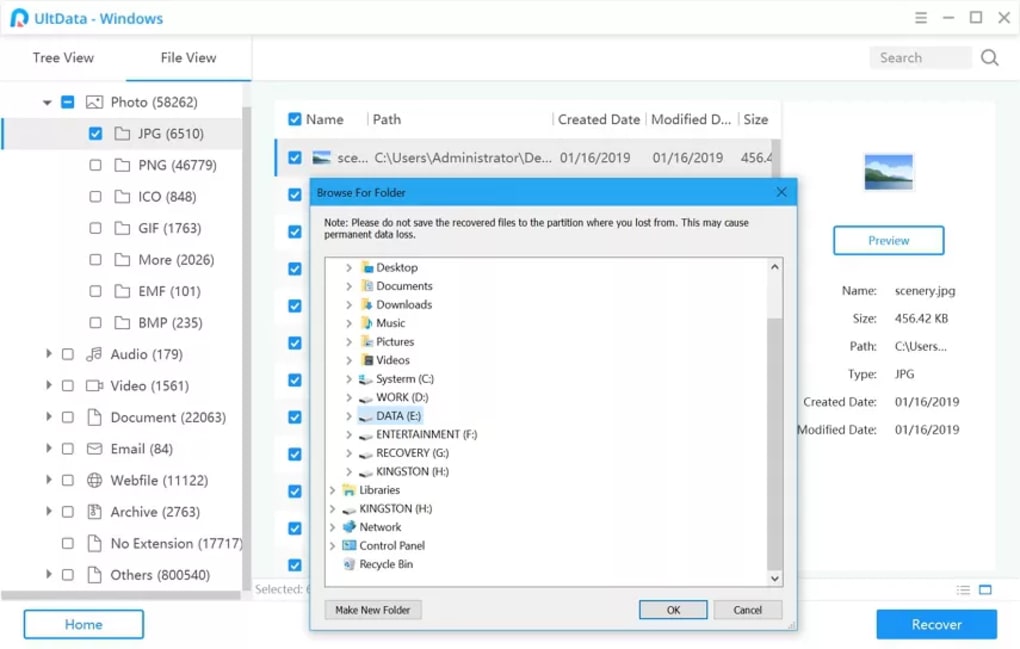
- Select Where to Scan: Upon launching the application, you’re presented with a list of available drives and partitions. You simply select the location where your files were lost. This could be a specific partition, an external drive, or even a desktop folder.
- Preview the Results: Once the scan is complete (which can vary in duration depending on the size of the drive and the extent of data loss), UltData displays a list of recoverable files. You can then use the preview function to inspect the files and confirm their integrity.
- Choose and Recover: After previewing, you select the specific files or folders you wish to retrieve. With a single click on the “Recover” button, UltData saves them to a destination of your choice. It’s crucial to save recovered files to a different drive than the one they were recovered from to prevent overwriting.
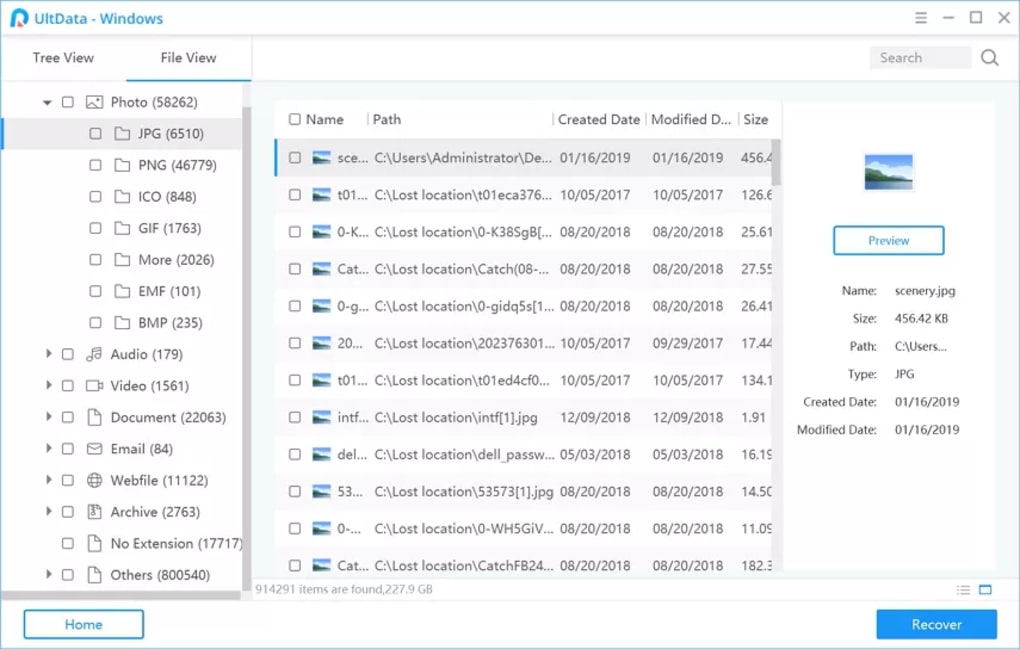
This straightforward workflow makes the entire process efficient and user-friendly, minimizing the stress often associated with data loss.
Diving Deeper: Pros, Cons, and Technical Specifications
While UltData - Windows Data Recovery offers a compelling solution, like any software, it comes with its own set of advantages and a few areas where it could see improvement. Understanding these aspects helps in making an informed decision.
Advantages That Set It Apart
- Simplicity and Ease of Use: As highlighted earlier, the simple interface and intuitive workflow are significant advantages. Users don’t need to be tech-savvy to navigate the recovery process, making it accessible to a wider audience.
- Effective Recovery Rates: Based on user feedback and general performance, UltData demonstrates a good capability for recovering files from common data loss scenarios, especially accidental deletion and formatting.
- File Preview Functionality: The ability to preview files before recovery is a critical feature, saving users time and ensuring the quality of the recovered data. It helps to avoid recovering corrupted or incorrect versions of files.
- Organized Results: Presenting scan results in an organized, navigable manner significantly enhances the user experience, allowing for quicker identification and selection of desired files.
- Broad Device and File Type Support: The ability to recover from both internal and external drives and support for hundreds of file formats makes it a versatile tool for various data recovery needs.
- Wide OS Compatibility: Supporting Windows 7 through 11 ensures that most current Windows users can utilize the software.
- Reputable Developer: Tenorshare Co. Ltd. is a well-established software company, lending credibility to UltData.
Areas for Improvement
- Default Recovery Save Destination: One notable con mentioned is the necessity to change the default recovery save destination. While a minor inconvenience, it’s a critical step in data recovery best practices (always save to a different drive). An automatic prompt or a more prominent warning could improve this.
- No Advanced Features Like Backups: UltData is primarily a data recovery tool. It does not offer advanced features such as data backup solutions, disk cloning, or health monitoring that some comprehensive utility suites provide. Users looking for an all-in-one data management solution might need additional software. However, it’s important to note that focusing on its core competency (data recovery) allows it to excel in that specific area.
- Limited Free Trial: The “Trial version” nature means that while you can scan and preview files, the actual recovery of a significant amount of data often requires purchasing the premium version. While standard for recovery software, it can be a drawback for those seeking a completely free solution for large-scale recovery.
Behind the Scenes: Technical Specs and Developer Insight
- License: Trial version (with a premium upgrade option)
- Version: 7.1.0.18 (as of the last update on May 16, 2022)
- Platform: Windows
- Supported OS: Windows 7, 8, 8.1, 10, 11
- Language: English (also available in Arabic, German, Spanish, French, Italian, Japanese, Korean, Portuguese, Russian, and Chinese)
- Size: 6.39 MB (a relatively small footprint, indicating efficient design)
- Developer: Tenorshare Co. Ltd.
- Downloads: The application has seen significant downloads, indicating its popularity and user trust. For instance, PhanMemFree.org reports 38.2K downloads with 452 last month, showcasing consistent user interest.
These specifications highlight UltData’s position as a well-maintained, lightweight, and globally accessible data recovery solution developed by a recognized entity in the software industry.
Comparing UltData with Leading Alternatives
The data recovery market is competitive, with several reputable tools offering similar functionalities. Understanding how UltData stacks up against its rivals can provide valuable context for potential users.
UltData vs. Recuva: A Head-to-Head Look
Recuva, developed by CCleaner, is often cited as a benchmark for free data recovery.
- Pricing: Recuva offers a robust free version that allows for full recovery, alongside a professional paid version with advanced features and priority support. UltData, while offering a free trial for scanning and previewing, typically requires a premium purchase for significant data recovery.
- User Interface: Both tools prioritize user-friendliness. UltData’s interface is arguably a bit more modern and sleek, while Recuva has a classic, straightforward wizard-based approach.
- Recovery Capabilities: Both are highly effective for common scenarios like accidental deletion. UltData may offer slightly better performance for more complex scenarios such as corrupted partitions or unsaved files due to power outages, thanks to its specialized algorithms. Recuva is known for its “Deep Scan” feature, which can unearth older or more deeply buried files.
- Device Support: Both support a wide range of storage devices.
- Advanced Features: Recuva Professional offers features like virtual hard drive support and automatic updates. UltData focuses purely on recovery without venturing into backup or system optimization tools.
- Verdict: For users seeking a completely free solution for basic accidental deletion, Recuva is a strong contender. However, for a more comprehensive approach to varied data loss scenarios, a more refined user experience, and potentially higher recovery rates in specific complex cases, UltData’s premium version offers a compelling value.
Exploring Other Notable Options
- Wondershare Dr. Fone: This is another comprehensive data recovery and device management tool, particularly popular for mobile devices but also offering PC recovery. Dr. Fone often comes with a broader suite of tools, making it a more ‘all-in-one’ solution. Its interface is also highly polished, similar to UltData.
- Disk Drill Windows Data Recovery: A professional-grade tool known for its powerful scanning algorithms and intuitive design. Disk Drill offers a limited free recovery option (up to 500MB) and robust paid tiers. It’s often praised for its ability to recover from challenging scenarios and its additional features like data protection.
- EaseUS Data Recovery Wizard: One of the most popular data recovery tools, known for its comprehensive features and high recovery rates. It also offers a free version with a recovery limit (up to 2GB). Its interface is modern and user-friendly, akin to UltData.
- Power Data Recovery & Recoverit: These are other strong contenders that offer extensive file type support and recovery from various scenarios. They typically offer trial versions with paid upgrades for full recovery.
Compared to these alternatives, UltData - Windows Data Recovery holds its own by striking a good balance between powerful recovery capabilities and an exceptionally easy-to-use interface. While some competitors might offer more advanced utilities or slightly different recovery limits in their free versions, UltData’s dedication to simplifying the core data recovery process remains a significant selling point.
Making the Right Choice: Is UltData For You?
Choosing the right data recovery software depends on individual needs, budget, and the specific data loss situation. UltData - Windows Data Recovery presents itself as a strong candidate for a broad range of users.
The Trial Version: Your Gateway to Recovery
PhanMemFree.org, like other software repositories, offers a trial version of UltData - Windows Data Recovery (Version 7.1.0.18). This trial version is invaluable for several reasons:
- Risk-Free Assessment: It allows you to download, install, and scan your drive for lost files without any financial commitment.
- Verify Recoverability: You can see if UltData can detect the files you’re looking for and, critically, use the preview function to ensure they are intact and recoverable. This is the most important step before considering a purchase. If the trial can’t find or preview your files, a paid version likely won’t either.
- Experience the Interface: You can navigate the software, understand its workflow, and ensure you’re comfortable with its ease of use before investing.
This “try before you buy” model is standard for data recovery software and highly recommended. It mitigates the risk of purchasing a product that may not meet your specific recovery needs.
Final Verdict and Recommendations
UltData - Windows Data Recovery is an excellent choice for anyone facing data loss on a Windows PC. Its strengths lie in its:
- Simplicity: A clean, intuitive interface makes it accessible to all users, regardless of technical proficiency.
- Effectiveness: It reliably recovers a wide range of file types from various data loss scenarios, including accidental deletion, formatting, and power outages.
- Versatility: Supports recovery from internal drives and a multitude of external storage devices.
- Preview Functionality: Allows users to verify files before committing to recovery, saving time and effort.
While it lacks advanced features like integrated backup solutions, this focus allows it to excel at its primary function: data recovery. The need to manually change the recovery save destination is a minor quibble, easily addressed with a simple user prompt.
If you have experienced data loss on your Windows 7, 8, 10, or 11 system and are looking for a straightforward, efficient, and effective solution, UltData - Windows Data Recovery by Tenorshare is highly recommended. Start with the trial version available on PhanMemFree.org to confirm its capabilities for your specific situation. This tool provides a powerful safety net, helping to alleviate the stress and potential consequences of losing your valuable digital assets. In a world increasingly reliant on digital information, having a reliable recovery tool like UltData is not just a luxury, but a fundamental necessity for peace of mind.
File Information
- License: “Trial version”
- Version: “7.1.0.18”
- Latest update: “May 16, 2022”
- Platform: “Windows”
- OS: “Windows 10”
- Language: “English”
- Downloads: “38.5K”
- Size: “6.39 MB”


