
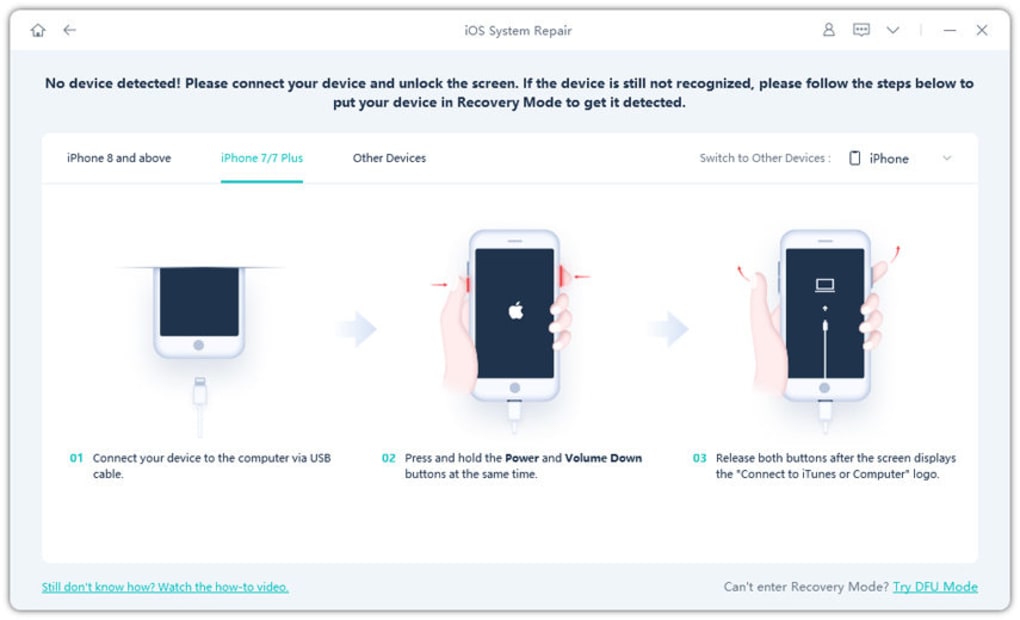
UltFone iOS System Repair is a software application designed to troubleshoot and resolve various system-level issues affecting Apple iOS devices. Unlike data recovery tools, its primary function is to repair corrupted or missing system files, effectively restoring the device to a functional state. This in-depth analysis will explore its capabilities, address common user concerns regarding safety and effectiveness, and compare it to alternative solutions available in the market.
How UltFone iOS System Repair Works
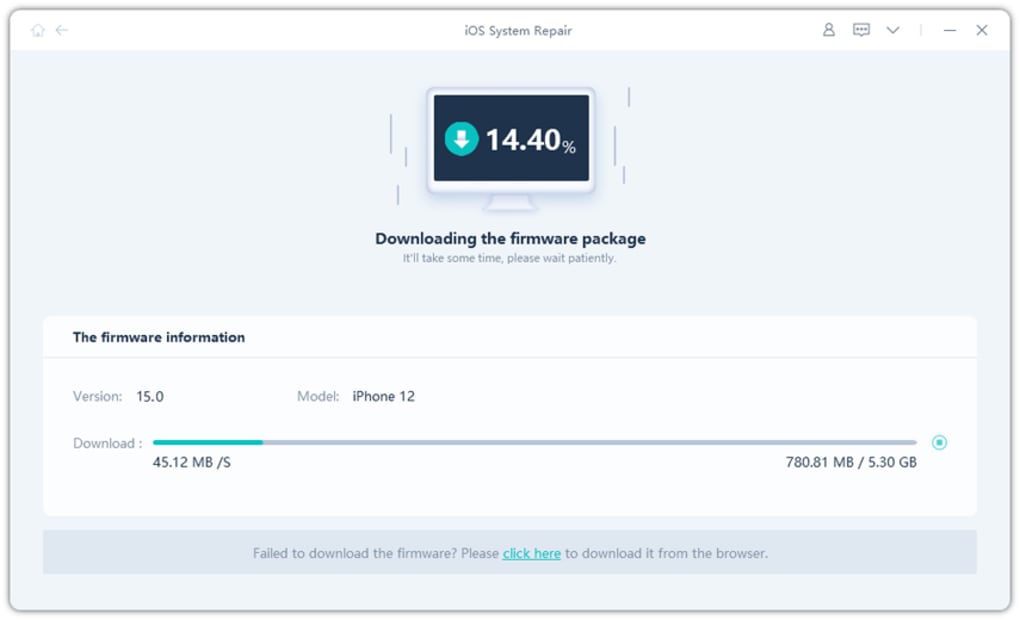
UltFone iOS System Repair operates by directly interacting with the iOS device’s system files. Its core mechanism involves identifying corrupted or missing system components, creating backups of existing data where possible, and then replacing these problematic files with clean, functional copies from its internal database. This process aims to resolve a wide range of iOS malfunctions, effectively bypassing the need for a complete factory reset which results in significant data loss. The software strives to maintain user data integrity throughout the repair process, making it a preferable choice to a full system wipe when data preservation is a concern.
The software’s approach is comparable to other iOS system repair tools, leveraging a similar method of system file replacement to fix underlying operating system problems. However, UltFone aims to distinguish itself through detailed tutorials and troubleshooting guides, catering to users with varying technical expertise. This user-friendly approach simplifies the repair process, making it accessible to individuals who may not possess extensive technical knowledge of iOS internals.
Unlike conventional recovery methods, UltFone iOS System Repair does not necessarily involve an extensive data wipe. This attribute makes it a crucial asset in scenarios where recovering lost or deleted files is a primary objective. While some data loss is still possible in extreme cases of corruption, it significantly reduces the risk compared to factory reset methods.
Addressing User Concerns: Safety and Effectiveness
A primary concern among potential users is the safety and effectiveness of third-party iOS repair tools. UltFone acknowledges this apprehension and aims to mitigate it through its design and approach. While the software itself is generally considered safe, the effectiveness of the repair largely depends on the specific nature of the problem affecting the iOS device. The software doesn’t address issues such as iCloud Activation Lock, focusing solely on system file integrity. If the underlying issue stems from malicious software or severe hardware damage, the repair tool might not resolve the problem or potentially exacerbate the existing damage.
One of the potential risks associated with using any third-party tool is the possibility of introducing malware or compromising device security. However, UltFone iOS System Repair undergoes rigorous security testing to minimize such risks. Users should still exercise caution and download the software from the official website to ensure its authenticity and prevent unintended security compromises.
The tool’s effectiveness is also contingent on the root cause of the iOS problem. The software’s strengths lie in rectifying system-level issues like boot loops, frozen screens, and other software-related malfunctions. It will not necessarily resolve hardware-related problems such as physical damage to the device’s components. Therefore, accurately identifying the nature of the problem before deploying the repair tool is crucial for success.
The lack of a free trial that allows comprehensive testing is a significant drawback. While a free version is available, its limited functionality prevents a thorough assessment of its suitability for a specific problem. Users might end up purchasing the full version only to discover its ineffectiveness in addressing their specific issue, leading to dissatisfaction. This limitation necessitates careful consideration before investing in the software.
UltFone iOS System Repair: Pros and Cons
Pros:
- Addresses Diverse iOS Problems: The software boasts the ability to address a wide array of iOS system malfunctions, including boot loops, frozen screens, white screens of death, recovery mode issues, and other software-related glitches.
- Data Preservation: Compared to a factory reset, UltFone iOS System Repair prioritizes data retention, minimizing the loss of user data during the repair process. This is a critical advantage when precious photos, videos, and other files are at stake.
- Detailed Tutorials and Guides: The software includes comprehensive tutorials and guides designed to assist users in navigating the repair process, regardless of their technical expertise. This user-friendly approach makes the tool accessible to a broader range of users.
- Ease of Use: The intuitive interface simplifies the repair process, making it relatively straightforward for users with limited technical skills.
Cons:
- Paid Software with Limited Trial: The full functionality of the software requires a purchase, and the free version doesn’t offer a comprehensive trial allowing users to test its effectiveness on their specific problems. This creates a risk of financial investment without guaranteed success.
- Not a Data Recovery Tool: It’s crucial to understand that UltFone iOS System Repair is not a data recovery tool. While it aims to minimize data loss, it’s primarily designed for system repair and cannot guarantee the recovery of data already lost due to corruption or deletion.
- Ineffective for Hardware Problems: The software is unable to address hardware-related issues. If the problem stems from physical damage to the device’s components, UltFone iOS System Repair will likely be ineffective.
- Doesn’t Bypass iCloud Activation Lock: This tool is solely focused on system file repair and cannot circumvent the iCloud Activation Lock. Users facing activation lock issues need to utilize official Apple methods for resolution.
Alternatives to UltFone iOS System Repair
Several alternative solutions exist for repairing iOS system problems, each with its own set of strengths and weaknesses. Choosing the right tool depends on the specific problem, user technical expertise, and budget constraints. Some notable alternatives include:
- iMyFone Fixppo: This is a well-regarded competitor that offers similar functionality to UltFone iOS System Repair, providing comprehensive iOS system recovery capabilities.
- Tenorshare ReiBoot: Another popular option, ReiBoot focuses on troubleshooting and resolving various iOS system issues, offering both free and paid versions.
- Apple’s Official Recovery Methods: Using iTunes or Finder to restore the iOS device is always an option, though this generally leads to complete data loss if a backup is not available. However, this is the most secure and reliable method for resolving many iOS issues.
The choice of the most suitable alternative should be guided by a careful evaluation of the specific problem, the level of technical expertise, the importance of data preservation, and the associated costs.
Conclusion
UltFone iOS System Repair presents a viable option for troubleshooting various iOS system issues, particularly when data preservation is a significant concern. Its strengths lie in its ability to address a range of software problems while minimizing data loss compared to a factory reset. However, the lack of a comprehensive free trial, its ineffectiveness against hardware issues and iCloud Activation Lock, and the potential for unsuccessful repairs due to the nature of the problem necessitate a cautious approach. Users should weigh its pros and cons against alternative solutions before making a decision, ensuring the chosen method aligns with their technical skills, budget, and the severity of the iOS problem. Thorough research and consideration of all available options remain paramount for optimal results.
File Information
- License: “Free”
- Version: “1.0”
- Latest update: “July 15, 2022”
- Platform: “Windows”
- OS: “Windows 11”
- Language: “English”
- Downloads: “5.1K”
- Size: “1.88 MB”


