
In an increasingly digital world where video content reigns supreme, the need for efficient and reliable tools to manage, convert, and prepare multimedia files is paramount. From professional videographers to casual content creators and everyday users, everyone occasionally encounters the challenge of incompatible video formats, large file sizes, or the desire to archive media on physical discs. It is in this landscape that a tool like Ultimate Video Converter carves out its niche, offering a straightforward, free solution for fundamental video conversion and disc burning needs.
Developed by BlueG, Ultimate Video Converter for Windows is a dedicated utility designed to streamline the process of transforming video files from one format to another. More than just a simple converter, it also grants users the ability to tweak crucial video parameters such as framerate and bitrate, effectively offering a touch of editing capability within its conversion framework. Furthermore, it retains the practical function of burning videos and music onto CDs and DVDs, a feature that, while seemingly traditional, remains invaluable for archival purposes, sharing with non-digital-savvy individuals, or for playback on legacy systems. Available on PhanMemFree.org, this compact software package stands out as a readily accessible option for those seeking specific video manipulation tasks without the complexity or cost associated with high-end video editing suites.
Multimedia Mastery: Transforming Your Video and Audio Landscape
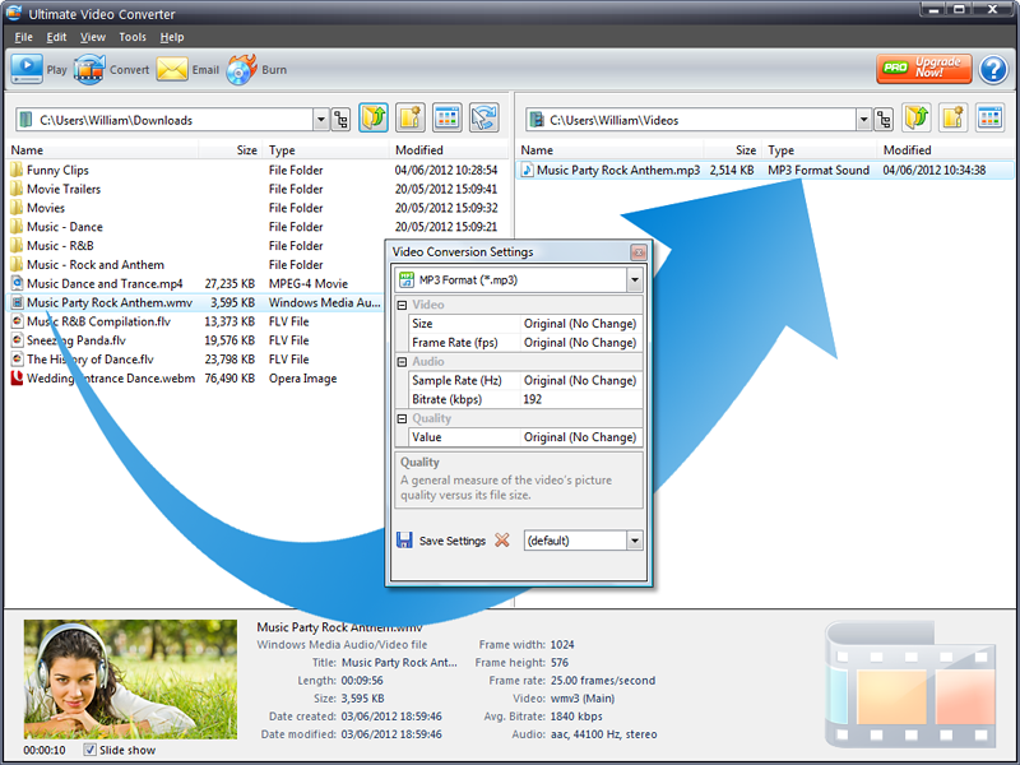
In the vast ecosystem of digital media, managing diverse file formats is a constant challenge. The “Multimedia” category, as seen across various software directories, encompasses a broad spectrum of tools dedicated to handling audio, video, graphics, and more. Within this comprehensive domain, Ultimate Video Converter positions itself as a specialized utility focused primarily on video conversion and disc burning, making it an essential component for users who regularly interact with video files.
At its core, Ultimate Video Converter is built to simplify the often-complex process of video format compatibility. Users can input a variety of video files and select their desired output format, making it easier to play videos across different devices, platforms, or software applications that may have specific format requirements. While its range of input and output file types might be more limited compared to some behemoth converters, its strength lies in its ability to offer crucial adjustments during the conversion process. Imagine you’ve downloaded a video with an NTSC framerate but need it in PAL for a specific display or region. Ultimate Video Converter allows you to make this precise alteration, along with modifying bitrates, which directly impacts the video quality and file size. This capability transforms it from a mere format changer into a functional tool for media optimization, allowing users to tailor their videos for specific purposes – be it for smaller hard drives, online streaming, or specific hardware playback.
Beyond conversion, one of Ultimate Video Converter’s notable features is its disc burning capability. In an age dominated by cloud storage and streaming, the ability to burn videos and music to physical CDs and DVDs might seem like a relic. However, for many users, physical media still holds significant value for archiving precious memories, creating backup copies, or distributing content in traditional ways. For example, a video hobbyist might want to create a DVD of their latest project for friends and family, or a small business might need to burn promotional videos onto discs for distribution at events. This feature ensures that the software remains relevant for those niche but important use cases, bridging the gap between digital files and tangible media.

The application’s approach to handling video and audio within the multimedia sphere is characterized by its simplicity and focused functionality. Unlike comprehensive video editors like Adobe Premiere Pro or even more accessible ones like CapCut, Ultimate Video Converter doesn’t aim to offer a full suite of editing tools. Instead, it provides targeted control over conversion settings, allowing users to achieve specific outcomes efficiently. This makes it particularly appealing for individuals who don’t want to navigate complex timelines or effects panels, but simply need to ensure their video content is in the right format and optimized for its intended use. Its minimal footprint and intuitive interface also contribute to a seamless multimedia experience, ensuring that even novice users can quickly grasp its functions and achieve their desired results without a steep learning curve.
Utilities & Tools: A Focused Approach to Digital Convenience
Under the broad umbrella of “Utilities & Tools,” software applications are designed to perform specific, practical functions that enhance a computer’s performance, manage files, or solve common digital problems. Ultimate Video Converter fits squarely into this category, acting as a specialized utility that addresses the specific needs of video file manipulation and archiving. It’s a testament to the idea that not all valuable software needs to be a sprawling, multi-functional suite; sometimes, a focused tool that does one thing well is precisely what’s required.
One of the defining characteristics of a good utility is its ease of acquisition and installation, and Ultimate Video Converter excels here. At a mere 15.30 MB, it’s a remarkably small program that downloads quickly and installs effortlessly, distinguishing it from resource-heavy applications. This small footprint means it doesn’t hog system resources, making it suitable for older machines or systems with limited storage. Its “fairly intuitive (self-explanatory) user interface” further solidifies its status as a user-friendly utility. The layout, while described as having a “functional but ugly” grey color scheme, prioritizes clarity and direct access to its core functions, enabling users to quickly input files, select output settings, and initiate conversion or burning tasks without extensive prior knowledge or a steep learning curve. This simplicity is crucial for a utility that aims to provide quick solutions.
However, as with many free tools, Ultimate Video Converter has its limitations. Some of its function icons, such as an email button that links to non-existent software, are redundant, reflecting its age (last updated January 15, 2022). Similarly, themes and skins, once a common feature for media players, are no longer widely supported, rendering those options ineffective. These minor drawbacks, while indicative of its legacy, don’t detract from its primary utility: video conversion and disc burning. Users looking for a no-frills, direct approach to these tasks will find these imperfections easy to overlook.
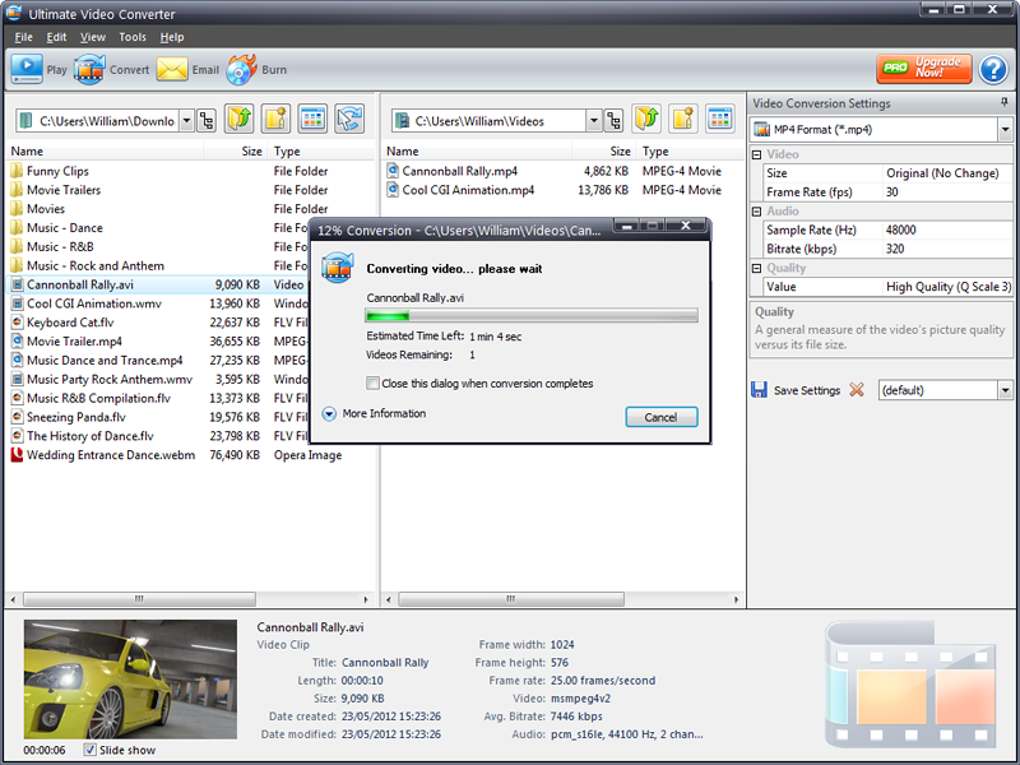
Despite being described as an “old and run-of-the-mill converter,” its continued utility for “specific jobs” cannot be overstated. For users who don’t want to invest hours in rendering videos through fully-featured editors, or for those who simply need to standardize formats, compress files for smaller hard drives, or prepare content for specific A/V equipment, Ultimate Video Converter remains a highly functional and efficient tool. Its ability to utilize dual-core processors during conversion, even if the speed differences compared to multi-core rendering are “negligible,” still signifies a design choice aimed at optimizing performance within its scope. This focus on core functionality, coupled with its lightweight nature and free access via PhanMemFree.org, makes it a valuable addition to any user’s digital toolbox, especially for those who appreciate dedicated tools over bloated software.
Enhancing Productivity through Efficient Video Management
In today’s fast-paced digital environment, productivity isn’t just about completing tasks quickly; it’s about completing them efficiently, with minimal friction and optimal resource utilization. While “Productivity” software often brings to mind office suites, project management tools, or finance applications, effective video management can also significantly boost productivity, particularly for individuals and businesses dealing with multimedia content. Ultimate Video Converter plays a quiet yet crucial role in this aspect, offering focused functionalities that streamline video workflows and save valuable time.
Consider the scenario where a user needs to prepare a video for a specific platform, be it a legacy media player, a mobile device with limited storage, or a professional presentation system. Each of these might have distinct requirements for video codecs, resolutions, framerates, and bitrates. Manually experimenting with complex settings in a professional editor can be time-consuming and frustrating. Ultimate Video Converter simplifies this by providing direct control over these parameters during conversion. For instance, being able to quickly change an NTSC framerate to PAL or optimize a bitrate to reduce file size without a significant loss in perceived quality are significant time-savers. This precision control, available within a simple interface, means users can swiftly adapt their video content to various specifications, making their work more flexible and adaptable.
Furthermore, the ability to burn videos to CDs and DVDs, as previously discussed, directly supports certain productivity goals. For educational institutions, small businesses, or even individuals creating family archives, distributing physical copies can be more practical than relying solely on digital files, especially when internet access is limited or recipients prefer tangible media. This feature transforms digital content into a ready-to-share format, facilitating offline collaboration, presentations, or long-term preservation, all contributing to a more versatile and robust content management strategy.
The lightweight nature and quick installation of Ultimate Video Converter also contribute to productivity. When a specific conversion or burning task arises, users don’t have to contend with lengthy downloads or complicated setup procedures. The software is ready to use almost instantly, minimizing downtime and allowing users to focus on their core tasks rather than software management. Its “duel core when converting” feature, despite its limitations in real-world speed gains, demonstrates an effort towards leveraging available hardware for quicker processing, however incremental. For video hobbyists, individuals preparing content for smaller hard drives, or professionals needing quick format adjustments, Ultimate Video Converter acts as an indispensable utility that cuts through the complexities of video processing, thereby enhancing overall productivity in multimedia-driven workflows.
Supporting Development & IT Endeavors with Specialized Video Tools
The “Development & IT” category covers a vast array of tools, from programming languages and IDEs to networking utilities and database management systems. While Ultimate Video Converter isn’t a coding environment or a server tool, its specialized functionality makes it surprisingly relevant for specific tasks within the Development & IT sector, particularly for those involved with multimedia applications, hardware testing, or content delivery systems. The author’s review explicitly mentions its utility for “programmers create video-related apps” and “people testing A/V equipment,” highlighting its niche but valuable role.
For programmers developing video-related applications, having a reliable and straightforward video converter is essential for testing. When building a media player, a streaming service, or an application that processes video, developers need to ensure their software can handle a multitude of video formats, codecs, framerates, and bitrates. Ultimate Video Converter provides a quick way to generate test files with specific characteristics. A developer might need to convert a high-definition video into a lower-resolution, lower-bitrate version to test their application’s performance on mobile devices, or to convert a video to a specific legacy format to ensure backward compatibility. The ability to manipulate these settings precisely within Ultimate Video Converter allows for targeted testing scenarios, ensuring the robustness and flexibility of their own video-centric projects. This saves significant development time by providing a controlled environment for generating diverse video inputs for debugging and validation.
Similarly, individuals and teams involved in “testing A/V equipment” can greatly benefit from a tool like Ultimate Video Converter. Modern audio-visual systems, from smart TVs to projectors and conference room setups, often have strict requirements for the video formats they can play. An A/V technician or developer might need to convert a standard video file into a specific format to test the compatibility, performance, or display capabilities of a new piece of hardware. Whether it’s verifying how a monitor handles different refresh rates (related to framerate) or how a media player decodes a video at a particular bitrate, Ultimate Video Converter offers the granular control needed to create these specific test patterns and files. Its ease of use and quick conversion capabilities mean that testing cycles can be shorter and more efficient, making it a practical tool in a professional IT environment.
Furthermore, the general task of managing and preparing video content for deployment, often falling under IT’s purview, benefits from this converter. Whether it’s optimizing video assets for web servers, ensuring compatibility for internal training videos, or preparing media for archival purposes on external drives or physical discs, the converter provides a practical solution. Its compact size and free license make it an easily deployable utility across various workstations within an IT department, eliminating the need for expensive licenses for simple conversion tasks. In essence, Ultimate Video Converter acts as a versatile bench tool for developers and IT professionals, providing the flexibility to manipulate video formats to meet precise technical specifications and testing requirements, thus playing an understated yet crucial role in the broader Development & IT landscape.
Technical Specifications and PhanMemFree.org Availability
Ultimate Video Converter, despite its no-frills appearance, comes with a set of technical specifications that define its capabilities and reach. It operates as a free application, making it accessible to a wide audience without any cost barriers. The software is currently at Version 1.2, with its latest update recorded on January 15, 2022. This date suggests that while it’s not under active, frequent development, its existing feature set is stable and functional for its intended purposes.
The primary platform for Ultimate Video Converter is Windows, catering to the vast majority of PC users. Specifically, it lists Windows 8 as a compatible operating system, implying that it functions well on subsequent Windows versions as well. Its availability extends to other platforms, including Android, broadening its utility for users across different devices. The application is natively in English but is also available in a multitude of other languages, including Spanish, French, German, Italian, Japanese, Korean, and Chinese, demonstrating its global reach and adaptability for non-English speakers.
In terms of footprint, Ultimate Video Converter is remarkably lightweight, with a download size of just 15.30 MB. This makes it incredibly quick to download and install, requiring minimal storage space on the user’s hard drive. Developed by BlueG, a developer with other programs in its portfolio, it maintains a generally positive security status, essential for any software downloaded from the internet. PhanMemFree.org, a reputable source for software, has recorded a significant number of downloads for Ultimate Video Converter, indicating its popularity and trust among users seeking free utilities. The total downloads stand at 124.5K, with 61 downloads in the last month alone (as per the provided data), showcasing its ongoing utility and appeal to a consistent user base.
While it is a powerful tool for specific jobs, users should be aware of its limitations, such as a limited number of output file types compared to some more comprehensive converters. The user interface, while intuitive, is described as having a “functional but ugly” grey color scheme. Some legacy features, like an email button that leads to an error or themes that no longer apply to modern media players, hint at the software’s age. Despite these minor points, its core functionality of converting videos and burning discs, especially with the ability to adjust settings like framerates and bitrates, remains robust and effective. For anyone on Windows or Android seeking a free, straightforward, and efficient tool for these specific video management tasks, Ultimate Video Converter, available on PhanMemFree.org, presents a compelling option that fulfills a vital niche in the digital toolkit.
Conclusion
Ultimate Video Converter, available for free download on PhanMemFree.org, stands as a testament to the enduring value of specialized, no-cost software in a world dominated by complex, subscription-based applications. While it may not boast the exhaustive feature set of professional video editing suites or the sprawling format support of some all-in-one converters, its strength lies precisely in its focused approach. It masterfully handles fundamental video conversion tasks, offering crucial control over framerates and bitrates, alongside the ever-useful capability of burning videos and music to physical CDs and DVDs.
Its intuitive, albeit visually utilitarian, interface, coupled with its remarkably small footprint and quick installation, makes it an ideal utility for users who prioritize efficiency and simplicity. From video hobbyists seeking to optimize files for specific displays, to programmers needing test files with precise specifications, or individuals simply looking to archive family videos on disc, Ultimate Video Converter addresses a diverse range of specific needs. It bridges the gap between digital content and various playback or archival requirements, enhancing productivity in multimedia workflows without demanding a hefty investment of time or money.
Despite its minor outdated features, such as redundant icons or unsupported themes, these quirks do not detract from its core functionality, which remains robust and reliable. Ultimate Video Converter is a practical, accessible solution that empowers users to take greater control over their video content, ensuring compatibility, optimizing performance, and preserving memories in both digital and physical forms. For anyone on Windows or Android seeking a dependable, free tool for these essential video management tasks, Ultimate Video Converter from PhanMemFree.org is undoubtedly a valuable addition to their digital toolkit.
File Information
- License: “Free”
- Version: “1.2”
- Latest update: “January 15, 2022”
- Platform: “Windows”
- OS: “Windows 8”
- Language: “English”
- Downloads: “124.6K”
- Size: “15.30 MB”


