
Ultracopier is a free and open-source file copying utility for Windows, licensed under the GPL. It functions as a powerful replacement for the default Windows file copy dialog, offering significantly improved speed, reliability, and features. This review delves into Ultracopier’s capabilities, examining its strengths, weaknesses, and overall effectiveness as a file management tool.
Enhanced File Copying and Moving Capabilities
Windows’ built-in file copy functionality, while functional, often lags in speed and robustness, especially when dealing with large files or numerous folders. Ultracopier addresses these shortcomings directly, providing a much more efficient and reliable experience. The program seamlessly integrates with Windows Explorer, allowing users to initiate copy and move operations using standard copy-paste commands. However, unlike simple replacements, Ultracopier works behind the scenes, handling the transfer process with optimized algorithms and enhanced error handling. This results in faster transfer speeds and a reduced likelihood of data loss or corruption during the process. The difference is particularly noticeable when copying or moving large files or numerous files within a complex folder structure.
One of Ultracopier’s standout features is its ability to handle large-scale file transfers with grace. Where the standard Windows copy dialog might stall or fail, Ultracopier often continues, providing comprehensive error handling and resume capabilities. This ensures that even in the event of interruptions (such as a power outage or network disconnect), the transfer process can be resumed from where it left off, minimizing data loss and saving valuable time. This robust handling of potential issues greatly increases the overall reliability and convenience of file transfers.
Advanced Features Beyond Basic Copying
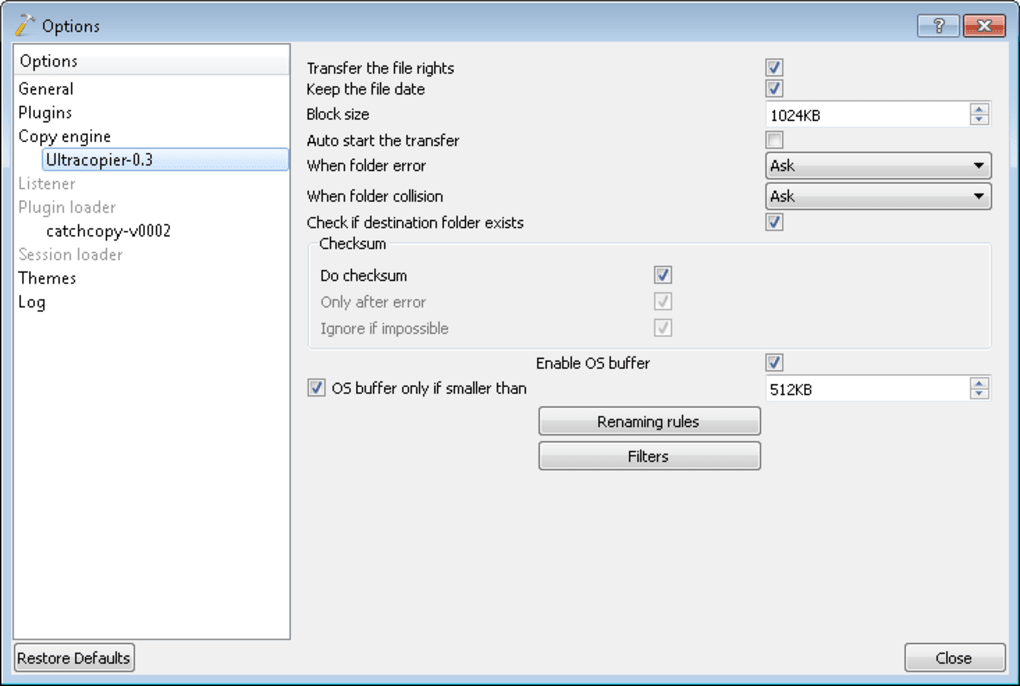
Beyond its core functionality, Ultracopier provides a range of advanced features that enhance the user experience and streamline file management. These include:
-
Pause and Resume: This allows users to temporarily halt the copying or moving process and resume it later at their convenience. This is particularly useful for long transfers, enabling users to prioritize other tasks or address interruptions without losing progress.
-
Speed Limitation: Users can limit the transfer speed, which can be beneficial when sharing bandwidth with other applications or when working on systems with limited resources. This prevents the file transfer from monopolizing network bandwidth or system performance.
-
Progress Monitoring: Ultracopier provides real-time progress updates, showing the transfer speed, percentage of completion, and estimated time remaining. This allows users to monitor the process and anticipate completion times accurately.
-
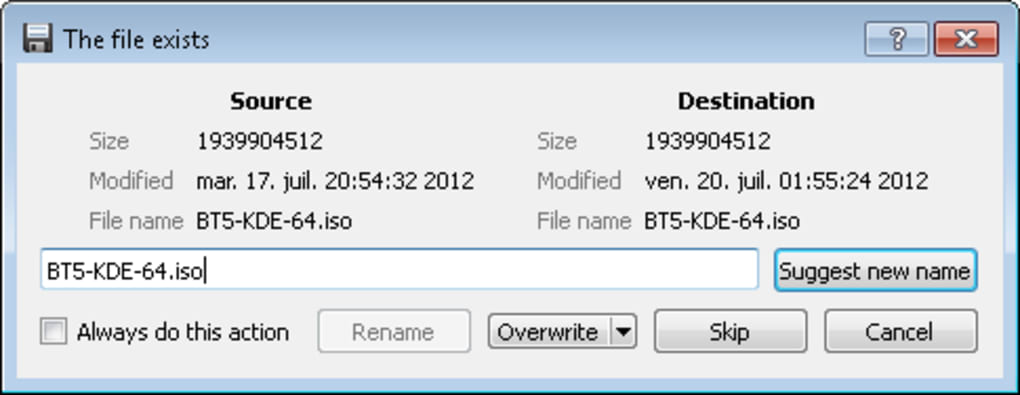
Error and Collision Handling: The software incorporates advanced error handling mechanisms to address issues such as file collisions (when a file with the same name already exists in the destination folder). It provides clear options for managing these conflicts, preventing data loss and streamlining the process.
-
Copy Lists: Users can create and manage lists of files and folders to be copied or moved. This is helpful for organizing large transfers and ensuring that all necessary files are included in the process. Furthermore, these lists can even be modified while a copy operation is in progress.
-
Extensive Settings Menu: Ultracopier offers a comprehensive settings menu, allowing users to customize the program’s behavior and appearance. This customization extends to various aspects, including interface elements, transfer speeds, and error handling preferences. While the default interface may not be visually striking, this level of customization lets users tailor the program to their individual needs and preferences.
Integration and Compatibility
Ultracopier seamlessly integrates with Windows Explorer, making it incredibly user-friendly. Users don’t need to learn a new interface or workflow; they can simply use the standard copy-paste commands and Ultracopier will handle the transfer efficiently in the background. This transparent integration ensures that the software doesn’t disrupt existing workflows, making it a seamless addition to any user’s file management routine.
The software is available in 32-bit and 64-bit versions, ensuring compatibility with a wide range of Windows systems. A portable version is also offered, eliminating the need for installation and providing maximum flexibility for use on various machines. This versatility makes Ultracopier an accessible option for a broad range of users and system configurations.
Comparison with Alternative Software
Several alternative file copying utilities exist, each with its own strengths and weaknesses. Popular alternatives often include Teracopy, FastCopy, and GS RichCopy 360. While these alternatives often offer similar core functionalities, Ultracopier distinguishes itself through its open-source nature, which fosters community involvement and continuous improvement, and its ease of use due to its seamless integration with Windows Explorer.
While some competing applications might boast more advanced features or a more polished user interface, Ultracopier’s combination of speed, reliability, and straightforward integration with existing Windows workflows makes it a compelling choice for many users. The choice between these applications ultimately depends on the user’s specific needs and preferences, particularly concerning the trade-off between advanced features and ease of use.
User Experience and Interface
Ultracopier’s user interface is functional but not aesthetically remarkable. The design is straightforward and uncluttered, prioritizing functionality over visual appeal. While some users may find the interface somewhat dated, its simplicity makes it easy to navigate and use, even for users with limited technical experience.
However, the lack of a modern, visually appealing design could be considered a drawback for some users. This is mitigated somewhat by the extensive customization options in the settings menu, allowing users to personalize the appearance to a certain extent. While the interface won’t win any design awards, its simplicity ensures that it doesn’t distract from the core functionality of the software.
Strengths and Weaknesses
Strengths:
- Speed and Reliability: Ultracopier significantly enhances the speed and reliability of file transfers compared to the default Windows functionality.
- Error Handling: The robust error handling and resume capabilities minimize data loss and streamline the transfer process.
- Seamless Integration: Its integration with Windows Explorer is seamless and requires no learning curve.
- Advanced Features: Features like pause/resume, speed limitation, and copy lists add significant value for advanced users.
- Open-Source and Free: The open-source nature ensures transparency, community support, and ongoing development.
- Portability: The portable version offers maximum flexibility for use across multiple machines.
Weaknesses:
- Interface Design: The user interface is functional but lacks a modern and visually appealing design.
- Limited Customization (Visual): While offering extensive functional customization, visual customization is relatively limited.
Conclusion
Ultracopier proves to be a valuable tool for users seeking a reliable and efficient alternative to the standard Windows file copying utility. Its speed, error handling, and seamless integration make it a convenient and effective solution for managing file transfers of all sizes. While its interface might not be visually impressive, the combination of robust functionality, open-source nature, and extensive customization options makes Ultracopier a strong contender in the file management software arena. For users prioritizing speed, reliability, and a hassle-free experience, Ultracopier offers an excellent free and open-source solution.
File Information
- License: “Free”
- Latest update: “February 4, 2025”
- Platform: “Windows”
- OS: “Windows 8.1”
- Language: “English”
- Downloads: “911.3K”
- Size: “15.24 MB”


