
UltraMon is a powerful utility designed to optimize the use of multi-monitor setups, significantly boosting productivity and maximizing the potential of your multiple displays. It goes beyond simply extending your desktop; UltraMon provides a suite of features tailored to enhance workflow efficiency and seamless multitasking across screens. This comprehensive review will delve into its capabilities, examining its key features, user experience, and its position within the broader landscape of multi-monitor management tools.
Streamlining Multi-Monitor Management: Key Features
UltraMon’s core functionality revolves around intelligent window management and enhanced taskbar control, offering a superior alternative to the built-in Windows capabilities for users with multiple displays. Its comprehensive feature set tackles many common frustrations associated with managing windows across several monitors, resulting in a significantly improved user experience.
Efficient Window Management: One of UltraMon’s standout features is its ability to seamlessly move and resize windows across your monitors. The intuitive drag-and-drop functionality allows for quick and easy repositioning of applications, eliminating the need for cumbersome window snapping or manual resizing. This fluid movement extends to maximizing windows across multiple screens, a feature particularly beneficial for users working with large datasets or complex applications requiring maximum screen real estate.
Smart Taskbar Enhancements: UltraMon’s refined taskbar functionality further streamlines workflow. Unlike the standard Windows taskbar, which can become cluttered and unwieldy on multi-monitor systems, UltraMon provides a sophisticated approach to taskbar management. It intelligently organizes application icons, offering a clearer and more organized view of running applications across all displays. This feature significantly reduces the time spent searching for specific programs and enhances overall productivity. The enhanced taskbar integrates seamlessly with the window management features, allowing for swift access and control of applications across multiple screens.
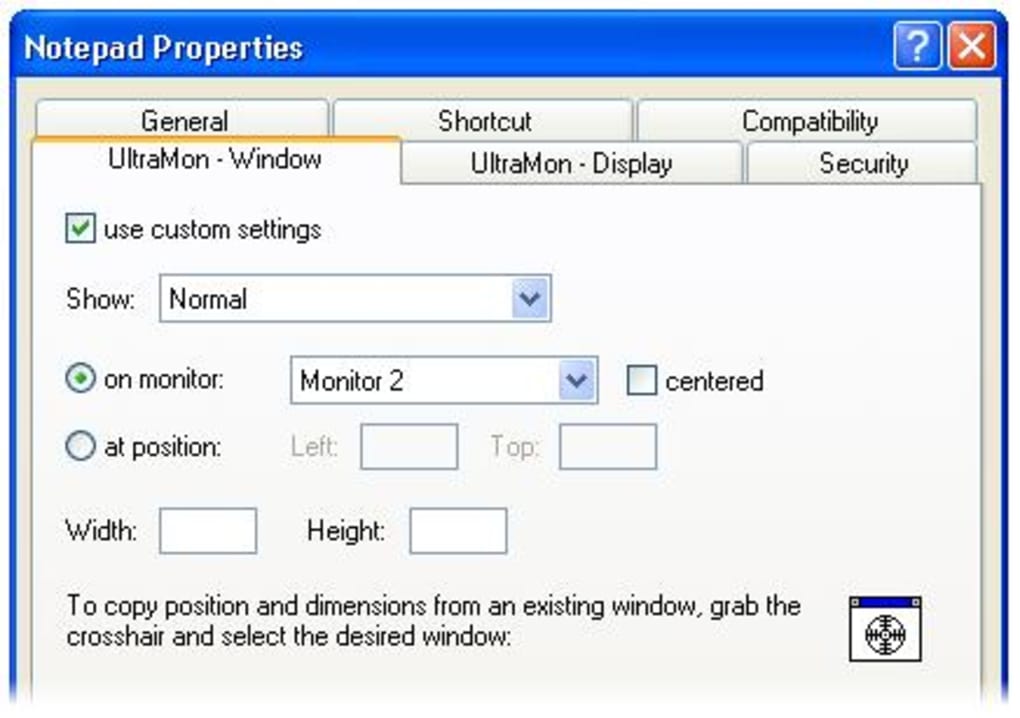
Precision Control with UltraMon Shortcuts: For power users seeking even greater control, UltraMon provides a customizable shortcut system. These shortcuts allow for rapid window manipulation, including quick movement between monitors, instant maximizing or minimizing, and custom actions tailored to specific applications. This level of customization is particularly valuable for users who frequently switch between applications or require precise control over window positioning. The ability to define personalized shortcuts for frequently performed tasks drastically reduces the time spent on repetitive actions. The configurable nature of this system allows each user to tailor it to their unique workflow, maximizing efficiency and minimizing interruptions.
Synchronized Wallpaper and Screen Savers: Maintaining visual consistency across multiple monitors is often overlooked but contributes significantly to a cohesive and professional workspace. UltraMon addresses this by enabling synchronized wallpapers and screen savers across all displays. This feature not only enhances the aesthetic appeal of the multi-monitor setup but also contributes to a more focused and organized work environment. The ability to apply a single, consistent visual theme across all screens eliminates the disjointed feel that can arise from using different wallpapers or screen savers on each monitor.
Mirroring for Presentations: Presentations often require a seamless mirroring of the main display onto a secondary monitor or projector. UltraMon simplifies this process by providing a dedicated mirroring feature. This eliminates the need for external mirroring software or complex configurations. The ease of use makes presenting information across multiple screens exceptionally straightforward. This functionality is crucial for anyone involved in giving presentations, streamlining the technical aspect of sharing content and ensuring focus remains on the presentation itself.
Beyond the Basics: Addressing Multi-Monitor Challenges
UltraMon’s capabilities go beyond simply managing windows and taskbars. It directly addresses several key challenges frequently encountered in multi-monitor environments, enhancing overall usability and productivity. The software anticipates and solves problems that often hinder efficiency in multi-screen setups.
Reduced Clutter and Improved Organization: With multiple monitors, the potential for visual clutter increases significantly. UltraMon’s organizational features directly combat this by providing intelligent taskbar management and efficient window positioning, minimizing screen distractions and maximizing usable workspace. The clean and streamlined interface ensures that the software itself doesn’t contribute to visual overload.
Enhanced Workflow Efficiency: By providing quick and easy access to applications and precise window control, UltraMon accelerates workflows. The reduction in time spent managing windows and searching for applications allows users to focus on the tasks at hand, resulting in improved productivity and faster completion of projects. The intuitive design minimizes the learning curve, ensuring that users can quickly leverage the software’s capabilities to optimize their workflow.
Seamless Multitasking: The software is tailored to support seamless multitasking across multiple monitors. Users can easily switch between applications, manage multiple projects simultaneously, and maintain a clear overview of their active tasks. This functionality is crucial for professionals and power users who regularly handle multiple projects or tasks concurrently.
UltraMon in the Multi-Monitor Ecosystem: A Comparative Look
UltraMon occupies a unique niche within the landscape of multi-monitor management tools. While several alternative applications exist, UltraMon distinguishes itself through its comprehensive feature set and intuitive interface. Many alternative applications focus on specific aspects of multi-monitor management, such as window snapping or taskbar customization, but UltraMon offers a unified solution that addresses a wider range of needs. The combination of window management, taskbar control, wallpaper synchronization, and shortcut customization sets it apart from competitors, offering a more holistic approach to multi-monitor optimization.
While some free alternatives exist, they often lack the sophistication and comprehensive feature set of UltraMon. Free options might provide basic window management or taskbar customization, but they frequently fall short in terms of advanced features such as synchronized wallpapers, extensive shortcut customization, or the smooth integration between window and taskbar management. This makes UltraMon a compelling option for users who value a robust and feature-rich solution. The investment in UltraMon is justified by the significant increase in productivity and the overall enhancement of the multi-monitor user experience.
User Experience and Ease of Use
UltraMon boasts an intuitive and user-friendly interface. The software is designed to be easily accessible to both novice and experienced users. The intuitive drag-and-drop functionality for window management and the clear, organized display of taskbar icons contribute to a streamlined and user-friendly experience. The customizability of the shortcuts further enhances user control and personalization. The software integrates seamlessly with the Windows operating system, minimizing any disruptions to existing workflows. The overall experience is one of efficiency and seamless integration, enhancing rather than hindering the user’s productivity.
The software’s setup and configuration are straightforward. The initial setup guides users through the necessary steps to optimize the software for their specific multi-monitor configuration. The clear and concise documentation provided assists users in navigating the features and customizing the software to their individual needs. The overall user experience is one of efficiency and ease of use, emphasizing the software’s core function of enhancing productivity.
Conclusion: UltraMon – A Productivity Essential
UltraMon is more than just a multi-monitor utility; it’s a productivity enhancer designed to unlock the full potential of your multi-screen setup. Its comprehensive feature set, intuitive interface, and seamless integration make it a valuable tool for anyone working with multiple monitors. The efficient window management, advanced taskbar customization, and synchronized wallpaper features transform the often-chaotic multi-monitor experience into a highly organized and productive workspace. From its effective window management to its precise control via custom shortcuts, UltraMon empowers users to seamlessly navigate and manage their digital environment. For professionals, power users, or anyone seeking to optimize their workflow across multiple screens, UltraMon stands as a highly recommended and essential tool.
File Information
- License: “Trial version”
- Latest update: “July 11, 2023”
- Platform: “Windows”
- OS: “Windows 7”
- Language: “English”
- Downloads: “2.9K”
- Size: “2.49 MB”


