UltraUXThemePatcher is a lightweight yet powerful utility designed to unlock the full potential of Windows theme customization. Unlike the limitations imposed by Microsoft’s operating system, which restricts users to pre-approved themes, UltraUXThemePatcher allows users to seamlessly install and enjoy a vast library of third-party Windows themes, dramatically enhancing the visual appeal of their desktops. This comprehensive guide explores the features, functionalities, installation process, alternatives, and overall effectiveness of UltraUXThemePatcher, providing users with a clear understanding of this essential personalization tool.
Breaking Free from Default Windows Themes: The Need for UltraUXThemePatcher
Microsoft Windows, despite its dominance in the operating system market, often falls short when it comes to offering extensive theme customization options. While some degree of personalization is available through built-in settings, the choices remain limited, leaving many users yearning for more expressive and visually engaging desktops. The inherent restrictions imposed by Microsoft on installing third-party themes further exacerbate this limitation. This is where UltraUXThemePatcher steps in. It acts as a bridge, effectively removing these artificial boundaries and empowering users to transform their Windows experience.
UltraUXThemePatcher addresses this crucial need by modifying specific system files, allowing the operating system to successfully load and display third-party themes without causing system crashes or performance degradation. This simple yet effective approach allows users to explore a wide variety of themes created by independent developers, catering to diverse tastes and preferences. The software’s straightforward design ensures that even users with minimal technical expertise can easily navigate its features and achieve a customized desktop environment.
A User-Friendly Interface for Seamless Theme Installation
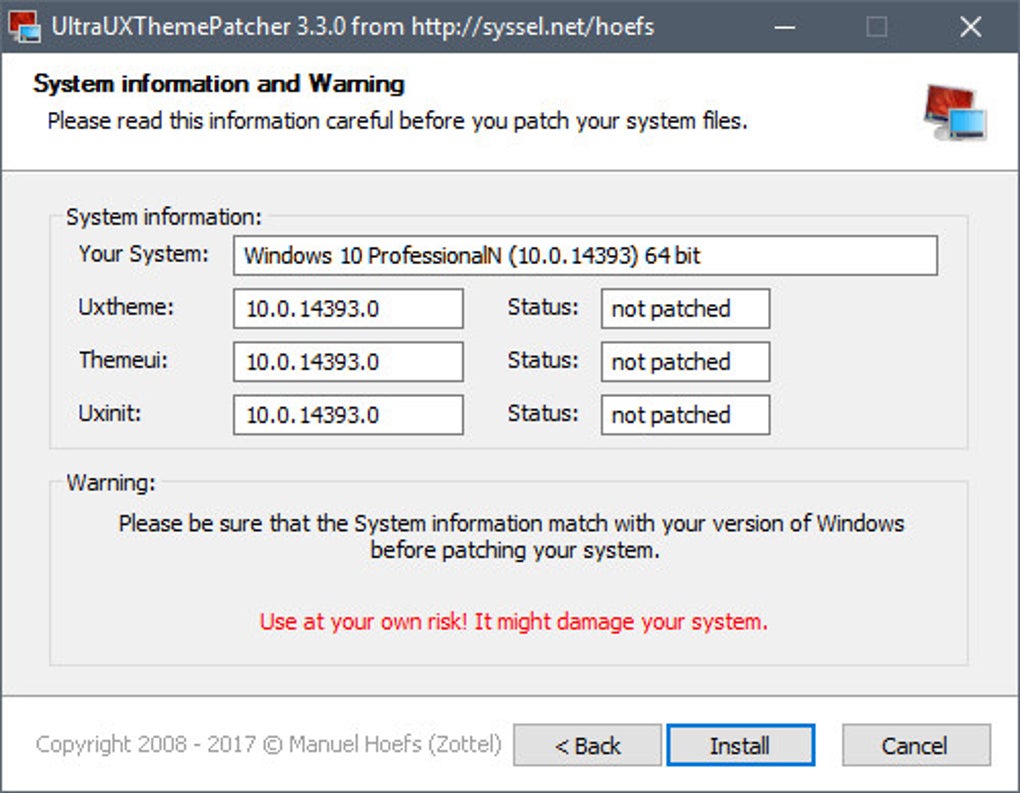
UltraUXThemePatcher boasts a clean and intuitive interface, designed for ease of use. The wizard-style menu guides users through the entire process, minimizing the need for technical knowledge or extensive troubleshooting. The program presents a clear and concise sequence of steps, ensuring a smooth and effortless experience for all users. This accessibility is a key strength of the software, democratizing the ability to customize one’s Windows desktop.
The process involves a simple sequence of steps: download, installation, and activation. The software provides users with helpful prompts throughout the process, guiding them through critical stages and ensuring a trouble-free experience. The user-friendly nature of the application contrasts sharply with some alternative methods that can prove complex and potentially risky for those less familiar with system file manipulation.
The Installation and Patching Process: A Detailed Overview
The core function of UltraUXThemePatcher involves strategically patching crucial system files. This process modifies the way the operating system interacts with themes, enabling it to properly recognize and render third-party themes. The files targeted by the patcher are typically Uxinit.dll, Themeui.dll, and Uxtheme.dll. UltraUXThemePatcher manages this process efficiently and transparently, ensuring minimal disruption to the system.
Before the patching process begins, UltraUXThemePatcher displays crucial system information, including the operating system version, targeted file details, and other relevant data. This allows users to verify the accuracy of the information before proceeding, thus minimizing the risk of potential system errors. This step highlights the software’s commitment to safety and responsible system modification. The process itself is swift and straightforward, typically completed within seconds without any noticeable system interruptions.
Restoring Original System Files and Managing Theme Updates
The ability to easily revert changes is a critical feature of responsible system modification software. UltraUXThemePatcher caters to this necessity by allowing users to effortlessly restore the patched files to their original state. This option is readily accessible within the program’s interface, enabling quick and easy reversal of any applied modifications. A system reboot is typically required after applying or reverting changes to ensure that all modifications are properly implemented.
Furthermore, the software’s ability to handle theme updates smoothly enhances its user-friendliness. As new updates and versions of themes become available, users can simply use UltraUXThemePatcher to apply the necessary changes. This process simplifies the maintenance and updating of custom themes, providing a consistent and streamlined personalization experience.
Exploring Alternatives and Comparing Features
While UltraUXThemePatcher stands as a popular and effective solution, several alternatives cater to similar needs. These options vary in their approach, features, and user experience.
Universal Theme Patcher: This portable application offers a similar functionality without the need for installation. This portability makes it suitable for use on multiple systems or via USB drives. However, its lack of a dedicated help file might make it less approachable for beginners.
Chrome XP: Specifically designed for older Windows XP systems, Chrome XP focuses on improving the visual appeal of aging operating systems. While user-friendly, it might present some alignment issues for certain users.
Dark Theme: Targeting Windows 7 users, Dark Theme provides a collection of high-definition background images. However, the presence of watermarks on these images, removable only via a paid subscription, might be a significant drawback for some.
Each of these alternatives offers unique benefits and drawbacks. The choice among them often depends on the specific needs and preferences of the user, as well as their technical proficiency and the version of Windows being used. UltraUXThemePatcher, however, stands out with its combination of ease of use, comprehensive functionality, and robust system-restore capabilities.
The Verdict: Is UltraUXThemePatcher the Right Choice?
For users seeking a reliable and user-friendly method to install and manage third-party Windows themes, UltraUXThemePatcher emerges as a strong contender. Its intuitive interface, straightforward installation process, and ability to seamlessly handle theme updates contribute to its overall appeal. The inclusion of crucial system safeguards and a built-in restore option further enhances its safety and reliability.
While potential risks associated with modifying system files always exist, UltraUXThemePatcher mitigates these risks effectively through its careful design and user-centric approach. For those yearning to transform their Windows desktop experience with custom themes, UltraUXThemePatcher provides a convenient and effective path to achieving a visually personalized computing environment. Its ease of use and robust functionality make it an excellent choice for both novice and experienced users alike. The ability to seamlessly incorporate new themes and easily revert to the original system settings further consolidates its position as a valuable personalization tool for Windows users. The combination of user-friendliness and functionality makes UltraUXThemePatcher a compelling solution for enhancing the overall aesthetic appeal and personalization of the Windows operating system.
File Information
- License: “Free”
- Latest update: “July 30, 2025”
- Platform: “Windows”
- OS: “Windows 11”
- Language: “English”
- Downloads: “79.7K”
- Size: “163.63 KB”